
Your SharePoint Intranet Design Partner
Give employees a useful place to start their day. NetMonkeys designs SharePoint intranets that bring company news, policies, contacts and everyday resources into a clear, branded experience your people can navigate.
Our SharePoint intranet designers work with your HR, communications and IT teams to decide what belongs on the homepage, how departments publish and where staff go to complete common tasks. We turn those decisions into an agreed design, a working implementation and a practical handover.
- Branded homepages and page layouts
- Navigation built around employee tasks
- Department sites and publishing guidance
- Launch support and owner training
Does your intranet look finished but still feel difficult to use?
A new colour scheme will not fix an intranet where policies are buried, links are labelled with internal jargon and news occupies the whole homepage. Employees need to recognise where to go and trust the information they find when they arrive.
Staff ask colleagues instead of using the site
The navigation may reflect your department chart rather than the task someone wants to complete. We review common questions and use those journeys to shape the information structure.
Content is duplicated or out of date
A useful design needs publishing ownership behind it. We help establish where authoritative content lives and who reviews it, so a new page does not become another competing source.
Every department page looks different
Reusable layouts can make the experience more consistent without forcing every team to publish identical content. We agree shared patterns for resources, contacts, updates and service information.
Start with examples from your employees: finding the expenses policy, requesting equipment, checking a department contact or locating a staff form. Those tasks become more meaningful design tests than asking whether people like a screenshot.
What working with a SharePoint intranet design partner includes
You need more than an attractive concept. The design must work within SharePoint, fit your Microsoft 365 environment and remain manageable for the people who will maintain it. We connect the discovery, design and delivery work so that those responsibilities are considered together.
We establish the brief with your project sponsor and representative users, then propose the site map, navigation and page patterns needed for the initial release. Your brand guidelines and content requirements inform the visual direction, while IT helps confirm the platform boundaries.
The proposal defines deliverables, review points, included revisions and the responsibilities your team retains. It also identifies any content migration, integrations or additional development that need to be scoped. You can then assess the result against an agreed brief rather than an expanding collection of ideas.
Your agreed design deliverables can include
- Employee task and content priorities
- Site map and navigation labels
- Homepage and page layout designs
- Branding and reusable page patterns
- Working SharePoint implementation
- Publishing and handover guidance
Our Microsoft SharePoint consultancy services cover the wider platform. This service focuses on the employee-facing intranet: what people see, how they find information and how your publishers keep the experience useful.
What our SharePoint intranet designers can deliver
Combine these capabilities within an agreed implementation or commission focused work on an existing intranet. We prioritise the design decisions that will make the biggest difference to your first release and the team maintaining it.
Employee research and design brief
Identify the audiences, common tasks and communication priorities that shape the site. We work with representative staff and stakeholders so the brief does not depend solely on what a project team assumes employees need.
Information architecture and navigation
Organise content into understandable destinations and labels. Decide which information belongs on a central site, which needs a departmental home and how users move between them without unnecessary duplication.
Homepage design
Balance important tasks, company updates and useful resources. We agree what deserves prominence and what can sit deeper in the site, rather than making every department’s request another item at the top of the homepage.
Branding and visual consistency
Apply your organisation’s identity through the supported design options agreed for the project. Consider colour, typography, imagery and page hierarchy, with custom components assessed separately when standard features cannot meet the brief.
Department and resource page patterns
Create repeatable layouts for team introductions, service information, policies and contacts. Publishers get a useful starting point while retaining flexibility for the content their audience actually needs.
Content planning and migration
Inventory the material relevant to launch and assign owners. Identify outdated pages, duplicate guidance and gaps that need writing before moving content into the new structure.
Responsive and accessible authoring
Consider page readability, meaningful headings, link text, image alternatives and smaller-screen use. Any formal accessibility target and testing requirements are agreed in scope rather than assumed from the platform alone.
Publishing training and launch support
Show owners how to use the agreed page patterns, keep links current and manage updates. Plan communications and initial feedback so the first release is introduced as a useful resource, not simply a new URL.
An intranet homepage with a clear job to do
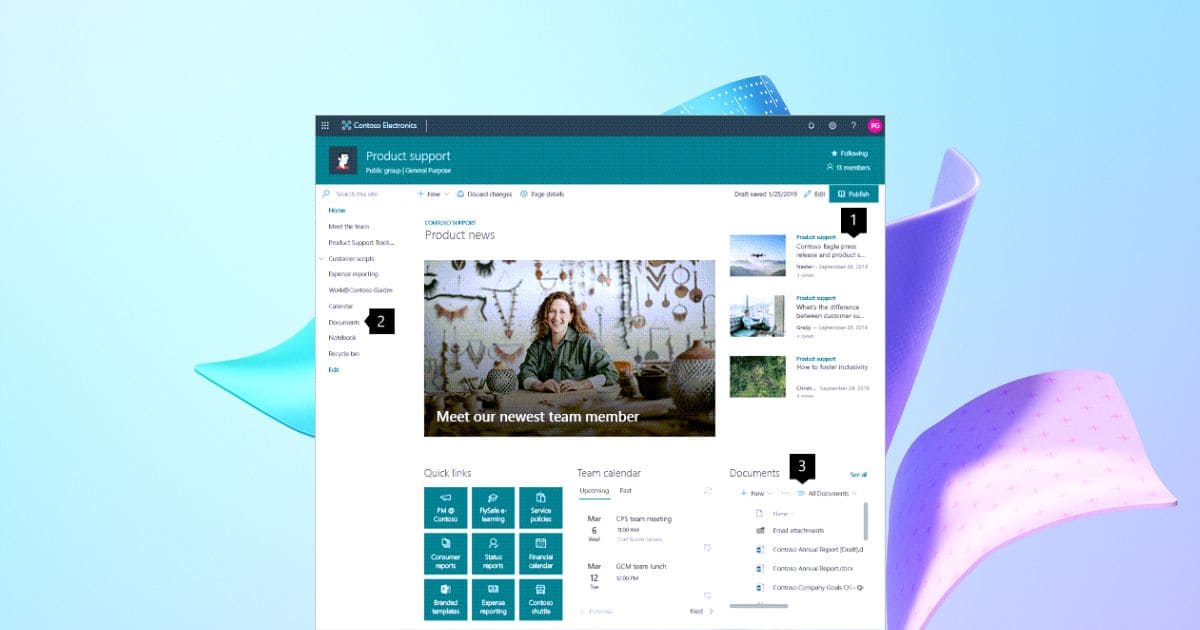
A homepage is a starting point, not a directory of everything the business has ever produced. We identify the information and tasks relevant to most employees, then give those items a clear place in the layout.
That might mean prominent access to policies, employee services and key applications, followed by timely news and resources. Department-specific detail can sit on the relevant sites, linked through labels people understand.
Microsoft’s navigation design guidance provides a planning framework. We apply it to the tasks and content in your organisation, then test the proposed routes with users.
What should employees be able to do?
The following examples show how a task can become a design requirement and an acceptance check. They are a planning illustration, not measured results from a client project. Your own brief should use tasks supplied by the people who will use the intranet.
| Employee need | Design response | What we can test |
|---|---|---|
| Find the current expenses policy | A clear policy destination linked from employee resources. | A new starter can locate the approved document without asking a colleague. |
| Contact the right department | A consistent team page with ownership and service contacts. | Staff can identify who handles a common request. |
| Understand a company announcement | A news layout with a clear summary and next action. | Readers can explain what changed and what they need to do. |
| Publish a department update | A reusable page pattern and agreed publishing route. | An authorised owner can create and publish an appropriate update. |
| Use the site on a smaller screen | A layout with readable content and prioritised actions. | Representative users can complete the agreed task on supported devices. |
New intranet, targeted redesign or a reusable foundation?
Your existing environment determines how much needs to change. Some organisations need an entirely new structure. Others have useful content and sites but an unclear homepage or inconsistent layouts. We assess the starting point before recommending a larger rebuild.
Redesign what is not working
Review an existing homepage, navigation or set of page layouts. Retain useful components and prioritise the changes needed for a clearer employee experience.
- Existing content assessment
- Targeted design and configuration
- Defined improvement scope
Start with reusable page patterns
Create a manageable first release using agreed page patterns, branding and navigation. Adapt the structure around your content and ownership rather than beginning with a blank canvas.
- Initial home and resource pages
- Brand and navigation configuration
- Publisher guidance
Plan a tailored intranet
Bring departments together around an agreed information structure, publishing model and staged rollout. Assess additional workflows and integrations as distinct requirements.
- Cross-department discovery
- Design, implementation and testing
- Phased content rollout
Content ownership is part of the intranet design
A polished intranet can lose credibility quickly if nobody removes expired news or updates a department contact. We involve content owners early and make maintenance part of the design brief. A page should have a purpose, an audience and someone responsible for it.
Agree a practical publishing model
Decide who can create pages, who approves important updates and when a central review is needed. A small organisation may need a simple arrangement; a larger intranet may need department publishers and shared standards. The model should match the people available to operate it.
Prepare the content before launch
Your team identifies current guidance, rewrites unclear material and decides what can be retired. We help map that content to the new structure and identify missing pages. Copywriting or extensive content cleanup is included only where agreed in the proposal.
Give owners reusable patterns
Page patterns and authoring guidance help owners present contacts, instructions and resources consistently. We explain the design choices so publishers can make sensible updates without needing specialist help for every paragraph.
Review the site as it changes
Plan how owners check links, current content and user feedback. Microsoft’s intranet governance guidance covers ongoing responsibilities. We help translate the relevant principles into a manageable arrangement for your team.
Personalisation, accessibility and permissions
Different employees may need different resources, but that does not mean building a separate intranet for every role. We consider common content first, then assess where departmental links or audience-specific information improve the experience. Any personalisation depends on the agreed features and identity setup.
Accessible content practices
Plan clear headings, readable layouts and meaningful links. Provide image alternatives and consider how content works with keyboard and assistive technology. Formal conformance and specialist audits require an explicit testing scope.
Appropriate access controls
Restricted information needs the correct permissions behind it. Audience targeting, hidden links and navigation choices are presentation tools, not substitutes for securing a site or document library.
Smaller-screen usability
Test representative pages and tasks at relevant screen sizes. A technically responsive page can still be difficult to use if the important action is buried beneath large images or unnecessary content.
The agreed acceptance criteria should reflect your employees and supported environments. We discuss device access, authentication and publishing requirements with your IT team so the design can be used in practice rather than only in a desktop preview.
How our SharePoint intranet designers work with you
1. Discover the audiences and tasks
Meet your sponsor, content owners and representative users. Agree the problems, priority journeys and scope for the first release.
2. Design the structure and direction
Propose the site map, navigation and page patterns. Review branding and sample layouts with your stakeholders before extending the design.
3. Build and prepare content
Configure the agreed SharePoint environment and apply the design. Your owners prepare the required content, while migration and any additional development follow their agreed scopes.
4. Test realistic employee journeys
Ask users to find information and complete the tasks defined in the brief. Review publisher workflows, permissions and relevant device behaviour alongside the visual presentation.
5. Launch and hand over
Introduce the intranet, train the people maintaining it and record remaining issues. Agree how feedback will inform changes after the initial release.
Your team’s input is an important dependency. We identify who approves designs, who prepares content and who participates in testing before setting a delivery schedule. That avoids a completed technical build waiting indefinitely for business decisions.
Connect your intranet to employee services
An intranet can be a useful starting point for the systems employees need without duplicating their records. A clear link to an authoritative application may be enough. A custom form, dashboard or automated process should be assessed as a separate functional requirement.
Microsoft 365 support
Align identity, site administration and workplace support with the intranet experience.
Power Apps
Assess forms or task interfaces for employee requests where standard pages are not sufficient.
Power Automate
Scope approval routes and notifications with clear ownership and exception handling.
Power BI
Assess dashboards alongside your intranet, including report access and licensing.
Business Central
Review whether employees need links or scoped connections to operational and finance processes.
SharePoint consultancy
Connect the design to document libraries, migration, permissions and broader platform requirements.
Why choose NetMonkeys as your SharePoint intranet design partner?
We connect the employee experience with the technical work required to deliver it. Your HR and communications teams need a useful publishing environment; your IT team needs to understand the structure and configuration it will inherit. Our engagement brings those conversations together.
A brief grounded in employee tasks
We use actual questions and journeys to prioritise the design, making the discussion more concrete than a general request for a modern-looking intranet.
Design decisions your team can review
You can assess navigation, layouts and branding at agreed checkpoints. The scope identifies what is included and how additional requirements are handled.
A handover for the people maintaining it
Publishers and administrators receive the guidance agreed for their roles, so ongoing ownership is considered before launch rather than left as an afterthought.
We can work with your existing IT provider or internal administrators. For organisations with several offices, project conversations can also connect with our Manchester SharePoint services and London SharePoint services. The delivery format is agreed around your stakeholders and project.
How much does SharePoint intranet design cost?
The cost depends on the work behind the design: the number of audiences and page patterns, content preparation, migration, publishing requirements and any additional development. A focused homepage redesign is different from a department-wide intranet implementation.
We review your existing Microsoft 365 environment and confirm relevant licensing dependencies. Standard configuration, custom components and third-party products have different implementation and maintenance implications. Those distinctions should be visible in the proposal.
Your quote separates the initial design and implementation from ongoing support or future phases. We also explain the content and approval responsibilities assigned to your team. That helps you compare the actual engagement rather than two prices based on different assumptions.
For an initial discussion, bring your current intranet, brand guidelines, common employee questions and the teams you want involved. You do not need a finished specification. We will help identify the information needed to define a useful first release.
SharePoint intranet design FAQs
What does a SharePoint intranet design partner do?
A design partner helps define your intranet structure, navigation, page layouts and publishing experience, then implements the agreed design. The scope may also include content planning, migration, testing and training.
Can your SharePoint intranet designers redesign our existing site?
Yes. We can assess your current structure and recommend targeted improvements where practical. Useful sites, content and components can be retained rather than assuming that every redesign needs a full rebuild.
Can you match our brand guidelines?
We review your identity and assess how it can be applied through the agreed SharePoint design options. Requirements beyond standard capabilities may need separately scoped development or third-party products.
Do we need to write all the content?
Your organisation normally supplies and approves its business content. We can help plan the inventory, ownership and page structure. Copywriting, rewriting or extensive cleanup is included where explicitly agreed.
Can we use a ready-made foundation?
A reusable foundation can suit a focused first release. We adapt page patterns, branding and navigation around your content and ownership. More complex requirements can be scoped as additional work.
Will the intranet work on mobile devices?
We consider relevant screen sizes and test representative tasks within the agreed supported environments. Device access, authentication and content choices also affect usability and are discussed during planning.
Do you include accessibility testing?
Accessibility considerations can form part of design and authoring guidance. Any formal conformance target, specialist audit or defined test programme must be included in the project scope.
Can different departments manage their own pages?
Yes, where the agreed publishing model and permissions allow it. We define owner responsibilities and provide page patterns and guidance for the people maintaining each area.
Does audience targeting secure sensitive information?
No. Audience targeting changes presentation; it is not a replacement for permissions. Restricted sites and documents need an appropriate access model and testing.
Can our intranet connect with Teams?
We can assess the entry points and content access your team needs within its Microsoft 365 environment. Any specific integration, additional experience or licensing requirement is confirmed during scoping.
Can you add forms, workflows or dashboards?
These can be assessed as additional requirements. We review the intended behaviour, supported data sources, permissions and licences before proposing Power Apps, Power Automate or Power BI work.
How long does intranet design take?
Timing depends on scope, content readiness and stakeholder availability. We propose milestones after assessing the brief and identify the approvals and preparation your team must complete.
How much does the project cost?
Pricing reflects discovery, layouts, configuration, content work, migration, testing and training included in the proposal. Additional development, products and ongoing support are discussed separately where relevant.
Can you work with our existing IT team?
Yes. We agree responsibilities with your administrators or provider, including access, configuration decisions, testing and handover. Your team stays involved in the environment it will manage.
What happens after launch?
The agreed handover covers publisher guidance, administration information and outstanding issues. Ongoing support and further improvements can be scoped separately, with ownership and request routes made clear.
SharePoint guides for your intranet project
Use these guides to prepare questions, brief internal stakeholders and understand the decisions behind your project. When you are ready to discuss your own environment, our consultants can help turn the requirements into an agreed scope.
Replacing shared network drives
Plan the move from a file server to structured SharePoint libraries.
Read guide →Guide 02Control access to sensitive files
Understand the permissions questions to resolve before wider sharing.
Read guide →Guide 03Build a company intranet
Prepare the content, navigation and ownership behind a useful intranet.
Read guide →Guide 04What is SharePoint Lists?
Explore structured records for tracking business information and activity.
Read guide →Guide 05SharePoint for project management
Bring project documents, tasks and working information into focus.
Read guide →Guide 06How to use SharePoint
Practical guidance for employees working with shared business content.
Read guide →Guide 07SharePoint Migration Tool guide
Understand the tooling and preparation behind a planned migration.
Read guide →Guide 0810 SharePoint intranet tips
Improve the resources and working habits behind employee adoption.
Read guide →Guide 09SharePoint intranet examples
Explore ideas for homepage layouts, content and department resources.
Read guide →Guide 10SharePoint managed services
Consider where external help fits your ongoing administration needs.
Read guide →Ready to work with a SharePoint intranet design partner?
Show us the content people struggle to find and the tasks your current intranet makes difficult. We will discuss the structure, design and delivery work needed for a clearer employee experience.
Book your free intranet design consultation
