
Data Warehouse Platforms: Types, Fit and What to Check
An overview of data warehouse platforms: cloud warehouses, Microsoft options, lakehouses and SQL Server, with a table, checklist and migration advice.
The quick answer
Data warehouse platforms are the technology products that store and process warehouse data. The main groups are cloud warehouses, Microsoft analytics services, lakehouse platforms and traditional SQL Server. The right one depends on your existing systems, skills, data and reporting needs, not on a league table.
Key takeaways
- There are four broad groups: cloud warehouses, Microsoft services, lakehouse platforms and SQL Server.
- Each group has a typical fit, and each has things you should verify before committing.
- Existing cloud, skills and Power BI use often matter more than raw features.
- A proof of concept on your own data beats any vendor comparison chart.
- Migration is a project in itself and needs reconciliation, parallel running and clear ownership.
What are data warehouse platforms?
A data warehouse platform is the technology that holds your warehouse data and runs queries against it. It supplies storage, processing, security and administration. It does not supply your data model, your loading routines or your business definitions. Those come from the design work on top.
Platforms differ in where they run, how they charge, how they scale and which skills they reward. They also overlap more than they once did, as vendors add features to match each other. That makes category labels useful for orientation and unreliable for final decisions.
If you are still working out what a warehouse is for, start with our introduction to the data warehouse. If you already know and need help choosing, our data warehouse services include independent platform selection.
↑ Back to contentsWhat types of platform are there?
The table groups the main options. It describes general tendencies only. Product names, packaging and features change often, so check each vendor's current documentation before relying on any row.
| Platform type | Typical fit | What to check |
|---|---|---|
| Cloud warehouse (for example Snowflake, Google BigQuery, Amazon Redshift) | Analytics-led organisations that want a managed service with elastic compute | Which cloud it runs on, how usage is measured, cost controls, data residency options |
| Microsoft options (Azure Synapse Analytics, Microsoft Fabric) | Organisations built around Microsoft 365, Azure and Power BI | Which service Microsoft currently recommends for new work, licensing model, integration with your identity setup |
| Lakehouse platform (for example Databricks) | Teams with large or varied data, engineering skills and data science plans | Skills needed, how SQL reporting performs, governance tooling, support model |
| Traditional SQL Server | Moderate volumes, stable reporting, existing SQL Server skills | Hardware and licence lifecycle, scaling limits, backup and resilience, in-house support |
None of these groups is better in every case. Each solves a different problem well, which is why a short list should come from your needs rather than from reputation.
↑ Back to contentsHow do the cloud warehouses differ?
Snowflake, Google BigQuery and Amazon Redshift are commonly grouped as cloud data warehouses. They share a broad purpose: fast SQL analysis over large data sets without managing physical servers.
- Snowflake. A cloud data platform available on several public clouds, generally described as separating storage from compute. Our Snowflake data warehouse overview explains the approach.
- Google BigQuery. A managed warehouse on Google Cloud, often chosen by organisations already using Google's analytics and data services.
- Amazon Redshift. A warehouse service on AWS, often chosen where the wider estate already sits in AWS.
Differences that matter in practice are less about features and more about surroundings. Where do your source systems run? Which identity and security model do you use? How will you load data and who will support it? Pricing structures also differ, and they behave differently under heavy use, so test with your own workload instead of comparing rate cards.
↑ Back to contentsWhat are the Microsoft options?
For organisations already invested in Microsoft, two names come up most: Azure Synapse Analytics and Microsoft Fabric. Microsoft has been evolving this area, so confirm in its current guidance which service it positions for new warehouse projects.
The general appeal is integration. Identity, security, administration and Power BI sit within one vendor ecosystem, which can reduce the number of moving parts. Teams with SQL Server experience usually find the skills transfer reasonably well.
The trade-off is that the portfolio is broad and still changing, so it takes care to choose the right service and licensing arrangement. We cover the detail in our guides to the Azure data warehouse and Fabric data warehouse. Our Azure cloud services team can help you map a Microsoft design to your environment.
↑ Back to contentsWhere do lakehouse platforms fit?
A lakehouse platform aims to combine the flexibility of a data lake, where raw files of many types are stored cheaply, with warehouse-style tables and SQL access. Databricks is a widely known example, and some other platforms describe themselves in similar terms.
These platforms are often a good fit where you have large volumes, varied data such as logs, images or sensor feeds, or a data science and machine learning programme. They usually reward strong engineering skills.
For a business whose main need is governed management reporting from a few core systems, a lakehouse can be more than is needed. It can also work well when the engineering team already prefers it, so fit depends on people as much as on product. Our explanation of data lakes versus data warehouses sets out the underlying concepts.
↑ Back to contentsIs traditional SQL Server still a sensible choice?
Yes, in the right circumstances. Many UK organisations run reporting successfully on SQL Server, whether on their own servers or in a virtual machine in the cloud. If volumes are moderate, reports are stable and your team knows the product, a well-designed SQL Server warehouse can be perfectly adequate.
The pressure points tend to be scale and maintenance. Hardware, patching and backup remain your responsibility. Scaling for heavy periods means buying or provisioning capacity in advance. Concurrency can become a problem when many users query during the working day.
What we would check first
Is the problem the platform, or the model and the loading? We often find slow reports caused by poor design, not by the database engine. Fixing the model first can postpone a platform change by years, and a platform change will not fix a weak model.
If a move to the cloud is on the table, you do not have to go all at once. Some organisations keep SQL Server for stable reporting and add a cloud platform for new, larger or more variable workloads. That hybrid approach reduces risk and lets your team build experience gradually.
↑ Back to contentsHow do cost models differ between platforms?
We do not give prices here, because they depend on contract, region and usage and they change. What you can compare reliably is how each model behaves.
- Usage-based. You pay for what you consume. This suits variable demand but needs monitoring, because heavy or careless queries raise spend.
- Capacity-based. You reserve a level of capacity. Costs are more predictable, and unused capacity is wasted.
- Licence and hardware. Typical of traditional SQL Server on your own servers. Costs are front-loaded and refreshed on a cycle.
- Mixed. Many platforms combine storage, compute and extra services, each billed differently.
Whatever the model, ask for a worked estimate based on your own volumes and refresh patterns, and ask what spending controls exist. If you would rather not manage this yourself, a managed cloud services provider can monitor usage and report on it.
↑ Back to contentsWhere does Power BI fit in the choice?
Many organisations report through Power BI, so it is a fair question. Power BI can connect to all the main platforms in this article, so it rarely rules an option in or out.
What changes is the experience. Some combinations offer simpler connections and refresh, others need more configuration, and some suit live query while others suit scheduled import. Test the actual reports with real users rather than assuming they will behave the same everywhere.
Our Power BI services team can help with the reporting layer, whichever platform sits underneath. A warehouse that feeds clean, well-modelled data makes dashboards faster to build and easier to trust.
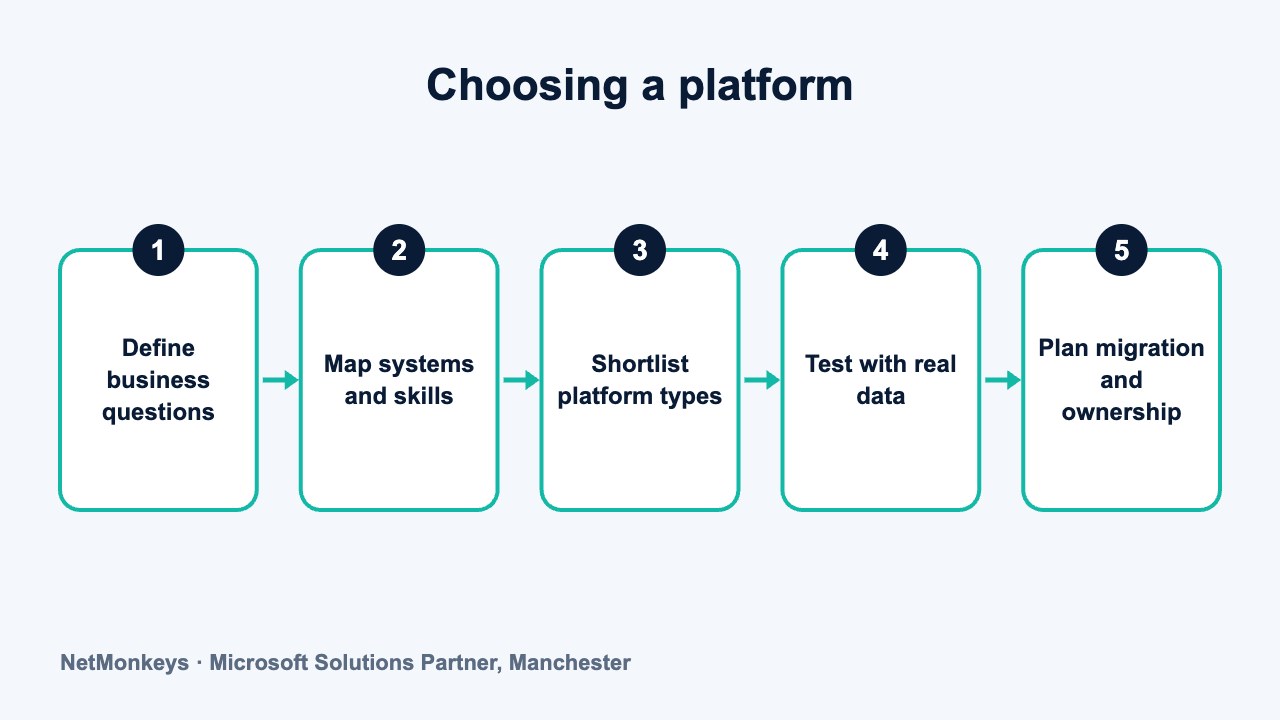
↑ Back to contentsHow do you choose between data warehouse platforms?
Use a checklist and score each shortlisted option against the same criteria. The aim is to expose differences that matter, not to find a number.
- Business questions. List the reports and decisions the warehouse must support, in order of importance.
- Existing estate. Note which cloud, identity system and operational software you already use.
- Team skills. Be honest about what your people know now and what they could learn.
- Data profile. Consider volumes, growth, variety and how fresh the data must be.
- Reporting tools. Check how well the platform works with Power BI or whatever your users rely on.
- Security and residency. Confirm where data can be held and how access is controlled and audited.
- Cost behaviour. Ask how spend changes with use, and what controls exist, without relying on headline rates.
- Support and ownership. Decide who runs it day to day, internally or through a partner.
A business intelligence consultancy can facilitate this assessment, and our guide to business intelligence companies is useful background if you are comparing providers.
↑ Back to contentsWhat should a proof of concept test?
Shortlist two or three options and run a small, time-limited test on real data. Choose a couple of source systems, build a thin slice of the model and run the reports people actually use.
Measure more than speed. Record how long loading took to build, how easy it was to change the model, how access was set up, and what the usage looked like. Ask the people who will run it to carry out the test.
Common mistake
Testing with a tidy sample file instead of real source data. Real data has duplicates, odd date formats and missing keys. A proof of concept that avoids these tells you very little about how the live project will go.
Agree success criteria before you start. For example: the test reports match existing figures, a failed load is detected and reported, and a new analyst can be given the right access in a short time. Written criteria stop the decision becoming a matter of opinion once the test is complete.
↑ Back to contentsWhat should you consider when migrating?
Moving from one platform to another is a project in its own right. It touches data, loading routines, reports and people. The following points come up in nearly every migration.
- Inventory first. List every table, load, report and user of the existing warehouse. Retire what nobody uses instead of moving it.
- Reconcile the numbers. Run old and new in parallel and compare key figures until differences are explained.
- Rewrite or lift? SQL written for one platform may need changes for another. Decide which logic to move as it stands and which to redesign.
- Plan the cutover. Agree a date, a rollback option and who signs off that the figures are right.
- Manage the reports. Power BI datasets and Excel files often point directly at old connections and need repointing and retesting.
- Train and document. New platforms change how people work, so allow time for it.
Our data migration services cover these steps. If your move involves changing source systems as well, treat the two as one programme rather than two separate projects. Avoid migrating at month-end or year-end, when finance teams depend most on the old reports and have the least time to check new ones.
↑ Back to contentsWhen should you stay where you are?
Sometimes the best platform decision is not to change. If reports are accurate, refresh on time and your team can support them, a migration adds risk without adding much value.
Consider staying if your volumes are modest, your costs are predictable and your main pain is elsewhere, such as unclear definitions or manual Excel work. Consider moving if scaling is a real constraint, support is fragile, or the platform is reaching the end of its supported life.
If you are unsure, an independent review costs far less than a wrong migration. NetMonkeys' data warehouse consultancy team can assess your current setup and give a plain recommendation, including advice to leave it alone.
↑ Back to contentsFrequently asked questions
What is the best data warehouse platform?
There is no single best option. The right platform depends on your existing cloud and software, your team's skills, your data and your reporting tools. Compare a shortlist against a realistic test.
Is Snowflake better than Azure Synapse or Fabric?
Neither is better in every case. Snowflake suits some multi-cloud and data-sharing needs, while Microsoft options suit organisations built around Azure and Power BI. Check Microsoft's current guidance on which service it recommends.
Do I need a cloud data warehouse?
Not always. A well-designed SQL Server warehouse can serve moderate workloads well. A cloud platform makes more sense when scaling, availability or flexible capacity are real constraints.
Is a lakehouse a replacement for a data warehouse?
It can serve the same purpose, but it is a different approach. It tends to suit teams with strong engineering skills and varied data. Many organisations use a warehouse and a lake together.
How long does a platform migration take?
It depends on how many tables, loads and reports you have, and how much needs redesigning. Start with an inventory, which gives a more reliable estimate than any rule of thumb.
Can I change platform later if I choose wrongly?
Yes, but it costs time and money. You can reduce that risk by keeping business logic documented, using standard SQL where practical and testing on real data before you commit.
About this guide and NetMonkeys
Written by Caleb Adoh, Growth Marketing Manager at NetMonkeys. NetMonkeys is a Manchester-based Microsoft Solutions Partner offering data warehouse services, Power BI services and business intelligence consultancy. This guide explains general data warehousing practice. Vendor products and features change, so check the current vendor documentation before making platform decisions.
Planning a data warehouse?
Talk to NetMonkeys about what you need to report on, where your data lives and which approach fits your business.
Explore data warehouse services Contact the team
