
Azure Data Warehouse: Options for UK Businesses
Compare the Azure data warehouse routes open to UK businesses: Azure SQL Database, Synapse and Microsoft Fabric, plus loading, security and data residency.
The quick answer
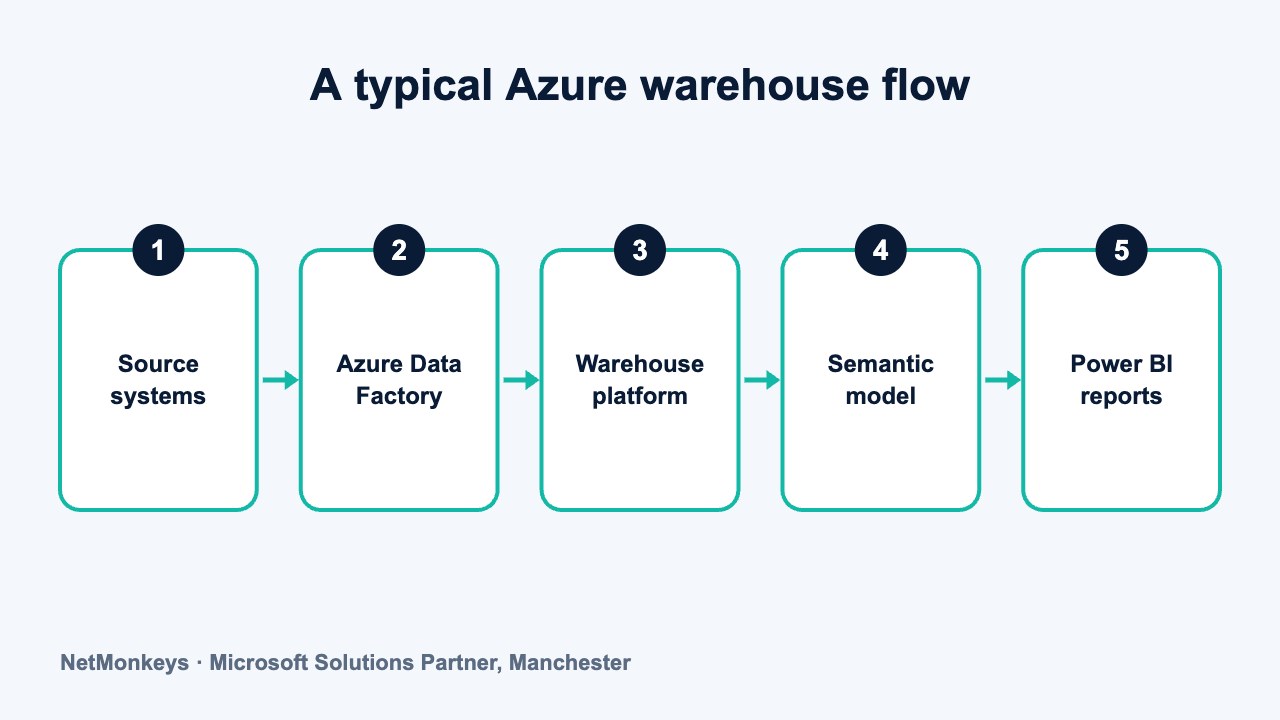
An Azure data warehouse is a central, structured store of business data built on Microsoft Azure services, usually fed by Azure Data Factory and reported on through Power BI. UK businesses typically choose between Azure SQL Database, Azure Synapse Analytics dedicated SQL pools and Microsoft Fabric, and the right choice depends on data volume, skills and how the rest of your Microsoft estate is set up.
Key takeaways
- Azure offers several routes to a warehouse. There is no single product called the Azure data warehouse.
- Azure SQL Database suits smaller, SQL-led warehouses. Synapse dedicated pools and Fabric suit larger analytical workloads.
- Azure Data Factory handles loading and Power BI handles reporting, whichever platform you pick.
- Identity through Entra ID and a deliberate choice of UK region matter as much as the platform itself.
- Microsoft changes its analytics lineup regularly, so check current documentation before you commit.
What is an Azure data warehouse?
An Azure data warehouse is a warehouse built from services in Microsoft Azure rather than on servers you run yourself. The warehouse itself is the same idea as any other: a governed, structured copy of data from your business systems, shaped so people can report on it consistently.
The phrase can be confusing because Azure does not sell one product with that name. You assemble the warehouse from a storage and compute platform, a loading tool and a reporting layer. If you are new to the underlying idea, start with our plain-English explanation of a data warehouse and then come back here for the Microsoft-specific choices.
Many UK businesses already run Microsoft 365, Dynamics 365 or Business Central. That makes Azure a natural home for a warehouse, because identity, licensing and reporting tools are already familiar. It does not make Azure the right answer by default, and later sections cover when it is not.
This article stays on the Microsoft route and explains the options in general terms. If you want help choosing and building, a data warehouse consultancy can map the options to your own systems, skills and budget.
↑ Back to contentsWhich Azure services can act as a data warehouse?
There are three main routes. Each can serve as the warehouse, and each sits at a different point on the scale from simple to large.
| Option | What it is | Typically suits | Main trade-off |
|---|---|---|---|
| Azure SQL Database | A managed relational database service based on SQL Server technology | Smaller to mid-sized warehouses, teams with strong SQL skills, modest data volumes | Not designed for very large, parallel analytical workloads |
| Azure Synapse Analytics dedicated SQL pools | A massively parallel processing engine for large analytical queries | Established estates with large structured datasets and existing Synapse investment | More design effort around distribution and capacity; check Microsoft's current direction for the product |
| Microsoft Fabric | Microsoft's newer unified analytics platform with a Warehouse item and OneLake storage | Organisations wanting one platform for data, warehousing and Power BI | Newer platform, so features and capacity models need checking against current documentation |
Other Azure services, such as Azure Data Lake Storage and Databricks, often appear alongside these. They are covered in our comparison of a data lake and a data warehouse, so we stay with the three warehouse routes here.
↑ Back to contentsWhen does Azure SQL Database make sense?
Azure SQL Database is often the most practical starting point for a mid-sized business. Your team probably knows SQL Server already, so design, querying and support skills transfer directly. A star-schema warehouse of moderate size runs well on it.
It is a good fit when the warehouse feeds a defined set of dashboards, the data volumes are manageable, and nobody is asking for large-scale machine learning on raw data. It is a weaker fit when queries scan very large tables or when many heavy workloads hit the platform at once.
What we would check first
Before recommending a platform we ask three things: how much history needs to be kept, how many people will query it at peak, and who will look after it day to day. A small, well-modelled warehouse on a database the team understands usually beats an ambitious platform nobody can maintain.
Where do Synapse dedicated SQL pools fit?
Azure Synapse Analytics dedicated SQL pools spread a query across many compute nodes. That design suits large fact tables and heavy reporting loads. The cost of that power is more design work: you need to think about how tables are distributed and how capacity is sized.
Many existing Azure warehouses run on dedicated pools, and they continue to work well for the workloads they were designed for. For a new build, though, Microsoft has been directing its investment towards Fabric, and the guidance for new projects has shifted over time. Check Microsoft's current documentation and roadmap statements before starting a new dedicated pool project, and ask your partner what they see in practice.
If you already run a dedicated pool, you do not need to panic. Treat it as a platform with a planned future, understand what a move would involve, and use data migration services when the time comes.
↑ Back to contentsWhat does Microsoft Fabric add to the picture?
Microsoft Fabric brings data engineering, warehousing, real-time analytics and Power BI into one platform. Data sits in OneLake, a single logical storage layer, and different engines work on the same copy. The Fabric Warehouse item gives you a SQL-based warehouse using T-SQL, alongside a Lakehouse item for more flexible file-based data.
The appeal for a Power BI-centred business is fewer moving parts. Loading, storage, modelling and reporting share one set of administration, security and capacity controls. We cover the item in detail in our guide to the Fabric Warehouse.
The trade-off is that Fabric is newer and still evolving. Features that matter to you, such as specific security controls or integration with a source system, should be confirmed in current Microsoft documentation, not assumed from an article or a sales conversation.
↑ Back to contentsHow does data get into an Azure warehouse?
Azure Data Factory is Microsoft's main service for moving and scheduling data. It connects to a wide range of sources, copies data into the warehouse, and runs the pipelines on a schedule or in response to events. Fabric includes its own pipeline experience built on similar ideas.
A typical loading design follows a short sequence.
- Land the raw data. Copy each source into a staging area unchanged, so you can always see what arrived.
- Clean and conform. Standardise dates, currencies, customer identifiers and product codes so the same thing has the same name everywhere.
- Load the model. Populate dimension and fact tables that reflect how the business thinks about sales, finance or operations.
- Test and log. Check row counts and totals against the source, and record every run so failures are visible.
- Schedule and monitor. Run loads at a sensible frequency and alert someone when one fails.
Connecting several business systems is usually the hardest part, not the platform. Our guide to combining data from multiple systems into one dashboard explains the matching and mapping work involved.
↑ Back to contentsHow does Power BI sit on top of the warehouse?
Power BI is the reporting layer for most Azure warehouses. It connects to the warehouse, usually through a semantic model that holds the measures, relationships and security rules in one place. Report authors then build from that shared model instead of writing their own calculations.
This separation matters. If the warehouse is well designed, a Power BI model on top of it stays small and fast, and two analysts asking the same question get the same number. If the warehouse is weak, every report becomes its own mini data project. Our Power BI services cover this modelling layer, and our article on automating monthly management reports shows the day-to-day payoff.
↑ Back to contentsHow are security and identity handled?
Access to an Azure warehouse is normally controlled through Microsoft Entra ID, the identity service behind Microsoft 365. People sign in with the accounts they already use, and access is granted by group rather than by individual.
At a general level, a sound setup covers the following points.
- Group-based access. Give permissions to Entra ID groups so that joiners, movers and leavers are handled in one place.
- Least privilege. Analysts read from the reporting layer. Only engineers and service accounts can change the underlying tables.
- Row and column restrictions. Limit sensitive fields, such as salary or health data, to the people who genuinely need them.
- Network controls. Decide whether the warehouse is reachable from the public internet or only through private connections.
- Monitoring and audit. Keep a record of who accessed what, and review it.
Security in the platform is only part of the job. Endpoint protection, patching and monitoring around it matter too, which is where managed security fits.
↑ Back to contentsWhat should UK businesses consider about data residency?
When you create an Azure resource you choose a region. Microsoft offers UK regions, and many UK organisations choose them so that data is stored and processed in the UK. This is usually a sensible default for personal data, public sector work and regulated sectors.
Residency is not the whole of UK GDPR compliance. You still need a lawful basis for processing, sensible retention rules and clear ownership of the data. Some services also process or replicate data outside a chosen region for certain features, so check each service's current documentation on where data is stored and processed.
Common mistake
Choosing a region once and assuming everything stays there. Backups, disaster recovery pairing, monitoring data and some preview features can have their own regional behaviour. Record the region decision for each component and review it when you add services.
How do you choose between the Azure options?
Start with the business questions, not the product list. The platform follows from what you need to report on, how much data is involved and who will run it.
- Define the reporting need. List the ten or so questions the business keeps asking. Small, stable lists point towards Azure SQL Database.
- Estimate volume and growth. Very large or fast-growing structured data points towards a parallel platform such as Fabric or a dedicated pool.
- Audit your skills. A team fluent in T-SQL can work in any of the three. A team with no engineers may need a partner for any route.
- Look at your Power BI plans. If Power BI is central and you want fewer products to manage, Fabric deserves a serious look.
- Check roadmap and licensing. Confirm current product status and licensing terms with Microsoft or your partner before committing.
- Plan a small first phase. Prove the design on one subject area, such as sales or finance, before extending it.
Sometimes the honest answer is that you do not need a warehouse yet. If you have one or two source systems and straightforward reports, Power BI connected directly may be enough. Our guide to BI software for SMEs covers that lighter route.
↑ Back to contentsHow do you build one without it becoming a long project?
Product names and capabilities in this area change often. Treat this article as a map of the options, and confirm the details of any specific feature, limit or licensing term in Microsoft's current documentation before you design around it.
Scope tightly and deliver in stages. Choose a single business area, agree the definitions with the people who own them, build the load and model, and put a few trusted reports on top. Then repeat for the next area. Each stage should end with something people use, so that feedback shapes the next one and the business sees value early.
Azure infrastructure also needs looking after once it is live. Costs, access, updates and failed loads all need an owner, which is why many firms pair the build with Azure cloud services and an ongoing support arrangement. If you want an experienced view on platform choice, NetMonkeys' data warehouse services start with exactly this scoping conversation.
↑ Back to contentsFrequently asked questions
Is there a product called Azure Data Warehouse?
Not as a single current product name. People use the phrase for a warehouse built on Azure services such as Azure SQL Database, Synapse dedicated SQL pools or Microsoft Fabric. Older material may refer to a service that has since been renamed, so check current Microsoft documentation.
Is Azure Synapse being replaced by Microsoft Fabric?
Microsoft has been placing much of its analytics investment in Fabric, and its guidance for new projects has changed over time. Existing Synapse workloads continue to run. Read Microsoft's latest product statements and discuss your plans with a partner before starting a new build.
Do I need Azure Data Factory to load an Azure warehouse?
No, but it is the most common choice. Other options include Fabric pipelines, SQL Server Integration Services or third-party tools. The right one depends on your sources, your skills and how much scheduling and monitoring you need.
Can I keep my data in the UK on Azure?
Yes, you can choose UK regions when you create resources, and many UK organisations do. Check the current documentation for each service you use to see where data is stored, backed up and processed, because some features behave differently.
Is Azure SQL Database enough for a small business warehouse?
Often yes. For a modest volume of data from a handful of systems, a well-modelled database with Power BI on top is a sound design. You can move to a larger platform later if volumes or workloads grow.
Who looks after an Azure warehouse once it is built?
Someone needs to own load monitoring, access reviews, cost control and change management. That can be an internal data team, a managed service or a mix of both. Decide this before go-live, not afterwards.
About this guide and NetMonkeys
Written by Caleb Adoh, Growth Marketing Manager at NetMonkeys. NetMonkeys is a Manchester-based Microsoft Solutions Partner offering data warehouse services, Power BI services and business intelligence consultancy. This guide explains general data warehousing practice. Vendor products and features change, so check the current vendor documentation before making platform decisions.
Planning a data warehouse?
Talk to NetMonkeys about what you need to report on, where your data lives and which approach fits your business.
Explore data warehouse services Contact the team
