
Snowflake Data Warehouse: What It Is and When It Fits
A plain overview of the Snowflake data warehouse: how it is built, common uses, strengths, trade-offs, cost control and when another platform may suit better.
The quick answer
A Snowflake data warehouse is a data warehouse built on Snowflake, a cloud data platform that is generally described as separating storage from compute. That lets teams scale query capacity independently of the data they hold. It is a strong option for many organisations, but whether it is the right one depends on your existing tools, skills and workloads.
Key takeaways
- Snowflake is a cloud data platform that is widely used as a data warehouse, not a warehouse design in itself.
- Its best-known architectural idea is separate storage and compute, delivered through virtual warehouses.
- It is available on more than one major public cloud, which matters for multi-cloud and data-sharing plans.
- Cost control is a matter of practice: sizing, scheduling and monitoring, not a one-off setting.
- A Microsoft-centred organisation should compare it with Azure and Fabric options before deciding.
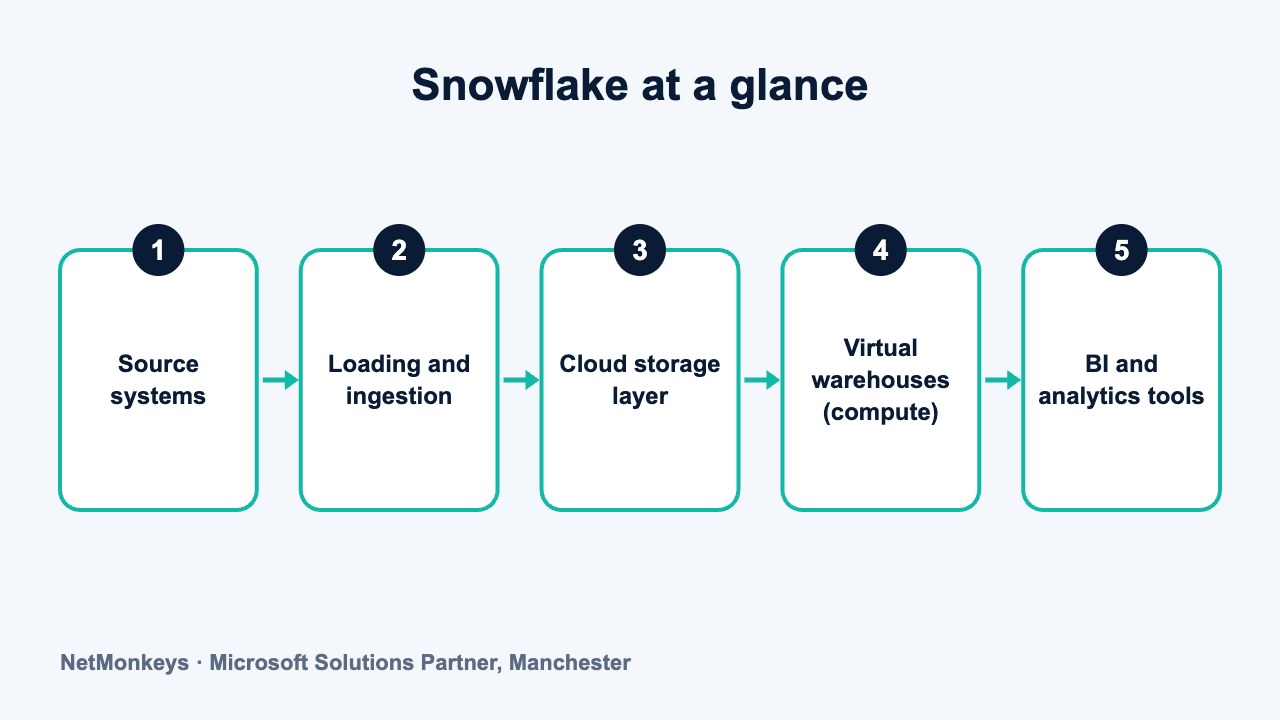
What is a Snowflake data warehouse?
Snowflake is a cloud data platform sold as a managed service. When people say "Snowflake data warehouse", they usually mean a data warehouse that has been built on Snowflake: a central, modelled store of business data that supports reporting and analysis.
The distinction matters. The platform supplies storage, processing and security features. The warehouse itself is the design on top: the tables, the business definitions, the loading routines and the rules about who sees what. If you are unsure of the underlying idea, start with our plain-English explanation of a data warehouse.
Snowflake began as a cloud-native warehouse product and has since widened its scope. Vendors now describe it more broadly as a data platform. For a narrower look at that naming question, see is Snowflake a data warehouse?. If you want help choosing and designing one, our data warehouse services cover platform selection as well as build.
↑ Back to contentsHow is Snowflake generally described architecturally?
Snowflake is usually described as having three layers that scale separately. Exact product wording changes over time, so treat this as the general picture rather than a specification.
- Storage layer. Data is held in cloud object storage in a managed, compressed format. Users do not manage files or disks directly.
- Compute layer. Queries run on clusters Snowflake calls virtual warehouses. You choose how large each one is and when it runs.
- Services layer. Metadata, security, query planning and transaction management sit here, coordinating the other two layers.
The word "warehouse" is slightly confusing in Snowflake. A virtual warehouse is a block of compute, not a data warehouse. A single Snowflake account can contain many databases and many virtual warehouses.
↑ Back to contentsWhat does separating storage and compute mean in practice?
In older on-premises systems, storage and processing power were tied together on the same hardware. Adding capacity for one often meant buying both. Separation changes that.
The practical effects are worth understanding before you commit:
- Workload isolation. Finance can run month-end queries on one virtual warehouse while data scientists use another, without slowing each other down.
- Independent scaling. You can enlarge compute for a heavy job and shrink it afterwards, without moving data.
- Pausing. Compute can generally be suspended when idle, so you are not paying for processing nobody is using.
- Shared single copy. Several teams query the same stored data rather than maintaining their own extracts.
None of this removes the need for good design. A badly modelled table is still slow and confusing, however elastic the compute behind it is. Our guide to data warehouse platforms shows how other products approach the same separation.
↑ Back to contentsWhere is Snowflake available?
Snowflake is generally offered on the major public clouds, with deployments in a range of regions. Organisations sometimes value this when they have suppliers, subsidiaries or customers on different clouds, or when they want to avoid tying a data strategy to one cloud provider.
Multi-cloud availability is not the same as multi-cloud simplicity. Data held in one region and cloud does not automatically appear in another. Sharing and replication features exist, but they need planning, and data residency rules may restrict where UK or EU data can sit. Check the vendor's current documentation for supported regions and features before you design around them.
Security deserves the same care. Role-based access, encryption and network controls are standard features of the platform, but they only protect you if they are configured well. If you hold personal or regulated data, involve whoever owns information security early. Our managed security team can review access design alongside the build.
↑ Back to contentsWhat is Snowflake commonly used for?
Most Snowflake deployments start with analytics and reporting, then broaden. Typical uses include:
- Management reporting. A governed source of figures for finance, sales and operations dashboards.
- Combining many systems. Bringing CRM, ERP, finance and web data into one place. The principle is combining data from multiple systems into one dashboard.
- Data sharing. Making datasets available to partners or other business units without sending copies.
- Semi-structured data. Holding formats such as JSON alongside conventional tables.
- Data science and machine learning inputs. Preparing consistent feature data, using the platform's additional tooling where it fits.
Treat the last two as areas where capabilities develop quickly. Confirm what is currently supported rather than relying on a summary written months ago.
↑ Back to contentsHow does data get into a Snowflake warehouse?
Snowflake does not collect your data for you. Something has to extract it from source systems and load it, and that something is a separate design decision. Most projects use a mix of approaches.
- Scheduled batch loads. Files or extracts from finance, ERP and CRM systems are loaded overnight or hourly. This is the most common starting point.
- Change capture. Only the rows that changed are moved, which reduces load and keeps data fresher.
- Streaming or near real-time feeds. Useful where a dashboard must reflect activity within minutes. Confirm the current options in the vendor's documentation, because this area changes often.
- Third-party integration tools. Many organisations use a dedicated connector or integration product rather than writing every pipeline by hand.
Whichever route you take, plan for failure. Pipelines break when a source system changes a field or a file arrives late. Good practice is to log every load, alert someone when one fails and make reruns safe, so that loading twice does not duplicate rows. Our system integration work covers this connecting layer, which is often where projects spend more time than expected.
↑ Back to contentsWhat are the strengths and trade-offs?
Snowflake has earned its reputation, but no platform is the right answer everywhere. This table sets out a balanced view.
| Area | Often a strength | Often a trade-off |
|---|---|---|
| Operations | Managed service with little hardware or tuning to run | Less low-level control than self-managed systems |
| Scaling | Compute can be resized and paused as demand changes | Poorly governed scaling can raise spend quickly |
| Workloads | Separate compute for separate teams | More virtual warehouses to organise, name and monitor |
| Cloud choice | Available across major public clouds | Moving data between clouds needs planning |
| Skills | SQL-first, familiar to many analysts | Surrounding tools for loading and modelling still need specialists |
| Ecosystem | Works with many BI and integration tools | Integration with a Microsoft estate needs deliberate design |
A sensible way to test fit is a short proof of concept. Pick two or three real reports, load the source data they need, and measure how long loading, refresh and queries take with your own volumes. Include the people who will run it day to day, not only the project sponsor. Note how much effort the surrounding work took as well as the platform itself, because that is usually the larger share.
Common mistake
Treating the platform as the project. Buying Snowflake does not give you a warehouse. Teams that skip modelling and business definitions end up with a fast, expensive place to keep the same inconsistent numbers they had before.
When might a Microsoft-centred stack suit better?
If your business already runs on Microsoft 365, Entra ID, Power BI and Azure, a Microsoft-native warehouse can be the simpler path. That is not a criticism of Snowflake. It is a question of fit.
Reasons organisations in this position sometimes lean towards Microsoft options include shared identity and security, one vendor relationship, and tight links to Power BI. Our overview of the Azure data warehouse options sets those out.
Reasons to look at Snowflake anyway include a multi-cloud estate, a strong in-house SQL team that prefers a neutral platform, or a need to share data externally with partners on other clouds.
Power BI works with Snowflake as a data source, so choosing one does not exclude the other. Our Power BI services team regularly connects reports to a range of warehouse platforms. As a Microsoft Solutions Partner we know the Microsoft route well, which is why we say plainly that it is not always the right one.
↑ Back to contentsIs Snowflake suited to a mid-sized business?
It can be, but size alone is a poor guide. The better questions are about complexity. How many source systems do you have, how many people need governed access to the same figures, and how much do those figures matter to decisions?
A business with one accounting system and a handful of Power BI reports may not need any warehouse. A business with a CRM, an ERP, a finance platform and a web analytics tool, all producing conflicting numbers, usually does. Disagreeing figures across departments are the usual symptom.
Once you do need one, the platform decision follows your environment. If most of your workloads already live in Azure, our Azure cloud services team can show you what a native build looks like next to a Snowflake one. If you would rather not run the surrounding infrastructure yourself, a managed cloud services provider can take on monitoring and support.
When not to build
If your reporting problem is really a data quality or ownership problem, a new platform will not fix it. Settle which system holds the master record for each key item, such as customer or product, before you choose where to store the copies.
How do you control Snowflake costs in general terms?
Usage-based platforms reward discipline. We do not quote prices here because they change and depend on contract, region and edition. The practices below hold whatever the rate card says.
- Right-size compute. Start small and increase only when a workload proves it needs more.
- Suspend when idle. Set virtual warehouses to pause automatically after short periods of inactivity.
- Separate workloads. Give loading, reporting and experimentation their own compute so each can be sized and measured on its own.
- Set limits. Use the platform's resource monitoring features to alert or stop spend that passes agreed thresholds.
- Review query habits. Large, unfiltered scans and repeated identical queries are common sources of waste.
- Assign ownership. Someone should see the usage report every month and be able to act on it.
What we would check first
Who can create a virtual warehouse, and do they know what it costs to leave one running? Uncontrolled access to compute is the most common cause of surprise bills in usage-based platforms.
What skills does a Snowflake warehouse need?
Snowflake is approachable for anyone who knows SQL, which is part of its appeal. A working warehouse still needs a mix of skills that a platform licence does not supply.
- Data modelling. Turning business questions into sensible fact and dimension tables.
- Data engineering. Building and monitoring loading pipelines from source systems.
- Security and governance. Role design, access control, data classification and audit.
- Cost and usage management. Watching consumption and adjusting sizes and schedules.
- Reporting design. Delivering the figures in a form people trust, often through Power BI.
Smaller organisations rarely have all of these in-house. That is where a business intelligence consultancy earns its keep, filling gaps while your own team builds confidence. If you are moving from an older system, planning data migration early prevents most delays.
If you want an independent view on platform choice, NetMonkeys' data warehouse team can compare options against your systems and skills before you spend anything on licences.
↑ Back to contentsFrequently asked questions
Is Snowflake a data warehouse or a data lake?
It is generally described as a cloud data platform. Many organisations use it as a data warehouse, and it can also hold semi-structured data in ways that overlap with a data lake. The label matters less than how you model and govern the data.
Does Snowflake work with Power BI?
Yes, Power BI can connect to Snowflake as a data source. Check the current connector options and authentication methods in Microsoft's and Snowflake's documentation, as these change. Performance depends heavily on model design and refresh approach.
Do I need a data engineer to use Snowflake?
Not always at the start, since SQL skills go a long way. But reliable loading, monitoring and security usually need someone with engineering experience, whether in-house or from a partner.
Is Snowflake cheaper than other warehouses?
There is no general answer. Cost depends on data volumes, query patterns, concurrency and how well usage is managed. Compare platforms using a realistic sample workload, not list rates.
Can Snowflake replace our existing SQL Server reporting database?
It can, but a replacement is a project, not a switch. You need to move data, rebuild loading routines, retest reports and retrain people. For small, stable workloads, staying put may be the better choice.
How long does it take to set up a Snowflake warehouse?
Creating an account takes little time. Building a trusted warehouse depends on how many source systems you have, how clear your business definitions are and how much data quality work is needed. Scope that with a short discovery phase.
About this guide and NetMonkeys
Written by Caleb Adoh, Growth Marketing Manager at NetMonkeys. NetMonkeys is a Manchester-based Microsoft Solutions Partner offering data warehouse services, Power BI services and business intelligence consultancy. This guide explains general data warehousing practice. Vendor products and features change, so check the current vendor documentation before making platform decisions.
Planning a data warehouse?
Talk to NetMonkeys about what you need to report on, where your data lives and which approach fits your business.
Explore data warehouse services Contact the team
