
Cyber Insurance Renewal Checklist: Controls Underwriters Expect
A cyber insurance renewal checklist of the technical controls underwriters usually ask about, with evidence to prepare and a 12-week plan for 50+ seat firms.
The quick answer
Underwriters typically look for managed endpoint detection and response, multi-factor authentication on email, remote access, admin and cloud accounts, segmented and tested backups, regular patching, controlled admin access, email security, an incident response plan and staff training. Requirements differ between insurers, so read your proposal form carefully and take advice from your broker. Always answer accurately, because over-claiming a control can put your cover at risk.
Who this is for: Finance Directors, Compliance Officers
Key takeaways
- Insurers differ. Use this list to prepare evidence, then check your own proposal form and take your broker's advice.
- Multi-factor authentication, managed EDR and tested backups are the controls most often discussed at renewal.
- Evidence matters more than assertion: screenshots, policies, reports and dates.
- Start about 12 weeks before renewal so gaps can be fixed, not just described.
- Answer every question accurately. Over-claiming a control can invalidate cover.
Why do underwriters decline or load cyber insurance renewals?
Underwriters price the likelihood and cost of a claim. When your answers or evidence suggest a higher chance of a ransomware attack, account takeover or data loss, they may decline cover, restrict it, add conditions, or increase the premium. This is often described as loading. Insurers differ in their appetite and in what they ask, so there is no single list that applies everywhere.
The pattern is consistent, though. Questions concentrate on the controls that most often decide whether an incident becomes a serious claim: who can log in and how, whether endpoints are monitored, whether backups survive an attack, and whether the business can respond when something goes wrong.
For a firm with 50 or more users, the proposal form has often moved from a short declaration to a detailed technical questionnaire. Finance Directors usually sign it, but they cannot answer it alone. Compliance and IT need to supply the facts.
This article covers the technical controls and the evidence to prepare. For the wider picture of what a policy covers and how it works, see our guide to cyber security insurance, which we do not repeat here.
Practical tip
Ask your broker early which controls the insurer has flagged as essential, and whether anything is likely to change at renewal. Insurers revise their questions, so check the current requirements for your own policy. Nothing in this guide is a promise of cover or of a particular premium.
What technical controls do underwriters usually expect at 50+ seats?
The controls below appear in most proposal forms for firms of this size, although wording and emphasis vary. Treat them as the baseline to evidence, and confirm against your own form.
- Managed endpoint detection and response (EDR): monitoring of laptops, desktops and servers, with a team responding to alerts. Basic antivirus is often not enough to satisfy the question.
- Multi-factor authentication (MFA): on email, remote access, administrator accounts and cloud services.
- Backups that survive an attack: segmented from the main network, immutable or offline, with restores tested.
- Patching: operating systems, applications and network devices kept current, with critical updates applied promptly.
- Privileged access management: limited admin accounts, separate from daily-use accounts, with review and logging.
- Email security: filtering for phishing and malicious attachments, plus protections against spoofing.
- Incident response plan: a written plan, with roles, contacts and a record of being tested.
- Staff security awareness training: regular, recorded and including phishing simulation where practical.
If one area is weak, it can be the area an insurer concentrates on. Many renewals stall on a single missing control, most commonly MFA coverage or backup design. The aim of the checklist is to identify those gaps early.
These controls overlap with common security frameworks and baselines. Our guides to cyber security best practices and cyber security requirements for UK businesses explain the wider context.
↑ Back to contentsControl by control: what do underwriters ask and what evidence should you prepare?
The table below shows typical questions and suitable evidence. Use it as a working document. Each row should have an owner and a date by which evidence is gathered.
| Control | What underwriters usually ask | Evidence to prepare |
|---|---|---|
| Managed EDR | Is EDR deployed on all endpoints and servers? Is it monitored 24/7 by a security team? | Deployment report showing coverage, service description, sample alert and response record |
| MFA on email | Is MFA enforced for all users on email and cloud mailboxes? | Screenshot of conditional access or MFA policy and user registration report |
| MFA on remote access | Is MFA required for VPN, remote desktop and any remote access tools? | Remote access configuration, MFA policy and list of remote access methods |
| MFA on admin and cloud accounts | Is MFA enforced for all privileged and cloud administrator accounts? | Admin account list with MFA status, cloud console settings |
| Backups | Are backups offline or immutable, segmented, encrypted and tested? How often are restores tested? | Backup design diagram, retention settings, dated restore test results |
| Patching | How quickly are critical patches applied? Is there an asset list and a process for end-of-life software? | Patch compliance report, asset register, exceptions list with owners |
| Privileged access management | Do admins use separate accounts? Are local admin rights removed? Is access reviewed? | Admin account inventory, review log, policy on admin use |
| Email security | Is email filtering in place? Are SPF, DKIM and DMARC configured? | Filtering product configuration and DNS record screenshots |
| Incident response plan | Is there a written plan? When was it last tested? Are contacts and insurer notification steps recorded? | Plan document, test or tabletop record, contact list |
| Staff training | Is security awareness training given at least annually? Are phishing tests run? | Training completion report, phishing simulation results |
| Asset visibility | Do you know what devices and systems you have? | Asset register, discovery scan summary |
| Third-party access | Are suppliers given remote access? Is it controlled and logged? | Supplier access list and approval records |
Evidence should be dated, current and tied to your real environment. A screenshot from a vendor brochure is not evidence. A screenshot from your own admin console, with the date visible, is.
↑ Back to contentsWhat do underwriters expect on managed EDR?
Endpoint detection and response goes beyond traditional antivirus. It records activity on devices, looks for behaviour that suggests an attack, and lets a responder isolate a machine. Underwriters increasingly ask whether it is monitored around the clock by a team, as well as whether it is installed.
A tool that is installed but nobody watches overnight, at weekends or on bank holidays is a common weak point. Attacks are often timed for these periods. A managed service, such as a managed security service, puts analysts on alerts and gives you a record of response. Our service page on managed EDR services describes how monitored endpoint protection works.
What to prepare
- Coverage report: the number of endpoints with EDR against the number of devices on your asset register.
- Exclusions: a list of anything not covered, such as old servers, with reasons.
- Monitoring evidence: how alerts are handled out of hours, and a sample response record.
- Contract: a clear statement of who responds, and within what time.
If your answer is that antivirus is installed, say that. Do not describe it as managed EDR. Describing a control more strongly than the facts support creates the risk discussed later in this guide.
↑ Back to contentsWhy is MFA coverage so often the sticking point?
Stolen credentials remain one of the commonest routes into business systems. MFA reduces that risk, which is why insurers ask about it in detail. The question is rarely whether you have MFA. It is where it is enforced and whether there are exceptions.
- Email and Microsoft 365: MFA for all users (see our Microsoft 365 services), with legacy authentication blocked where possible. See our guide to securing Microsoft 365 against phishing and account compromise.
- Remote access: VPN, remote desktop, remote management tools and any supplier access.
- Administrator and cloud accounts: all privileged roles, including service desk accounts and break-glass accounts.
- Exceptions: shared mailboxes, service accounts and executives who asked to be excluded. These tend to be the accounts attackers want.
Write down every exception, who approved it and why. If an exception is unavoidable, record the compensating control. If you answer yes to an MFA question and an exception exists, check with your broker how the question should be answered. A plain statement of the limits is better than an overstated yes.
What we would check first
We would export a list of every account with its MFA status, then look for administrator accounts, shared mailboxes and accounts that have never signed in with MFA. The gaps in that list are what an incident investigator would find first, so they are worth finding first yourself.
What do underwriters look for in backups and recovery?
Ransomware attackers often try to delete or encrypt backups before demanding payment. Underwriters therefore ask whether backups can survive an attack, and whether you can restore from them in a reasonable time.
- Segmentation: backup systems separated from the main network and protected by their own credentials and MFA.
- Immutable or offline copies: at least one copy that cannot be altered or deleted by an attacker with admin access.
- Coverage: servers, Microsoft 365 data, key line-of-business systems and any cloud workloads.
- Tested restores: dated records of recovering real data, not just a green status light.
- Recovery objectives: a realistic view of how long recovery would take, matched to what the business can tolerate.
A job that reports success is not proof of a working restore. Schedule a test at least a few times a year, record the outcome and keep the evidence. Our service page on business continuity covers how backup and recovery fit into wider resilience planning.
Be accurate about retention and scope. If Microsoft 365 mailboxes are not backed up separately, do not imply they are. Brokers can advise how to describe the position on the form.
↑ Back to contentsHow do patching and privileged access feature at renewal?
Proposal forms often ask how quickly critical patches are applied, and whether you hold a current list of assets. They may also ask about end-of-life software. An unsupported server that still runs a business application will draw questions, and you should be ready to explain the risk controls around it.
Patching evidence
- Patch compliance report: current percentage of devices up to date, drawn from your management tool.
- Policy: stated timelines for critical and high-severity updates.
- Exceptions register: devices that cannot be patched, with owners and compensating controls.
- Network devices: firewalls, switches and access points, which are often forgotten.
Privileged access evidence
- Separate admin accounts: administrators should not use their daily accounts for admin tasks.
- Local admin rights removed: standard users should not have admin rights on their own laptops.
- Access reviews: dated records showing admin lists were reviewed and unused accounts removed.
- Logging: admin actions recorded and retained.
These two areas depend on routine discipline. Overloaded IT teams often defer them. Our guide to signs an internal IT person needs backup explains why, and how to spot it early.
↑ Back to contentsWhat about email security, incident response and training?
Most incidents begin with a message. Underwriters therefore ask about email filtering and about DNS records that reduce spoofing. They also want to know that staff can recognise suspicious messages, and that there is a plan when something gets through.
- Email security: filtering for phishing, malicious attachments and links, plus SPF, DKIM and DMARC records for your domains.
- Incident response plan: a written document with named roles, decision rights, contact details for your insurer, broker and advisers, and a record of being tested. Our cyber incident response plan template gives you a starting structure.
- Insurer notification steps: many policies need you to notify the insurer quickly and use approved responders. Check your policy wording and put the contact route in the plan.
- Staff training: regular awareness training with completion records and, where practical, phishing simulations.
A plan that has never been read is of limited use. Run a short tabletop exercise with Finance, Operations, HR and IT once a year, and record who attended and what was learned. The evidence of testing is often as valuable as the plan itself.
↑ Back to contentsWhat does a 12-week pre-renewal plan look like?
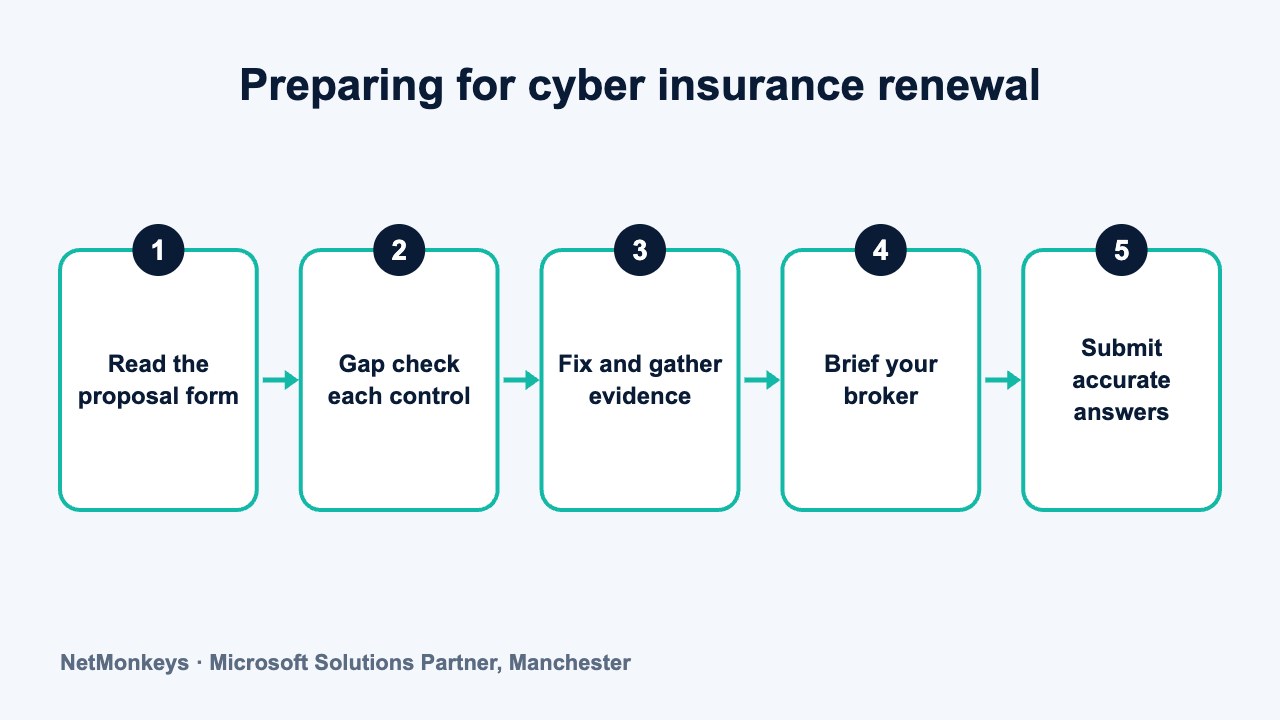
Twelve weeks is a practical window for most firms. It gives time to fix gaps, gather evidence and brief your broker before the form arrives. If your renewal is closer than that, prioritise MFA, backups and EDR, and tell your broker where there are known gaps.
| Weeks | Focus | Output |
|---|---|---|
| 1 to 2 | Obtain last year's proposal form and any insurer feedback. Agree an owner in Finance, IT and Compliance. | Gap list and timetable |
| 3 to 4 | Check MFA coverage on email, remote access, admin and cloud accounts. Close exceptions. | MFA report and exceptions register |
| 5 to 6 | Review backup design. Run a restore test. Confirm an immutable or offline copy exists. | Dated restore test record |
| 7 to 8 | Check EDR coverage and monitoring. Review patch compliance and admin accounts. | Coverage and patch reports, admin account review |
| 9 | Review email security configuration and DNS records. Confirm training completion. | Configuration screenshots, training report |
| 10 | Update the incident response plan and run a tabletop exercise. | Updated plan and exercise record |
| 11 | Draft answers on the proposal form with evidence attached. Compare against your actual environment. | Draft answers with evidence index |
| 12 | Brief your broker on strengths and gaps. Agree how any gaps will be described. Sign only when answers are verified. | Broker-reviewed, accurate submission |
Where gaps cannot be closed in time, say so and show the plan to close them. Your broker can advise how to present this to the insurer. A realistic remediation plan is easier to discuss than an answer that does not match reality.
An independent review can speed up the gap check. A cyber security audit gives a structured view of controls, and cyber security assessments explain what is covered.
↑ Back to contentsWhich answers on proposal forms commonly cause problems?
The problems below are the ones that tend to cause difficulty at claim time or when an insurer asks follow-up questions. They are drawn from general practice, not from any one insurer.
- Saying yes to MFA everywhere when there are exceptions. A single unprotected admin account can make the answer wrong.
- Describing antivirus as EDR. The two are different, and the form usually explains how.
- Claiming backups are offline when they are on a connected share. If an attacker with admin access can delete them, they are not offline or immutable.
- Stating that restores are tested without dated evidence. If nobody has recovered data recently, say so.
- Quoting patch policy rather than actual compliance. The policy says what should happen. The report shows what did.
- Saying a plan exists when it is an unreviewed template. A plan nobody has read may not count.
- Leaving out subsidiaries, remote sites or acquired companies. The form usually covers the whole group.
- Relying on what a supplier told you without checking. If the supplier is wrong, you carry the answer.
Common mistake
Letting the person who is most confident, not the person who holds the facts, complete the technical section. Have IT supply evidence for each answer, and have Compliance or Finance review the final wording against that evidence.
Can over-claiming controls invalidate cover?
Yes, it can. Insurance law and policy wording depend on accurate disclosure. If an insurer finds that an answer on the proposal form was inaccurate or misleading, it may reduce a claim payout, apply different terms or, in serious cases, treat the policy as invalid. How this works in practice depends on your policy and on the law, so take advice from your broker or a solicitor.
The practical rule is simple. Answer exactly what is true on the day you sign, keep evidence, and update your broker if circumstances change during the policy period. If a question is ambiguous, ask the broker how to answer it, in writing.
- Accuracy over optimism: a cautious answer with a remediation plan is safer than a confident answer that cannot be evidenced.
- Written broker advice: keep emails showing how ambiguous questions were resolved.
- Change notification: if you drop a control mid-term, such as removing EDR from some servers, ask whether the insurer needs to know.
- Evidence retention: keep the evidence pack alongside the signed form.
A cyber security partner can help you gather evidence and fix gaps, but the declaration is yours. We do not provide insurance advice, and nothing here replaces your broker's guidance. If you want a technical view of your controls before renewal, you can speak to NetMonkeys.
If you are also working towards a certification that insurers recognise, our guides to preparing for Cyber Essentials Plus and Cyber Essentials versus Cyber Essentials Plus explain what is involved. Certification does not replace the proposal form, but it can support the evidence you provide.
↑ Back to contentsFrequently asked questions
What do cyber insurers check at renewal?
Typically MFA coverage, managed EDR, backup design and restore testing, patching, privileged access, email security, incident response and staff training. The exact questions differ between insurers, so read your proposal form and take advice from your broker.
Will having all these controls guarantee cover or a lower premium?
No. Insurers set their own appetite and pricing, and the market changes. Strong controls give you a better position to discuss terms, but no one can promise cover or a particular premium. Your broker is the right person to advise.
How early should we start preparing for renewal?
About 12 weeks before the renewal date is a sensible target. That leaves time to fix MFA gaps, test backups and gather evidence. If you have less time, focus on the controls insurers ask about most and be open with your broker about gaps.
Is antivirus enough to answer the EDR question?
Usually not. EDR monitors behaviour and supports investigation and response, and underwriters often ask whether it is monitored 24/7. If you only have antivirus, answer on that basis and discuss options with your broker and IT provider.
What if we cannot meet every control before renewal?
Be open about it. Tell your broker which controls are missing, show a dated plan to close them and ask how to present this to the insurer. Some insurers accept a remediation plan, but that is a matter for the insurer. Do not tick a box that is not true.
Can a wrong answer on the form affect a claim?
It can. Inaccurate or misleading answers may lead an insurer to reduce or decline a claim, or to treat the policy as invalid, depending on the policy and the law. Check accuracy before signing and take advice from your broker or a solicitor if you are unsure.
Who should complete the proposal form?
A Finance Director or Compliance Officer usually signs it, but IT should supply the facts and evidence. Have a second person check each technical answer against the evidence before it is submitted, and involve your broker early.
About this guide and NetMonkeys
Written by Caleb Adoh, Growth Marketing Manager at NetMonkeys. NetMonkeys is a Manchester-based Microsoft Solutions Partner with offices in Manchester, Nottingham and London and field engineers across around 12 UK cities, providing managed IT support, cyber security and virtual CIO services. This guide gives general information for UK businesses. Contracts, insurance policies and certification schemes differ, so check your own documents and current requirements, and take legal, insurance or financial advice where it matters.
Want a second opinion on your IT?
Talk to NetMonkeys about your current set-up, your contract and what a sensible next step looks like for your business.
Explore managed IT support Contact the team
