
Cyber Essentials Plus Preparation Guide: What Your IT Provider Does
Cyber Essentials Plus preparation explained: the technical audit work your IT provider should handle, a responsibility table and an 8-week pre-audit plan.
The quick answer
Cyber Essentials Plus preparation is the technical work that readies your devices, accounts and network for hands-on testing by a certification body. A good IT provider should run vulnerability scans, track patching, harden devices, manage malware protection, enforce MFA, review firewall settings and gather evidence. You approve scope and sign off decisions. Check the current scheme requirements before setting dates.
Who this is for: Operations Managers, Compliance Leads
Key takeaways
- Cyber Essentials Plus adds hands-on technical verification to the self-assessed scheme.
- Most of the heavy lifting is operational work a good provider should already run.
- Scan early, because unsupported software and MFA exceptions cause many failures.
- A responsibility table and dated evidence stop tasks drifting between you and the provider.
- Use an 8-week plan and a mock check to leave time for surprises.
What does Cyber Essentials Plus preparation involve, and who does the work?
Cyber Essentials Plus preparation is the technical work that makes sure your devices, accounts and network settings will stand up to hands-on testing by a certification body. Much of that work sits with your IT provider, because it involves scanning, patching, configuration and evidence gathering that most operations teams do not run day to day.
The scheme has two levels. Cyber Essentials is verified through a self-assessment. Cyber Essentials Plus covers the same control areas but adds hands-on technical verification, where an assessor tests a sample of your devices and checks how they behave. For the differences in detail, see our comparison of Cyber Essentials and Cyber Essentials Plus.
This guide is written for Operations Managers and Compliance Leads who own the outcome but may not own the technology. It focuses on the provider's responsibilities: what a good managed service provider should do, what you should still do yourself, and how to hold the provider to account. It does not repeat the step-by-step process in our guide to preparing for a Cyber Essentials assessment, or the consequences covered in what happens if you fail Cyber Essentials Plus.
Check the current scheme requirements
Technical requirements, scope rules and assessment methods are updated from time to time. This article describes the general shape of the work. Before you set a timetable, check the current requirements with your certification body or provider, and confirm which version of the scheme applies to your assessment date.
What technical work sits behind the audit?
The assessment looks at a handful of control areas. For each one, someone needs to do the technical work and keep proof of it. Here is what that usually means in practice.
- Firewalls and boundary settings. Reviewing rules on the router or firewall, closing unneeded inbound ports, changing default credentials and checking remote access paths.
- Secure configuration. Removing unneeded software and accounts, setting sensible defaults, enforcing screen locks and checking that devices follow a documented build.
- User access control. Making sure people have only the access they need, that admin accounts are separate and limited, and that leavers are removed promptly.
- Malware protection. Anti-malware or equivalent controls on in-scope devices, kept up to date, with alerts reviewed.
- Security update management. Operating systems, applications and firmware patched within the timeframe the scheme sets, with proof of what was updated and when.
Cyber Essentials Plus adds testing on top. An assessor typically runs vulnerability scans from outside and inside the network, samples devices, and checks things such as malware protection behaviour and whether email and web content can deliver harmful files. The exact tests are set by the scheme and may change, so confirm with your certification body.
Notice that almost every item involves ongoing operations, not a one-off project. A firewall review done last year does not count if rules changed since. A patching run completed once does not prove a process exists. This is why preparation goes more smoothly when your provider already runs these tasks as part of normal service, supported by managed IT support with monitoring and reporting built in.
↑ Back to contentsWhat should your IT provider do for vulnerability scanning?
Vulnerability scanning is the area where unprepared firms most often discover surprises. The assessor's scan finds what an attacker could find. If your provider has not scanned first, you learn about weaknesses on audit day.
A competent provider should run authenticated and unauthenticated scans against your internet-facing addresses and your internal devices before the assessment, then act on the findings. They should explain results in plain language and agree which items matter for the scheme and which are lower risk.
- Confirm the scope. Agree which devices, servers, cloud services and addresses are in scope, and document it.
- Scan externally and internally. Cover public IP addresses and a representative sample of internal devices, using a current scanner.
- Triage findings. Rank issues by severity and by relevance to the scheme's requirements.
- Fix or document. Patch, reconfigure or remove the affected item, and record any exception with a reason.
- Rescan and keep the report. A clean rescan, dated and saved, is useful evidence and a good dry run for the assessor's tests.
Ask to see sample reports before you commit. A useful report names the device, the finding, the fix and the date closed. A report that lists thousands of unprioritised items without a plan is a sign the process is not under control.
What we would check first
Before the real assessment, we would check whether any end-of-life operating systems, unsupported applications or forgotten internet-facing services exist. These are among the quickest ways to fail a technical test, and they are often invisible to a team that has never audited its own estate. Our guide to cyber security asset management explains how to find them.
How should patch management be tracked and evidenced?
Patch management is not just installing updates. For this scheme it is the ability to show that updates are applied within the required timeframe, and to identify devices that are not. Check the current requirements for the exact window and severity rules.
Your provider should be using tooling that reports patch status per device and per update. A dashboard screenshot is a start, but an export with dates is better. Look for these elements.
- Coverage. Every in-scope device reports in, including laptops that spend time off the network.
- Operating system updates. Reported and enforced, with a deadline for restarts so updates actually complete.
- Application updates. Browsers, PDF readers, remote access tools and line-of-business software are included, not only Windows.
- Unsupported software. A list of anything past end of support, with a plan to replace or isolate it.
- Exceptions. A documented reason and expiry date for any device or application that cannot be updated on time.
A common gap is third-party applications. Operating system patching is often automated, while older versions of utilities sit untouched on laptops. Assessors find them. Ask your provider how third-party software is covered, and ask to see a recent list of installed versions.
You also play a part. Staff who postpone restarts for weeks or leave laptops switched off over holiday periods undermine the process. A short, clear policy on restarts, supported by the provider's tooling, solves most of it.
↑ Back to contentsWhat does device hardening and configuration involve?
Hardening means reducing what a device offers to an attacker. In scheme terms, that includes removing or disabling software and services you do not need, changing default passwords, and applying sensible settings. The work is easier when devices are built from a standard image or enrolled through a management platform, because settings are applied consistently.
Your provider should hold a documented baseline for each device type: Windows laptops, Macs, mobile devices and servers. Ask what the baseline contains and how drift is detected. Where users have local admin rights, ask why, and what is in place to limit the risk.
| Area | What a provider should confirm | Evidence |
|---|---|---|
| Accounts | Default or unused accounts removed or disabled; admin rights limited | Local admin report, account list |
| Software | Unneeded applications and services removed | Software inventory export |
| Screen lock and sign-in | Automatic lock and a sign-in method that meets scheme guidance | Configuration policy screenshot |
| Auto-run features | Auto-run and similar features restricted where possible | Policy export |
| Disk encryption | Enabled on laptops and removable devices where practical | Encryption status report |
| Mobile devices | Managed or covered by device policy, with updates enforced | Mobile management report |
Mobile phones and tablets are often forgotten. If staff access company email on personal or company-owned phones, confirm how the scheme treats them and whether they are in scope. Check the current requirements, because rules on personal devices and cloud services have changed over time.
Use our guide to cyber security best practices to set sensible baselines beyond the scheme minimums, and treat the scheme as a floor, not a ceiling.
↑ Back to contentsHow do malware protection, access control and MFA fit in?
These three areas overlap, and a provider should handle them as a connected set.
Malware protection
Every in-scope device needs protection that is switched on, up to date and monitored. Basic anti-malware satisfies the scheme in many cases, but alerts that nobody reads are of limited use. If you want detection and response beyond the baseline, managed EDR services add monitoring by a security team. Ask your provider which model you have and who reviews alerts.
User access control
Check that each person has an individual account, that admin accounts are separate from daily accounts, and that leavers are disabled promptly. A joiner and leaver process that the provider and HR both follow is worth more than a clever tool. Ask for a list of administrators and the date of the last review.
Multi-factor authentication
Multi-factor authentication is now an expected control for cloud services and for admin access. Confirm which accounts are enforced, which are exempt and why. Exempt accounts such as shared mailboxes, service accounts and old guest users are common failure points. Our guide to securing Microsoft 365 against phishing and account compromise shows how these accounts become the weak link.
Common mistake
Treating MFA as done because it is enabled in the policy. Enabled and enforced are not the same. Ask for a report showing the status of every user, including guests and service accounts, not just a statement that MFA is on.
Who is responsible for what? A provider and client responsibility table
Confusion over who does what is a leading reason preparation stalls. The table below shows a sensible split. Adjust it to your contract, and check it against the current scheme requirements.
| Task | Provider | You | Evidence |
|---|---|---|---|
| Define scope and asset list | Builds from tooling and discovery | Confirms accuracy and ownership | Scope statement, asset register |
| Vulnerability scanning | Runs scans, triages and fixes | Approves downtime and exceptions | Dated scan and rescan reports |
| Patch management | Deploys, monitors and reports | Enforces restart policy with staff | Patch status export with dates |
| Device hardening | Maintains baseline and configuration | Accepts business impact of settings | Policy exports, baseline document |
| Malware protection | Deploys, updates and monitors | Reports suspicious activity | Protection status report, alert log |
| Access control and MFA | Enforces settings and reviews admins | Authorises access and joiners or leavers | User and admin lists, MFA report |
| Firewall and boundary | Reviews rules, closes unneeded ports | Approves business reasons for open services | Rule review record, change log |
| Evidence gathering | Exports and organises technical proof | Signs off policies and answers | Indexed evidence folder |
| Assessor liaison | Supports technical questions and testing | Books assessor and approves scope | Assessment schedule, scope sign-off |
The right-hand columns matter. Without a named owner and dated evidence, tasks drift. If your provider's contract does not clearly include this work, ask whether it is covered or chargeable. Our guide to Cyber Essentials Plus certification cost explains how preparation effort affects the total, and our Cyber Essentials certification support page describes the support model we offer.
If your business has no internal IT team, the split changes. The provider takes on more, and you focus on decisions and sign-off. See Cyber Essentials without an internal IT department for how that works. For firms that keep a small internal team, a co-managed IT model can divide the work more evenly.
↑ Back to contentsWhat is a sensible 8-week pre-audit plan?
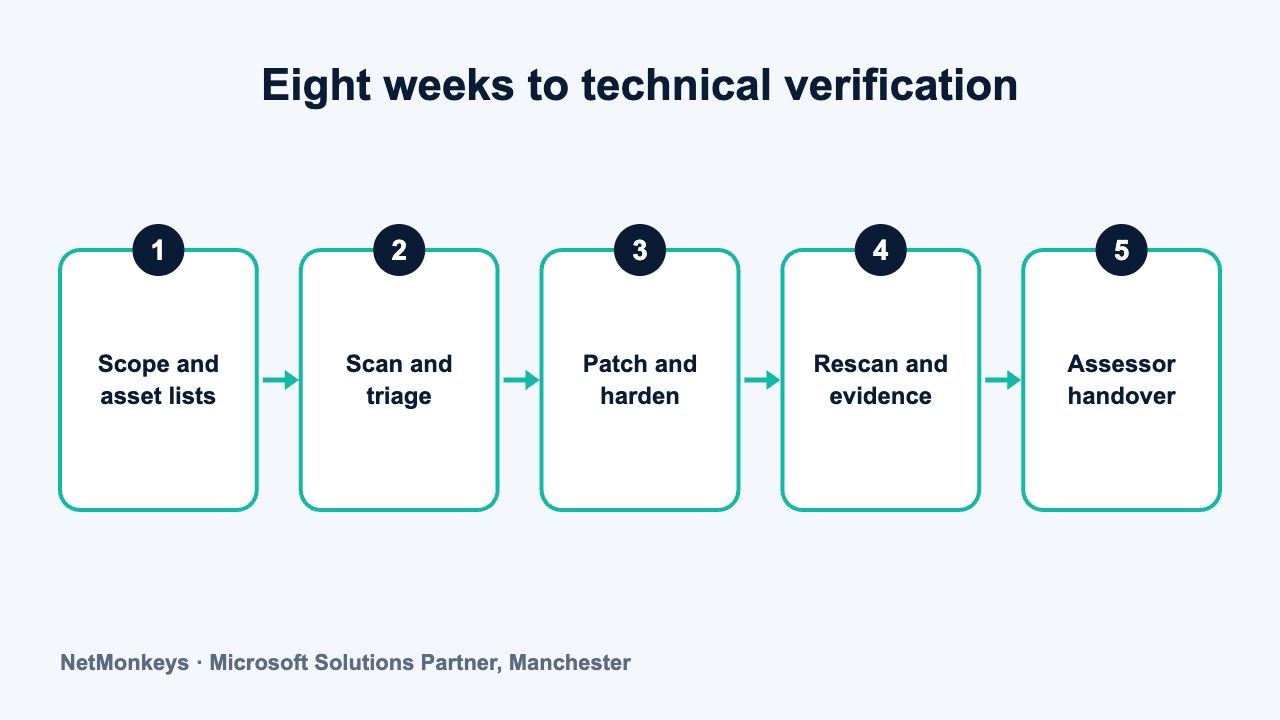
Eight weeks is an example. Smaller estates may need less and larger or untidier ones more. The point is the order of work: find, fix, prove, then book.
- Week 1: confirm scope and ownership. Agree what is in scope, name the owners on both sides and book a short weekly check-in.
- Week 2: build the asset and account lists. Devices, operating systems, applications, cloud services and administrators. Flag anything unsupported.
- Week 3: run the first vulnerability scans. Internal and external. Share the findings in a prioritised list.
- Week 4: fix the high-impact issues. Patch, remove unsupported items, close unneeded ports and tighten admin rights.
- Week 5: harden devices and enforce MFA. Apply baselines, check encryption and screen lock, and close MFA exemptions.
- Week 6: rescan and test malware protection. Confirm fixes held and protection is active on every in-scope device.
- Week 7: assemble the evidence pack. Export reports, collect policies and index them. Run a dry run with someone who did not do the work.
- Week 8: final checks and assessor handover. Resolve open points, confirm the scope with the assessor and lock changes during the testing window.
Allow some slack. Real estates produce surprises: a forgotten server, a laptop that never reports, an application nobody can update. A plan with no buffer turns each surprise into a delay. If your provider's reporting is weak, our guide on how to audit MSP SLA reports shows what good evidence looks like.
↑ Back to contentsWhat are the common causes of failure?
Failures tend to cluster around a short list of causes. Most are preventable with earlier scanning and clear ownership.
- Unpatched or unsupported software. An old operating system or an out-of-date application that nobody tracked.
- Incomplete scope. Devices or cloud services missing from the asset list, then found during testing.
- MFA exceptions. Shared accounts, legacy accounts or service accounts left out of enforcement.
- Malware protection gaps. One device with protection disabled, out of date or never installed.
- Exposed services. An open remote access port or a forgotten test server reachable from the internet.
- Evidence that cannot be produced. Controls exist but nobody can show them, because reports were not kept.
- Changes during the assessment window. New devices or settings introduced just before or during testing.
If a technical test does fail, the scheme normally gives a way to fix issues and retest, subject to the current rules and timeframes. Our guide on what happens if you fail covers this, so we will not repeat it here.
Illustrative scenario. A 70-person professional services firm passes its self-assessment without issue. During the technical verification, a scan finds an older remote management tool installed on a handful of laptops, outside the patching scope. Nothing was wrong with the firm's intentions. The tool was never on the asset list. A pre-audit scan and a software inventory would have caught it weeks earlier.
↑ Back to contentsWhat should a provider-accountability checklist contain?
Use these questions to hold your provider to account. They work for an existing provider and as part of choosing a new one. A good answer is specific, dated and evidenced.
| Question to ask | What a good answer sounds like |
|---|---|
| Which devices and services are in scope, and how do you know the list is complete? | A documented scope, built from tooling and cross-checked against HR and purchasing records |
| When did you last run an authenticated vulnerability scan, and what did it find? | A recent, dated report with prioritised actions and closed items |
| How do you report patch status, and how do you cover third-party software? | Per-device exports covering operating systems and named applications |
| Which accounts are exempt from MFA, and why? | A short, justified list with owners and review dates |
| Who reads malware alerts, and how quickly are they acted on? | A named team, a defined process and a sample alert history |
| What is our hardening baseline, and how do you detect drift? | A written baseline and automated checks with exceptions recorded |
| How will you support the assessor during testing? | A named technical contact, availability during the test window and a change freeze |
| Is this work in our contract or chargeable? | A clear answer in writing, with any extra costs stated before work starts |
If answers are vague, treat that as information. It does not prove poor service, but it tells you the work may not be organised in the way the assessment needs. Ask for a written plan and revisit in a fortnight.
Practical tip
Ask your provider to run a mock technical check four weeks before the real assessment. If the first run finds many issues, you have time to fix them. If it finds few, you have evidence the process is working.
How does this link to wider business benefits?
Cyber Essentials Plus is often pursued because a customer or tender asks for it. The preparation also tends to improve things you care about regardless of certification: fewer outdated devices, fewer unmanaged accounts, clearer asset records and better evidence for insurers. Our article on supply chain security audits and winning bigger clients covers the commercial side.
Preparation will not fix everything. It tests a defined set of controls. It does not replace risk assessment, incident response planning or ongoing monitoring. Treat it as one part of a security programme, and look to your cyber security services arrangements for the rest.
If you want a second pair of eyes on your readiness, or want to find out whether your current provider's reporting would stand up to an assessor, you can get in touch and we will talk through what we would check first.
↑ Back to contentsFrequently asked questions
What does a Cyber Essentials Plus assessor actually test?
The assessor performs hands-on technical verification, such as vulnerability scans and checks on a sample of devices, in addition to reviewing your answers. The exact tests are defined by the scheme and can change, so confirm the current requirements with your certification body.
How early should we start Cyber Essentials Plus preparation?
Many firms allow around eight weeks, though a tidy estate may need less and a complex one more. Start earlier if you have unsupported software, unmanaged devices or unclear ownership of accounts.
Is vulnerability scanning the provider's job or ours?
It is normally a provider task, because it needs specialist tools and the ability to fix what is found. You approve scope, downtime and exceptions. Confirm in writing whether scanning is included in your contract or charged separately.
Does malware protection need to be a paid EDR product?
The scheme has requirements for malware protection, but they are expressed as outcomes. Many baseline tools can meet them. EDR adds detection and response and is worth considering for risk reasons. Check the current requirements and talk to your provider.
Why do MFA exemptions cause so many problems?
Assessors and attackers both look for accounts that are easy to get into. Shared mailboxes, service accounts and old guest users are often left out of enforcement. A full user-by-user MFA report highlights them early.
Can we do the preparation ourselves without a provider?
Yes, if you have the time, tools and skill. Many small teams find scanning, patch reporting and evidence gathering take more effort than expected. A provider reduces the load, and you keep decisions and sign-off.
What if our provider says the work is not in our contract?
Ask for the scope and cost in writing before you proceed. Some contracts cover monitoring and patching but not certification support. If the gap is large, compare options before the assessment is booked.
About this guide and NetMonkeys
Written by Caleb Adoh, Growth Marketing Manager at NetMonkeys. NetMonkeys is a Manchester-based Microsoft Solutions Partner with offices in Manchester, Nottingham and London and field engineers across around 12 UK cities, providing managed IT support, cyber security and virtual CIO services. This guide gives general information for UK businesses. Contracts, insurance policies and certification schemes differ, so check your own documents and current requirements, and take legal, insurance or financial advice where it matters.
Want a second opinion on your IT?
Talk to NetMonkeys about your current set-up, your contract and what a sensible next step looks like for your business.
Explore managed IT support Contact the team
