Your SharePoint intranet is only as valuable as the number of people who use it. A poorly designed intranet is one of the most expensive mistakes an organisation can make — not because of the licensing costs, but because of the productivity drain, the frustrated employees, and the missed opportunity to become a genuine hub of communication, knowledge, and culture.
This guide covers ten SharePoint intranet design best practices that separate the intranets people bookmark from the ones people quietly ignore. Whether you’re building from scratch, refreshing a legacy environment, or trying to salvage something that never quite landed, these principles apply.
Why SharePoint Intranet Design Matters More Than Most IT Projects
Before getting into the practices themselves, it’s worth understanding the stakes. Microsoft research consistently shows that employees spend significant portions of their week searching for information, re-creating documents that already exist, or navigating around broken digital processes. A well-designed SharePoint intranet directly attacks that waste.
Beyond productivity, intranet design signals something about your organisation. A modern, intuitive intranet communicates that leadership invests in the employee experience. A clunky, outdated one — even if it technically works — communicates the opposite. In an era where talent attraction and retention are competitive differentials, that signal matters.
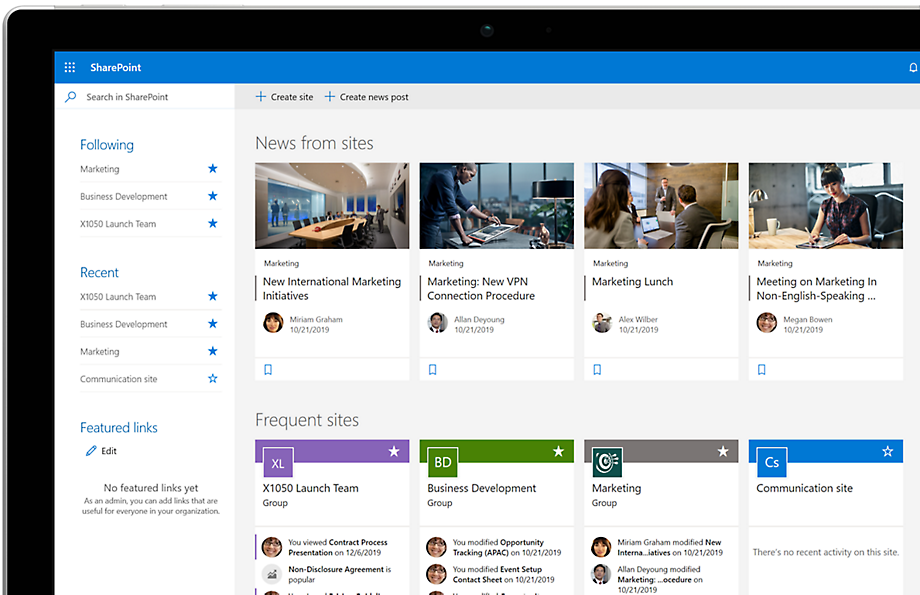
SharePoint Services, as part of Microsoft 365, is now the dominant intranet platform for medium and enterprise organisations globally. Its depth of integration with Teams, Outlook, OneDrive, and the broader Power Platform makes it uniquely powerful. But that power also creates complexity. Left unmanaged, SharePoint environments become sprawling, inconsistent, and difficult to navigate. The difference between a transformational intranet and a digital graveyard almost always comes down to deliberate design decisions.
1. Start With User Research, Not SharePoint Features
The most common SharePoint intranet mistake is starting with the platform. Teams jump straight into site creation, page layouts, and web part configurations before they’ve spoken to a single employee about what they actually need. The result is an intranet built around what SharePoint can do rather than what people need it to do.
Effective intranet design begins with structured discovery. This means conducting employee interviews across departments and seniority levels, running surveys to quantify pain points, and facilitating card sorting exercises to understand how people naturally group and label information. It means asking frontline workers what information they need at the start of every shift, asking managers what they’re constantly being asked that should be self-serve, and asking new starters what they spent their first three weeks failing to find.
User research also surfaces the shadow systems that have emerged because the existing intranet fails people. The spreadsheets on shared drives, the Teams channels where people post the same question every month, the email threads that contain institutional knowledge nobody has thought to document. These are the gaps your intranet design should close.
Once you have this research, build personas. Not marketing personas, but practical employee archetypes that capture different work patterns, digital literacy levels, device preferences, and information needs. Design every subsequent decision against these personas. When someone proposes a feature or a navigation choice, the first question should always be: which of our personas does this serve, and how?
2. Invest Heavily in Information Architecture
If user research is the foundation of good intranet design, information architecture (IA) is the structure built on top of it. Poor IA is the single biggest reason intranets fail. It doesn’t matter how beautiful the visual design is or how sophisticated the web parts are — if people can’t find what they’re looking for, the intranet has failed.
Information architecture for SharePoint involves making deliberate decisions about how content is organised, labelled, and connected. This includes your global navigation structure, the taxonomy of your content types, your site hierarchy, and how search is configured to surface results meaningfully.
Start with a flat information architecture. The instinct is to mirror your organisational chart — a site for every department, sub-sites for every team, sub-sub-sites for every project. This instinct is almost always wrong. Employees don’t think in org charts. They think in tasks: “I need to submit an expense claim.” “I need to find the brand guidelines.” “I need to know the holiday policy.” A task-oriented IA consistently outperforms a departmental one in usability testing.
Label everything in plain language. Avoid internal jargon, acronyms, and bureaucratic terminology in navigation labels. “People and Culture” is better than “HR.” “Submit a Request” is better than “Service Desk Portal.” “Company News” is better than “Corporate Communications Hub.” Every label should pass the clarity test: would someone who joined last week understand exactly what they’d find here?
Use SharePoint’s managed metadata and content types deliberately. Consistent tagging makes search significantly more effective and makes it possible to surface related content intelligently. Invest the time upfront to build a sensible taxonomy rather than retrofitting one later — retrofitting taxonomy in a live SharePoint environment is painful.
3. Design a Homepage That Earns Attention
Your SharePoint intranet homepage is the front door to your organisation’s digital workplace. It needs to work for every employee, every time they visit, regardless of what they’re looking for. That’s a demanding brief, and most intranet homepages fail to meet it.
The best SharePoint intranet homepages do three things well. First, they surface the most important and time-sensitive content immediately — news, announcements, events, and alerts that are relevant right now. Second, they provide quick access to the tools and tasks that employees use most frequently. Third, they create a sense of place — a visual and tonal environment that reflects the organisation’s culture and makes employees feel connected.
Personalisation is increasingly central to homepage effectiveness. SharePoint’s audience targeting capability allows you to surface different content to different employee groups based on their department, location, role, or Microsoft 365 profile attributes. A homepage that greets a warehouse operative in Manchester with the same content as a finance manager in Singapore is a homepage that feels irrelevant to both. Use audience targeting to make every employee feel like the homepage was designed specifically for them.
Keep the homepage focused. Resist the pressure from every team to add their content to the homepage. Everything cannot be important. Work with stakeholders to agree on a homepage governance model that prioritises genuinely organisation-wide content and directs departmental content to the appropriate sections of the intranet. A cluttered homepage is a homepage nobody trusts to show them what matters.
Load time matters enormously. SharePoint homepages loaded with high-resolution images, auto-playing videos, and dozens of web parts will be slow. Slow homepages train employees to avoid the intranet. Optimise images, be selective about web parts, and test performance across different network conditions — particularly if you have employees on slower connections or working remotely.
4. Build Navigation That Makes Sense to Employees
Navigation design is where many SharePoint intranets make their most visible mistakes. Navigation that was built to satisfy internal politics rather than user needs, navigation that uses language employees don’t recognise, navigation that works beautifully on desktop and is completely unusable on mobile — these are all common failure modes.
SharePoint’s global navigation, hub navigation, and local site navigation give you a layered system to work with. Use this hierarchy intentionally. Global navigation should cover the universal destinations that every employee needs regardless of their role — tools, policies, news, IT support. Hub navigation should cover the sections of the intranet that relate to a particular area — a hub for Operations, a hub for People, and so on. Local navigation should help people move around within a specific section.
Keep navigation shallow. The research on this is consistent: employees abandon navigation that requires more than three clicks to reach their destination. If you need more than two levels of navigation to accommodate your content, you probably have an information architecture problem, not a navigation problem. Solve the IA before adding navigation levels.
Test your navigation with real employees before you launch. Tree testing — where participants are shown a text-only version of your navigation and asked to locate specific pieces of content — is an inexpensive and revealing method. If participants consistently fail to find HR policies, or they look for IT support under three different navigation items before giving up, you know where your navigation is breaking down before it’s in front of thousands of people.
Revisit navigation regularly after launch. Usage analytics will show you which navigation items get clicked and which ones sit untouched. If something is never clicked, either no one needs it or no one understands what it is. If certain sections receive disproportionate traffic, consider whether they deserve more prominent placement. Navigation is not a set-and-forget design decision.
5. Make Search Work Properly
Search is often described as the safety net of intranet navigation — what employees fall back on when they can’t find something through browsing. In practice, it’s much more than that. For many employees, particularly in larger organisations, search is the primary way they interact with the intranet. If your search doesn’t work, your intranet doesn’t work.
Microsoft Search in SharePoint is capable of genuinely excellent results, but it requires deliberate configuration to reach its potential. Out of the box, search will return results — but they may not be the right results, presented in the right way, for your employees’ actual queries.
Bookmarks and promoted results are powerful tools that most organisations underuse. Identify the most common search queries — you can find these in your Microsoft Search analytics — and create bookmarks that surface the definitive answer to those queries instantly. If “annual leave” is a top search term, a bookmark that surfaces your holiday policy as the first result before any other content will save thousands of minutes of frustration every year.
Content quality is the foundation of good search results. Search can only surface what exists and is properly tagged. If your SharePoint environment contains outdated policies from 2019, duplicate documents with conflicting information, and pages with no metadata, search will surface that chaos. A content audit and quality improvement programme is a prerequisite for good search, not an optional extra.
Configure your search verticals to help employees narrow their results meaningfully. Custom verticals for People (employee directory), Documents, News, and specific applications make search results far more scannable and actionable. SharePoint’s search schema allows you to surface the right managed properties in search results — showing document owners, publication dates, and content types alongside results helps employees quickly evaluate relevance.
6. Prioritise Mobile Experience From Day One
In many organisations, a significant proportion of employees primarily access the intranet on a mobile device. Frontline workers, field teams, retail staff, manufacturing operatives — these groups may never sit at a desktop computer during their working day. An intranet that only works well on a widescreen monitor excludes them entirely.
SharePoint’s modern experience is genuinely responsive, which gives you a solid foundation. But responsive design and good mobile design are not the same thing. A page that technically renders on mobile but requires pinching and zooming to read, or that buries key information below twelve carousels, is not providing a good mobile experience.
Design with mobile constraints in mind from the start. This means keeping page layouts simple, using large touch targets for navigation and interactive elements, avoiding web parts that behave poorly on small screens, and ensuring that the most important content appears above the fold without scrolling. Test every page template on an actual mobile device, not just using browser responsive simulation.
The SharePoint mobile app deserves specific attention. For organisations with significant mobile workforces, configuring and promoting the app can dramatically improve adoption. The app provides a faster, more integrated experience than a mobile browser, with offline capability for content that employees access regularly.
Push notifications through the SharePoint app and Microsoft Teams integration can also transform how you reach employees who aren’t tethered to email. For time-sensitive announcements — particularly in environments like retail, hospitality, or logistics — the ability to reach employees instantly on their mobile devices through the intranet ecosystem is genuinely valuable.
7. Establish and Enforce Governance From Launch
The most beautifully designed SharePoint intranet will deteriorate without governance. Governance is the system of policies, processes, and accountabilities that keep your intranet coherent, current, and trustworthy over time. It is not exciting, but it is essential.
Governance for a SharePoint intranet covers several distinct areas. Content governance establishes who is responsible for creating, reviewing, and archiving content in each section of the intranet, with what frequency, and to what standards. Site governance determines who can create new sites, what templates they must use, and what approval process applies. Permissions governance controls who can access what, ensuring sensitive content is appropriately protected without creating unnecessary barriers to information.
The most critical governance decision is ownership. Every piece of content on your intranet needs a named owner — a person whose job it is to keep that content accurate and current. Without ownership, content ages silently. The HR policy that refers to a process that changed three years ago. The IT support guide that describes a system that was decommissioned eighteen months ago. The CEO welcome message from the previous CEO. These aren’t just usability problems; they actively undermine trust in the intranet as a reliable source of information.
Build content review cycles into your governance model. Mandatory review periods — quarterly for fast-changing content like HR policies and IT guides, annually for slower-moving content — combined with automatic expiry notifications in SharePoint help keep content fresh without relying on owners to remember.
Governance needs visible, senior sponsorship to be effective. If the governance policies are enforced by the intranet team alone, they will be resisted. If they are endorsed by the executive sponsor and understood by department heads as a shared responsibility, they have teeth. Document your governance model clearly, communicate it widely at launch, and revisit it annually as the organisation and the platform evolve.
8. Use Visual Design to Build Trust and Recognition
SharePoint gives you extensive visual customisation options that many organisations either ignore entirely or misuse. The result is either a generic Microsoft-template intranet that feels like nobody chose it, or an over-designed intranet crammed with brand elements that slow it down and distract from the content.
Good intranet visual design is intentional and restrained. It applies your organisation’s brand identity — colours, typography, logo — consistently across all areas of the intranet, creating a coherent environment that employees recognise as belonging to their organisation. It uses visual hierarchy to help employees understand what is important and what is supporting context. It uses imagery purposefully, choosing photographs that reflect your actual organisation and people rather than generic stock images.
SharePoint’s site branding capabilities, including custom themes, header configurations, and custom fonts via the Look Book, allow for significant brand expression without code. For organisations with more specific requirements, SharePoint Framework (SPFx) extensions can deliver fully custom navigation and header components. The investment in a well-branded, visually consistent intranet pays back in user trust and adoption.
Accessibility is a non-negotiable dimension of visual design, not an optional consideration. Your intranet must be usable by employees with visual impairments, cognitive differences, motor difficulties, and other access needs. This means meeting WCAG 2.1 AA standards as a minimum: sufficient colour contrast, readable font sizes, keyboard navigability, screen reader compatibility, and alternative text for all images. SharePoint’s modern experience provides a strong accessible foundation, but every custom element and every content creator needs to understand and maintain these standards.
Photography choices deserve particular attention. Intranets that use only stock photography feel inauthentic. Organisations that invest in a library of genuine photographs — from offices, events, projects, and teams — create intranets that feel real and human. Employees are far more likely to engage with content that features faces they recognise or environments they work in.
9. Integrate With the Tools Employees Actually Use
A SharePoint intranet that exists in isolation from the rest of an organisation’s technology stack is an intranet with a ceiling on its value. The real power of a modern Microsoft 365 intranet comes from its integration with the broader ecosystem of tools that employees use every day.
Microsoft Teams is the most important integration point for most organisations. Surfacing intranet content in Teams channels, enabling employees to access intranet pages from within Teams via tabs, and using Viva Connections to bring intranet content directly into the Teams interface — these integrations meet employees where they already spend their time rather than asking them to go somewhere new.
Microsoft Viva, Microsoft’s employee experience platform, extends SharePoint significantly. Viva Connections creates a personalised dashboard in Teams that surfaces intranet content, tasks, and tools. Viva Topics uses AI to automatically surface expertise and knowledge across your Microsoft 365 environment, reducing the friction of finding subject matter experts and related content. Viva Insights provides employees and managers with data about working patterns and collaboration. The Viva suite is not universally necessary for every organisation, but for larger organisations serious about the employee experience, it represents a meaningful step up in intranet sophistication.
Beyond Microsoft’s own ecosystem, SharePoint’s web part framework allows you to embed content and tools from external systems directly in intranet pages. Expense management systems, HR self-service portals, project management tools, facilities booking systems — bringing these into the intranet experience reduces context switching and makes the intranet the genuine starting point for employee workflows rather than just an information repository.
Think carefully about which integrations genuinely add value and which create noise. The goal is not to consolidate every tool into the intranet; it’s to make the tools employees need easier to access from within their natural digital workflow.
10. Measure, Learn, and Continuously Improve
A SharePoint intranet launch is not a finish line; it’s a starting point. Organisations that treat intranet design as a project with an end date consistently fall behind those that treat it as an ongoing programme with a continuous improvement cycle.
Microsoft’s built-in analytics for SharePoint provide a solid foundation for understanding how your intranet is being used. Page views, unique visitors, time on page, and device breakdown are available out of the box at both site and page level. These metrics tell you what is being used and what is being ignored, but they don’t tell you why.
Supplement usage analytics with qualitative feedback mechanisms. Regular pulse surveys — kept to three or four questions to respect employees’ time — provide a regular temperature check on intranet satisfaction and surface emerging issues. An always-on feedback mechanism on intranet pages, such as a simple thumbs up/thumbs down rating with an optional comment, captures in-context feedback that is often more specific and actionable than survey responses.
Establish a clear process for acting on what you learn. Feedback that goes nowhere is worse than no feedback mechanism at all — it signals to employees that their input is not valued and reduces the quality of future responses. Define how feedback is reviewed, who is responsible for triaging it, and how improvements are prioritised and communicated back to employees.
Set up a regular cadence of deeper reviews — quarterly for content and navigation performance, annually for a more comprehensive assessment of whether the intranet is meeting its strategic objectives. Compare your metrics against benchmarks from comparable organisations where available. Track trends over time rather than point-in-time snapshots. And engage employees directly in your improvement process: a user panel or intranet champions network that provides structured input into design decisions creates advocates as well as insights.
Building a SharePoint Intranet That Lasts
The ten best practices above share a common thread: they all require you to prioritise the people who will use the intranet over the convenience of the people who build it. That means doing the user research rather than skipping straight to the platform. It means enforcing governance even when content owners push back. It means continuing to measure and improve after launch, even when the next exciting project is calling.
A SharePoint intranet that follows these practices won’t just look good on its launch day. It will continue to earn employee trust, drive genuine productivity improvements, and adapt as your organisation evolves. That’s the difference between an intranet as a project and an intranet as a capability — and it’s the kind of intranet that earns its place at the heart of your digital workplace.
—
Frequently Asked Questions
How long does it take to design and build a SharePoint intranet?
For a medium-sized organisation, a well-governed SharePoint intranet project from discovery to launch typically takes between four and nine months. Larger organisations with more complex requirements, legacy content migration, and multiple stakeholder groups may require twelve months or more. Rushing the discovery and information architecture phases to hit an earlier launch date almost always creates problems that cost more to fix later than the time saved.
What is the biggest mistake organisations make with SharePoint intranet design?
Skipping user research and starting with the platform. Building an intranet around SharePoint’s features rather than employee needs produces an intranet that reflects the technology rather than the organisation. The investment in structured discovery — interviews, surveys, card sorting — pays back many times over in adoption and satisfaction.
How much does it cost to design a SharePoint intranet?
Costs vary significantly based on the scope of the project, the level of custom development required, the volume of content to migrate or create, and whether you use internal resources or a specialist partner. Projects range from modest investments for template-based approaches in smaller organisations to substantial six-figure programmes for large enterprise environments with extensive custom development. The SharePoint licensing itself is typically included in existing Microsoft 365 subscriptions, so the primary cost is design, development, and change management.
How do you measure SharePoint intranet success?
The most meaningful metrics combine usage data (active users, page views, search usage, return visit frequency) with employee experience measures (satisfaction scores, net promoter score for the intranet, and qualitative feedback themes) and business outcomes (reduction in time spent searching for information, reduction in duplicate content, improved scores on relevant questions in employee engagement surveys).
Should we build our SharePoint intranet in-house or use a specialist partner?
Both approaches can work. In-house builds offer tighter integration with your organisation’s knowledge and culture, and avoid dependency on a third party. Specialist partners bring pattern recognition from comparable projects, technical depth, and the ability to scale effort during intensive phases. Many successful intranet programmes combine internal ownership of strategy and governance with specialist support for design, development, and change management. The right answer depends on your internal capabilities, the complexity of your requirements, and the pace at which you need to move.
We are UK’s leading Sharepoint Consulting Provider