
The 90-Day IT Provider Transition Plan: Switch Without Downtime
A week-by-week plan to change IT providers without downtime, with a handover checklist, risk register and advice if your outgoing supplier is uncooperative.
The quick answer
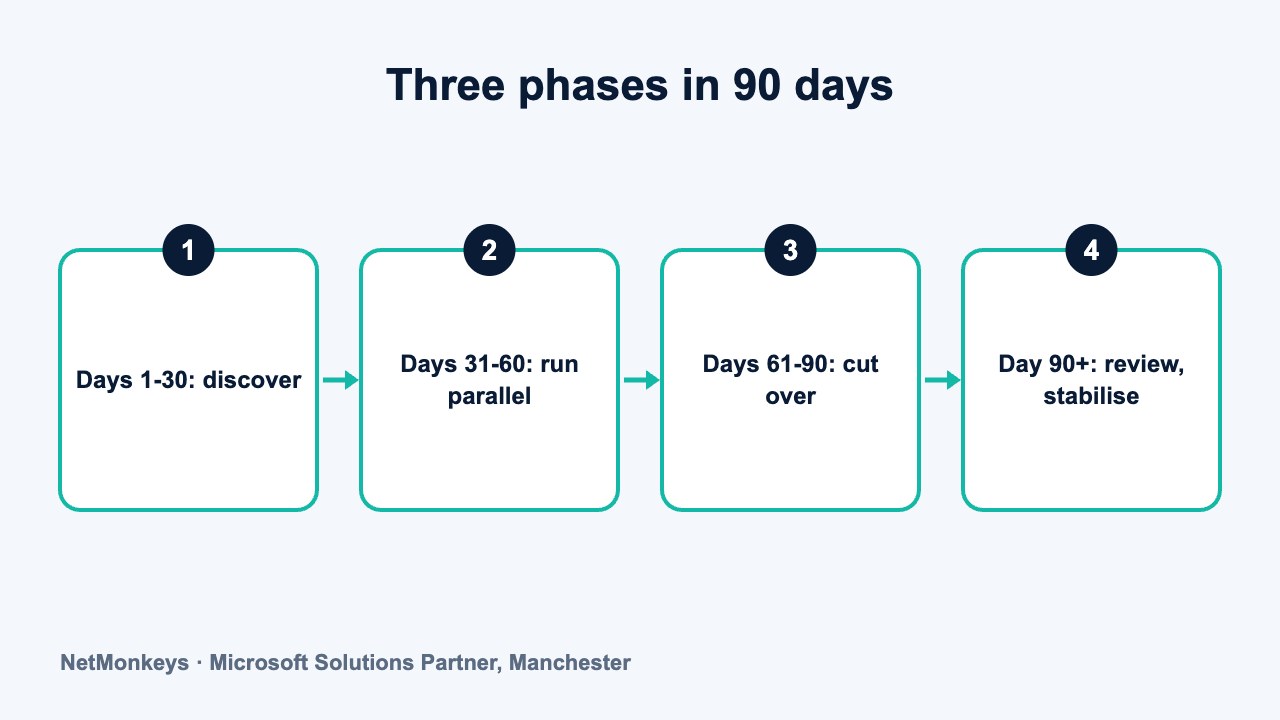
You can change IT providers without downtime by treating the move as a 90-day project in three phases: discovery and documentation, parallel running and cut-over preparation, then cut-over and stabilisation. The aim is to reduce risk at each step, not to claim it is zero. Secure admin credentials early, test before each change and keep the outgoing provider in place until the new one is proven.
Who this is for: Operations Managers, Finance Directors, Managing Directors
Key takeaways
- A planned 90-day transition has three phases: discover and document, run in parallel and prepare, then cut over and stabilise.
- Admin credentials, licence ownership and documentation are the foundations, so secure them in the first two weeks.
- Most disruption comes from a few predictable points, such as DNS, email routing, line-of-business software and printers.
- Parallel running lets the new provider prove its tooling before the old one is switched off.
- If the outgoing provider is slow to cooperate, stay calm, check your contract and take advice from a solicitor.
Can you really change IT providers without downtime?
In most cases, yes, with planning. A well-run transition uses a phased approach so that staff keep working on existing systems while the new provider takes control of monitoring, support and security in stages. The risk is never zero, but it is managed rather than left to chance.
This guide goes deeper than our overview of switching IT support providers without downtime. It sets out a week-by-week plan, a credentials checklist, a risk register and calm, practical advice for when the outgoing provider is slow to help.
The plan assumes a business of roughly 50 to 250 staff with Microsoft 365, a mix of cloud and local systems and one to three sites. Smaller or simpler environments can compress it. More complex environments, with multiple sites or specialist applications, may need longer.
What we would check first
Before any planning, read the current contract for notice, exit assistance and data return. The contract renewal checklist explains what to look for. Dates and terms differ, so check your own agreement and take advice from a solicitor if needed.
What does a well-run transition actually involve?
There are six workstreams that run alongside each other. Each has an owner on your side and on the new provider's side.
- Discovery: a full inventory of devices, users, applications, suppliers and connectivity.
- Access: secure administrator accounts, licences and vendor portals under your control.
- Documentation: capture network, configuration and process details so nothing lives in one person's head.
- Tooling: deploy monitoring, patching, backup checks and security tools alongside the old ones.
- Cut-over: move support responsibility on a planned date, with a rollback plan.
- Stabilisation: watch closely, fix the snags and hold a formal review.
The new provider should lead the plan, but you remain accountable. Where the move coincides with changes to servers, networks or cloud hosting, align the plan with the wider IT infrastructure roadmap so that two projects do not collide. Appoint one person on your side, usually the operations manager, to make decisions and unblock access. Without a named owner, transitions tend to drift.
If the move is also an opportunity to change how IT is managed, see the article on co-managed and fully outsourced models before the plan is fixed.
↑ Back to contentsWhat happens in days 1 to 30: discovery and documentation?
The first month is about knowing what you have. The new provider should not touch production systems beyond read-only access until they understand them. This is also when relationships with the outgoing provider are most sensitive, so communicate clearly and politely.
- Week 1: kickoff meeting, agree roles, confirm the contract exit date and notice, and identify the key people at both providers.
- Week 2: secure administrator access, confirm licence ownership and begin the asset inventory.
- Week 3: review the network, backup and security setup, and document the line-of-business applications and their suppliers.
- Week 4: produce a findings report with risks, quick fixes and a draft cut-over plan.
The inventory deserves care. Our guide to cybersecurity asset management explains why an accurate list of devices and accounts underpins everything else, from patching to incident response.
Common mistake
Waiting for the outgoing provider to volunteer information. Request what you need in writing in week 1, with dates, and record what you receive. Most of the useful detail can also be discovered from the systems themselves.
What does the week-by-week 90-day plan look like?
The table below shows an illustrative plan. Dates will shift with the size of your business, the number of sites and the notice period in your current contract. Treat it as a starting point for your own plan.
| Weeks | Phase | Key activities | Gate to pass |
|---|---|---|---|
| 1 | Discover | Kickoff, roles, contract dates, stakeholder briefing | Named owners and agreed communication plan |
| 2 | Discover | Admin credentials secured, licence ownership confirmed | Admin access held in your name |
| 3 | Discover | Inventory of devices, users, apps, suppliers and connectivity | Inventory reviewed and signed off |
| 4 | Document | Findings report, risk list and draft cut-over plan | Plan agreed with leadership |
| 5-6 | Prepare | Deploy monitoring and security tooling alongside the existing setup | Tooling reporting with no user impact |
| 7-8 | Parallel run | New provider monitors and reports, old provider still supports | Alerts match and no unresolved discrepancies |
| 9 | Parallel run | Test the help desk with a pilot group, test backup restore | Pilot feedback reviewed, restore verified |
| 10 | Prepare | Staff communications, service desk onboarding, final runbooks | Runbooks approved and rollback plan agreed |
| 11 | Cut-over prep | Change freeze agreed, final checks of access and contacts | Go or no-go decision recorded |
| 12 | Cut-over | Support responsibility transfers, old tooling removed in stages | No critical incidents unresolved |
| 13 | Stabilise | Daily check-ins, ticket review, rapid fixes | Ticket volumes and themes under review |
| 14-15 | Stabilise | Post-transition review, documentation updates, lessons learned | Formal sign-off and first service review booked |
A note on staff communication. People tolerate change well when they know what to expect. Send a short message two weeks before cut-over, a reminder the week before and a one-page guide on the day, covering the new help desk contact, how to raise an urgent issue and what has not changed. If you want a wider comparison of what to expect from support, the switching overview and the SLA guide are useful companions.
Notice that the cut-over is a short, well-prepared event within a long preparation period. Most of the risk is removed before it happens. The parallel-running weeks matter most, because they show the new provider's tooling and processes working on your real environment before you rely on them.
↑ Back to contentsWhat should you do in days 31 to 60: parallel running?
In the second month the new provider installs its monitoring, patching and security tools while the old provider continues to provide support. Running both is more expensive for a short time, and that overlap is usually worth paying for. It is the main way of avoiding a gap in coverage.
Check that the tools can run side by side. Some security products conflict, so the new provider should test on a small group of devices first. Where endpoint protection is changing, see the page on managed EDR for the kind of cover to plan for, and make sure there is no period in which devices are unprotected.
- Tooling: install monitoring and remote management on a pilot group, then widen in stages.
- Backups: confirm that backups are running and perform at least one test restore.
- Microsoft 365: review tenant settings, conditional access and admin roles. See Microsoft 365 services for what is usually covered.
- Service desk: agree how staff raise tickets and run a pilot with a small group.
- Communication: brief staff on what is changing and what is not.
Where data or services need to move between platforms, plan these as separate, scheduled changes with their own rollback steps. A defined data migration process, with testing before and after, is much safer than a bulk move at the weekend.
↑ Back to contentsWhat goes in the credentials and admin-access handover checklist?
Credentials are the most common single point of failure in a transition. Get them early, store them securely and check that they work. Do not ask for passwords to be emailed, and do not share them in chat.
| Item | What to confirm | Done when |
|---|---|---|
| Microsoft 365 global admin | At least two named admin accounts held by you, with MFA | You have signed in with each |
| Domain registrar and DNS | Account is in your company name and the login is in your control | You can view and change records |
| Firewall and network devices | Admin credentials, firmware versions and configuration backups | Backups stored and tested |
| Servers and hypervisors | Local admin and management access, including out-of-band access | Access verified on each system |
| Backup platform | Admin access, retention settings and the last restore test | Restore performed and recorded |
| Licence portals | Ownership of Microsoft, antivirus and other subscriptions | Subscriptions sit in your tenant or account |
| Line-of-business applications | Vendor contact, support contract and admin account | Vendor confirms the change of support contact |
| ISP and telephony | Account details, circuit IDs, contract end dates | Account holder and contacts confirmed |
| Break-glass accounts | Emergency admin accounts stored offline and tested | Procedure documented and held by two people |
Treat the Microsoft 365 admin accounts with particular care, because a compromised administrator account is among the more damaging incidents a business can face. Our guide to securing Microsoft 365 against phishing and account compromise covers the controls worth confirming at this stage. Once the new provider has its own access, rotate any shared or inherited credentials, remove the outgoing provider's accounts as part of the exit and review for service accounts nobody can explain. This is a security step as well as a housekeeping one, and it is covered more broadly in our guide to assessing third-party IT supplier security risks.
Practical tip
Store the break-glass credentials with two senior people and keep a record of when they were last tested. If one person leaves, you still have a route in.
What goes wrong, and how is it managed? A risk register
The honest position is that transitions can cause disruption. The causes are predictable, and so are the mitigations. Share this register with your leadership team before you start, so that nobody is surprised.
| Risk | Likely cause | How it is managed |
|---|---|---|
| Email delivery interrupted | DNS or mail routing changes made without testing | Change records during low-traffic periods, lower DNS TTLs in advance, test before and after |
| Staff cannot raise tickets | New help desk process not communicated | Pilot group, clear guide, announcement and a temporary hotline |
| Security gap during tool swap | Old protection removed before new is active | Install and verify new tools first, then remove old ones in stages |
| Application fails after change | Hidden dependency or unknown integration | Application owner sign-off, vendor contact, test in advance, rollback plan |
| Backup failure goes unnoticed | Jobs reassigned without checks | Test restore before cut-over and after, review alerts daily |
| Missing documentation | Knowledge held by one person at the old provider | Early discovery, interviews, systems review and documented findings |
| Printers and peripherals stop working | Print servers or drivers changed | Include in discovery, test with a pilot group, keep vendor contacts |
| Credentials not handed over | Admin accounts held by the outgoing provider | Request in writing at the start, escalate through your contract, take advice |
| Cost overrun | Overlap period longer than planned | Agree overlap dates and budgets up front, review at each gate |
The risk register should be reviewed at every gate and kept by the project owner. Add risks specific to your business, such as a seasonal peak, a system audit or a planned office move, and avoid scheduling the cut-over near them.
The right way to read this table is as a list of things to test, not a reason to worry. Each risk has a named owner and a trigger for escalation. If a gate is not passed, the plan moves back rather than pressing on.
It also helps to agree in advance what a rollback means. For each stage, write down how you would return to the previous state and how long that would take.
↑ Back to contentsWhat happens in days 61 to 90: cut-over and stabilisation?
By day 60 the new provider should have full visibility, tested tooling and a working service desk process. The cut-over is the formal transfer of responsibility on an agreed date. It should be unremarkable.
- Go or no-go: hold a short meeting to confirm that every gate has been passed. Record the decision.
- Cut-over day: the new provider becomes the primary contact. The outgoing provider's remote access is withdrawn, ideally outside peak hours.
- First week: daily check-ins. Review every ticket and each alert.
- Weeks 2 to 4: look for patterns. Repeated tickets can point to configuration issues inherited from the old environment.
- Day 90: post-transition review covering service, documentation, security and cost.
Ask the new provider for a written report at day 90. It should list what was found, what was fixed and what remains outstanding, with owners and dates. That report becomes the starting point for your first service review and your roadmap. A business continuity check, including a restore test under the new arrangement, is a sensible final step.
Common mistake
Treating cut-over as the end. The first 30 days after it are when the unusual issues appear, such as a monthly job nobody mentioned. Keep the project team in place until the review is complete.
What if the outgoing provider is uncooperative?
Most providers behave professionally during a handover, but some are slow, defensive or unclear about what they must hand over. Stay calm. Raised voices cost time and give you nothing. The aim is to get the information you need and to keep the business running.
- Read your contract: check the exit, data return and transition assistance clauses. These set out what you can reasonably expect.
- Make requests in writing: list what you need, with a date and a named contact. Keep copies of everything.
- Separate the people from the process: engineers often want to help. If a request stalls, escalate politely to the account manager or a director.
- Use what you already own: you control your Microsoft 365 tenant, your domain and your own devices. Much can be discovered from those directly.
- Take advice: if access or data is being withheld, speak to a solicitor about your position before you take any steps beyond the contract.
- Keep the service running: do not remove anything until the new tooling is proven.
None of this assumes bad faith. Delays are often the result of staff turnover, unclear processes or a commercial disagreement that has not yet been resolved. A short, factual note that sets out your needs and your timetable usually resolves more than a long argument.
The contract renewal article, the IT support contract renewal checklist, covers how to make exit terms clearer in future agreements.
↑ Back to contentsHow do you know a provider can deliver this plan?
Ask them to describe their onboarding process in detail. A provider with a repeatable method will talk about gates, runbooks, rollback and communication. One without a method will talk in general terms about being flexible.
- Ask for a sample plan: with client details removed.
- Ask who leads the project: and what else they are managing at the time.
- Ask how they test: what is checked before each change and how problems are reversed.
- Ask for references: from firms of a similar size who have been through a transition.
The selection criteria in how to choose an IT support company and the SLA guide help you set expectations. Once you have signed, a clear managed IT support agreement should describe both onboarding and the service levels you can expect after cut-over.
If you would like to talk through a transition plan for your own environment, you can contact us and we will discuss the timescale, the risks and the questions to put to your current provider.
↑ Back to contentsFrequently asked questions
How long does it take to change IT providers?
A structured transition for a mid-sized business often takes around 90 days, though simple environments can be quicker and complex ones longer. The length is driven by discovery, parallel running and the notice period in your contract. Check the contract dates first.
Will we have downtime when we switch IT providers?
A planned transition aims to avoid noticeable downtime, using parallel running, testing and a rollback plan. It cannot promise zero risk. The main points of possible disruption are DNS, email routing, line-of-business software and security tool changes, all of which can be tested and scheduled.
What do we need from our old IT provider?
You need administrator credentials, system documentation, configuration backups, licence ownership details and a list of suppliers and contracts. Your contract should say what the outgoing provider must hand over. Request items in writing, with dates, at the start of the process.
Should the old and new providers overlap?
A short overlap is usually sensible. It allows the new provider to install monitoring and prove its processes while the existing provider continues to support users. It does add cost for a few weeks, so agree dates and responsibilities in advance.
What if our provider will not hand over passwords?
Stay calm and check your contract for the exit and data return terms. Make a clear written request, escalate to a senior contact and take advice from a solicitor if necessary. Meanwhile, use the access you already hold, such as your own Microsoft 365 tenant and domain account.
Can we switch IT provider mid-contract?
That depends on the contract. Some agreements allow termination for specific failures or with a notice and a fee. Others do not. Read the clause, and take advice from a solicitor before you act.
What is the biggest risk when switching IT providers?
The most common problems are lost access, missing documentation and gaps in security coverage during the tool swap. Securing credentials in the first two weeks and running new tooling alongside the old reduces all three.
About this guide and NetMonkeys
Written by Caleb Adoh, Growth Marketing Manager at NetMonkeys. NetMonkeys is a Manchester-based Microsoft Solutions Partner with offices in Manchester, Nottingham and London and field engineers across around 12 UK cities, providing managed IT support, cyber security and virtual CIO services. This guide gives general information for UK businesses. Contracts, insurance policies and certification schemes differ, so check your own documents and current requirements, and take legal, insurance or financial advice where it matters.
Want a second opinion on your IT?
Talk to NetMonkeys about your current set-up, your contract and what a sensible next step looks like for your business.
Explore managed IT support Contact the team
