
Fixed Fee vs Per-User IT Support Pricing: A CFO's Guide
Fixed fee vs per user IT support pricing explained for finance directors: break-fix, hybrid, per-device and tiered models, hidden costs and a TCO worksheet.
The quick answer
A fixed monthly fee and a per-user price are often the same thing: a predictable, recurring charge, usually calculated per user and covering a defined scope. The real question for a finance team is not the headline rate but what sits outside it. An all-inclusive per-user model gives a 50+ seat business the most predictable budget, while break-fix and per-device pricing can be reasonable when demand is low and the estate is simple.
Who this is for: CFOs and Finance Directors
Key takeaways
- Compare scope before price: two quotes are only comparable once inclusions and exclusions are written side by side.
- Low headline rates in break-fix and hybrid contracts can cost more once out-of-scope work, projects, after-hours and onsite visits are billed separately.
- All-inclusive per-user pricing suits 50+ seat businesses because the largest variable costs move inside a fixed monthly figure.
- Break-fix and per-device pricing are reasonable for very small, low-risk or highly standardised estates.
- Use a total cost of ownership worksheet with your own figures and ask for the last 12 months of invoices from any incumbent.
What are the main ways IT support is priced?
Most business IT support in the UK is sold under one of six commercial models: break-fix, hybrid, per-user all-inclusive, per-device, a single fixed monthly fee, or a tiered package. The names overlap, and providers use them loosely, so the label on a proposal tells you less than the schedule of inclusions behind it.
For a finance director the useful lens is variance. Each model moves a different amount of cost risk from the provider to your business. Break-fix leaves nearly all of it with you. A well-scoped all-inclusive model moves most of it to the provider, in exchange for a higher and steadier monthly charge.
This guide explains each model in plain terms, shows how a low headline price can turn into a higher annual cost, and gives you a worksheet and a scope checklist to test any quote. It does not repeat the market-level cost ranges, which are covered in our IT support pricing and cost guide. Here the focus is how the contract is built, not what the market charges.
- Break-fix: you pay for each fault, usually by the hour or the visit, with no recurring fee.
- Hybrid: a smaller monthly fee covers some tasks, such as monitoring or a help desk with limits, and everything else is billed as extra.
- Per-user all-inclusive: one monthly price per user covers a defined, broad scope including help desk, monitoring, security tooling and routine changes.
- Per-device: the price is set by the number of laptops, servers and other devices managed, not by people.
- Fixed monthly fee: one agreed sum for a defined scope, often derived from a user or device count at the outset.
- Tiered: bronze, silver and gold style packages with rising inclusions and rising prices.
Practical tip
Ask every bidder to price the same scope. If you hand each one a different brief, you will receive quotes you cannot compare, and the cheapest will usually be the one that left the most out.
How does break-fix pricing work, and when is it reasonable?
Break-fix is the oldest model. Something stops working, you call, and you are charged for the time and parts. There is no retainer, no monitoring and no commitment. The provider earns money when things go wrong, which is the structural weakness: their income and your uptime pull in opposite directions.
That does not make it a poor choice in every case. It is a sensible arrangement when the estate is small and simple, when downtime is cheap, and when the business already has someone competent in-house who only needs occasional specialist help. A 10-person studio with cloud-based tools and no regulated data may reasonably prefer to pay as it goes.
It becomes hard to defend as the business grows. A 50+ seat organisation has more users, more devices, more cloud tenancies and more third-party systems. Faults are more frequent, security exposure is greater, and the cost of an afternoon of lost productivity across a team is far larger than the callout fee. We cover this transition in more detail in our guide on outgrowing a break-fix IT provider.
Where break-fix works well
- Very small teams: a handful of users on standard cloud tools, with little regulated or customer data.
- Fixed-scope projects: an office move or a server replacement quoted as a defined project is commonly priced this way, even by managed providers.
- Specialist top-ups: an internal IT team that needs occasional extra hands on a specific platform.
- Short-term cover: a gap while you recruit, where you do not want a long contract.
Where break-fix costs more than it appears
The invoice for a single call looks small. The cost sits elsewhere: unmonitored backups that fail silently, patches applied late, licences that lapse, and no one reviewing security settings until an incident forces the issue. Those costs do not appear on the break-fix invoice, so they never appear in the comparison.
Common mistake
Comparing a year of break-fix invoices with a managed quote and concluding break-fix is cheaper. A quiet year says little about next year. Compare the worst twelve months you can reasonably imagine, not the average one.
What is hybrid pricing and where do the extra costs appear?
Hybrid contracts sit between break-fix and a full managed service. You pay a monthly fee for a limited set of services, commonly remote monitoring, antivirus and a capped number of help desk tickets or hours. Anything outside that list is charged at a day rate or hourly rate.
The attraction is a lower monthly figure. The risk is that the contract scope is narrower than the buyer assumes. 'Support' in a sales conversation can mean unlimited help desk. In the schedule it may mean a defined number of hours, remote only, in business hours, for named systems. The gap between the two is billed at the rate card.
Hybrid is not a flawed model in itself. It can suit a business with a capable internal IT lead who wants monitoring and escalation support but not a full service. The problem arises when a business with no internal IT buys hybrid expecting full coverage, then discovers that the first major incident, a Microsoft 365 migration or an office move sits outside the monthly fee.
Typical out-of-scope charges in hybrid and break-fix contracts
- Projects: anything described as a change, migration, rollout or upgrade, including work on your own systems.
- Onsite attendance: engineer visits charged per visit or per half day, plus travel time.
- After-hours and weekend work: premium rates that can be double the standard day rate, depending on the contract.
- Hardware and licences: supplied at list price or with a margin, sometimes with procurement fees.
- Security incidents: investigation and remediation time billed as additional work.
- New starters and leavers: charged per request rather than included.
What we would check first
Find the rate card and the definition of 'out of scope' in the contract. Then ask for the last twelve months of out-of-scope invoices from the current provider, if you have one, and calculate what proportion of total spend they represent.
How do per-user, per-device, fixed fee and tiered models compare?
The four recurring models look similar on a quote but behave differently when your business changes. A new starter, a second site or a move to cloud-based servers can change what you pay under one model and leave it untouched under another. The table below compares them on the points a finance team usually cares about.
| Model | How the price is set | Budget predictability | Main risk | Typically suits |
|---|---|---|---|---|
| Break-fix | Time and materials per fault | Low, varies month to month | Costs rise when things go wrong and incentives are misaligned | Very small, low-risk estates and one-off projects |
| Hybrid | Smaller monthly fee plus rate card for extras | Medium, depends on scope wording | Out-of-scope billing for projects, onsite and after-hours work | Businesses with a capable internal IT lead who need targeted support |
| Per-user all-inclusive | Monthly price per user for a broad defined scope | High, scales with headcount | Scope definition and fair-use terms need checking | Businesses of 50+ seats with no or limited internal IT |
| Per-device | Monthly price per managed device | Medium, scales with device count | Servers, mobiles and IoT can multiply the total; users with several devices cost more | Device-heavy or shared-device environments such as sites with kiosks |
| Fixed monthly fee | One agreed sum for a defined scope | High while scope holds | Changes in headcount or estate may trigger re-pricing mid-term | Stable teams with a clear, unchanging scope |
| Tiered | Package level chosen by need | Medium to high | Essential services may sit in a higher tier than you assumed | Businesses with varied needs across departments |
In practice, per-user and fixed fee often describe the same arrangement. A provider may calculate a fixed monthly figure by multiplying your users by a per-user rate and then fix it for a period. The distinction matters at renewal and when headcount changes, so ask how the fee moves if you add or remove ten users.
Per-device pricing deserves a closer look
Per-device pricing is easier to justify when the number of devices does not track headcount. A warehouse with shared scanners, or a school-style environment with shared machines, may be cheaper per device than per person. For an office-based team where each person has a laptop, a phone and often a tablet, per-device can cost more than per-user for the same people, and the definition of 'device' becomes a negotiation point.
Tiered pricing and the missing feature
Tiered packages are easy to compare at a glance and easy to misread. The feature you consider essential, perhaps 24-hour cover or managed endpoint detection, may only appear in the top tier. Always map your must-have list against each tier before comparing prices, and check whether a mid-term upgrade requires a new contract. If out-of-hours support matters to you, our guide on whether you need 24/7 IT support sets out how to decide.
↑ Back to contentsHow can a low headline price end up costing more?
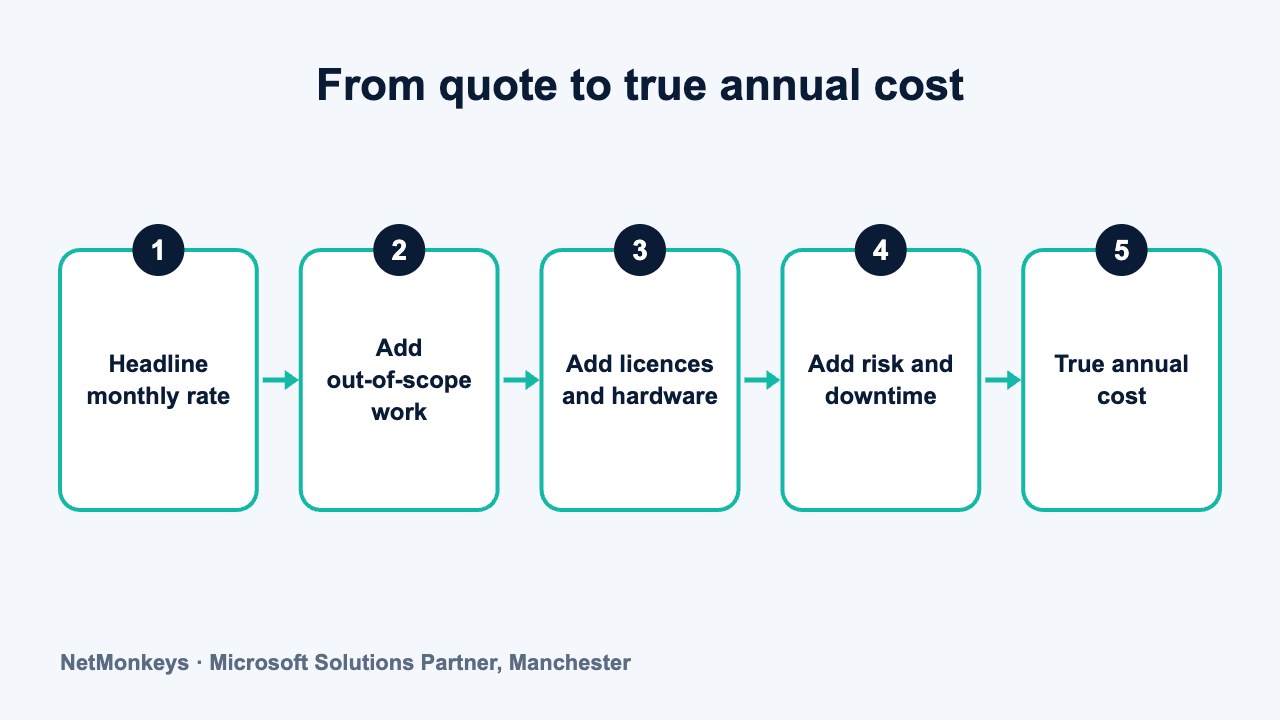
A headline price is the figure on the front of the proposal. The annual cost is everything you actually pay over twelve months to keep the same standard of service. The two diverge when work that you regard as normal is classed as extra.
This is rarely a sign of bad faith. Providers price to a defined scope, and a narrower scope gives a lower price. The difficulty is that a buyer reading 'unlimited support' on a summary page may not read the exclusions three pages later. Variable charges also make planning harder for the provider's own finance team, so many prefer to avoid them, but not all do.
An illustrative comparison
The scenario below is illustrative, with no real prices, and shows how the structure of a contract changes the annual shape of the cost for a 60-seat business.
- Contract A (lower headline): a hybrid fee covering monitoring and a capped number of remote help desk hours. In a normal month the invoice matches the quote. In the month the business opens a second office, upgrades its servers and loses a key user to a phishing attack, project work, onsite visits, after-hours remediation and new hardware are all billed on top.
- Contract B (higher headline): a per-user all-inclusive fee covering help desk, onsite attendance within agreed boundaries, routine changes and security tooling. The monthly invoice is higher, but it is the same in every month, and only separate projects and hardware are quoted additionally.
- The comparison: Contract A is cheaper in eleven quiet months and more expensive in the twelfth, and the twelfth month is the one the finance director has to explain to the board.
Whether Contract A or B costs more across the year depends on how many such events occur. That is the point: you are buying a distribution of outcomes, not a number. A finance leader who is comfortable with variance, and has a contingency, may rationally prefer A. One who needs predictability should price B.
Common mistake
Treating the monthly fee as the contract value. For hybrid and break-fix arrangements, ask the provider to model a bad year alongside the quiet one, using your own history of incidents and projects, and to show their working.
Our IT support contract renewal checklist covers the clauses that most often change the real cost at renewal, including auto-renewal, indexation and minimum terms.
↑ Back to contentsWhy does an all-inclusive per-user model suit a 50+ seat finance team?
Above roughly 50 users, three things change. The volume of routine requests becomes continuous rather than occasional. The security exposure widens, because more accounts, devices and suppliers mean more ways in. And the cost of disruption rises, because more people are idle when something fails. These conditions favour a model in which the provider is paid for keeping things running, not for fixing them.
A managed IT support contract priced per user and scoped broadly shifts variable costs into a fixed monthly fee. Day-to-day requests, monitoring, patching, endpoint security and the help desk sit inside it. The finance team can forecast IT operating cost against headcount, which is how most other per-employee costs are already planned.
- Forecastable: cost moves with headcount, so a hiring plan translates directly into an IT cost line.
- Aligned incentives: the provider benefits from fewer incidents, because every avoidable fault consumes time they have already been paid for.
- Easier approval: a single monthly invoice is simpler to approve, audit and allocate to departments than a stream of ad hoc invoices.
- Lower negotiation load: fewer quotes to approve for routine work means less friction between the business and its provider.
- Clearer exit: a defined scope makes it easier to compare a replacement and plan a handover.
A per-user model also lines up with how licences and security tools are usually priced. Microsoft 365, endpoint protection and backup are all commonly charged per user, so a per-user support fee sits naturally alongside them. If you are weighing the wider service picture, the managed IT services page sets out how the components fit together.
What we would check first
Ask what 'all-inclusive' excludes. A credible provider will answer that question in writing, and the best will volunteer it. If the answer is vague, treat the model as hybrid until proven otherwise.
When all-inclusive per-user is not the right answer
It is not always the better value. A business with an experienced internal IT team and a stable estate may pay for services it does not use. A business with fewer than around 15 to 20 users may find the per-user minimum disproportionate. And a business with unusual requirements, such as large numbers of shared devices, may be better served by a device-based or bespoke arrangement. A short IT consultancy engagement can help you test which fits before you commit.
↑ Back to contentsWhat should be inside or outside the scope of an IT support contract?
Scope is where price comparisons succeed or fail. The table below is a checklist of the six areas that most often cause disputes or surprise invoices. For each, ask the provider to state whether it is included, included with limits, or charged extra, and to put the answer in the contract rather than the proposal.
| Area | Questions to ask | Why it matters to finance |
|---|---|---|
| Projects | How is a project defined? Is a migration, rollout or office move included, discounted or quoted separately? Is there a fair-use threshold for small changes? | Projects are the largest source of unbudgeted spend and the most commonly excluded item. |
| Onsite attendance | Is onsite included? How many visits, at which sites, and are travel costs covered? Is remote-first the default? | Onsite charges accumulate quickly across several sites, as the guide to onsite IT support explains. |
| After-hours and weekend | Are hours of cover defined? Is emergency out-of-hours support, such as a 24/7 IT support arrangement, included or billed at a premium? | Premium rates can be a multiple of the standard rate and are typically triggered in a crisis. |
| Hardware | Is hardware supplied, procured at cost, or bought by you? Who handles warranty, repair and replacement cycles? | Refresh cycles create predictable capital spend that should be planned, not discovered. |
| Licences | Who holds the licences? Are Microsoft 365, backup and security licences bundled, passed through at cost or marked up? | Licence ownership affects exit: you should be able to move without repurchasing. |
| Security | Is endpoint detection, patching, email security, backup monitoring and incident response included? What happens in a breach? | Security incidents are low frequency but high cost, and response time is often billed separately. |
Three points deserve emphasis. First, security tooling is often sold as an add-on, and it is increasingly expected by insurers and customers. Check whether managed endpoint detection, for example, is included or priced per device as an extra, and see how managed EDR services are typically structured. Wider cyber security services such as audits and testing are usually separate engagements, so confirm where the boundary lies. Third, ask who owns the documentation and administrative credentials. They should be yours.
Fair-use terms
Even an all-inclusive contract may include fair-use language, for instance limits on the number of project hours or the frequency of onsite visits. These are reasonable in principle, since the provider cannot offer unlimited engineer time for a fixed fee. Ask for the thresholds in writing and what happens when they are exceeded, so that an extreme month does not become a dispute.
The response and resolution commitments that sit alongside scope are covered separately in our guide to IT support SLAs.
↑ Back to contentsHow do you build a total cost of ownership worksheet?
A total cost of ownership worksheet asks you to place every cost of keeping IT running, not only the support fee, into one view for each option you are considering. It works because it forces the out-of-scope costs onto the page. Fill in each row with your own figures or with figures obtained from the provider in writing. The cells below are deliberately blank.
| Cost line | Option 1: incumbent or break-fix | Option 2: hybrid | Option 3: all-inclusive per-user |
|---|---|---|---|
| Monthly support fee x 12 | Your figure | Your figure | Your figure |
| Expected out-of-scope support (hours x rate) | Your figure | Your figure | Your figure |
| Projects planned in the next 12 to 36 months | Your figure | Your figure | Your figure |
| Onsite visits and travel | Your figure | Your figure | Your figure |
| After-hours and emergency work (estimate) | Your figure | Your figure | Your figure |
| Hardware refresh and warranty | Your figure | Your figure | Your figure |
| Licences (Microsoft 365, backup, security) | Your figure | Your figure | Your figure |
| Security tooling not included in the fee | Your figure | Your figure | Your figure |
| Internal staff time spent managing IT or the supplier | Your figure | Your figure | Your figure |
| Estimated cost of downtime (users x hours x loaded cost) | Your figure | Your figure | Your figure |
| Exit and transition cost | Your figure | Your figure | Your figure |
| Total over 36 months | Sum | Sum | Sum |
Two rows are routinely left blank by buyers: internal staff time and downtime. Both are real. An office manager who spends a day each week chasing IT issues is an IT cost, even though it never appears on a supplier invoice. Downtime has a cost per hour that your own payroll data can estimate, using the number of affected users and their loaded cost.
Run the worksheet for a quiet year and for a difficult year. If the options are close in the quiet year and far apart in the difficult one, you have found the variance you are paying to avoid.
Practical tip
Ask the incumbent provider, or the previous one, for twelve months of invoices broken down by contract fee and extras. Real history beats forecasting. If you cannot obtain it, ask the bidders to price a stated scenario, such as a second site and a server replacement in the same year.
How should a finance team budget for IT support?
Budgeting for IT support is easier once you separate three types of cost: the recurring service fee, planned capital items, and a contingency for the unplanned. Mixing them together is what makes IT feel unpredictable.
- Fix the run cost first. Set the recurring support fee, licences and security tooling against headcount, and review it when the hiring plan changes.
- Plan hardware on a cycle. Laptops and network equipment have a finite life. Spread replacement across years instead of buying in a lump, and record the cycle in the budget.
- Schedule the projects you already know about. A Microsoft 365 tenant tidy-up, a Wi-Fi upgrade, an office move or a Cyber Essentials assessment can all be forecast twelve months ahead.
- Hold a contingency. Even an all-inclusive contract leaves room for genuine projects and emergencies. Set a modest reserve and define who can approve its use.
- Review annually. Agree a review date, with the provider, where scope, headcount and strategy are checked against what you are paying for.
Technology roadmapping is where a virtual CIO service is often useful for finance. It turns a vague wish list into a costed multi-year plan, so that the capital items and projects you need are in the budget before they become urgent.
Use the pricing guide to sense-check the market, then watch indexation. Many contracts include an annual price increase tied to an index or a fixed percentage. Check the mechanism, the cap and the notice period, because an uncapped increase can erode the predictability that a fixed fee was supposed to provide.
Contract term and flexibility
A longer term often brings a lower rate, and a shorter one gives you flexibility. Neither is correct for everyone. What matters is that the contract states how headcount changes are handled, whether you can reduce user numbers mid-term, and what the exit and handover obligations are. These terms matter more than a small difference in monthly rate.
↑ Back to contentsWhat should you ask before signing?
Use the following questions in your final round of evaluation. They are designed to surface cost variance and scope boundaries, and they work whether you are choosing a first provider or reviewing an existing one.
- What is not included? Ask for a one-page list of exclusions, and the rate card for everything on it.
- How is a project defined, and is there a threshold below which changes are included?
- What happens if our headcount rises or falls by ten percent mid-term?
- Who owns the licences, documentation and administrative credentials, and how do we get them on exit?
- What is the price increase mechanism at renewal?
- What security services are included, and which are optional?
- What does a bad month look like? Ask the provider to describe the most expensive month a comparable client has had, in general terms, without naming them.
These questions also help you judge the provider. One that answers them clearly and in writing is easier to work with over a three-year term than one that prefers to keep the discussion at headline level. For a wider evaluation framework, see our guide to choosing an IT support company, and the buyer's guide for businesses with 50 or more users.
What we would check first
Read the definitions section of the contract before the pricing section. Words such as 'support', 'project', 'business hours' and 'device' determine what the price buys. If you disagree with a definition, you disagree with the price.
If you would like a second opinion on a quote, or want to see how a per-user structure would apply to your headcount, you can speak to the NetMonkeys team. Our managed IT support team can walk through the structure with you. A conversation costs nothing, and a comparison against your current spend is usually the most useful starting point.
↑ Back to contentsFrequently asked questions
Is fixed fee IT support the same as per-user pricing?
Often, yes. Many fixed monthly fees are calculated by multiplying a per-user rate by your headcount and then holding the result for a set period. The difference is how the fee changes when headcount changes, so ask whether it flexes mid-term or only at renewal.
Is break-fix ever cheaper than a managed contract?
It can be for very small teams with simple cloud-based systems, low reliance on IT and little sensitive data. Over a quiet year it may cost less. Over a difficult year, with a security incident or a project, the total can exceed a managed fee, so compare both.
What is the main risk of hybrid IT support contracts?
The risk is scope mismatch. The monthly fee covers a defined set of services, and everything else is billed at the rate card. If you expected full support, the first project, onsite visit or after-hours incident can generate invoices well above the headline figure.
When is per-device pricing better than per-user?
It tends to suit environments where devices outnumber people or are shared, such as sites with kiosks or shared workstations. For office teams where each person has several devices, per-device pricing can cost more than per-user for the same group.
How should we compare two IT support quotes?
Give both providers the same scope and ask for inclusions and exclusions in writing. Then complete a total cost of ownership worksheet for each, covering support fees, out-of-scope work, projects, hardware, licences, security and downtime, using your own figures.
Should an all-inclusive contract include hardware and licences?
It depends on the provider and your preference. Some bundle them, some pass them through at cost, and some leave them to you. What matters is that ownership is clear, you can take licences with you on exit, and refresh cycles are planned in the budget.
Where can I find typical IT support prices?
Market-level ranges and the factors that move them are covered in our IT support pricing and cost guide. This article focuses on contract structure rather than price points, so use the two together when preparing a budget.
About this guide and NetMonkeys
Written by Caleb Adoh, Growth Marketing Manager at NetMonkeys. NetMonkeys is a Manchester-based Microsoft Solutions Partner with offices in Manchester, Nottingham and London and field engineers across around 12 UK cities, providing managed IT support, cyber security and virtual CIO services. This guide gives general information for UK businesses. Contracts, insurance policies and certification schemes differ, so check your own documents and current requirements, and take legal, insurance or financial advice where it matters.
Want a second opinion on your IT?
Talk to NetMonkeys about your current set-up, your contract and what a sensible next step looks like for your business.
Explore managed IT support Contact the team
