
IT Support SLAs Explained: Response Times That Matter
An IT support SLA sets how fast your provider must respond, fix and update you. This guide shows how to read one, test it and compare proposals.

Key Takeaways
- An IT support SLA should give response, resolution and update targets for each priority, not a single headline number.
- Priority comes from impact and urgency; ask to see the matrix in the proposal.
- Response time is not resolution time: check what counts as a response and when the clock pauses.
- Service credits are small against downtime cost; negotiate termination rights and reporting instead.
- Compare proposals by normalising hours of cover, clocks and exclusions before comparing price.
An IT support SLA (service level agreement) is the part of your contract that states how quickly your provider must respond to a fault, how quickly it must fix it, what counts as urgent, and what happens when targets are missed. A sensible reading of any IT support SLA starts with three numbers per priority level: time to respond, time to resolve and how often you get updates in between.
Most UK buyers compare providers on the headline response time and stop there. That is the weakest number in the document. This guide explains how priority levels work, why response time and resolution time are different promises, what service credits are really worth, and how to compare two proposals line by line. It is written for UK SMEs and mid-market organisations choosing or renewing managed IT support.
Every response-time table in this article is an illustration built to explain the mechanics. Example, not a benchmark or a NetMonkeys commitment. Where a figure comes from a source we opened, we say so and link it.
What Is an IT Support SLA?
An SLA is a documented commitment between a provider and a customer. According to Atlassian's service request management guidance, it sets out the services covered, the performance targets, how those targets are measured and the remedies if they are missed, such as service credits or escalation. In IT support, the performance targets are usually response time, resolution time and, for hosted services, availability.
It helps to separate three related terms. Atlassian's explanation of SLA, SLO and SLI is useful here:
- SLA: the formal commitment to the customer, including consequences if terms are missed.
- SLO: an internal objective tied to the SLA, such as a target over a set time window.
- SLI: the measured performance that shows whether the objective, and so the SLA, is being met.
In a managed IT contract, the SLA is normally a schedule attached to the main agreement. The main agreement says what is in scope (users, devices, servers, Microsoft 365, security tooling). The SLA says how fast and how well the provider acts within that scope. A provider that quotes a response time without a definition of how it is measured has told you very little.
If you are still deciding whether to outsource at all, our comparison of outsourced IT support versus in-house IT sets out the trade-offs, and our service pages explain how managed IT support and outsourced IT support are structured.
↑ Back to ContentsSLA Priority Levels P1, P2, P3 and P4 Explained
A priority level is a label that decides how urgently a ticket is handled. Most providers use four or five levels, labelled P1 to P4 (or P5). The label is normally derived from two questions: how many people or how much of the business is affected (impact), and how quickly the problem must be fixed to stop further harm (urgency).
This is the approach described in the ITIL-style priority matrix explained by InvGate. Impact is the extent of business disruption; urgency is how soon resolution is needed, and it is independent of impact. Combining the two gives the priority.
Priority matrix: impact by urgency
| Impact / Urgency | High urgency | Medium urgency | Low urgency |
|---|---|---|---|
| High impact (whole organisation or core system) | P1 | P2 | P3 |
| Medium impact (a department or large group) | P2 | P3 | P4 |
| Low impact (one user or a non-critical system) | P3 | P4 | P5 |
Many providers collapse the bottom-right cell into P4 to keep four levels. The important point is that the matrix, not the customer's mood on the day, decides priority. Ask to see it in the proposal.
What is a P1 in IT support and how fast should it be answered?
A P1 (sometimes called critical or severity 1) is an incident with high impact and high urgency: for example, the whole office cannot work, email is down for everyone, a core line-of-business system is unavailable, or there is a confirmed security incident. A P1 should be answered by a named engineer, not logged and left in a queue, and it should trigger a defined escalation path and regular updates.
How fast is a matter for the contract and the hours of cover. As a reference point, the InvGate article gives example targets of 10 minutes to acknowledge and 4 hours to resolve a P1, and says these should be calibrated to business hours and contractual commitments. Treat that as one published example, not as a UK norm.
Typical definitions for P1 to P4
| Priority | Typical definition | Example |
|---|---|---|
| P1 Critical | Business-wide outage or confirmed security incident; no workaround | Email down for all staff; ransomware suspected |
| P2 High | Major function degraded or a group of users blocked | Finance team cannot reach the accounting system |
| P3 Medium | Single user blocked, or a workaround exists | One laptop will not start; shared mailbox access fails |
| P4 Low | Request, question or minor fault with no business impact | New starter set-up; software install request |
Check how the contract treats a ticket that starts as P3 and turns out to be P1. A good SLA lets either side raise priority and states that the clock for the higher level starts at the moment of reclassification.
↑ Back to ContentsWhat Response Times Should You Expect From a UK IT Support Provider?
We have not found an independent, published benchmark of typical P1 to P4 response times for UK managed IT providers, so we do not quote one. What you can do is use an illustrative structure and test each provider's proposal against it. The table below is built to show how the numbers fit together. Example, not a benchmark or a NetMonkeys commitment.
Example SLA table (illustrative)
| Priority | Response target | Update frequency | Resolution or workaround target | Hours covered |
|---|---|---|---|---|
| P1 | 15 minutes | Every 30 to 60 minutes | Workaround within 4 hours | As contracted (see below) |
| P2 | 30 minutes | Every 2 hours | 1 working day | Business hours |
| P3 | 2 hours | Daily | 3 working days | Business hours |
| P4 | 1 working day | On request | 5 to 10 working days | Business hours |
Your own figures will depend on your size, risk profile and budget. Faster targets cost the provider more to staff, so they appear in the price. NetMonkeys quotes against your user, device and security needs; if you want to see how that works for your organisation, talk to us.
Should our SLA cover out-of-hours?
It depends on when the business actually trades. A firm that works 08:00 to 18:00, Monday to Friday, may be well served by standard hours with a separate emergency line for P1 incidents. A business with weekend trading, shift patterns, remote sites or overseas customers needs cover that matches those hours.
- Business hours only: lowest cost; a Friday evening outage waits until Monday.
- Extended hours: early starts and late finishes; suits office-based teams with flexible hours.
- Out-of-hours for P1 only: a call-out route for critical incidents; a common compromise.
- Round-the-clock: a continuously staffed desk; see our page on 24/7 IT support helpdesk services.
Whichever you choose, the SLA must say which clock applies. A four-hour P1 target that only runs in business hours is a different promise from one that runs continuously.
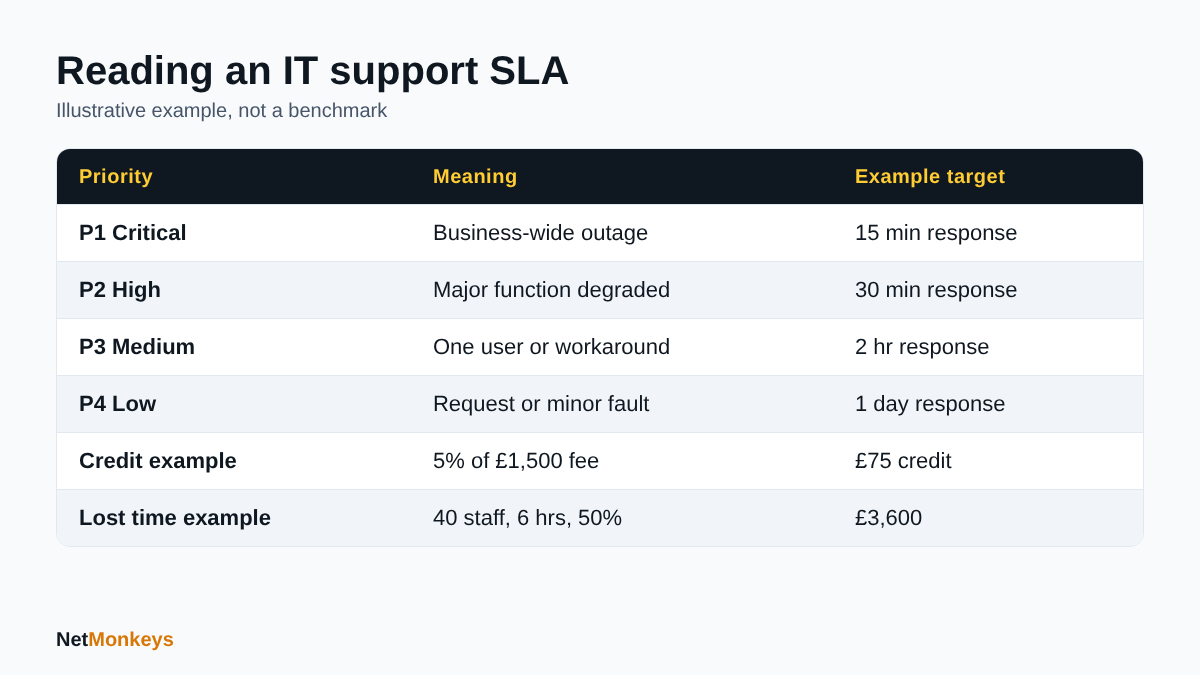 Illustrative figures only; built from the assumptions stated in the article.
Response Time vs Resolution Time in an SLA
These are different promises, and confusing them is the commonest way buyers end up disappointed. Atlassian defines response time as how quickly the team acknowledges a request after it is reported, and resolution time as how long it takes to fully fix the issue from the initial report. Atlassian's guidance also recommends pausing the clock while the provider waits for a reply from the customer.
A fast response with no resolution target is cheap to deliver. An automated acknowledgement email can meet a five-minute response target while the fault sits untouched. Ask what counts as a response: a human engineer who has read the ticket and started work, or a system message.
Response, resolution and update frequency compared
| Measure | What it tells you | What to check in the contract |
|---|---|---|
| Response time | How soon a person acknowledges and begins work | Is it a human response? When does the clock start? |
| Resolution time | How long until the fault is fixed | Is a workaround counted as resolved? Is the clock paused for third parties? |
| Update frequency | How often you hear while it is open | Is it stated per priority? Who contacts whom? |
| Escalation time | When a stalled ticket goes to a senior engineer | Is there a named escalation route and trigger? |
Resolution targets are often expressed as a percentage (for example, 90 per cent of P3 tickets within three working days) rather than a guarantee for every ticket. That is reasonable, but the percentage and the measurement period should be written down. Also look at exclusions: hardware that needs a manufacturer's replacement, faults in a third-party application, or issues caused by a change the customer made without telling the provider are commonly carved out.
Speed also depends on how the support is delivered. Many faults can be fixed through remote support in minutes, while hardware or cabling faults need onsite IT support. The SLA should say when an engineer will visit and how quickly.
↑ Back to ContentsWhat Is a Good First-Time-Fix Rate?
First-time fix, or first contact resolution, is the share of incidents resolved at the first contact without call-backs or escalation. The HDI Support Center Certification Standard, quoted in HDI's 2019 explanation of first contact resolution, defines it as the percentage of incidents resolved during the initial contact between the customer and the support centre. That article gives the definition but no target percentage.
That matters for the question of a first-time fix rate benchmark. Published figures vary by sector, ticket mix and the way the metric is counted, and we have not found an authoritative UK figure for managed IT providers that we can cite. Atlassian's guidance includes a software company example of 70 per cent of calls resolved on first contact, but it is an illustration of how to write a target, not a market benchmark.
So rather than asking whether a provider hits a particular number, ask these questions:
- How is first-time fix defined, and does it count tickets that are re-opened within a set period?
- Which ticket types are included? Password resets and simple requests inflate the figure.
- Is the figure reported monthly, by priority and by channel?
- Does the provider agree a target for your account, and what happens when it is missed?
A first-time-fix target works best alongside a re-open rate and a customer satisfaction measure. Otherwise there is an incentive to close tickets quickly rather than fix them properly.
↑ Back to ContentsAre IT Support Service Credits Worth Anything?
Service credits are a reduction in your next invoice when the provider misses an SLA target. They are a useful signal that the provider is accountable, but they are not compensation for the cost of downtime. Credits are normally capped at a percentage of the monthly fee, whereas the cost of an outage is driven by what your staff and customers cannot do while systems are down.
Worked example (illustrative budgeting example)
The figures below are assumptions chosen to show the arithmetic. They are not NetMonkeys prices, credit terms or a market average.
- Monthly managed support fee: £1,500
- Service credit for a missed P1 target: 5 per cent of the monthly fee
- Business affected: 40 staff, average employment cost of £30 per hour each
- Outage: 6 hours, with staff able to work at about half their normal output
| Step | Calculation | Result |
|---|---|---|
| Service credit | £1,500 x 5% | £75 |
| Lost staff time | 40 staff x £30 x 6 hours x 50% | £3,600 |
| Credit as share of lost time | £75 / £3,600 | about 2% |
On these assumptions the credit covers roughly one-fiftieth of the staff time lost, before counting missed sales, customer goodwill or recovery work. The lesson is not that credits are pointless. It is that the SLA should be judged on the commitments it makes to fix problems, escalate and report, not on the penalty it pays.
Read the credit clause for these points: the cap per month, whether credits are automatic or must be claimed within a short window, whether they apply only against the fee for the affected service, and whether the contract states that credits are the sole remedy. A right to terminate after repeated misses is usually worth more than the credits themselves.
Protect against the real cost
Resilience matters more than remedies. Tested backups, endpoint protection and sound security basics reduce the chance of the P1 happening at all. See our guidance on cybersecurity best practices and managed EDR services.
What Should a Good Managed IT SLA Include in 2026?
As at October 2026, a good managed IT SLA is specific about measurement and honest about limits. Use this checklist when reviewing a draft.
| Clause | What good looks like | Question to ask |
|---|---|---|
| Hours of cover | Stated for each priority, with out-of-hours route for P1 | Which hours does each clock run in? |
| Priority definitions | Impact and urgency matrix included; customer can escalate | Who sets priority, and can it change? |
| Measurement | Clock start, pause and stop rules; defined data source | Is it measured in the ticketing system? |
| Targets | Response, resolution or workaround and update frequency per priority | Are targets per ticket or a percentage? |
| Exclusions | Short, named list; third-party faults and customer changes handled fairly | What is excluded and who decides? |
| Escalation | Named roles, time triggers, senior contact for P1 | What happens at 2 hours with no fix? |
| Reporting | Monthly report with volumes, performance against target, re-opens and trends | Will we see misses, not just averages? |
| Review | Quarterly or annual review with change process for targets | How are targets revised as we grow? |
| Security incidents | Defined handling and notification steps | Who leads and who notifies whom? |
| Exit and handover | Documentation and admin access returned on exit | Do we hold our own admin credentials? |
The last two rows are often missing. Security incidents need their own path because they combine urgency with legal and insurance duties. A cyber security audit can show what a provider would be responsible for, and Cyber Essentials certification is a common baseline requirement from customers and insurers. On exit, our guides on admin access held by a provider and an IT support handover checklist explain what to insist on.
↑ Back to ContentsHow to Compare Two IT Support Proposals With Different SLAs
Two proposals rarely use the same words. One quotes a 15-minute response, the other a four-hour fix. Convert both into a common format before looking at price.
A five-step comparison method
- List the priorities. Map each provider's levels to P1 to P4 using the impact and urgency definitions, not the labels.
- Normalise the clock. Write down whether each target runs in business hours or continuously, and what pauses it.
- Split response from resolution. Fill in both columns for every priority. Mark blanks as 'not committed'.
- Price the gaps. Where one provider offers out-of-hours P1 cover and the other does not, ask for the cost of adding it.
- Test with a scenario. Ask both providers how they would handle a Friday 17:30 email outage for all staff, step by step.
Side-by-side template
| Item | Provider A | Provider B |
|---|---|---|
| P1 response (human?) | ||
| P1 resolution or workaround | ||
| P1 update frequency | ||
| Hours the P1 clock runs | ||
| P2 to P4 targets | ||
| First-time-fix definition and target | ||
| Service credit cap and claim process | ||
| Reporting and review cadence | ||
| Exclusions | ||
| Termination for repeated misses |
Red flags
- A response target with no resolution or workaround target.
- 'Best endeavours' wording in place of numbers for P1.
- Priority set solely by the provider with no right to challenge it.
- Long lists of exclusions that cover the faults you are most likely to have.
- No reporting, or reporting only of averages.
- Credits as the sole remedy with no right to exit after repeated failures.
- Pressure to sign before you have seen the SLA schedule.
For a wider view of selection criteria, read our guide on how to choose an IT support company. If you are moving away from an existing provider, switching IT support providers without downtime covers the transition.
↑ Back to ContentsConclusion: Judge an IT Support SLA on Commitments, Not Headlines
A good IT support SLA defines priorities by impact and urgency, separates response from resolution, states the hours each clock runs in, and commits to updates, escalation and reporting. Service credits are a courtesy, not cover for downtime, so weigh the quality of the commitments first. Where no reliable benchmark exists, as with UK response times and first-time-fix rates, rely on clear definitions and your own scenarios rather than a single headline number.
If you would like an SLA built around your hours, users and risks, contact NetMonkeys and we will walk through it with you.
↑ Back to ContentsFrequently Asked Questions (FAQs)
What response time should I expect from a UK IT support provider?
It varies by priority, contract and price. We have not found an independent UK benchmark, so use the priority table in this guide as an illustration only. Expect a human response to a P1 within minutes during contracted hours, slower for lower priorities, and always confirm what counts as a response and when the clock starts.
What is a P1 in IT support and how fast should it be answered?
A P1 is a critical incident with high impact and high urgency, such as a business-wide outage or a confirmed security incident. It should be answered by an engineer, with escalation and regular updates. One published ITIL-style example uses 10 minutes to acknowledge and 4 hours to resolve; your contract should set its own figures.
What is the difference between response time and resolution time in an SLA?
Response time is how quickly the provider acknowledges and starts work after you report a fault. Resolution time is how long it takes to fix it, from the original report to the final fix. A fast response with no resolution commitment can still leave you waiting, so look for both numbers for every priority.
Are IT support service credits worth anything?
Credits are usually a small percentage of the monthly fee, so they are small against the cost of downtime. In our illustrative example a £75 credit sits against about £3,600 of lost staff time. Use them as a sign of accountability and negotiate termination rights for repeated misses instead.
What should a good managed IT SLA include in 2026?
It should state hours of cover, priority definitions, measurement rules, response, resolution and update targets, exclusions, escalation routes, monthly reporting and a regular review. It should also cover security incident handling and the return of documentation and admin access when the contract ends, so a change of provider does not leave you locked in.
How do I compare two IT support proposals with different SLAs?
Map both to the same P1 to P4 definitions, note which hours each clock runs in, and fill in response, resolution and update columns for each priority. Mark missing commitments, price any gaps such as out-of-hours cover, and ask both providers to walk through the same realistic outage scenario.
What is a good first-time-fix rate?
There is no single authoritative UK figure we can cite. HDI defines it as the percentage of incidents resolved at initial contact, without callbacks or escalation. Ask each provider how it counts re-opened tickets, which ticket types are included and what target it will commit to for your account.
What is an IT support SLA?
An IT support SLA is the documented commitment between a provider and customer setting out what is covered, the response and resolution targets, how performance is measured, and the remedies if targets are missed. It normally sits as a schedule to the main managed IT services agreement.
Speak to a NetMonkeys specialist
Practical, plain-English IT advice for UK businesses, from our Manchester headquarters and our teams in London and Nottingham.
Book a conversation
