
Data Warehouse Architecture Requirements Checklist
Data warehouse architecture requirements explained: what to gather on business, data, security, governance and budget, and how it maps to architecture layers.
The quick answer
Data warehouse architecture requirements are the documented needs that decide how a warehouse is built: the questions it must answer, the data it must hold, how fast and secure it must be, and what you can afford to run. Gather them before choosing a platform, then map each one to a layer of the architecture: sources, ingestion, storage, modelling and serving.
Key takeaways
- Requirements come before platform choice, not after.
- Cover ten areas, from business needs through to support and budget.
- Write each requirement so it can be tested, with an owner.
- Map every requirement to an architecture layer to see what it affects.
- Unclear data volumes and compliance duties are the most common gaps.
What are data warehouse architecture requirements?
Data warehouse architecture requirements are the written statements of what a warehouse must do and the limits it must work within. They cover the business purpose, the data, performance, security, governance, integration, growth, support and cost.
They matter because architecture is a set of trade-offs. A design that is fast and flexible may cost more. A design that is cheap may not meet your compliance duties. Without written requirements, the loudest voice or the nearest vendor makes those trade-offs for you.
This article covers the requirements stage. For the build itself, see our guide to data warehouse design. If you are new to the subject, what is a data warehouse gives the background.
↑ Back to contentsWhy gather requirements before choosing an architecture?
Platform choices are hard to reverse. Moving a warehouse later means rebuilding pipelines, remodelling data and retraining people. Spending a few weeks on requirements is cheaper than a migration caused by a wrong assumption.
Requirements also give you a fair way to compare options. Instead of asking which product is best, you ask which option meets the list at an acceptable cost. That turns a sales conversation into an evaluation.
A data warehouse consultancy will normally run this stage as a short discovery. You can also do much of it internally, as long as someone is accountable for finishing it.
↑ Back to contentsHow should you write requirements so they can be tested?
A good requirement is specific, has an owner and can be checked. "The warehouse must be secure" fails all three. "Only members of the finance group may view payroll tables, and access must be logged" passes.
For each requirement, record five things: the statement, the reason for it, the owner, the priority (mandatory, preferred or optional) and how it will be verified. Keeping them in one shared register stops requirements living in meeting notes and email threads.
- Use plain sentences. Write what the system must do, not how it should be built.
- Give each item an identifier. This lets you refer to it in supplier responses and test plans.
- Separate mandatory from preferred. Mandatory items are pass or fail. Preferred items are used for scoring.
- Record assumptions. If you assume data volumes or user numbers, say so, and mark who will confirm them.
- Review with the business. Ask each owner to sign off their section, so nobody is surprised later.
Illustrative example
A hypothetical finance team might write: "Month-end sales figures must be available by 08:00 on working day one, and must reconcile to the ledger." That single line sets a freshness target, a load window and a testing rule.
What business requirements should you capture?
Start with the decisions the warehouse should support. Ask each department which reports and questions matter most, how often they need answers, and what they do with them.
- Priority questions. The 10 to 20 questions that justify the project, ranked by value.
- Users and roles. Who will use the data, and whether they need dashboards, self-service analysis or raw extracts.
- Success measures. How you will know the warehouse has worked, such as hours saved on reporting or fewer disputed figures.
- Definitions. The agreed meaning of key measures such as revenue, margin and active customer.
- Scope boundaries. What is explicitly out of scope for the first release.
Keep this list short enough to deliver. A first release that answers a few important questions well is better than a long list that is never finished. Where the main pain is manual reporting, the automating monthly management reports guide shows the kind of outcome to aim for.
↑ Back to contentsWhat data requirements do you need to document?
Data requirements describe what you must store and how it behaves. List every source system, who owns it, how the data can be extracted, and how clean it is.
Record the approximate size today and the expected growth. Where you do not know, write a placeholder such as [add figure from source system owner] and treat it as an open question. Also note how much history you need, because keeping ten years of detail has a different cost from keeping two.
Capture how fast data changes and how fresh the reports need to be. A monthly management pack and a live operations screen are very different requirements, and mixing them up is a common source of overspend. Our guide to real-time financial dashboards shows how freshness needs shape the design.
What we would check first
Ask for a sample extract from each source before agreeing scope. Real data often has gaps, duplicates and inconsistent codes that no workshop will reveal.
How do performance and scalability requirements affect the design?
Performance requirements should be measurable. "Reports should be fast" cannot be tested. "The sales dashboard should open within a few seconds for up to [add number] concurrent users" can.
Cover three things. First, query performance for the busiest reports. Second, load windows: how long the overnight refresh may take and when it must finish. Third, concurrency: how many people will use the system at the same time, and at what peak times.
Scalability is about growth in data, users and subject areas. Ask whether you need to add new sources each year, and whether usage will spread from finance to the rest of the business. Platforms that separate storage from compute tend to handle uneven demand more easily, but you should check each vendor's current documentation for how they actually scale.
↑ Back to contentsWhat security, privacy and compliance requirements apply?
Security requirements start with who may see what. List the roles, the data each can access, and whether restrictions apply to rows or columns, such as hiding salary data from most users.
Compliance depends on your data. If you hold personal data about customers or staff, UK GDPR applies. At a general level, that means knowing what personal data you hold, having a lawful reason to hold it, keeping only what you need, protecting it, and being able to find or delete it when required. Some sectors have extra rules, so check with your data protection lead or legal adviser.
Also record where data may be stored and processed, how long it must be retained, how access is logged, and how backups are protected. Your wider managed security arrangements should be involved in this part, not told afterwards.
↑ Back to contentsWhat governance, integration and support requirements matter?
Governance answers who owns the data and who decides when definitions change. Name a data owner for each subject area. Decide how new reports and fields are requested, approved and documented. Without this, a warehouse slowly fills with duplicate and conflicting measures. Also decide who documents the data, for example a glossary that explains each measure in business terms, so new starters can understand the numbers without asking around.
Integration requirements cover how data gets in and out. List the connection types each source supports, such as databases, files or application interfaces, and any systems that need to read from the warehouse. If several systems must be combined, system integration work is often a larger part of the project than the warehouse itself.
Support requirements are easy to forget. Decide who monitors the loads, who fixes failures, what response times you expect, and who can change the model. Many teams build a warehouse and then find nobody has the time or skills to run it. A managed cloud services provider is one option for ongoing operation.
↑ Back to contentsWhat does a requirements checklist look like?
Use the list below as a starting point. Each line should end up with an answer, an owner and a priority.
- Business. Priority questions, users, success measures and agreed definitions are written down.
- Data. Sources, owners, volumes, history needed and data quality issues are listed.
- Freshness. The required refresh rate is stated for each report or subject area.
- Performance. Targets for query time, load window and peak concurrent users are measurable.
- Security. Roles, row and column restrictions, and logging needs are defined.
- Compliance. Personal data is identified, with retention and location rules recorded.
- Governance. Data owners, change control and a definitions glossary are named.
- Integration. Source connection types and downstream consumers are known.
- Scalability. Expected growth in data, users and sources over the next few years is estimated.
- Support. Monitoring, incident handling and skills are assigned.
- Budget. Build and running cost limits, including licences, storage, compute and people, are set.
Budget deserves a note. Running costs usually matter more than build costs over several years, so ask for an estimate of both. Cloud platforms often charge for usage, so your requirements on refresh rates and concurrency feed directly into the cost.
↑ Back to contentsHow do requirements map to architecture layers?
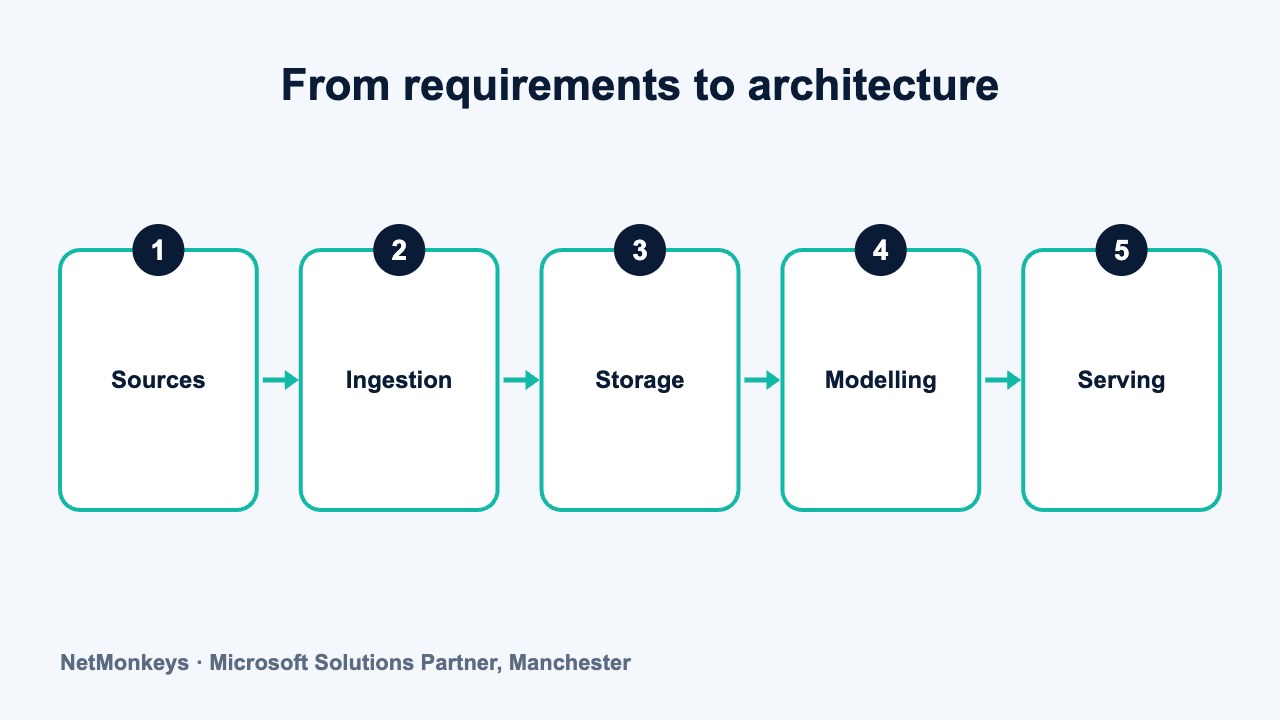
A warehouse architecture can be described in five layers. Sources are where data starts. Ingestion moves it in. Storage holds it. Modelling shapes it for analysis. Serving delivers it to people and applications. The table shows which layer each requirement mainly affects.
| Requirement | Main layer | What it decides |
|---|---|---|
| Source systems and data quality | Sources | Which connectors are needed and what cleaning is required before loading |
| Freshness and volume | Ingestion | Batch or near-real-time loads, incremental or full, and tooling for pipelines |
| Retention, residency and scale | Storage | Which platform and region, how much history, and how storage and compute are sized |
| Definitions and governance | Modelling | The dimensional model, naming, documentation and change control |
| Performance and concurrency | Serving | Caching, summary tables, semantic models and capacity for peak users |
| Security and compliance | All layers | Access roles, encryption, masking, logging and audit across the whole chain |
| Support and budget | All layers | Level of automation, monitoring, team skills and which parts to buy or build |
Security, support and budget cut across every layer, which is why they should be agreed early. For Microsoft-based organisations, the storage and serving choices usually connect to Azure cloud services and to Power BI, so check how those fit your existing licences and skills.
↑ Back to contentsHow do you turn requirements into an architecture decision?
Score each architecture option against the requirements. Mark which are mandatory, such as data residency, and which are preferred. Any option that fails a mandatory item is out. The rest can be compared on cost, risk and fit with your team. Ask each supplier to show how they meet each mandatory item, and treat any answer that says "on the roadmap" as not yet met. Where a requirement is unclear, run a small proof of concept using your own sample data before you commit.
Do not skip the option of doing less, or of phasing the build. If your needs are a few reports from one system, a full warehouse may not be justified. Read data lake vs data warehouse to see where other storage styles may fit.
Common mistake
Writing requirements that describe a product, such as "must use [product name]", instead of a need. Requirements should say what the system must achieve. The choice of product follows from them.
When the list is ready, share it with your suppliers and ask them to respond item by item. If you would like a second opinion, NetMonkeys' data warehouse team can review your requirements or help write them.
↑ Back to contentsFrequently asked questions
What are the main data warehouse architecture requirements?
They fall into business, data, performance, security and compliance, governance, integration, scalability, support and budget. Each should be written so that it can be checked, with a named owner. The business and data requirements usually drive most of the others.
Who should help gather the requirements?
You need business users who know the questions, the owners of the source systems, someone responsible for security and data protection, and a sponsor who controls the budget. A technical lead or consultant can facilitate and write the findings up.
How long does requirements gathering take?
For a small or medium organisation, a focused discovery can take a few weeks. The time depends on the number of sources, how many departments are involved and how quickly definitions are agreed. Rushing it usually costs more later.
Does UK GDPR change how a warehouse is designed?
Yes, where personal data is involved. You should know which personal data you load, keep only what you need, control access and be able to find or remove records when required. Speak to your data protection lead or legal adviser for advice specific to your organisation.
Should requirements name a specific platform?
No. They should describe needs, not products. Once the requirements are agreed, you can compare platforms against them. Our overview of data warehouse platforms is a useful next step.
What if we do not know our data volumes?
Record it as an open question and get a rough estimate from each source system owner. A sample extract helps. Choose an architecture that can scale in steps, so a wrong estimate does not force a rebuild.
About this guide and NetMonkeys
Written by Caleb Adoh, Growth Marketing Manager at NetMonkeys. NetMonkeys is a Manchester-based Microsoft Solutions Partner offering data warehouse services, Power BI services and business intelligence consultancy. This guide explains general data warehousing practice. Vendor products and features change, so check the current vendor documentation before making platform decisions.
Planning a data warehouse?
Talk to NetMonkeys about what you need to report on, where your data lives and which approach fits your business.
Explore data warehouse services Contact the team
