
Fabric Data Warehouse: What It Is and Who It Suits
What the Microsoft Fabric data warehouse is, how it relates to the Lakehouse and Synapse, who it suits, and what to check on migration and governance.
The quick answer
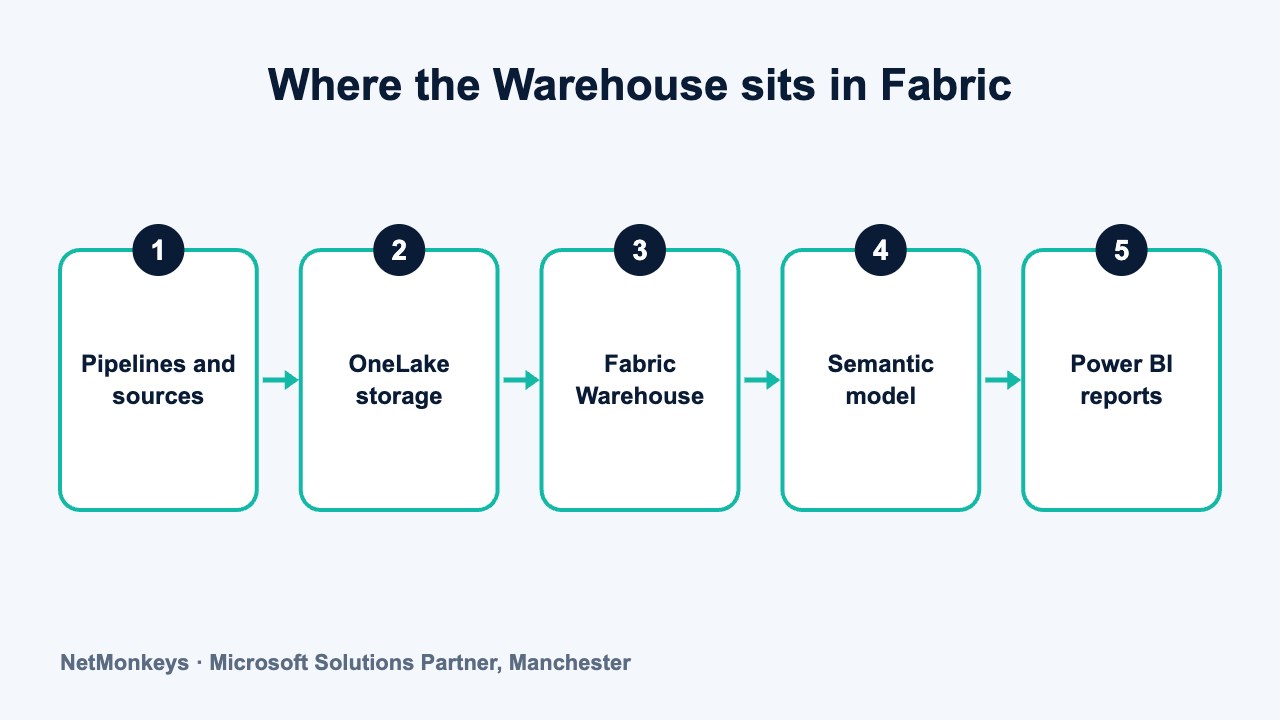
The Fabric data warehouse is the Warehouse item inside Microsoft Fabric: a SQL-based warehouse that you query with T-SQL, stores its data in OneLake and connects directly to Power BI. It suits teams that think in tables, joins and SQL and want warehousing, data engineering and reporting on one platform.
Key takeaways
- The Warehouse is one item type in Fabric. It works alongside the Lakehouse, not instead of it.
- Data is stored in OneLake, so other Fabric engines can work on the same copy.
- Warehouse suits SQL-led, structured, governed reporting. Lakehouse suits files, notebooks and varied data.
- Compared with Synapse dedicated pools, the model is more integrated and less infrastructure-focused.
- Fabric is evolving. Verify features, limits and licensing against current Microsoft documentation.
What is the Fabric data warehouse?
Microsoft Fabric is a unified analytics platform that brings data engineering, warehousing, real-time analytics and Power BI under one roof. Inside it, the Warehouse is an item type: a relational, SQL-based warehouse where you create tables, load data, write T-SQL and serve the results to reports.
If you know SQL Server, the experience will feel familiar. You work with schemas, tables, views and stored procedures. The difference is what sits underneath: storage is managed for you in OneLake, and compute is shared through the platform's capacity model, so you do not provision a separate server.
This article looks at the Warehouse item specifically. For the wider choice of Microsoft routes, see our guide to the Azure data warehouse options. If you are still getting to grips with the basics, what a data warehouse is is the place to start.
Our view, from scoping warehouse projects, is that the item type matters less than the design. A clear model, agreed definitions and reliable loading make any of these platforms work. Without them, none will. That is the focus of NetMonkeys' data warehouse services, and it is the lens we use in the rest of this article.
↑ Back to contentsHow do you load data, and what does a design look like?
Data usually arrives through Fabric pipelines, which are closely related to Azure Data Factory, or through dataflows that use Power Query. Inside the Warehouse you then shape it with T-SQL: staging tables, cleaning steps, dimension and fact tables, and views for reporting.
Many teams use a simple layered approach. Raw data lands first, a cleaned layer standardises it, and a final layer holds the business-ready model. Keeping the layers separate makes problems easier to trace and fixes easier to apply. If your team uses Power Query already, our explainer on Power Query shows how that skill carries across.
Whichever tools you pick, build in checks. Compare row counts and totals with the source after every load, and make failures visible to a named person.
Here is a hypothetical scenario, included for illustration only. A UK distribution firm has an accounting system, a warehouse management system and a CRM. Finance builds monthly reports by exporting each system to Excel and joining the results by hand. Definitions of revenue and margin differ between departments.
A Fabric Warehouse design for that firm would load each system through pipelines, clean and match customers and products, and publish a small set of conformed tables for sales, stock and finance. One Power BI semantic model would hold the agreed definitions. The Excel exports would stop, which is the outcome described in our guide to stopping manual Excel exports.
The technology is the smaller part of that project. Agreeing what revenue means, and who owns each definition, takes more time than creating the tables.
Common mistake
Treating the move to a new platform as a chance to copy every old report across unchanged. Retire reports nobody opens, and rebuild the important ones on agreed definitions. You will carry less, and the new warehouse will be easier to trust.
How does OneLake storage work with the Warehouse?
OneLake is Fabric's single logical storage layer. Think of it as one data lake for the whole organisation, with each workspace and item holding its data in it. Warehouse tables are stored there in an open table format, which is what lets other Fabric engines read the same data without making copies.
That matters for two reasons. First, a data scientist working in a notebook and an analyst running T-SQL can work from one version of the data. Second, you can reference data from one item in another through shortcuts, rather than copying it between systems and then arguing about which copy is correct.
The exact behaviour of storage, shortcuts and cross-item access has changed as the platform has matured. Confirm how the current version handles your scenario before you design around it.
↑ Back to contentsHow does the Warehouse relate to the Lakehouse?
Fabric offers two main places to hold analytical data. The Lakehouse is built around files and tables you typically work with using Spark notebooks and Python. The Warehouse is built around SQL and fully relational design.
They are designed to work together. A common pattern is to land and prepare raw or semi-structured data in a Lakehouse, then publish clean, modelled, business-ready tables in a Warehouse for reporting. Both sit on OneLake, and Power BI can read from either.
This is the same thinking behind the wider debate covered in data lake versus data warehouse, expressed as two item types in one product. You do not have to pick only one.
↑ Back to contentsLakehouse or Warehouse: which should you use?
The table below gives a general decision guide. It describes tendencies, not hard rules, and the line between the two has moved as Microsoft has added features to each.
| Question | Lakehouse leans towards | Warehouse leans towards |
|---|---|---|
| Primary skill in the team | Python, Spark, notebooks | T-SQL, relational design |
| Shape of the data | Files, semi-structured, mixed or raw | Structured, modelled, consistent |
| Typical workload | Data engineering, data science, exploration | Governed reporting, dimensional models |
| Who queries it | Engineers and data scientists first | Analysts and report builders first |
| Transformation style | Code-based pipelines and notebooks | SQL scripts and stored procedures |
| Role in a layered design | Raw and prepared layers | Business-ready serving layer |
If most of your sources are line-of-business systems with neat tables, and your people write SQL, the Warehouse is usually the more natural fit. If you collect logs, documents or large files, start with the Lakehouse and publish to a Warehouse where it helps.
↑ Back to contentsHow is it different from Synapse dedicated SQL pools?
Both give you a SQL warehouse for large-scale analysis, so the comparison comes up often. The differences are conceptual rather than a feature checklist.
- Platform scope. Synapse dedicated pools are one service among several. The Fabric Warehouse is part of a platform that also covers pipelines, lakehouses and Power BI administration.
- Storage model. Dedicated pools manage their own storage tied to the pool. The Warehouse stores data in OneLake in an open format that other engines can read.
- Capacity thinking. Dedicated pools are sized and scaled as a separate resource. Fabric uses a shared capacity that different workloads draw on.
- Design effort. Dedicated pools ask you to plan table distribution and similar physical choices. The Warehouse aims to reduce that tuning, though design still matters.
- Direction of travel. Microsoft's investment emphasis has been moving towards Fabric. Check current statements about each product before choosing for a new build.
None of this makes an existing dedicated pool a mistake. It is a reason to plan the long-term path deliberately.
↑ Back to contentsWho does the Fabric Warehouse suit?
It tends to suit organisations that already rely on Microsoft tools and want fewer separate products to manage. In particular:
- Power BI-centred businesses. Reporting is the main goal, and you want the warehouse and the semantic layer close together.
- SQL-skilled teams. Your people know T-SQL and dimensional design and would rather not learn Spark first.
- Mid-sized firms consolidating tools. You currently run a mix of databases, scheduled jobs and separate reporting servers.
- Teams planning to grow into data engineering. You expect to add notebooks or real-time data later and want one platform to hold them.
When it may not be the right choice
A very small business with two source systems and a handful of reports may not need a warehouse at all. Power BI connected directly, or a modest Azure SQL database, can be simpler and easier to support. Choose the platform that the team can actually run after the consultants leave.
How does Power BI connect to the Warehouse?
Power BI is the most natural consumer of a Fabric Warehouse. A semantic model can be built on warehouse tables, and Fabric offers storage modes in which Power BI reads data directly from OneLake without a separate import step. The practical result can be less duplication and fewer refresh schedules to manage.
Whichever mode you use, the principle is the same: put business logic in the warehouse and the shared model, not in each report. That keeps numbers consistent across departments, which is the focus of our guide to improving data accuracy across departments. Our Power BI services cover building and tuning that layer.
Which storage modes and licensing options are available to you depends on your Fabric and Power BI setup, so check this with Microsoft or your partner.
↑ Back to contentsWhat should you consider when migrating to the Fabric Warehouse?
Moving an existing warehouse is a project in its own right. The SQL may look familiar, but supported features differ between engines, and some T-SQL constructs or object types you rely on may behave differently or not be available.
- Inventory what you have. List tables, views, stored procedures, jobs and reports, and mark which are actually used.
- Check feature support. Compare the T-SQL surface and features you depend on against current Fabric documentation.
- Decide what to rebuild. Some objects migrate cleanly. Others are better redesigned than copied.
- Move data and reconcile. Load the data, then compare totals, counts and key reports against the old system.
- Run in parallel. Keep both systems live for a defined period so users can compare results before the old one is retired.
- Switch and decommission. Repoint reports, retire the old jobs and record what changed.
Our data migration services follow this kind of structure, with reconciliation built into every stage.
↑ Back to contentsWhat governance and security points matter?
A platform that makes data easy to share also makes it easy to over-share. Decide the rules before people start building.
- Workspace design. Separate development, test and production, and decide who can create items in each.
- Identity and access. Use Microsoft Entra ID groups for permissions and review membership regularly.
- Sensitive data. Apply sensitivity labels and row or column restrictions to personal and financial fields.
- Ownership. Name an owner for each dataset and each report, with a route for questions and changes.
- Capacity and cost control. Monitor how workloads use shared capacity so one heavy job does not slow everything else.
- Data residency. Check the region in which your Fabric capacity and its data are held, and confirm it meets your UK GDPR and contractual needs.
Controls inside the platform need to be matched by sound security around it. Our guide to managed security describes that wider layer.
↑ Back to contentsHow do you get started, and what should you verify first?
Pick one subject area, such as sales or finance, and build it end to end: load, model, publish, report. Keep the first phase small enough to finish and review with the people who will use it.
Fabric changes quickly. Features move from preview to general availability, names change and limits are revised. Before you commit, check the current Microsoft documentation for the specific features, limits, security controls and licensing terms your design depends on, and do not rely on a blog post, including this one, for those details.
If you would like an experienced second opinion on whether the Warehouse, the Lakehouse or a different platform fits, NetMonkeys' data warehouse team can review your sources, skills and reporting needs with you.
↑ Back to contentsFrequently asked questions
What is the difference between a Fabric warehouse and a Fabric lakehouse?
Both store data in OneLake. The Warehouse is SQL-first and relational, suited to modelled tables and governed reporting. The Lakehouse is file and notebook-first, suited to raw, varied and engineering-heavy data. Many designs use both.
Does the Fabric Warehouse use T-SQL?
Yes, it is queried and managed with T-SQL. The supported surface is not identical to SQL Server, so check current Microsoft documentation for the features and syntax your existing code depends on.
Can Power BI read directly from the Fabric Warehouse?
Yes. Power BI semantic models can be built on Warehouse tables, and Fabric offers modes that read from OneLake directly. Which mode suits you depends on data volume, refresh needs and your licensing, so test with a real report.
Should I move my Synapse dedicated pool to Fabric now?
Not automatically. An existing pool that works can keep working. Review Microsoft's current guidance, assess what a move would involve, and plan it when there is a clear benefit, such as simpler administration or a wider platform need.
Is the Fabric Warehouse suitable for a small business?
It can be, but it may be more than you need. If you have few sources and simple reporting, a lighter design may be easier to run. Match the platform to the skills and support you actually have.
Can I keep Fabric data in the UK?
Fabric capacities are created in a chosen region, and UK regions are available. Confirm in current documentation which features and services store or process data elsewhere, and record the decision for your compliance file.
About this guide and NetMonkeys
Written by Caleb Adoh, Growth Marketing Manager at NetMonkeys. NetMonkeys is a Manchester-based Microsoft Solutions Partner offering data warehouse services, Power BI services and business intelligence consultancy. This guide explains general data warehousing practice. Vendor products and features change, so check the current vendor documentation before making platform decisions.
Planning a data warehouse?
Talk to NetMonkeys about what you need to report on, where your data lives and which approach fits your business.
Explore data warehouse services Contact the team
