
What Is a Data Warehouse? A Plain-English Guide
What is a data warehouse? A plain-English guide to what it holds, how it differs from a database, what it contains, who needs one and who does not.
The quick answer
A data warehouse is a central store of cleaned, organised business data, brought together from several source systems and kept for reporting and analysis. It holds history, uses agreed definitions, and is built to answer questions about the business rather than to run day-to-day transactions. Its job is to give finance, sales and operations one consistent set of figures.
Key takeaways
- A data warehouse is a separate database built for reporting, not for running transactions.
- It combines data from several systems and keeps history that source systems often overwrite.
- Typical parts are sources, staging, a modelled storage layer, shared definitions and a reporting layer.
- You are most likely to need one when reports take days to build or departments quote different figures.
- Many smaller businesses do not need one yet, and a good adviser will say so.
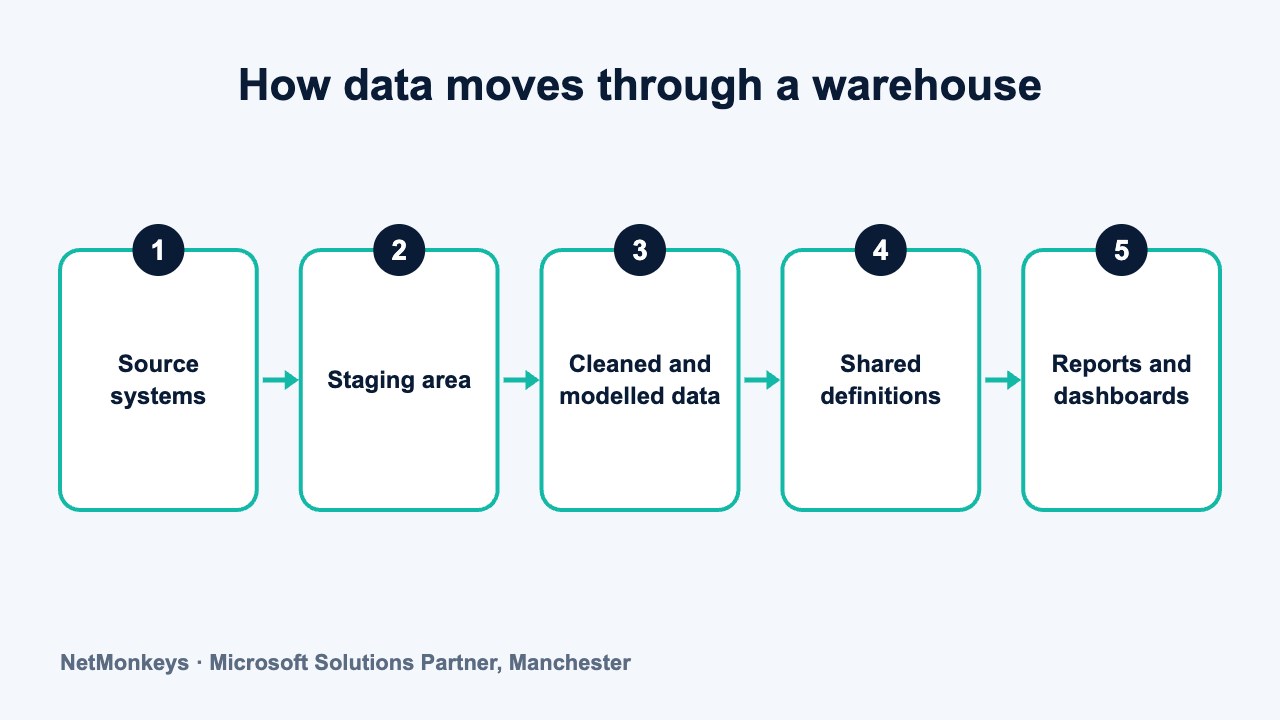
What is a data warehouse?
A data warehouse is a separate database designed for reporting and analysis. It collects data from the systems your business already uses, such as accounting, CRM, ERP, e-commerce and HR, and stores it in one organised place.
The word that matters is organised. Data is checked, matched across systems and arranged around business subjects like customers, products, orders and invoices. A customer in your CRM and the same customer in your accounts package become one customer in the warehouse, with one name and one identifier.
A warehouse also keeps history. Source systems usually overwrite old values when something changes. A warehouse can keep what was true last March as well as what is true today, which is what makes trend and year-on-year reporting reliable.
People often call it a single source of truth. That phrase is only honest if the business has agreed its definitions first. A warehouse stores agreed answers. It cannot settle an argument about what counts as a sale. If you want to see how we approach this work, our data warehouse services page sets it out.
↑ Back to contentsHow is a data warehouse different from a database?
Every data warehouse is a database, but most databases are not data warehouses. The difference is purpose and design.
An operational database sits behind an application. It handles many small tasks quickly: take an order, update an address, record a payment. It is tuned for writing, and it mostly holds current data.
A warehouse is tuned for reading. It answers large questions, such as revenue by region by month over three years, and it is arranged to make those questions fast and consistent.
| Feature | Operational database | Data warehouse |
|---|---|---|
| Main job | Running a process, such as taking orders | Answering questions about the business |
| Typical request | Read or change one record | Summarise many records over time |
| Data held | Mostly current | Current and historical |
| Data shape | Organised for the application | Organised around business subjects |
| Sources | Usually one application | Several systems combined |
| Users | The application and its staff | Analysts, managers, reports and dashboards |
| Changes | Constant, made by users | Loaded on a schedule or near real time |
Running heavy reports directly on a live system can slow it down for the people using it. Keeping analysis in a separate warehouse protects both sides.
↑ Back to contentsWhy not just report from inside your source systems?
Most systems have built-in reports, and for a small business they are often enough. Problems appear when a question crosses systems.
- Different definitions. Sales may count an order when it is signed, while finance counts it when it is invoiced. Both are right in their own system, and the two reports never agree.
- No shared keys. The CRM names a client one way and the accounts package another, so joining the data by hand means guesswork.
- Limited history. Many systems keep only the current state, so you cannot see how a customer status or a product price changed over time.
- Performance. Large reports on a live system can slow down the people who rely on it.
- Spreadsheet sprawl. Teams export data to Excel and each builds their own version. Nobody can say which is correct. We cover this in stopping manual Excel exports.
- Weak controls. Access, audit trails and data quality are handled system by system, or not at all.
If you have one or two systems and the built-in reports answer your questions, you probably do not have this problem yet. If you are stitching exports together every month, you do.
↑ Back to contentsWhat goes into a data warehouse?
Anything that describes the business and is needed for reporting. Common inputs are:
- Finance data from accounting or ERP: ledgers, invoices, budgets and cost centres.
- Customer and sales data from a CRM: accounts, contacts, opportunities and activity.
- Operational data from line-of-business applications: orders, stock, jobs, tickets and projects.
- People data from HR and payroll: headcount, absence and roles, handled in line with data protection rules.
- Web and marketing data: site activity, campaign results and email performance.
- Reference files such as targets, budgets held in spreadsheets and mapping tables.
Data usually arrives through scheduled loads. It is checked, cleaned and reshaped on the way. Moving data well is a discipline of its own, and it overlaps with system integration work.
Each source needs a named owner on the business side. When a figure looks wrong, that person can say whether the warehouse or the source is at fault. Without that, every query turns into a debate.
Not everything should go in. Start with the data that answers your priority questions. Adding sources later is normal and expected.
↑ Back to contentsWhat comes out of a data warehouse?
A warehouse does not usually present anything itself. It feeds other tools. The common outputs are:
- Dashboards and reports built in tools such as Power BI, all reading the same agreed figures.
- Management packs produced automatically each month, as described in automating monthly management reports.
- Extracts for analysts who want to explore the data in Excel or a statistics tool.
- Data for other systems, such as passing cleaned customer records back to an application.
- Inputs for forecasting and AI work, which depend on consistent, well-described data.
The test of a good warehouse is not the technology. It is whether two people asking the same question get the same answer.
↑ Back to contentsWhat are the typical components of a data warehouse?
Designs vary, but most warehouses contain the same building blocks. Design choices are covered in data warehouse design. Here is the plain version.
- Source systems. The applications and files that hold the raw data.
- Ingestion. The jobs that copy data out of the sources on a schedule.
- Staging area. A holding area where raw data lands before anything is changed, so you can always trace a figure back to the original.
- Storage and modelling layer. Where cleaned data is arranged into tables designed for analysis, usually facts (events and measures) and dimensions (descriptions such as customer or product).
- Shared definitions. The agreed business rules and calculations, such as what counts as revenue.
- Access layer. The reports, dashboards and queries people actually use.
- Monitoring and governance. Load checks, logging, security and documentation that keep the whole thing trustworthy.
These can sit on a server you run yourself or on a cloud platform, for example through Azure cloud services. Platform choice comes after you know what the warehouse has to do. Product comparisons are in data warehouse tools.
↑ Back to contentsWho needs a data warehouse?
The signs are practical rather than technical. You are likely to benefit if:
- Reports take days to produce and rely on copying data between systems by hand.
- Departments quote different figures for the same measure.
- You need history that your source systems do not keep.
- Data comes from three or more systems and has to be combined.
- Reporting slows live systems, or users complain about it.
- Audit or compliance requires a controlled, traceable set of figures.
- Growth or an acquisition has multiplied the number of systems in use.
Size alone is a poor guide. A company with modest data volumes but five systems and a monthly reconciliation headache may benefit more than a larger firm with one well-run platform. Count the systems and the manual steps before you count the rows.
Mid-sized organisations often reach this point sooner than they expect, particularly after adding a CRM or ERP alongside an existing finance package.
↑ Back to contentsWho does not need a data warehouse?
Many businesses do not, and an honest adviser will say so. You may not need one if:
- You run one main system and its built-in reporting answers your questions.
- Your data is small and simple enough for a Power BI model to connect directly to the sources.
- Your questions are few and stable, so a handful of reports will do the job.
- Nobody will own it. A warehouse without an owner decays into another set of unreliable reports.
What we would check first
Before recommending a warehouse, we ask which decisions are being held up, which numbers people disagree about, and how many systems are involved. If a well-built reporting model connected straight to your sources answers those, a warehouse adds cost without adding value. Our guide to BI software for SMEs covers lighter options.
How does a data warehouse relate to a data lake or a data mart?
A data lake stores raw data in many formats with little structure. A warehouse stores structured, modelled data. Many organisations use both, and the trade-offs are set out in data lake vs data warehouse.
A data mart is a smaller, focused slice of data built for one department or subject, such as sales or finance. It can sit on top of a warehouse or stand alone. See data warehouse vs data mart for the differences.
Neither term replaces the warehouse idea. They are options for how much to store, how structured it should be, and who uses it.
↑ Back to contentsWhat does a data warehouse not do?
A warehouse is often expected to fix problems it cannot fix. Being clear about its limits saves disappointment.
- It does not correct bad source data. It can flag errors and apply rules, but if staff enter inconsistent data at source, the problem returns on every load.
- It does not decide your definitions. Someone in the business has to agree what a customer, a sale or an active account means.
- It does not replace your applications. Orders are still taken in the order system and invoices raised in the accounts package.
- It is not a one-off build. Source systems change, new questions arise and loads fail. It needs routine care.
- It does not guarantee insight. It makes good analysis possible. People still have to ask good questions.
Illustrative scenario
Imagine a distributor with a CRM, an ERP and a web shop. Sales reports revenue from the CRM, finance reports it from the ERP, and the totals differ every month. A warehouse brings both feeds together, applies one agreed definition of revenue and lets both teams see the same figure. The hard part is agreeing the definition, not loading the data. This is a hypothetical example, not a client case.
Data quality is a shared responsibility. Our article on improving data accuracy across departments covers the habits that help at source.
↑ Back to contentsWhat should you do next?
Write down the ten questions the business most needs answered. List the systems that hold the data. Note where the answers currently disagree. That list is the start of any sensible warehouse project, and it will show whether you need one at all.
If you want an outside view, business intelligence consultants can review the list with you. NetMonkeys is a Manchester-based Microsoft Solutions Partner, and NetMonkeys' data warehouse team can advise on whether a warehouse, a simpler model or no change is the right answer.
↑ Back to contentsFrequently asked questions
Is a data warehouse the same as a database?
No. A data warehouse is a type of database designed for reporting and analysis across several systems. An operational database runs an application and mostly holds current data. A warehouse combines data from many sources, keeps history and is organised for questions rather than transactions.
What is a data warehouse used for?
It is used to give a business one consistent set of figures for reporting, analysis and planning. Typical uses are finance reporting, sales performance, operational dashboards and audit-ready figures. It also supplies clean data to forecasting and AI projects.
Does a small business need a data warehouse?
Usually not at first. If you have one or two systems and their built-in reports answer your questions, a warehouse may be more than you need. It starts to make sense when data sits across several systems and teams disagree about the numbers.
Is Excel a data warehouse?
No. Excel is a spreadsheet tool. Teams often use it as an informal warehouse by pasting exports together, but that approach is manual, hard to audit and prone to version problems. A warehouse automates the collection and keeps one controlled copy.
Is a data warehouse stored in the cloud?
It can be, but it does not have to be. Warehouses run on servers you manage or on cloud platforms. The right choice depends on your data volumes, security needs, existing Microsoft licensing and the skills you have in house. Check the vendor's current documentation before committing.
Who looks after a data warehouse once it is built?
Someone must own it. That usually means a business owner for definitions and priorities, plus a technical owner, in house or a partner, who monitors loads, fixes failures and handles changes in the source systems.
About this guide and NetMonkeys
Written by Caleb Adoh, Growth Marketing Manager at NetMonkeys. NetMonkeys is a Manchester-based Microsoft Solutions Partner offering data warehouse services, Power BI services and business intelligence consultancy. This guide explains general data warehousing practice. Vendor products and features change, so check the current vendor documentation before making platform decisions.
Planning a data warehouse?
Talk to NetMonkeys about what you need to report on, where your data lives and which approach fits your business.
Explore data warehouse services Contact the team
