
Ransomware Protection for Businesses UK: 2026 Guide
Ransomware protection for businesses UK-wide comes down to a handful of controls applied in the right order. This guide sets them out, with the NCSC, ICO and GOV.UK position as at October 2026.

Key Takeaways
- Ransomware protection for businesses UK-wide is layered: no single product stops it, so combine tested backups, MFA, patching, endpoint detection and email filtering.
- Keep a backup attackers cannot reach. The NCSC advises a recent offline backup of your most important data.
- Paying is not a recovery plan. The NCSC and UK law enforcement do not encourage payment, and payment does not guarantee you get data back.
- Decide your response before the attack. A written plan, named roles and an assured incident responder save hours when they matter.
- The 72-hour ICO clock can apply if personal data is lost or made unavailable, so assess the risk early and record your decision.
Ransomware protection for businesses UK organisations can rely on is a set of layered controls: tested backups that attackers cannot reach, multi-factor authentication, prompt patching, endpoint detection, email filtering, limited admin rights and a rehearsed incident plan. No single tool does the job. The aim is to make an attack harder to start, quicker to spot, smaller in impact and survivable if it lands.
This guide is written for UK SME and mid-market decision makers who want a sensible order of work rather than a product list. It draws on the NCSC ransomware guidance, the ICO guide to personal data breaches and the GOV.UK ransomware proposals consultation, checked as at October 2026.
We are a Microsoft Solutions Partner and managed IT provider, so the practical advice reflects how these controls are normally deployed and where they usually fail: untested backups, unpatched edge devices, shared admin accounts and no one sure who makes the first call.
What is ransomware and how does an attack unfold?
Ransomware is malicious software that encrypts your files so you lose access to devices and data, followed by a demand for payment, usually in cryptocurrency. The NCSC also notes that attackers may threaten to leak stolen data.
The NCSC describes three stages:
- Access: the attacker gets into the network, installs encryption software and may copy data out.
- Activation: devices lock and data is encrypted across the network.
- Ransom demand: a notice explains how to pay.
The first stage is where most defences should sit. Attackers often spend time in a network before activation, which is why detection and access control matter as much as backups.
What are the usual ways in?
The common routes are phishing emails, stolen or reused credentials, unpatched internet-facing systems and remote access tools without MFA. Our guide to phishing types and prevention covers the email side in more detail.
Why are UK SMEs targeted?
Smaller organisations are attractive because they hold valuable data, depend on being online and often have thinner security resource. Size is not a shield. Our overview of cybersecurity risks for small businesses explains how that exposure arises.
↑ Back to ContentsHow do you protect a business from ransomware?
You protect a business from ransomware by combining prevention, detection and recovery controls, so that a failure in one layer is caught by another. The table shows the order we normally recommend for an SME that is starting from a mixed position.
| Priority | Control | What it reduces |
|---|---|---|
| 1 | Tested backups with an offline or immutable copy | Impact if everything else fails |
| 2 | MFA on email, remote access and admin accounts | Stolen-credential access |
| 3 | Patching of internet-facing systems and endpoints | Exploited vulnerabilities |
| 4 | Email filtering and user awareness | Phishing and malicious attachments |
| 5 | Endpoint detection and response with monitoring | Dwell time and spread |
| 6 | Least-privilege admin and network segmentation | Blast radius |
| 7 | Written, rehearsed incident plan | Time to decision and recovery |
The order reflects consequence, not glamour. Recovery capability comes first because it limits the damage from every other failure. Government-backed baselines such as Cyber Essentials cover several of these controls and give you an externally recognised floor.
Is antivirus enough?
No. Traditional antivirus matches known threats. Modern ransomware operators use legitimate admin tools and fresh variants, so behaviour-based detection and access controls are needed alongside it.
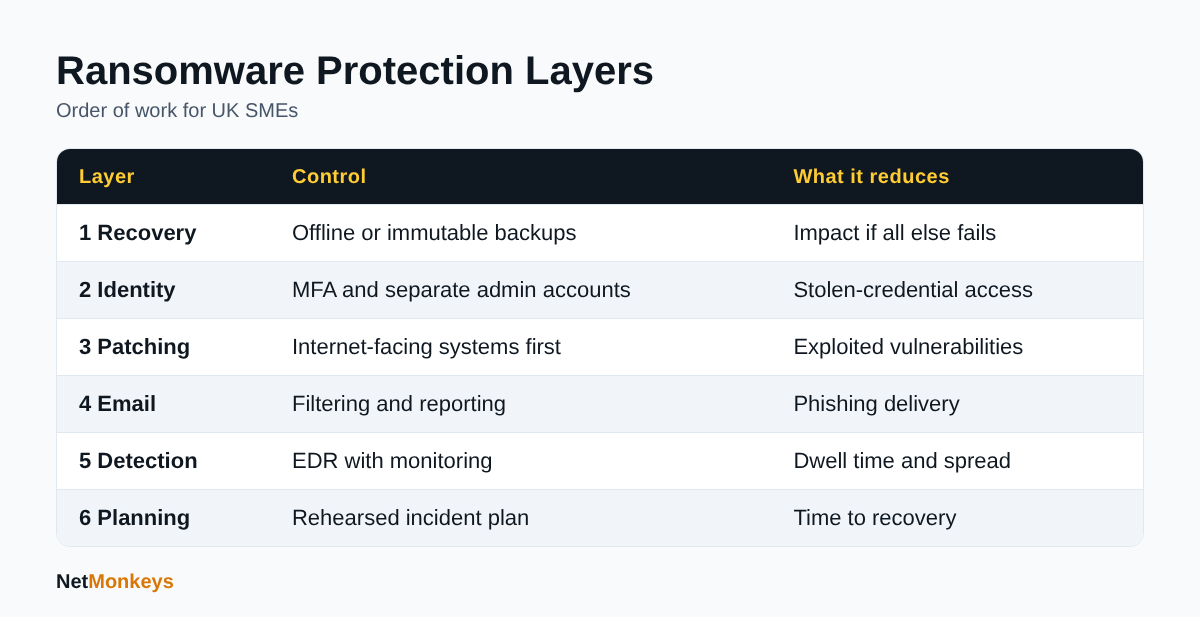 Suggested order of work for ransomware protection, as at October 2026.
What backups protect against ransomware?
The backups that protect against ransomware are ones attackers cannot encrypt or delete: offline, air-gapped or immutable copies that you have tested by restoring. The NCSC advises keeping a recent offline backup of your most important files and data, so you have a recovery option the attacker cannot reach.
Attackers know backups are the main reason victims do not pay, so they try to find and destroy them first. A backup server joined to the same domain, using the same admin credentials, is often reachable.
What should a ransomware-resilient backup design include?
- At least one copy that is offline, air-gapped or immutable (write-once, with a retention lock).
- Separate credentials for backup administration, with MFA, not shared with domain admins.
- Cloud data covered too. Microsoft 365 mailboxes, SharePoint and OneDrive need their own backup arrangements and retention settings. Our Microsoft 365 support team can review these.
- Documented recovery order: identity, core servers, line-of-business systems, then everything else.
How often should you test restores?
Test on a schedule you can defend, and always after a major system change. A backup that has never been restored is an assumption. Record how long a full restore of your critical systems actually takes, because that figure, not the backup frequency, determines your downtime.
For wider planning, see our business continuity plan template.
↑ Back to ContentsHow do MFA, patching and segmentation limit ransomware?
MFA and access control stop ransomware by making stolen passwords insufficient and by limiting what an intruder can reach once inside.
- Enforce MFA on email, VPN or remote access, cloud admin portals and all privileged accounts. Prefer authenticator apps or hardware keys over SMS where you can.
- Separate admin accounts from daily-use accounts. Nobody should read email while logged in as a domain admin.
- Remove standing privilege. Grant admin rights when needed and review them regularly.
- Disable legacy authentication and unused accounts, including leavers and old service accounts.
- Manage devices. Enrolled, compliant devices make it easier to block unmanaged ones. See our explainer on Intune device management.
Why do shared admin accounts cause so much damage?
One compromised shared credential gives an attacker the same reach as your IT team, and nobody can tell who used it. Individual named accounts with logging are a cheap, high-value fix.
Why does patching matter for ransomware protection?
Patching matters because attackers actively exploit known vulnerabilities in internet-facing systems to get in without needing a password. Firewalls, VPN appliances, remote access gateways and mail servers are the priority, since anyone on the internet can probe them.
- Keep an accurate asset list so nothing is forgotten.
- Apply security updates to internet-facing devices on a short, defined timescale.
- Replace products that no longer receive updates. Our guide to the Windows 10 end of support explains the position for that platform.
- Review firmware and appliances, not only Windows and Microsoft 365.
Cyber Essentials sets expectations for supported software and timely updates, and our Cyber Essentials requirements checklist shows how that translates into day-to-day tasks.
Does network segmentation limit ransomware damage?
Yes. Segmentation limits damage by stopping an intruder moving freely from one device to every server and site. A flat network lets ransomware spread rapidly once it has a foothold.
- Separate servers, user devices, guest Wi-Fi and operational technology.
- Restrict administrative protocols so they only work from designated management systems.
- Keep backup infrastructure on its own segment with tightly controlled access.
- Review firewall rules for old exceptions that were never removed.
Hybrid estates need the same thinking across on-premises and cloud. Our hybrid cloud page covers how those environments are typically governed.
Most intrusions we see described in guidance combine a weak identity control with an unpatched or flat network. Fixing these three areas together removes a large share of the easy routes in, and each is within reach of a small IT team or a managed provider. Agree owners and review dates, otherwise the work drifts once the first push is over.
↑ Back to ContentsWhat do EDR, MDR and email security add?
Endpoint detection and response (EDR) records and analyses device behaviour to spot an attack in progress, while managed detection and response (MDR) adds people who watch those alerts and act on them. An alert that nobody reads out of hours does not stop a weekend encryption event.
What should you ask an EDR or MDR provider?
- Who monitors alerts, and when? Is it 24/7?
- Can they isolate a device or account without waiting for you?
- What is the escalation route and who do they call?
- Which devices and servers are covered, including those that are off the corporate network?
Our managed EDR services page explains how this is delivered, and a 24/7 IT helpdesk can provide the first-line response.
How does email security fit in?
Email remains a primary delivery route. Use filtering that scans links and attachments, block risky file types, apply sender authentication (SPF, DKIM and DMARC) and give staff an easy way to report suspicious messages. Awareness training works best when it is short, regular and free of blame.
↑ Back to ContentsWhat should a ransomware incident response plan include?
A ransomware incident plan should state who decides, who is called, what is shut down, how you communicate and how you restore, written so it works when email and file servers are unavailable. Keep a printed or offline copy.
What goes in the plan?
- Named incident lead and deputy, with out-of-hours numbers.
- Contacts for your IT provider, insurer, legal adviser and an NCSC-assured incident response provider. The NCSC recommends all UK organisations use an assured Cyber Incident Response provider.
- Isolation steps: which systems to disconnect first and who may authorise it.
- Evidence preservation, so forensic work is not undermined.
- Decision log, and a rule on who may speak to staff, customers and media.
- Recovery order and the point at which you invoke continuity arrangements.
We publish a cyber incident response plan template you can adapt. Rehearse it with a short tabletop exercise at least once a year, including the awkward question of who approves downtime for the whole business.
What does the NCSC say to do during an attack?
The NCSC ransomware guidance directs UK organisations to report incidents through the GOV.UK reporting service and to follow its response actions. It also points to guidance on communications and staff welfare, which are often forgotten until the day itself.
↑ Back to ContentsShould you pay the ransom, and what is the UK position?
The NCSC and UK law enforcement do not encourage paying ransoms. The NCSC states that paying does not guarantee you will get access to your data, may leave systems infected and may make you a more likely target in future, as well as funding criminals.
Is paying a ransom illegal in the UK?
As at October 2026, we found no confirmation that the proposals below had become law in the sources reviewed, so paying is not generally prohibited for private businesses, though sanctions and terrorism financing rules can make particular payments unlawful. Take legal advice before any payment is considered.
What has the government proposed?
The GOV.UK ransomware proposals consultation shows a consultation that ran from 13 January 2025 to 8 April 2025, with the government response published on 22 July 2025. The proposals covered a targeted ban on ransomware payments by public sector bodies and regulated critical national infrastructure operators, a payment prevention regime, and mandatory incident reporting.
Legal commentary dated February 2026 recorded that none of these had been enacted and that scope, thresholds and penalties were still being developed, with a 72-hour initial reporting window under consideration. Because the position can change, check the GOV.UK page for the latest status before relying on it, particularly if you supply public sector bodies.
Plan for non-payment
Build your resilience on the assumption that you will not pay. If backups are tested and the plan is rehearsed, a ransom demand becomes a recovery problem rather than a business-ending decision.
What are your ICO and insurance obligations after ransomware?
If ransomware affects personal data, you must report to the ICO within 72 hours of becoming aware when the breach is likely to risk people's rights and freedoms. The ICO guide to personal data breaches says the clock starts when you become aware, you may provide information in phases, and you must give reasons if you are late.
- The definition of a breach includes loss of availability of personal data, so encrypted data can count.
- If the risk is unlikely, you need not report, but you should record and justify that decision.
- If the risk to individuals is high, you must also tell them without undue delay.
- If a processor is breached, it must tell you without undue delay.
- Record every breach, reportable or not.
Does cyber insurance cover ransomware?
Policies vary, so read the wording on notification duties, approved responders, exclusions and security conditions. Insurers often expect MFA, tested backups and endpoint protection to be in place. Notify the insurer early and before engaging outside responders unless the policy says otherwise. Our guide to cybersecurity insurance explains what to check.
↑ Back to ContentsHow would a layered approach work in practice?
A layered approach works by giving each stage of an attack a chance to be stopped. The following is an illustrative scenario, not a real client case, using assumed facts.
Assume a 60-person professional services firm with one office, Microsoft 365, a file server and a line-of-business application. An employee receives a convincing email and enters their password on a fake page.
- Layer 1, email filtering: the link is rewritten and may be blocked. If it gets through, the user can report it.
- Layer 2, MFA: the stolen password alone does not give access.
- Layer 3, endpoint detection: if malware does run, unusual encryption behaviour triggers an alert and automatic isolation.
- Layer 4, least privilege: the user is not an admin, so the malware cannot reach the servers.
- Layer 5, backups: if files are encrypted, an immutable copy allows restoration to the last good point.
- Layer 6, plan: the incident lead knows who to call and when to consider ICO notification.
Remove any one layer and the outcome worsens, but the others still help. That is the point of the approach.
↑ Back to ContentsHow do you choose help with ransomware protection?
Choose a provider on evidence of how they deliver the controls above, not on a list of tools. Ask for specifics.
- Can they demonstrate backup restore tests and show results?
- Who monitors alerts out of hours, and what are they allowed to do?
- How do they handle admin access and offboarding?
- Do they support your sector's compliance requirements, for example financial services or law firms?
- What happens at contract end? Our guide on when an IT provider will not give admin access shows why this matters.
An independent cyber security audit is a useful way to find gaps before choosing where to spend. Our guide to choosing an IT support company lists wider selection criteria, and managed IT support can combine monitoring, patching and backup management under one contract.
↑ Back to ContentsWhat is the best next step for ransomware protection for businesses UK-wide?
The best next step for ransomware protection for businesses UK-wide is to prove you can recover: restore a critical system from an offline or immutable backup, time it, then close the gaps in MFA, patching, detection and planning in the order shown above.
Do not wait for a perfect programme. A tested restore, MFA on every admin account and a one-page incident plan will move most small organisations a long way. Review the plan after any change of provider, system or key staff.
If you would like a second pair of eyes on your current position, speak to the NetMonkeys team.
Who wrote this and how it was checked
Written by Caleb Adoh, Growth Marketing Manager at NetMonkeys, a Microsoft Solutions Partner headquartered in Manchester with offices in Nottingham and London. Content was checked against the cited NCSC, ICO and GOV.UK pages as at October 2026. Legal and insurance matters should be confirmed with your own advisers.
Frequently Asked Questions (FAQs)
What is the best ransomware protection for businesses UK-wide?
There is no single best product. Effective ransomware protection for businesses UK organisations can rely on combines tested offline or immutable backups, MFA, prompt patching, endpoint detection with monitoring, email filtering, limited admin rights and a rehearsed incident plan. Start with backups and MFA, then add detection and planning in order.
Should a UK business pay a ransomware demand?
The NCSC and UK law enforcement do not encourage payment. Paying does not guarantee you regain access, may leave systems infected and can make you a more likely target. Sanctions rules can also make some payments unlawful, so take legal advice and focus on recovery from backups instead.
Is paying a ransom banned in the UK?
The government has proposed a targeted ban for public sector bodies and regulated critical national infrastructure, plus payment prevention and mandatory reporting. A consultation response was published in July 2025, and commentary in February 2026 said none was yet law. Check GOV.UK for the current status.
What should I do first if ransomware hits my business?
Isolate affected devices from the network, keep them powered where advised so evidence is preserved, and call your incident lead and IT provider. Report the incident through the GOV.UK service, contact your insurer, consider an NCSC-assured responder, and start a decision log while assessing ICO notification.
Do I have to report ransomware to the ICO?
If personal data is affected and the breach is likely to risk people's rights and freedoms, you must report to the ICO within 72 hours of becoming aware. Loss of availability counts as a breach. If you decide not to report, record and justify that decision.
Are cloud backups safe from ransomware?
Only if designed for it. Cloud copies can be encrypted or deleted if attackers obtain your admin credentials. Use separate backup credentials with MFA, immutable or retention-locked storage, and test restores. Microsoft 365 data needs its own backup arrangements, not just default retention.
How often should backups be tested?
Test restores on a regular schedule you can defend and after any major system change. Time a full restore of your critical systems, because that duration determines your real downtime. A backup that has never been restored is an assumption rather than a safeguard.
Does Cyber Essentials protect against ransomware?
Cyber Essentials covers controls that block many common attacks, including secure configuration, access control, malware protection and patching. It does not replace backups, detection or an incident plan, but it gives UK organisations an externally recognised baseline to build on.
Speak to a NetMonkeys specialist
Want an expert to review your setup, or to put this guide into practice with you? Our team can help.
Book a conversation
