
Microsoft 365 for Charities Pricing: What UK Charities Pay
Only Business Basic is a grant, up to 300 licences; Business Premium is discounted by 75 percent. This guide separates verified pricing from the costs that sit outside the licence.

Key Takeaways
- Business Basic is the grant plan, up to 300 licences, as at October 2026.
- Business Premium is discounted by 75 percent, not free.
- E3 and E5 nonprofit staff pricing was shown in US dollars; sterling prices were not verified.
- Keep 85 percent active usage of granted licences to protect future grants.
- Migration, security, backup, support and training often cost more than licences.
Microsoft 365 for charities pricing depends on the plan. As at October 2026, Microsoft's published position is that eligible nonprofits can receive up to 300 Microsoft 365 Business Basic licences as a grant, while Business Premium is discounted by 75 percent rather than donated. Most other plans are discounted, not free.
This guide sets out what we could confirm on Microsoft's own pages, what we could not, and where the real cost of running Microsoft 365 sits for a UK charity. Licences are often the smallest line. Migration, security, support and training usually cost more over three years.
It is written for charity trustees, finance leads and the person who ends up managing IT alongside another job. It is deliberately different from our general overview of Microsoft for charities in the UK and our guide to Microsoft non-profit programmes: here the focus is the price, the plan choice and the budget around it.
What do UK charities pay for Microsoft 365?
UK charities pay nothing for the grant plan and a discounted rate for everything else, subject to eligibility. The detail below is taken from Microsoft's UK nonprofit Microsoft 365 page, the Microsoft nonprofit FAQ and the Microsoft partner notice on the Business Premium and Office 365 E1 grant discontinuation, all opened in October 2026.
| Plan or offer | What Microsoft states | Price status |
|---|---|---|
| Microsoft 365 Business Basic | Primary cloud grant offer; up to 300 licences | Free under the grant |
| Microsoft 365 Business Premium | 75% discount for eligible nonprofits; the former full grant was discontinued | Discounted; GBP price not verified |
| Microsoft 365 E3 (nonprofit staff pricing) | $9.75 per user per month, paid yearly, annual commitment | USD price on the US page |
| Microsoft 365 E5 (nonprofit staff pricing) | $24.00 per user per month, paid yearly, annual commitment | USD price on the US page |
| Microsoft 365 Copilot add-on | 15% discount; list price $25.50 per user per month, paid yearly | USD price |
| Microsoft 365 F3 | Nonprofit pricing available; up to 5 volunteer F3 seats per licensed E3 or E5 seat | Discount not stated |
Two points matter before you budget. First, the page we opened showed US dollar figures only. We could not verify equivalent sterling prices, so any sterling number you see elsewhere should be treated as a quote from a reseller, not a Microsoft published price. Second, the pages carry no visible publication date, so confirm current pricing in your admin centre or with your partner before committing.
What we could not verify
We could not confirm sterling list prices, the discounted Business Premium price in pounds, or any nonprofit position for Business Standard or Apps for business. Where this guide is silent on a figure, that is why.
Which Microsoft 365 plans are free for charities?
Only Business Basic is described as a grant, and only up to 300 licences. Microsoft's Microsoft nonprofit FAQ calls it the primary cloud grant offer, while noting that specific seat limits depend on the offer.
The Microsoft partner notice on the Business Premium and Office 365 E1 grant discontinuation, last modified on 7 August 2025, states that the Business Premium and Office 365 E1 grants are being discontinued and that nonprofits can receive up to 300 Business Basic licences instead. Many offers, including Business Premium and E1, are discounted by as much as 75 percent.
What does Business Basic include?
Business Basic gives web and mobile Office apps, Exchange email, Teams, SharePoint and OneDrive. It does not include the desktop Office applications and does not include the security and device management features of Business Premium. For a charity that mainly needs email, Teams and file sharing, that can be enough. For a charity that handles safeguarding records, donor data or grant-funder information on laptops, it often is not.
Does the grant apply to everyone in the charity?
No. Microsoft states that grants are limited to paid employees and unpaid executive leadership. Discounts can extend to staff and volunteers. Programme participants, members and donors are not eligible, and licences cannot be shared, transferred, rented or resold.
Are there nonprofit grants that are free in other ways?
Microsoft 365 Copilot Chat is described as available at no additional cost with an eligible Microsoft 365 subscription, and Teams Audio Conferencing is a no-cost add-on for E3 and E5. These are inclusions on paid plans, not free plans.
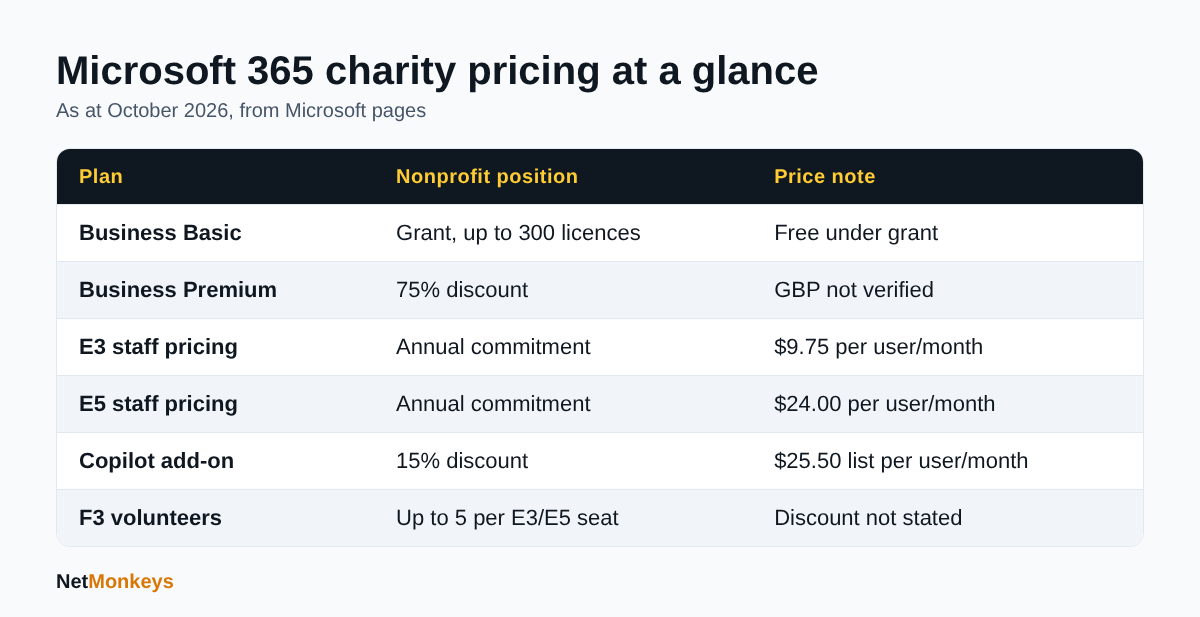 Figures from Microsoft nonprofit pages opened in October 2026; US dollar prices as shown.
How much does Microsoft 365 Business Premium cost for a charity?
Business Premium costs 75 percent less than the standard commercial price for an eligible nonprofit, which means you pay 25 percent of the list price. Microsoft states the 75 percent discount on Microsoft's UK nonprofit Microsoft 365 page. We did not find a verified sterling figure, so the working below uses a stated assumption.
The Business Premium offer matters because it adds device management, advanced threat protection and conditional access to Basic-style collaboration. If you are weighing it against general cybersecurity good practice, this is the plan that makes several of those controls available without buying separate products.
Illustrative example, not a quote
Assume a charity with 40 paid staff and a commercial list price of £X per user per month. At a 75 percent discount the charity pays 0.25 × £X per user per month, so 40 users cost 10 × £X per month in total. Replace £X with the current figure from your admin centre or partner quote. The structure of the calculation is what Microsoft's published discount supports; the pound amount is not verified here.
Because the former full grant was discontinued, charities that previously held donated Premium licences face a decision at renewal. Independent commentary indicated that renewals from 1 July 2025 moved to the discounted paid rate, with an annual term. We rely on Microsoft's own notice for the discontinuation, and recommend you read your renewal date and terms directly in the Microsoft admin centre.
↑ Back to ContentsWhat do Microsoft 365 E3 and E5 cost for nonprofits?
On the page we opened, nonprofit staff pricing is $9.75 per user per month for E3 and $24.00 per user per month for E5, paid yearly with an annual commitment. This comes from Microsoft's nonprofit plans and pricing page, which showed US dollar prices.
That page also states that E3 and E5 allow up to five PCs or Macs, five tablets and five phones per user, with a 100 GB primary mailbox and a 1.5 TB archive. Eligibility checks can take up to seven business days.
Which charities should look at E3 or E5?
Larger charities with compliance duties, multiple sites or heavy data protection obligations. E5 adds advanced security and analytics. If you are considering data classification or retention, our explainer on Microsoft Purview shows what those controls do before you pay for them.
What is the volunteer F3 allowance?
For each licensed E3 or E5 seat, a nonprofit can receive up to five additional Microsoft 365 F3 seats for volunteers. It is tied to paid E3 or E5 seats and is not a free standalone grant.
What does Copilot cost for a charity?
Microsoft 365 Copilot carries a 15 percent nonprofit discount against a list price of $25.50 per user per month, paid yearly. Before buying, read our guide to Microsoft 365 Copilot, because permissions and data hygiene need fixing first.
↑ Back to ContentsWho is eligible for Microsoft 365 charity pricing?
Eligibility requires recognised charitable status in your country and Microsoft's approval, which it makes at its sole discretion. The Microsoft nonprofit eligibility page sets out the general rules, and we opened it in October 2026.
- Housing associations are listed as ineligible in the UK.
- Excluded categories include government bodies, schools and universities, hospitals and health systems, financial institutions, professional or trade associations, sports organisations and political organisations.
- The person registering must be an employee or strategic volunteer. Third-party IT providers cannot register on your behalf.
- Verification can take up to seven business days.
The page did not name the UK registration bodies. If your charity is registered with the Charity Commission, the Office of the Scottish Charity Regulator or the Charity Commission for Northern Ireland, check Microsoft's current UK guidance or its support form before assuming acceptance.
What is the 85 percent active usage rule?
Microsoft requires nonprofits to keep active usage at 85 percent or more of granted assigned licences. A user counts as active if they have used a Microsoft 365 cloud service in the past 90 days. Missing the target can risk disqualification from future grants, so unused seats should be removed, not left assigned.
↑ Back to ContentsWhat does Microsoft 365 really cost a charity beyond licences?
Over three years, licences are frequently the smallest cost for a charity on the grant plan, because the surrounding work is paid for in staff time or supplier fees. The categories below are the ones we see budgeted poorly. We give no amounts because they depend on size, data volume and starting point.
| Cost area | What it covers | Often missed because |
|---|---|---|
| Migration | Mailboxes, files, shared drives, accounts, devices | Seen as one-off, but needs planning and testing |
| Security configuration | MFA, conditional access, backup, email protection | Basic grant plans exclude advanced tools |
| Device management | Enrolment, patching, wipe for lost devices | Volunteers use personal devices |
| Support | Helpdesk, user changes, licence audits | Handled informally by one person |
| Training | Teams, SharePoint structure, safe working | Adoption is assumed |
| Backup and retention | Third-party backup of mailboxes and files | Microsoft is not a backup service |
Do charities need a Microsoft 365 migration?
Only if they are moving from another platform, such as a legacy server, Google Workspace or consumer email. Our cloud migration services and data migration services cover that work. Underestimating file structure clean-up is the most common cause of overrun.
What does support look like for a small charity?
A defined route to a named provider beats informal favours. Microsoft 365 support typically covers user management, licence assignment, tenant settings and escalation. If you are deciding between a paid provider and one internal person, see our comparison of outsourced and in-house IT.
↑ Back to ContentsWhich Microsoft 365 plan should a UK charity choose?
Choose the cheapest plan that meets your security and compliance needs, not the cheapest plan on the price list. A short decision sequence works better than comparing features.
- Count eligible people. Paid staff and unpaid executive leadership qualify for grants. Volunteers need discounted or F3 licences.
- List the data you hold. Safeguarding, health, donor and beneficiary data usually justify device and identity controls.
- Decide how people connect. Personal phones and shared laptops need managed access.
- Check funder and insurer expectations. Some require Cyber Essentials, which depends on correct configuration.
- Price three years, not one. Include support, backup and training.
When is Business Basic enough?
When staff mainly use email, Teams and browser-based Office, hold little sensitive data and have a managed route for security settings added elsewhere. The grant limit of 300 licences will suit most small and medium charities.
When is Business Premium worth paying for?
When you need managed devices, stronger threat protection and conditional access. Our Microsoft security information article explains the sign-in controls, and Intune device management explains how devices are enforced. A mixed estate is possible: grant Basic for volunteers and light users, discounted Premium for staff handling sensitive records.
Can a charity mix licence types?
Yes, within one tenant, and many do. Assign by role, document the reason, and review twice a year. Keep a simple register showing who holds which licence, why, and when it was last checked, because that record answers most questions from trustees, auditors and insurers.
↑ Back to ContentsHow do charities keep Microsoft 365 secure and compliant?
Switch on multi-factor authentication for every account, restrict administrator rights, keep devices updated and take independent backups. These controls matter more than the licence name. Our Cyber Essentials support helps charities show that those basics are in place, and the Cyber Essentials certification guide explains the scheme.
- Require MFA for staff, volunteers and administrators.
- Use separate admin accounts without mailboxes.
- Remove leavers promptly and reclaim licences.
- Back up email and files outside Microsoft's service.
- Train staff on phishing; see our guide on what phishing is and how to prevent it.
Is Microsoft 365 UK GDPR compliant for charities?
The platform provides tools, but the charity remains responsible as data controller for how it configures them and who it gives access. Retention settings, sharing permissions and access reviews are the practical work. Our small organisation cyber risk guide covers the typical exposure.
Who should manage the tenant?
Someone accountable, with a deputy. Where that is not possible, a managed IT support provider can hold the admin role under a documented agreement. Our IT support handover checklist explains what to ask for, so you retain control of your tenant. Whoever administers it, the charity should hold the global administrator details in a sealed record that trustees can reach if the main contact leaves.
↑ Back to ContentsHow do you apply for Microsoft 365 charity pricing?
You register your charity with Microsoft's nonprofit programme, wait for verification, then claim offers through the Microsoft admin centre or a partner. Verification can take up to seven business days, so allow for it before a renewal or migration date.
- Gather your registration details. Have your charity's registered name, number and a named contact ready.
- Register as an employee or strategic volunteer. A third-party provider cannot do this for you.
- Wait for approval. Do not move users until you have it.
- Select offers. Claim the grant for eligible staff, then buy discounted plans only for the roles that need them.
- Record the renewal date. Diarise it six weeks ahead so you can review seats and terms.
What are the most common mistakes?
- Assuming a previous donated plan will carry on unchanged at renewal.
- Assigning licences to volunteers who are not covered by the grant.
- Leaving leavers licensed, which drags down the active usage figure.
- Treating the nonprofit tenant as owned by whoever set it up, rather than by the charity.
- Buying Copilot before fixing file permissions.
None of these is hard to avoid, but each one costs money or access when it is found late. A licence review twice a year, with a named owner, catches nearly all of them.
↑ Back to ContentsWhat is the bottom line on Microsoft 365 for charities pricing?
The headline for Microsoft 365 for charities pricing as at October 2026 is simple: up to 300 Business Basic licences as a grant, 75 percent off Business Premium, nonprofit staff pricing for E3 and E5, and a 15 percent discount on Copilot. Everything else, including sterling prices, needs a current quote. Treat licences as the starting line of the budget, not the whole of it.
- Confirm eligibility and register in your own name.
- Match plans to roles, using the grant where it fits.
- Remove unused licences to stay above 85 percent active usage.
- Budget for migration, security, backup, support and training.
- Review the tenant twice a year.
For help choosing a plan or running your tenant, talk to NetMonkeys. If you are comparing suppliers first, our guide to choosing an IT support company sets out the questions worth asking.
Who wrote this and how it was checked
Written by Caleb Adoh, Growth Marketing Manager at NetMonkeys, a Manchester-headquartered Microsoft Solutions Partner. Content was checked against the Microsoft pages cited above as at October 2026. Microsoft can change nonprofit offers at any time, so confirm figures before purchase.
Frequently Asked Questions (FAQs)
What is Microsoft 365 for charities pricing in the UK?
As at October 2026, eligible nonprofits can receive up to 300 Business Basic licences as a grant, and Business Premium is discounted by 75 percent. E3 and E5 are offered at nonprofit staff pricing, shown in US dollars on the page we opened. Sterling prices were not verified, so request a current quote.
Is Microsoft 365 free for charities?
Only partly. Microsoft describes Business Basic as the primary grant offer, up to 300 licences, for paid employees and unpaid executive leadership. Other plans, including Business Premium, are discounted instead. The Business Premium and Office 365 E1 grants were discontinued, according to a Microsoft partner notice last modified in August 2025.
How much is the Business Premium discount for charities?
Microsoft states a 75 percent discount for eligible nonprofits, so you pay 25 percent of the standard price. We could not verify the resulting price in pounds. Check the current figure in the Microsoft admin centre or ask a partner for a written quote that states the term, billing frequency and renewal conditions.
Can volunteers get Microsoft 365 licences?
Grants cover paid staff and unpaid executive leadership only. Discounts can extend to volunteers. For each licensed E3 or E5 seat, a nonprofit can receive up to five additional F3 seats for volunteers. Programme participants, members and donors are not eligible, and licences cannot be shared, transferred or resold between people.
What is the 85 percent usage rule?
Microsoft expects nonprofits to keep active usage at 85 percent or more of granted assigned licences. A user is active if they used a Microsoft 365 cloud service in the previous 90 days. Missing the target risks losing future grants, so remove unused licences promptly and review assignments at least twice a year.
Which UK charities are not eligible?
Microsoft lists housing associations as ineligible in the UK. Government bodies, schools, universities, hospitals, financial institutions, trade associations, sports and political organisations are also excluded. Microsoft decides eligibility at its own discretion, and verification can take up to seven business days. Check the current exclusions on Microsoft's page before you plan a migration around the offer.
What costs apply beyond Microsoft 365 licences?
Migration, security configuration, device management, backup, support and training are the main items. These often exceed licence costs over three years, especially for charities moving from legacy systems. Budget for them separately, and ask any provider to itemise exactly what is included in a quote.
Can an IT provider register my charity for Microsoft nonprofit pricing?
No. Microsoft's eligibility page states that the person registering must be an employee or strategic volunteer of the nonprofit, and third-party IT providers cannot register on an organisation's behalf. A provider can advise on the process and later manage the tenant once your charity owns it, but the registration itself must come from you.
Speak to a NetMonkeys specialist
Want an expert to review your setup, or to put this guide into practice with you? Our team can help.
Book a conversation
