
Microsoft Non Profits: Grants, Eligibility and How to Apply
Microsoft for Nonprofits offers eligible charities free and discounted Microsoft 365, Azure and Dynamics products. This guide explains eligibility, applying and setup as at October 2026.

Key Takeaways
- Business Basic is free for up to 300 users, per Microsoft's September 2026 offers guide.
- UK housing associations and schools are excluded from the nonprofit programme.
- Your own employee or volunteer must register; IT providers cannot apply for you.
- Grants carry conditions: annual attestation and 85% active usage of granted licences.
- Secure the tenant first: enable MFA before moving beneficiary or donor data.
Microsoft non profits is the shorthand most people use for the Microsoft for Nonprofits programme: a scheme that gives eligible charities and non-governmental organisations free or heavily discounted Microsoft 365, Azure, Dynamics 365 and related products. You register, Microsoft checks that you are a genuine nonprofit, and once approved you can claim grants and discounts through the Nonprofit Hub.
This guide covers what the programme offers as at October 2026, who qualifies in the UK, how validation works, what to do after approval and why applications fail. Everything below was checked against Microsoft's own nonprofit pages in October 2026. Where Microsoft does not publish a detail, such as the exact documents required in the UK, I say so rather than guess.
I am writing as a Microsoft Solutions Partner that supports organisations of all sizes. The recurring pattern is that approval is the easy part. The harder part is setting the tenant up securely, assigning licences correctly and keeping the organisation eligible. Those are covered in detail here, alongside our Microsoft 365 support experience.
What is Microsoft for Nonprofits and how does it work?
Microsoft for Nonprofits is a programme that lets verified nonprofits access technology grants and discounts across Microsoft 365, Azure and Dynamics 365. Microsoft's nonprofit programme page describes offers for eligible nonprofits and a single registration route through its "Get started" link.
The mechanics are the same worldwide. You register an organisation, Microsoft's validation process confirms eligibility, and the approved organisation gets access to the Nonprofit Hub. From there an administrator claims grants, buys discounted offers and assigns licences in the Microsoft 365 admin centre.
What is the difference between a grant and a discount?
A grant is a licence or credit you receive without paying, while a discount is a reduced price you pay for a standard commercial product. Microsoft's own Nonprofit Offers Guide, published September 2026, speaks generally of "grants and discounts" and labels few offers individually. Its clearest grant example is Windows 11 Professional for up to 50 licences, supplied through TechSoup, with discounted pricing beyond that through a Cloud Solution Provider.
The practical point is that the two behave differently. Grants carry usage conditions, covered later. Discounts are ordinary subscriptions at nonprofit pricing, so they renew on a billing cycle and can be bought through a partner.
Who benefits most from the programme?
Small charities with fewer than 50 staff benefit most from the free Business Basic licences and the discounted Business Premium plan, because they replace paid email and file storage with an enterprise-grade platform. Larger organisations tend to value the Azure credit and the discounted Dynamics and Power Platform products, though those need an owner who can run them.
What does a worked example look like?
Take an illustrative example with stated assumptions: a UK charity with 25 staff, 10 regular volunteers and a small finance team. Assume it gives all 25 staff Business Basic under the grant, and assumes four finance and safeguarding staff need Business Premium. The rest of the staff stay on the grant, the four Premium users are bought at nonprofit pricing, and the volunteers use discounted licences because grants are limited to paid employees and unpaid executive leadership. The result is a mixed licence estate that costs far less than buying everything at commercial rates, but needs a licence register to stay accurate.
The lesson is to design roles first and licences second. Organisations that assign Premium to everyone, or Basic to everyone, tend to revisit the decision within a year.
↑ Back to ContentsWhat offers do Microsoft non profits get as at October 2026?
Eligible nonprofits can claim free Microsoft 365 Business Basic for up to 300 users, discounted Business Premium, an annual Azure grant and reduced pricing on Copilot, Dynamics 365 and Power Platform. The table below is taken from Microsoft's Nonprofit Offers Guide (published September 2026) and the US nonprofit programme page, which I opened in October 2026.
| Offer | Terms published by Microsoft | Type |
|---|---|---|
| Microsoft 365 Business Basic | Free for up to 300 users | Grant |
| Microsoft 365 Business Premium | 75% discount; guide lists $5.50 per user per month, paid yearly | Discount |
| Microsoft 365 E3 / E5 / F3 | $9.75, $24 and $2.50 per user per month respectively | Discount |
| Microsoft Copilot (add-on) | $25.50 per user per month, paid yearly; page also states a 15% discount | Discount |
| Copilot Chat | Included with a Microsoft 365 subscription at no extra charge | Included |
| Azure | Annual Azure Grant of $2,000 (USD) in credits per year | Grant |
| Dynamics 365 Business Central | 60% discount; guide lists $32 per user per month | Discount |
| Dynamics 365 Sales / Customer Service | From $16.25 and $12.50 per user per month, paid yearly | Discount |
| Power Apps / Power BI | Power Apps free for up to 10 users, then $2.50; Power BI Desktop free; Power BI Pro $4.20 | Grant and discount |
| Windows 11 Professional | Grant for up to 50 licences via TechSoup; discounted beyond | Grant |
Read the currency and region
The figures above are US dollar prices on Microsoft's pages. UK prices, currency and availability are shown in the Nonprofit Hub after approval and may differ. Treat the table as a guide to the structure of the offer, not a UK quote.
How much Business Basic is free for UK charities?
Microsoft states Business Basic is free for up to 300 users, with web and mobile apps, Copilot Chat, essential security and 1TB of cloud storage per user. Its FAQ adds that granted Microsoft 365 licences are mainly Business Basic, with Office 365 E1 in limited cases.
Are there security add-ons?
Yes. The offers guide lists add-ons for Business Premium, including a Defender suite at $4, a Purview suite at $4, a combined Defender and Purview option at $6, Entra at $4.80 and Intune at $4 per user per month, all paid yearly. Our explainers on Intune device management and Microsoft Purview show what those products do before you buy them.
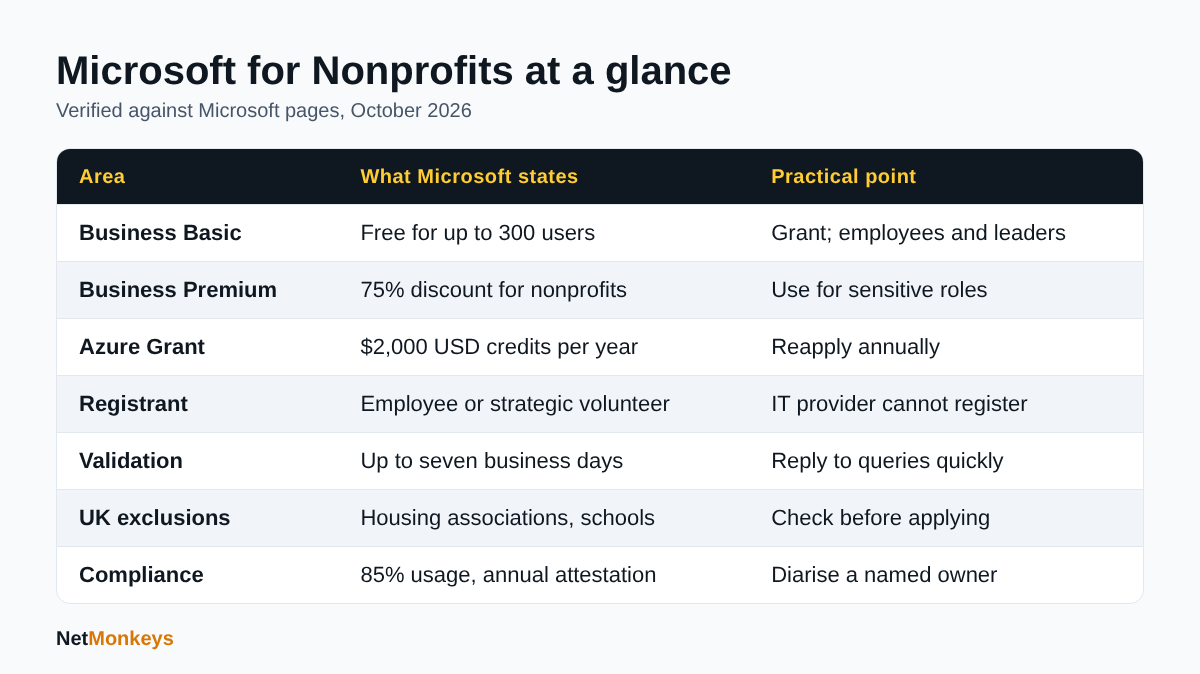 Summary of the main Microsoft for Nonprofits terms covered in this guide.
Who is eligible for Microsoft non profits in the UK?
A UK organisation is eligible if it is a nonprofit or non-governmental organisation with recognised charitable status in its country and does not fall into one of Microsoft's excluded categories. Microsoft's eligibility page sets out the rules, which I read in October 2026.
Which organisations does Microsoft exclude?
Microsoft lists several ineligible types: government agencies, international governmental and UN organisations, schools, colleges, universities and academic museums, financial institutions, professional, commerce and trade associations, professional and semi-professional sports organisations, political, labour and fraternal organisations, and organisations focused on influencing public policy. Hospitals and health systems are also excluded, apart from specified US rural types.
Are UK housing associations eligible?
No. The eligibility page states that housing associations in the UK are not eligible. This surprises many social housing providers because some are registered charities, so check before spending time on an application.
Are UK schools and academies eligible?
Not under the nonprofit programme. Schools, colleges and universities are on the excluded list, and Microsoft's FAQ notes that academic licences must be bought and managed in a separate tenant from nonprofit licences. A multi-academy trust that is also a charity should treat its schools as an education matter.
Who can register on behalf of the charity?
The registrant must be an employee or a strategic volunteer of the nonprofit. Microsoft states that third-party IT providers cannot register on an organisation's behalf. That has a practical consequence: your IT partner can advise and later administer the tenant, but a member of your own team must submit the application.
What does eligibility depend on in practice?
Microsoft says the check uses its criteria, public information, local records and registration details. For most UK applicants that means being able to point to a public record of charitable status. Registered charities in England and Wales, Scotland and Northern Ireland sit on public registers, and other nonprofits such as community interest companies need to expect more questions. Microsoft does not publish a UK document list, so I cannot confirm exactly what is requested.↑ Back to Contents
How do I apply for Microsoft non profits step by step?
You apply by registering through Microsoft's "Get started" link, submitting your organisation's details for validation and waiting for the result. Microsoft's FAQ says validation can take up to seven business days, while the offers guide says most organisations hear within three business days.
What should I prepare before registering?
Gather the items below first. Applications stall when the person registering cannot answer basic questions about the organisation.
- The organisation's full legal name exactly as it appears on its public register.
- Its charity or company registration number and registered address.
- A working website and an email address on the organisation's own domain where possible.
- The name of the employee or strategic volunteer who will register.
- A decision on which email domain will become the Microsoft 365 tenant.
What are the application steps?
- Decide who in your own team will register. It cannot be your IT supplier.
- Use Microsoft's Get started link and sign in or create an organisational account.
- Enter the organisation details and country, then submit for validation.
- Respond promptly if the validation partner asks for more information.
- When approved, open the Nonprofit Hub and review the offers available to your country.
- Claim grants and purchase discounted offers, then assign licences in the Microsoft 365 admin centre.
Who validates UK applications?
Microsoft uses a third-party validation supplier. Its FAQ does not name that supplier, so I cannot confirm which company handles UK checks, and I would be cautious about any site claiming to know. If the validation partner contacts you, check the request refers to your Microsoft registration before replying.
How long does approval take?
Plan for up to seven business days. Do not schedule a migration cut-over until the licences are visible in your admin centre.↑ Back to Contents
Why are Microsoft non profits applications rejected?
Applications are usually rejected because the organisation falls into an excluded category, the details do not match public records or the validation partner receives no reply. Microsoft's pages do not publish a list of rejection reasons, so the following comes from the published rules and from the way we see such applications fail.
What does Microsoft say about decisions?
The eligibility page states that Microsoft may grant or deny applications at any time and for any reason, at its sole discretion, and that decisions are not subject to external review. The FAQ adds that if you believe a decision is wrong you can contact Microsoft for a review.
What are the most common causes?
- Wrong organisation type: housing associations, schools, trade bodies and professional associations are excluded.
- Name mismatch: registering under a trading name when the public record uses a different legal name.
- Third-party registration: an IT provider or consultant submitting on your behalf.
- Unanswered validation queries: a request goes to a shared inbox nobody monitors.
- Policy-focused activity: organisations whose activities focus on influencing public policy are excluded.
What should I do if I am rejected?
Read the message carefully, correct any mismatch and use Microsoft's contact route for a review. Do not register a second time under slightly different details, because duplicate registrations create more confusion. If your organisation is in an excluded category, ask your reseller about commercial discounts instead.
↑ Back to ContentsWhat should I do after Microsoft approves my nonprofit?
After approval, claim your offers in the Nonprofit Hub, create or connect a Microsoft 365 tenant and assign licences to the right people. Microsoft's FAQ says to sign in to the Nonprofit Hub for instructions on purchasing offers and assigning users in the Microsoft 365 admin centre.
Which licence should a charity choose?
Choose Business Basic for people who only need email, Teams and web apps, and Business Premium for those who handle sensitive data or need desktop apps and stronger security. Many charities mix the two, giving Premium to finance, safeguarding and leadership roles. Our Microsoft 365 support team often helps map roles to licences before purchase.
Who can receive grant licences?
Microsoft's FAQ says grants go only to paid nonprofit employees and unpaid executive leadership. Discounted offers can be used by staff and volunteers, but not by programme participants, members or donors. If volunteers need accounts, plan for discounted licences rather than grants.
What is the correct order for setup?
- Confirm the domain and create the tenant, or connect an existing one.
- Create two emergency administrator accounts that are not tied to a person.
- Turn on multi-factor authentication before moving any data.
- Claim grants and buy discounted licences, then assign them.
- Migrate mail and files in stages. Our cloud migration services page explains how that is run.
- Document the setup so a successor can administer it.
What common mistakes slow charities down?
- Starting a migration before licences are assigned, then paying commercial rates for a stopgap.
- Using a personal email address as the programme contact, which causes problems when that person leaves.
- Creating a new tenant when an existing one already holds mail, then having to merge them later.
- Forgetting that MFA must be enrolled for every account, including shared mailboxes accessed by people.
- Leaving administrator rights with a former supplier. Our guide on what to do when an IT provider will not hand over admin access explains the escalation route.
How should I phase the first 30 days?
Spend the first week on tenant, domain and security baseline, the second on licence assignment and pilot users, the third on mail and file migration, and the fourth on training and clean-up. This is a sequencing suggestion rather than a Microsoft requirement, and smaller organisations can compress it. The point is that security configuration comes before data, not after it.
What should trustees and leaders ask?
Leaders should ask who owns the programme registration, who holds global administrator rights, where backups are held and when the next compliance attestation is due. These four questions expose most weaknesses in an hour.
What about Azure credits?
The $2,000 annual Azure Grant is set up through Microsoft's Azure onboarding route for nonprofits. According to the FAQ, credits can be reapplied for each year while you remain eligible, and renewal instructions arrive 30 days before expiry. Microsoft Entra ID Premium cannot be bought with Azure credits. Credits suit modest workloads, so cost-control alerts matter from day one.↑ Back to Contents
How should a nonprofit secure its Microsoft 365 tenant?
Switch on multi-factor authentication, block legacy sign-in, limit administrator roles and protect devices before you load real data. Charities hold donor, beneficiary and safeguarding records, so a compromised mailbox is a data protection incident as well as an operational one.
Should I use security defaults?
Yes, if you have no Entra ID P1 or P2 licences and no complex needs. Microsoft's security defaults documentation describes six baseline controls: MFA registration for all users, MFA for administrators at every sign-in, risk-based prompts, blocking of legacy authentication, blocking of device code flow and MFA for privileged Azure management. They are free, and Microsoft states the 14-day registration grace period no longer applies, so users register at next sign-in.
When should I move to Conditional Access?
Move when you need exceptions or finer control, which requires at least Entra ID P1. Business Premium includes this capability. The two cannot run together, so disable security defaults and enable Conditional Access immediately afterwards, keeping two cloud-only emergency access accounts.
What does the NCSC recommend for charities?
The NCSC's guidance collection for small organisations and charities points to free resources including its Cyber Action Toolkit, Check your cyber security tool, Early Warning service, Exercise in Box and guidance on choosing a managed service provider. It also highlights the Cyber Essentials scheme, which our Cyber Essentials service supports.
What security checklist should I follow?
- MFA enforced for every account, with number matching in Microsoft Authenticator.
- No more than a few named global administrators, plus two emergency accounts.
- Devices enrolled for management and encrypted.
- Endpoint protection monitored, for example through managed EDR.
- Regular, tested backups of mail and files held outside the main tenant.
- Staff briefed on phishing, with a clear way to report it.
For smaller teams, our guide to cybersecurity for small business sets out sensible priorities.
↑ Back to ContentsHow do I stay compliant after joining Microsoft non profits?
Stay compliant by completing the donor-rule attestation, removing unused licences and keeping active usage of granted licences at 85% or more. These conditions come from Microsoft's eligibility page and are easy to miss once the excitement of approval has passed.
What happens if I stop meeting the conditions?
Microsoft states that failing to complete the attestation may remove eligibility until it is done, and that it may reduce or revoke access for abuse, such as sharing licences with ineligible organisations. The FAQ adds that an organisation found ineligible may lose nonprofit renewal pricing and move to commercial licensing at the next renewal, while existing licences generally stay active through the current term.
What routine checks should an administrator run?
- Quarterly review of assigned licences against current staff, removing leavers promptly.
- Annual attestation diary entry, owned by a named person.
- Check that volunteers hold discounted, not granted, licences.
- Review of Azure credit usage ahead of the annual renewal.
- Record of who registered the organisation, so access is not lost when they leave.
Why does ownership matter?
Microsoft requires an employee or strategic volunteer to register, so the programme account is tied to a person. If they leave without handover, you can lose the ability to manage renewals. Our IT support handover checklist covers what to document when responsibilities change.
↑ Back to ContentsDo I need an IT partner to manage Microsoft for nonprofits?
You do not need one to apply, because Microsoft requires the application to come from your own people, but many charities use a partner for setup, security and ongoing administration. The question is how much capability sits in-house after the grant licences are live.
What should a partner do for a nonprofit?
- Plan the tenant, domain and licence mix before purchase.
- Run the migration with minimal disruption to staff and volunteers.
- Configure identity, device and email security to a sensible baseline.
- Provide a helpdesk and clear escalation, for example through managed IT support.
- Document everything and hand over admin rights when you ask.
How do I judge a partner?
Ask for a named Microsoft partner status and experience with nonprofit tenants, then ask how they handle licence compliance and offboarding. Our guide to choosing an IT support company sets out the wider criteria. If you are weighing options, outsourced IT versus in-house is a useful comparison.
What about Copilot for a nonprofit?
Copilot Chat is included with a Microsoft 365 subscription, and the paid Microsoft Copilot add-on is listed at $25.50 per user per month on Microsoft's guide. Before buying, clean up permissions so Copilot only surfaces what staff should see. Our explainer on Microsoft 365 Copilot covers readiness.
↑ Back to ContentsMicrosoft non profits: what should you do next?
Confirm you are in an eligible category, register through your own team, secure the tenant before moving data and diarise the compliance conditions. Microsoft non profits offers can cut software costs considerably, but only if the set-up is done carefully and the organisation stays eligible.
If you would like help with the tenant, migration or security baseline, speak to the NetMonkeys team. We are Manchester-headquartered, with offices in Nottingham and London and field engineers across around 12 UK cities.
Who wrote this and how it was checked
Written by Caleb Adoh, Growth Marketing Manager at NetMonkeys, a Microsoft Solutions Partner. Content was checked against Microsoft's nonprofit eligibility, FAQ, offers guide and security defaults documentation, and the NCSC guidance collection, as at October 2026. Prices quoted are Microsoft's US dollar figures; confirm UK pricing in the Nonprofit Hub.
Frequently Asked Questions (FAQs)
What is Microsoft non profits?
Microsoft non profits refers to the Microsoft for Nonprofits programme, which gives verified charities and NGOs grants and discounts on Microsoft 365, Azure and Dynamics 365. You register, Microsoft's validation supplier checks eligibility, and approved organisations claim offers through the Nonprofit Hub. Eligibility rules exclude some bodies, including UK housing associations and schools.
Is Microsoft 365 free for UK charities?
Business Basic is described by Microsoft as free for up to 300 users, which covers web and mobile apps, Teams and storage. Business Premium is discounted rather than free. Microsoft's pages quote US dollar prices, so check the Nonprofit Hub for UK pricing and availability once your organisation is approved.
Who can register a charity with Microsoft for Nonprofits?
The registrant must be an employee or strategic volunteer of the nonprofit. Microsoft states that third-party IT providers cannot register on an organisation's behalf. Your IT partner can advise and help with setup afterwards, but a member of your own team should submit the application and keep the programme details.
How long does Microsoft nonprofit approval take?
Microsoft's FAQ says validation can take up to seven business days depending on country requirements and how quickly you respond to document requests. Its offers guide says most organisations receive results within three business days. Respond promptly to any validation message and avoid planning migration dates until licences are visible.
Are UK housing associations eligible for Microsoft nonprofit offers?
No. Microsoft's eligibility page states that housing associations in the UK are not eligible, even where some are registered charities. Schools, colleges and universities are also excluded. If your organisation falls into an excluded category, ask a reseller about commercial pricing or other discounts instead.
Why was my Microsoft for Nonprofits application rejected?
Microsoft does not publish a list of reasons and says decisions are at its discretion. Common causes include an excluded organisation type, details that do not match public records, a third party registering and unanswered validation requests. You can contact Microsoft to ask for a review if you believe the decision is wrong.
Do Microsoft non profits get Azure credits?
Microsoft lists an annual Azure Grant of $2,000 (USD) in credits per year for eligible nonprofits. Its FAQ says organisations can reapply annually while they remain eligible and that renewal instructions arrive 30 days before expiry. Entra ID Premium cannot be bought with Azure credits.
Can volunteers use Microsoft nonprofit grant licences?
Not usually. Microsoft's FAQ says grants go only to paid employees and unpaid executive leadership, while discounted offers can be used by staff and volunteers. Programme participants, members and donors are not eligible for either. Plan licences for volunteers as discounted purchases and review assignments regularly.
Speak to a NetMonkeys specialist
Want an expert to review your setup, or to put this guide into practice with you? Our team can help.
Book a conversation
