
What Is an MSP? Managed Service Providers Explained for UK Businesses
An MSP, or managed service provider, runs part or all of your IT for a predictable fee. This guide explains what an MSP is, what it does, how it is priced and how to choose one in the UK.

Key Takeaways
- An MSP is a managed service provider: a company that takes ongoing responsibility for some or all of another organisation’s IT, usually under a contract with agreed service levels.
- In IT, an MSP typically provides a help desk, monitoring, security, patching, backup, cloud and Microsoft 365 management, often for a monthly fee.
- MSPs differ from break-fix support, which fixes problems only when they arise, and from an in-house IT team, which you employ directly.
- Government research estimated 11,492 active managed service providers in the UK in 2023, and most of them were micro businesses.
- Because MSPs hold privileged access to client systems, security credentials, certifications and contract terms matter as much as price.
If you have seen the term MSP in a tender, a supplier email or a job advert, you may be asking what it means. In technology, MSP stands for managed service provider, and it describes a way of buying IT: you hand ongoing responsibility for defined services to a specialist company rather than fixing problems as they appear.
This guide covers what an MSP is, what an MSP company actually does, how the model works and what to check before you sign. NetMonkeys is a Manchester-based managed IT support company and Microsoft Solutions Partner, so we have a view, but we have tried to explain the model fairly, including where it may not suit you. For an overview of what we offer, see our managed IT services.
What is an MSP?
An MSP is a managed service provider. It is a business that delivers services to other businesses on an ongoing basis, taking responsibility for outcomes such as keeping systems running, secure and supported. When people ask “what is MSP” or “what is an MSP company”, this is the definition they want.
The UK government has set out a four-part definition of a managed service in its research on managed service providers. A managed service is one provided by one business to another, related to IT services such as systems, infrastructure, networks and applications, reliant on network and information systems, and providing regular and ongoing management support, active administration or monitoring. You can read the detail in the government’s research on UK managed service providers.
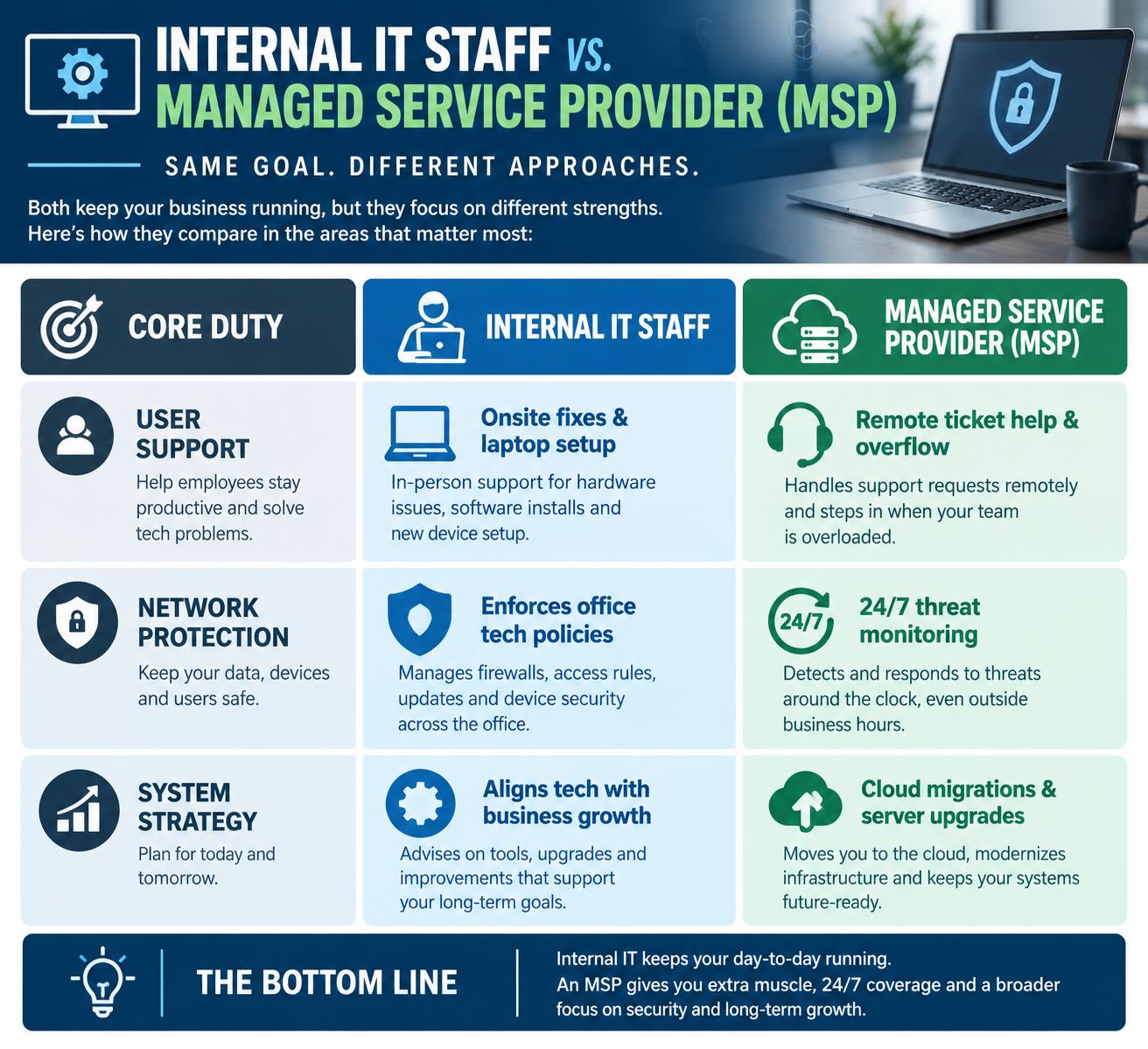
In plain terms, an MSP is an outsourced IT department with a service agreement. You pay a regular fee, and in return the provider monitors, maintains and supports your technology and responds when something goes wrong.
↑ Back to ContentsWhat is MSP in IT?
In IT, MSP almost always means managed service provider. The “managed” part is the key. Instead of selling you a one-off project or a repair, the provider manages a service continuously, often including active monitoring and maintenance so that problems are found before users notice them.
If you are asking what is an MSP in tech more broadly, think of it as the service layer between a business and its technology. Cloud platforms, devices, networks and security tools all need someone to run them day to day, and an MSP takes on that role under a contract.
You may also see other terms for the same idea. An IT MSP, an MSP in tech and an MSP company usually mean the same thing: a business that delivers managed IT services. Some providers describe themselves as managed IT support companies or outsourced IT providers.
Other meanings of MSP
The letters have other uses. In the UK, MSP can mean a Member of the Scottish Parliament. In recruitment, an MSP can be a managed service provider that administers a client’s agency workforce. In this guide, MSP means a managed IT service provider.
What does an MSP do?
Services vary, but a typical IT MSP covers the following areas.
- Help desk and end-user support: a service desk that logs, tracks and resolves staff issues, remotely and sometimes on site.
- Monitoring and maintenance: tools that watch servers, devices and networks, apply updates and flag faults early.
- Cyber security: endpoint protection, email security, multi-factor authentication, vulnerability management and security awareness support.
- Backup and disaster recovery: protecting data and testing that it can be restored.
- Cloud and Microsoft 365 management: administering tenants, licences, security settings and migrations. See our Microsoft 365 consultancy.
- Networks and infrastructure: Wi-Fi, firewalls, servers and connectivity.
- Strategy and planning: roadmaps, budgets and reviews, sometimes through a virtual CIO. See our vCIO services.
- Compliance support: help to achieve and maintain standards such as Cyber Essentials. See our Cyber Essentials service.
Not every MSP does all of this, and some specialise. Ask for a clear list of what is in scope and what costs extra.
↑ Back to ContentsHow does an MSP work?
The relationship is usually built around a contract and a service level agreement, often called an SLA. The SLA sets out what is covered, how quickly the provider will respond and resolve issues, and how performance is reported.
Discovery and audit
The MSP reviews your devices, network, licences, security and users to document what you have and what needs fixing.
Onboarding
Monitoring tools and security software are deployed, documentation is created and users are introduced to the help desk.
Ongoing service
The provider monitors systems, patches devices, answers support requests and handles incidents within agreed times.
Reporting and review
Regular reports and review meetings track tickets, response times, security events and improvements.
Planning
Lifecycle planning, projects and budgets keep technology aligned with the business.
Good MSPs report openly. Our guide on how to audit your MSP’s SLA reports explains what to look for.
↑ Back to ContentsHow are MSPs priced?
MSP pricing is normally a recurring monthly fee, though the structure differs between providers.
| Model | How it works | Considerations |
|---|---|---|
| Per user | A fixed price per person each month | Simple to budget and scales with headcount |
| Per device | A price for each managed device | Suits organisations with many shared or specialist devices |
| Tiered packages | Bronze, silver and gold style bundles | Check what is excluded from each tier |
| Fixed fee | One agreed monthly price for a defined scope | Predictable, but scope must be precise |
| A la carte | Pay for chosen services only | Flexible, but can become complex |
We compare the main options in our guide to fixed-fee vs per-user IT support pricing, and our overview of IT support pricing and cost sets out what typically affects the price. We have not listed figures here because they depend on size, systems, security needs and service hours.
↑ Back to ContentsMSP vs break-fix vs in-house IT: what is the difference?
Organisations usually choose between three approaches, or a combination.
| Approach | What you get | Best suited to |
|---|---|---|
| Break-fix | Support only when something breaks, charged per job | Very small organisations with simple needs and low risk |
| Managed service provider | Ongoing monitoring, support and security for a regular fee | Organisations wanting predictable cost and planned, preventative IT |
| In-house IT team | Staff you employ directly | Larger organisations with complex or specialist needs |
| Co-managed IT | Your team and an MSP share responsibility | Organisations with some IT staff who need extra capacity or skills |
For more detail, see outsourced IT support vs in-house IT, co-managed IT vs fully outsourced and when you have outgrown your local IT person.
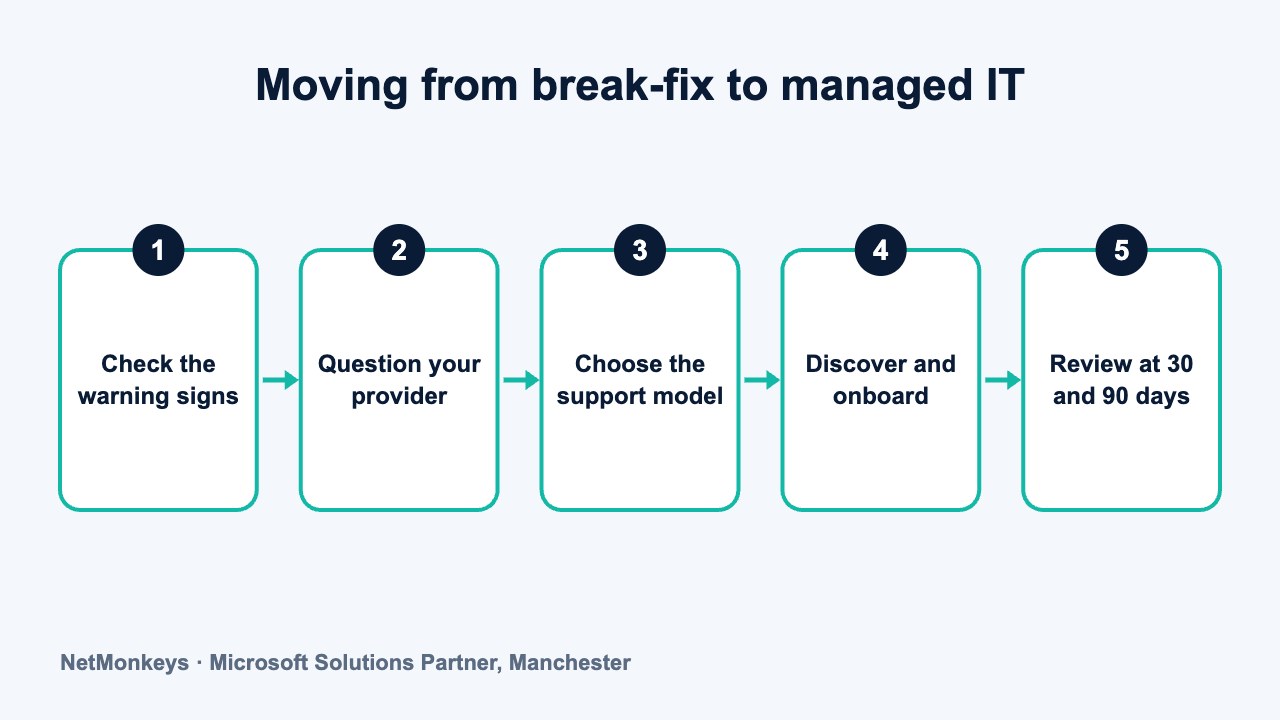
Break-fix reacts to problems. A managed service aims to prevent them.
How is an MSP different from an MSSP or a reseller?
The acronyms can blur together, so here is how they differ.
| Term | Stands for | Main focus |
|---|---|---|
| MSP | Managed service provider | Ongoing IT management and support |
| MSSP | Managed security service provider | Security monitoring, detection and response |
| VAR | Value-added reseller | Selling hardware and software with added services |
| CSP | Cloud solution provider | Reselling and supporting cloud platforms such as Microsoft 365 and Azure |
| MDR | Managed detection and response | Specialist threat detection and response service |
Many MSPs offer security services too, and many are also Microsoft partners. The important question is not the label but what is in the contract and who is accountable.
↑ Back to ContentsWhat is an MSP in the UK IT industry?
When people search for what is an MSP IT industry UK buyers can trust, they are usually asking two things: what the term means and how the UK market is made up. The definition is above, so this section looks at the market.
The UK has a large and varied managed service sector. Research for the Department for Science, Innovation and Technology, carried out between June and September 2023 and published in February 2024, estimated 11,492 active managed service providers in the UK. It estimated that they generated combined annual revenue of £52.6 billion and employed around 294,340 full-time equivalent staff. Most were small: the research put 59% in the micro category, 28% as small, 9% as medium and 4% as large.
That mix means quality varies widely. A local MSP with a handful of engineers and a national provider with a large service desk can both be good, but they offer different strengths. Check accreditations, references and how the provider handles growth and absence.
Security and regulation are changing too. The government research notes that MSPs are attractive targets because they often hold privileged access to client systems. The Cyber Security and Resilience (Network and Information Systems) Bill, which completed Lords Report Stage on 26 October 2026 according to ISACA, is intended to bring certain managed service providers into scope of regulation, with details to be set out in secondary legislation. We have not seen it become law at the time of writing, so check the current position. Our guide to the Cyber Security and Resilience Bill explains what UK firms should know.
↑ Back to ContentsWhat are the benefits and risks of using an MSP?
Benefits
- Predictable monthly cost instead of unplanned repair bills
- Access to a wider range of skills than one hire can provide
- Active monitoring that finds problems early
- Faster support, often with out-of-hours cover
- Security and compliance expertise, including Cyber Essentials
Risks to manage
- The MSP has privileged access, so its own security matters
- Poor contracts can hide exclusions and extra charges
- Slow or generic service if the provider is overstretched
- Dependency if documentation and ownership are unclear
- Lock-in through long contract terms
Most risks can be reduced through due diligence and a good contract. Ask who owns your documentation and credentials, how quickly you can leave and what happens to your data if you do.
↑ Back to ContentsHow do you choose an MSP?
A structured evaluation helps you compare providers on more than price. Our 2026 buyer’s guide to evaluating managed IT support companies goes further, but these are the essentials.
- Define your needs: users, devices, systems, locations, security requirements and hours of cover.
- Check credentials: Cyber Essentials, relevant Microsoft partner status, vendor accreditations and any sector experience.
- Ask about security: how the MSP protects its own tools and access, including multi-factor authentication and staff vetting.
- Review the SLA: response and resolution targets, hours, what is excluded and how performance is reported.
- Speak to references: ideally organisations of a similar size and sector.
- Understand the exit: notice periods, documentation handover and data return.
- Compare total cost: include projects, hardware, licences, onboarding and out-of-scope work.
Local presence matters to some organisations and not to others. If you want on-site support, see our pages for IT support in Manchester and IT support in London.
↑ Back to ContentsWhat should an MSP contract include?
Read the contract and the SLA together. These are the points we would look for.
| Item | Why it matters |
|---|---|
| Scope of services | Defines what is included and what is charged extra |
| Response and resolution times | Sets expectations for urgent and routine issues |
| Hours of cover | Shows whether out-of-hours support is included |
| Security obligations | Confirms how the MSP protects your data and systems |
| Reporting | Gives you evidence of performance |
| Term and notice | Controls lock-in and your ability to leave |
| Data and documentation ownership | Ensures you can take your information with you |
| Liability and insurance | Shows who is responsible if something goes wrong |
Is an MSP right for your business?
An MSP is often a good fit when
- You have no in-house IT, or one person carrying too much
- You want predictable IT costs
- You need security and compliance support
- You are growing and your IT is not keeping pace
You may not need one when
- You have a capable in-house team with spare capacity
- Your needs are very simple and low risk
- You only need a one-off project
- You want complete control of every system
Many organisations land in the middle and choose a co-managed arrangement, where an MSP supports an existing IT person or team.
↑ Back to ContentsHow does NetMonkeys work as an MSP?
NetMonkeys is a managed IT support company headquartered in Manchester, with offices in Nottingham and London and field engineers across the UK. We are a Microsoft Solutions Partner, hold Cyber Essentials certification and are a Huntress partner. Our managed IT support covers the service desk, monitoring, security, Microsoft 365 and cloud, with clear reporting.
If you are weighing up whether an MSP is right for you, we are happy to review your current set-up and give an independent view.
↑ Back to ContentsFrequently Asked Questions (FAQs)
What is an MSP?
An MSP is a managed service provider: a company that takes ongoing responsibility for some or all of another organisation’s IT services, usually under a contract with agreed service levels.
What is MSP in IT?
In IT, MSP means managed service provider. It describes a provider that manages technology continuously, including monitoring, support, security and maintenance, rather than fixing issues only when they arise.
What is an MSP company?
An MSP company is a business that sells managed services to other businesses. In the technology sector that normally means managed IT services such as help desk, security, backup and cloud management.
What is an IT MSP?
An IT MSP is a managed service provider that specialises in IT. The term is used interchangeably with MSP in tech, managed IT support company and outsourced IT provider.
What is an MSP in the UK IT industry?
It is a provider of managed IT services to UK organisations. Government research estimated 11,492 active providers in 2023, most of them micro businesses, so quality and size vary widely.
What is the difference between an MSP and an MSSP?
An MSP manages general IT services, while an MSSP focuses on security monitoring and response. Many MSPs also provide security services, so check exactly what is in the contract.
How much does an MSP cost?
Costs depend on the number of users and devices, the systems supported, hours of cover and security requirements. Pricing is commonly per user, per device, tiered or fixed fee.
What is the difference between an MSP and break-fix support?
Break-fix support responds to problems and charges per job. An MSP provides ongoing monitoring and support for a regular fee, aiming to prevent problems and cap unplanned costs.
What should I look for when choosing an MSP?
Look at credentials such as Cyber Essentials, the SLA, security practices, references, contract terms and exit arrangements. Compare the total cost, not just the monthly fee.
Does NetMonkeys provide managed IT services?
Yes. NetMonkeys is a Manchester-based managed IT support company and Microsoft Solutions Partner, supporting organisations across the UK.
Sources and Further Reading
- GOV.UK: Research on UK managed service providers
- ISACA: The UK’s Cyber Security and Resilience Bill, key takeaways from Lords Report Stage
- Gowling WLG: Cyber Security and Resilience Bill, what is the latest
- NCSC: Cyber Essentials
More guides on choosing IT support
The 2026 Buyer’s Guide to Managed IT Support
How to evaluate and compare providers.
Read more →PricingFixed-Fee vs Per-User IT Support Pricing
Which pricing model suits you.
Read more →ReportingHow to Audit Your MSP’s SLA Reports
What good reporting looks like.
Read more →ModelsCo-Managed IT vs Fully Outsourced
Choosing how much to hand over.
Read more →Thinking about a managed service provider?
Talk to NetMonkeys about managed IT support, security and Cyber Essentials. We will review your current set-up and give you independent advice.
Book a Free IT Review Call 0161 834 9345
