
The Single IT Manager Dilemma: Key Person Risk Explained
Single IT manager key person risk explained for MDs: absence, resignation, shared admin access and no peer review, with a bus factor test and 30-day plan.
The quick answer
Single IT manager key person risk is the exposure a business carries when one person holds the knowledge, passwords and decision-making for its IT. It is not a criticism of that person. It is a structural gap: if they are ill, on leave or leave the company, support, security and continuity depend on one set of notes, or none. Co-managed IT is the usual way to close the gap without replacing the internal role.
Who this is for: Managing Directors and business owners
Key takeaways
- Key person risk is a structural issue in how IT is organised, not a judgement on the individual doing the job.
- The main exposures are absence, resignation, undocumented knowledge, concentrated admin access, no peer review and no escalation route.
- A simple bus factor self-test shows within minutes how exposed the business would be.
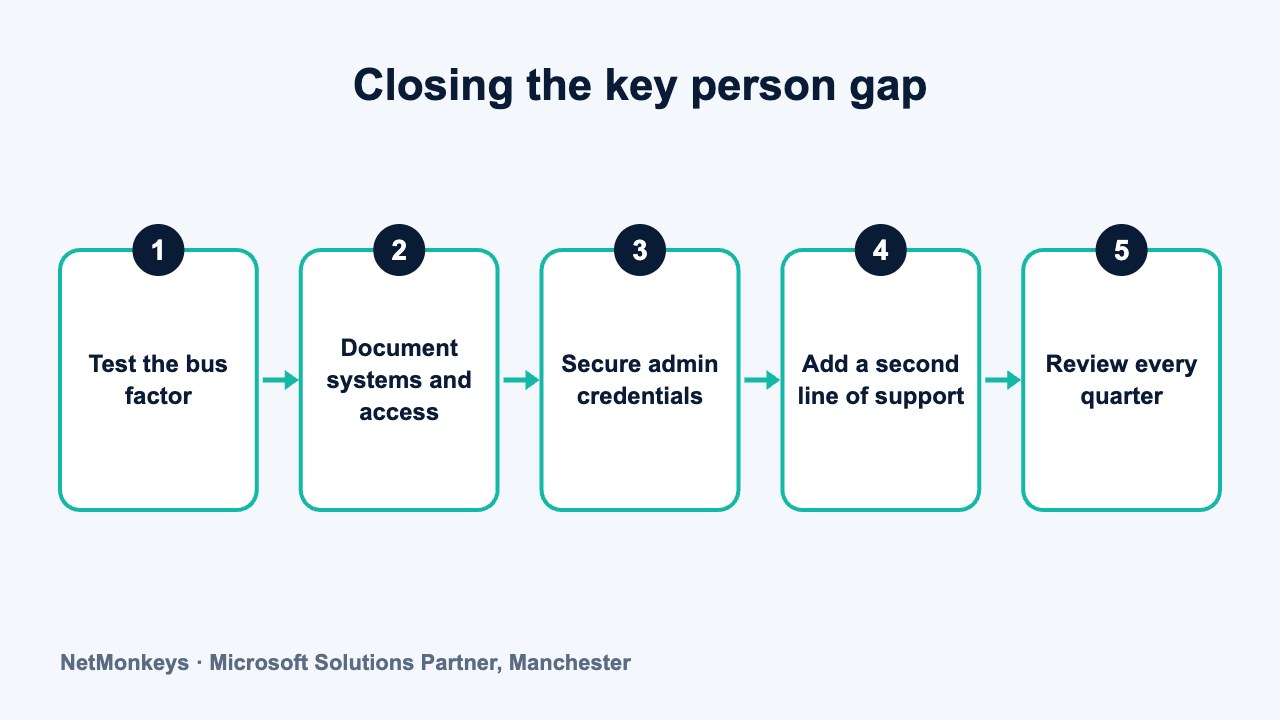
- Documentation, shared access and a named second line reduce risk quickly, often within 30 days.
- Co-managed IT adds a team behind the internal manager, protecting the business and the person.
What is single IT manager key person risk?
Single IT manager key person risk is the exposure created when one employee is the only person who understands, controls and can repair the systems the business depends on. Email, files, security, backups, suppliers and user accounts all run through them. When they are present, everything works. When they are not, there may be nobody who knows what to do.
Many growing businesses reach 50 to 150 staff with exactly this arrangement. It usually started sensibly: a capable person was hired, took ownership of IT and built much of what exists today. Nothing went wrong, so nothing was changed. The risk is invisible until the day it is tested.
This article is written for managing directors and owners. It does not suggest that an internal IT manager is a problem. In most cases they are the reason things work. It explains the operational and security risks of the structure, gives you tools to measure your own exposure and sets out a practical 30-day plan to reduce it, with respect for the person at the centre.
- Operational risk: the business stops, or slows, when the person is unavailable.
- Security risk: all administrative power sits with one account, and there is no second pair of eyes.
- Knowledge risk: how and why systems were built exists only in one person's memory.
- People risk: a single point of workload and stress that leads to burnout and resignation.
Practical tip
Frame the conversation as protecting the business and supporting the IT manager. Done in that spirit, most internal IT staff welcome the discussion, because it also relieves them of being permanently on call.
Why does one IT person become a single point of failure?
Key person risk builds gradually. A small IT function begins with an enthusiastic generalist. Over time, they become the owner of every system, the first call for every problem and the keeper of the passwords. Each new tool they introduce makes them more indispensable.
There are three common drivers. The first is growth: the business doubles but IT remains one person. The second is trust: because the person is reliable, nobody asks for documentation. The third is time: they are so busy fixing issues that writing things down is always tomorrow's task.
None of this reflects poorly on the individual. A person who is busy fixing things has little capacity to document or to hand over. The risk is therefore created by how the role is resourced, which is a leadership decision and a fixable one.
The warning signs
- Everyone asks them first: staff go directly to one person, even for routine issues.
- Nobody else has admin access: or the only other administrator is also the same person's second account.
- Holidays are quiet and tense: leave is approved with anxiety, and a phone is expected to stay on.
- Documentation is thin or out of date: the network diagram, if it exists, was last updated years ago.
- Decisions are not reviewed: purchases, configurations and security settings are made without a second opinion.
- The suppliers only know one contact: broadband, telephony and software vendors all deal with the same person.
If three or more of these apply, treat the exposure as material. Our guide to the levels of IT support describes how a normal escalation structure works, and shows what is missing when everything stops at one person.
↑ Back to contentsWhat happens when the IT manager is ill, on leave or resigns?
The risks fall into scenarios that every business will meet at some point. The table below sets out the scenario, the likely impact and a practical mitigation. It is a planning aid, not a prediction, and the impact will depend on how much documentation and shared access already exists.
| Scenario | Likely impact | Mitigation |
|---|---|---|
| Short-term sickness | Faults wait, new starters are delayed, monitoring alerts go unseen | Named backup contact, remote support agreement, shared alert mailbox |
| Annual leave | Business-hours support has no cover; the person is contacted while away | Scheduled cover with a second line, leave handover note, no expectation of availability |
| Long-term absence | Projects stall; routine maintenance is missed; security patches lapse | Retainer with an external team, shared documentation, pre-agreed access |
| Resignation | Knowledge walks out with them; handover is rushed; passwords and licences are unclear | Standing documentation, secured credentials in a managed vault, an exit checklist, a co-managed partner |
| Dismissal or dispute | Risk of access being withheld or systems being changed | Independent break-glass administrator account, ownership of licences in the company's name |
| Cyber incident while they are away | Slow detection and response; nobody authorised to act | Monitoring with a second line, incident plan with named roles, out-of-hours contact |
| Burnout | Declining quality, errors, eventual resignation | Workload review, shared on-call, external support for routine tasks |
| Single admin error | No peer review to catch a misconfiguration | Change log, second-person review for high-risk changes, regular audit |
Notice how many of these scenarios are not about malice or even competence. Illness, leave and resignation are ordinary events. Every business with a single IT person will face at least one of them. The only question is whether the business is ready when it happens.
Common mistake
Planning for the dramatic scenario and ignoring the common ones. A week of sickness or a two-week holiday occurs far more often than a resignation, and the lack of cover during them is where most day-to-day risk sits.
What are the security risks of relying on one person?
Security is where key person risk becomes most serious. In a single-person IT function, one individual typically holds global administrator rights across Microsoft 365, the network, the firewall, backups and key business systems. If that account is compromised, the attacker inherits all of it. If the individual leaves on poor terms, the business may not be able to regain control.
- Concentrated privilege: one account with unrestricted access is an attractive target and a single failure point.
- No separation of duties: the person who makes changes also approves and reviews them.
- No second pair of eyes: misconfigurations, such as open ports or weak policies, go unchallenged.
- Patch and backup gaps: when the person is away, routine maintenance and backup checks can slip.
- Slow incident response: detection depends on the individual noticing, and response depends on them being reachable.
- Orphaned access: accounts for former staff and suppliers may stay active because nobody audits them.
Some of these points are also frequently asked about by insurers and customers. If you are preparing for a renewal or a supplier questionnaire, see our guides on cyber insurance and on cyber security best practice. Check the current requirements with your broker, as they change.
A single person also cannot provide a full range of expertise. A good internal IT manager may be strong on networks and users but less so on cloud security, compliance or incident response. Adding specialist cover through cyber security services fills those gaps without replacing the person.
Account takeover and the single administrator
The most common route into a Microsoft 365 tenant is a compromised account. If that account is the sole global administrator, the impact is wide. Our guide on securing Microsoft 365 against phishing and account compromise explains controls such as multi-factor authentication and separate admin accounts, which every business should have in place regardless of structure.
↑ Back to contentsWhat is your bus factor? A self-test for business owners
The bus factor is a blunt but useful measure: how many people would need to be unavailable before the business could no longer maintain its IT? For many firms with a single IT manager the answer is one. The test below takes about ten minutes. Answer each question yes or no, without consulting your IT manager first, then compare notes with them.
- Can someone other than the IT manager reset a user's password and add a new starter today?
- Does a second person hold administrator access to Microsoft 365, the firewall and the backup system?
- Is there a written list of every system, supplier, contract and renewal date?
- Do you know where the admin passwords are stored, and could the business retrieve them without the IT manager?
- Are all software licences and domain registrations held in the company's name?
- Is there a documented backup and restore process that someone else has tested?
- Does anyone review changes to security settings besides the person who makes them?
- If the IT manager were away for two weeks, is there a named person or supplier to call?
- Could a new IT manager understand the network from the documentation alone?
- Does the IT manager take their full annual leave without being contacted?
Score one point for each yes. A score of eight to ten suggests a well-protected function. A score of four to seven indicates gaps that could be closed in a few weeks. A score of three or fewer means the business is relying heavily on one person, and action should be a priority. This is a guide, not an audit.
What we would check first
Question four. If the administrator credentials exist only in one person's memory or personal password manager, nothing else in this article matters as much. Securing them in a shared, company-owned vault is the single most valuable early step.
How should you respect and support your internal IT manager?
A discussion about key person risk can feel threatening to the person at the centre. They may hear it as a message that they are not trusted or are about to be replaced. It is worth approaching the conversation carefully, because their cooperation is the most important factor in whether the outcome is good.
Start by recognising what they have done. In most businesses, the IT manager has kept systems running with limited resources, limited recognition and an always-on expectation. They know the history, the workarounds and the people. That knowledge is valuable, and a good solution protects it. It does not replace it.
- Be explicit that this is about the structure: state clearly that the aim is to reduce pressure and protect the business, not to question their performance.
- Involve them in the design: ask what support would make their job easier and what they would never want to lose.
- Offer real relief: show how shared on-call, a help desk for routine requests and holiday cover reduce their load.
- Invest in them: training, certifications and time for improvement work signal that the role is valued.
- Agree the boundaries: set out what stays with them, what is shared and what is handed to the partner.
- Share the credit: when resilience improves, make sure the business knows who made it possible.
Burnout is a related risk. A single IT manager who is always reachable is often one difficult quarter from leaving. Our internal IT burnout checklist helps you spot the signs early, and the reasons businesses outsource IT support explains how sharing the load can improve retention.
Practical tip
Hold the first conversation with the IT manager before any supplier meeting. Ask them to identify the three risks they worry about most. They usually know exactly where the gaps are, and have been waiting to be asked.
How does co-managed IT act as a safety net?
Co-managed IT is an arrangement in which an external provider works alongside your internal IT manager or team. The internal person keeps day-to-day ownership and context. The provider adds a help desk, monitoring, specialist skills, cover for absence and a second pair of eyes on security.
It addresses key person risk directly. There is a team behind the individual, a second set of administrators, documented systems and an escalation route when something is beyond one person's expertise. It does so without removing the internal role, which is why many internal managers prefer it to the alternatives.
- Absence cover: a help desk and engineers handle routine requests and incidents when the manager is away.
- Peer review: security changes and configurations are checked by a second team.
- Documentation: systems and access are recorded in a shared, maintained format.
- Escalation: specialist skills in cloud, security and networking are available on demand.
- Continuity: if the manager leaves, the provider holds the knowledge and can stabilise the service while you recruit.
It is not the only option, and it is not always the right one. A fully outsourced arrangement suits some businesses better, and a second internal hire suits others. The sibling article on co-managed IT versus fully outsourced IT compares them in detail. For many businesses with an effective internal manager, managed IT support delivered in a co-managed form is the lowest-disruption way to remove the key person gap.
When co-managed may not be needed
If your internal IT is a team of three or more, with documented processes, shared access and tested cover, you already have most of the protection. Co-managed IT adds value mainly where the team is one or two people, where specialist skills are missing or where the business is growing quickly. Check the exposure with the self-test before deciding.
↑ Back to contentsWhat belongs on a documentation and access checklist?
Documentation and access are the quickest wins. They require time more than money and produce a lasting benefit. The checklist below covers what a competent outsider would need in order to keep the business running for a fortnight.
- System inventory: every server, cloud service, line-of-business application and network device, with an owner and a purpose.
- Network overview: a diagram of sites, links, firewalls, switches, Wi-Fi and key IP ranges.
- Supplier register: contact details, account numbers, contract end dates and renewal terms for each supplier.
- Licence register: which licences exist, who holds them and when they renew, all in the company's name.
- Admin credentials: stored in a company-owned password vault with named custodians and a break-glass account.
- Domain and DNS ownership: registrar logins and renewal details held by the company, not an individual.
- Backup and recovery: what is backed up, where, how often, and the documented, tested restore steps.
- Joiner, mover and leaver process: a written checklist for new starters, role changes and departures.
- Incident contacts: who to call and in what order for a security incident or outage, with out-of-hours numbers.
- Known issues and workarounds: the folklore of the estate, written down.
Treat the last item as a priority. Undocumented workarounds are what a new person finds hardest to discover. Ask the IT manager to record them in the order they come to mind, and tidy them later. If you need a framework for the asset record, see our guide to cyber security asset management.
For incident roles, a ready template is a good starting point: our cyber incident response plan template provides a structure you can adapt. Business continuity planning builds on these records, and business continuity services can help test them.
Common mistake
Writing documentation once and filing it. Documentation that is not reviewed becomes wrong, and wrong documentation is worse than none during an incident. Set a quarterly review date and a named owner.
What does a 30-day action plan look like?
The plan below is designed to reduce the most urgent exposure within a month, with no major spend. It assumes the managing director sponsors the work and the IT manager leads the detail. Adjust the pace to suit your business.
| Week | Focus | Actions | Outcome |
|---|---|---|---|
| Week 1 | Understand and agree | Run the bus factor test. Hold a supportive conversation with the IT manager. Agree the goal and the owner of the plan | Shared view of the exposure and agreed intent |
| Week 2 | Secure access | Move admin credentials to a company-owned vault. Create a break-glass account. Confirm licence and domain ownership | No single person controls the keys |
| Week 3 | Document the essentials | Complete the system inventory, supplier register, backup process and leaver checklist. Record known workarounds | A pack an outsider could use |
| Week 4 | Add a second line | Review options for cover: a retained provider, co-managed IT, or an additional hire. Agree out-of-hours contacts and the incident plan | A named backup for absence and incidents |
At the end of the month, repeat the self-test and compare scores. Then decide on the longer-term structure. Options include a co-managed agreement, an additional internal hire, a strategic adviser or a mixture. A virtual CIO can provide the planning layer, particularly where the business is growing, and the IT consultancy service can help you evaluate the choice independently.
If this is part of a wider growth plan, the sibling guide on the shift in IT infrastructure at around 50 seats explains why the same pattern tends to appear at that size.
If you would like an independent view of your exposure, or to talk through how a co-managed arrangement might work alongside your existing IT manager, you can contact NetMonkeys. The conversation can start with what your IT manager already does well.
↑ Back to contentsFrequently asked questions
What is key person risk in IT?
It is the risk that the business depends on one individual for knowledge, access or decisions about its IT. If that person is absent or leaves, support and security can be disrupted. The risk comes from how the role is structured and resourced, not from the individual.
Is having one IT manager a problem for a 50-person company?
Not necessarily. Many businesses of that size run well with one capable person. The risk lies in gaps around that person: no cover for absence, no shared admin access, thin documentation and no peer review. Those can be closed without changing the role.
What happens to our systems if the IT manager resigns?
It depends on preparation. With documentation, shared credentials and a second line of support, the business can stabilise while it recruits. Without them, the business may lose access to systems and face weeks of disruption. A tested handover process and a co-managed partner reduce the exposure.
How is co-managed IT different from outsourcing everything?
In a co-managed model, your internal IT manager stays in place and an external provider adds cover, tools and specialist skills. In a fully outsourced model, the provider takes over day-to-day IT. Which suits you depends on your size, risk and preference.
Who should hold the administrator passwords?
The company should own them, stored in a managed password vault with named custodians and a documented break-glass account. No single individual, including the IT manager, should be the only person able to retrieve them. Check the approach against your insurer and customer requirements.
How can we raise this with our IT manager without upsetting them?
Be clear that the aim is to protect the business and reduce their load, not to question their work. Ask what support they would value and involve them in designing the solution. Most IT managers welcome shared cover and peer review once they see the intent.
How quickly can we reduce key person risk?
Many of the biggest gains come within 30 days. Securing admin credentials, confirming licence and domain ownership, documenting essential systems and agreeing a named backup for absence are all achievable in that period without major cost.
About this guide and NetMonkeys
Written by Caleb Adoh, Growth Marketing Manager at NetMonkeys. NetMonkeys is a Manchester-based Microsoft Solutions Partner with offices in Manchester, Nottingham and London and field engineers across around 12 UK cities, providing managed IT support, cyber security and virtual CIO services. This guide gives general information for UK businesses. Contracts, insurance policies and certification schemes differ, so check your own documents and current requirements, and take legal, insurance or financial advice where it matters.
Want a second opinion on your IT?
Talk to NetMonkeys about your current set-up, your contract and what a sensible next step looks like for your business.
Explore managed IT support Contact the team
