
The IT Services Buyer's Guide for 50+ User Businesses
A buyer's guide to IT services for 50+ users, with a ten-area self-scoring maturity grid so you can grade your current setup and know what to ask for next.
The quick answer
IT services for 50+ users should be judged on outcomes, not ticket volumes. A mature setup has controlled identity, tested backups and recovery, security monitoring, documented governance, a named account manager and a budgeted roadmap. Use the scoring grid in this guide to grade your current arrangement across ten areas and decide what to improve first.
Who this is for: Managing Directors, Operations Managers
Key takeaways
- Around 50 staff is the point where fixing broken laptops stops being enough and planning starts to matter.
- A mature IT setup is measured across ten areas, from identity and patching to roadmap and documentation.
- Score each area from 1 to 4, total the result and read it against the maturity bands in this guide.
- Strategic input, usually through a virtual CIO or dedicated account manager, links IT spend to business goals.
- Continuity plans only count once they have been tested, so ask for evidence of the last test.
What does a mature IT setup look like at 50+ users?
A mature IT setup at this size is one where technology is planned, measured and tied to the business, rather than repaired when it breaks. Staff can work without thinking about IT. Leadership can say who is responsible for what, how much is being spent and what happens if something fails.
Below about 20 people, a good generalist and a handful of cloud tools are often enough. Somewhere around 50 users, the picture changes. There are more systems, more suppliers, more data, more customer questions about security and more cost if the business stops for a day. Informal arrangements start to creak.
This guide describes what good looks like for a mid-market firm, gives you a ten-area scoring grid to grade where you stand, and explains what to ask of a provider at each level. It is written for managing directors and operations managers who are not technical but are accountable for the result.
When this does NOT apply
If your business has fewer than 30 people, a single site and little regulated data, you may not need every control in this guide. Use the grid as a conversation starter and apply judgement about proportion. Smaller firms can still use it to spot gaps.
Why does the break-fix model stop working at this size?
Break-fix support responds to problems after they happen. It can be a sensible, economical choice for a very small business. At 50 users the cost of a problem is higher, because a failed server, a compromised mailbox or a lost laptop affects many people at once.
The deeper issue is that break-fix has no one looking ahead. Nobody is asked whether the firewall is nearing end of life, whether backups can be restored or whether the next office move has been planned. Those jobs fall to whoever notices, which is often nobody.
| Area | Reactive IT | Mature IT |
|---|---|---|
| Focus | Fixing what is broken | Preventing and planning |
| Reporting | Ticket counts, if any | Outcomes, risks and trends |
| Budget | Surprises when equipment fails | Annual plan with a replacement schedule |
| Security | Antivirus and hope | Monitoring, response and testing |
| Knowledge | Held by one person | Documented and shared |
| Relationship | Call when needed | Named contact and regular review |
For more on how support models differ, see our guide to the levels of IT support, and for the commercial side, how to choose an IT support company. The article on moving away from an informal arrangement, outgrown the local IT person, covers that transition in detail.
↑ Back to contentsWhat are the ten areas of IT maturity?
We use ten areas because together they cover what a board or a customer is likely to ask about. They are not a certification, and the scoring is yours to apply. The point is to make the conversation concrete.
- Identity and access: who can sign in to what, with what protection, and how that changes when people join, move or leave.
- Patching and device management: how quickly updates are applied and whether you know what devices you own.
- Backup and recovery: what is backed up, how often and whether it has been restored in a test.
- Security monitoring: whether someone watches for threats and responds, not just whether tools are installed.
- Governance and policy: written policies, data handling rules and supplier oversight.
- Continuity testing: a plan for failure that has actually been exercised.
- Account management: a named person who knows your business and meets you regularly.
- Roadmap and budget: a 12 to 24 month plan with costs attached.
- Documentation: systems, passwords and processes recorded so they survive staff changes.
- Support experience: how staff find the help desk, judged by the people who use it.
Some of these overlap with formal frameworks. If you want a more technical view of security specifically, see the cybersecurity maturity model guide and the overview of cybersecurity frameworks.
Practical tip
Ask three people to score separately: the person who manages IT day to day, a senior leader and a regular user. Differences between their scores are as useful as the totals, because they show where perception and reality part.
How do you score your own IT setup?
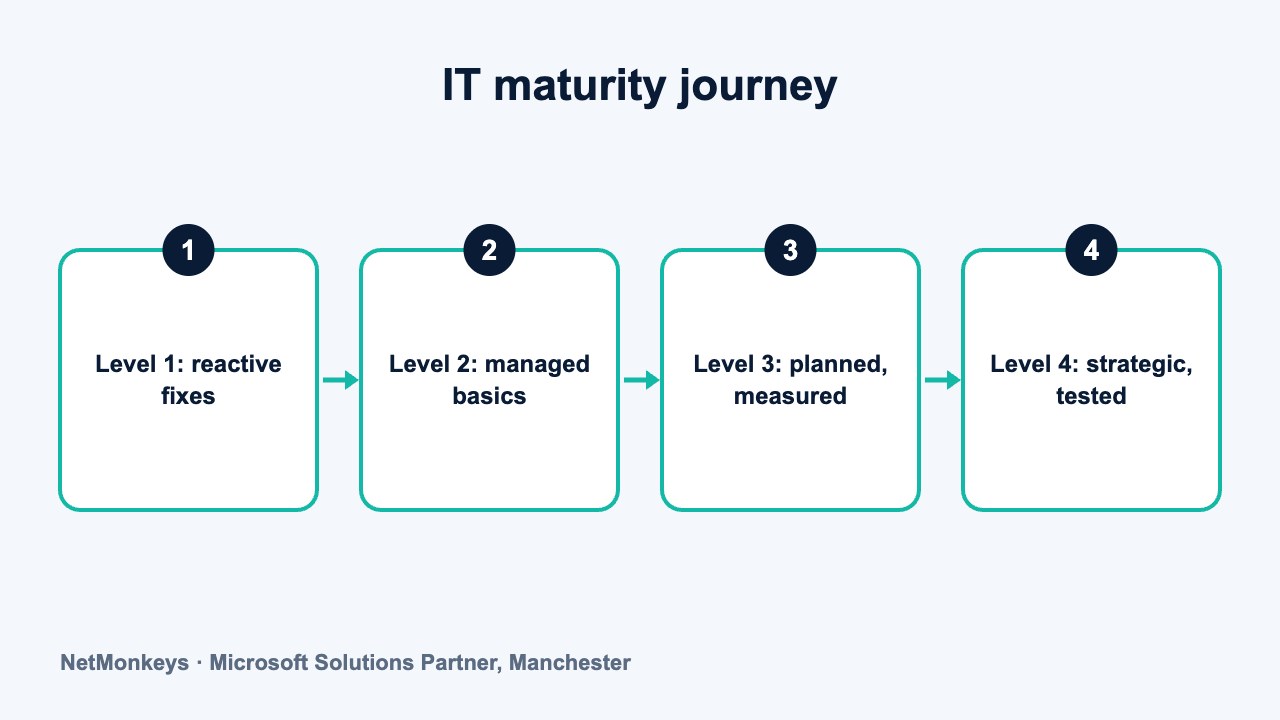
Score each area from 1 to 4 using the descriptors below. Choose the level that describes what is happening today, not what is planned or intended. If you are between two levels, take the lower. Where you do not know the answer, score 1 and treat the gap as a finding.
| Area | Level 1 | Level 2 | Level 3 | Level 4 |
|---|---|---|---|---|
| Identity and access | Shared accounts, no MFA, leavers handled ad hoc | MFA on email only, manual leaver process | MFA for all users, role-based access, leaver checklist | Conditional access, regular access reviews, automated joiners and leavers |
| Patching and devices | Users update their own devices | Updates applied but not tracked | Managed patching, device inventory, reported monthly | Patch compliance targets, device lifecycle plan, exceptions approved |
| Backup and recovery | Unknown or untested backups | Backups run, restores never tested | Backups monitored, restore tested at least yearly | Defined recovery targets, regular restore tests, offline or immutable copies |
| Security monitoring | Antivirus only | Endpoint tools installed, nobody watching | Monitored alerts with a response process | Managed detection and response, tested incident plan, reviewed quarterly |
| Governance and policy | No written policies | Some policies, rarely reviewed | Core policies approved, supplier list kept | Policies reviewed yearly, risk register, supplier assessments |
| Continuity testing | No plan | Plan exists on paper | Plan tested in a desktop exercise | Plan tested with a live recovery, lessons recorded and acted on |
| Account management | Contact is whoever answers the phone | Named contact, no regular meetings | Quarterly review with agreed actions | Strategic reviews tied to business goals, a virtual CIO or equivalent |
| Roadmap and budget | No plan, spend is reactive | Equipment replaced when it fails | 12-month plan with costed projects | 18 to 24 month roadmap linked to growth plans and reviewed twice a year |
| Documentation | In one person's head | Partial notes, out of date | Central, current documentation for core systems | Documented, access-controlled and verified in reviews |
| Support experience | Staff avoid calling IT | Support works but is inconsistent | Clear process, staff are satisfied, feedback collected | Feedback drives service changes, onboarding for new staff |
Add up the ten scores. The maximum is 40 and the minimum is 10. Then read your total against the bands below.
↑ Back to contentsWhat do the scores mean?
| Total score | Band | What it usually means | What to do next |
|---|---|---|---|
| 10 to 17 | Exposed | IT is reactive, with major gaps in security, recovery and knowledge | Fix identity, backup and documentation first, within the next quarter |
| 18 to 25 | Developing | The basics are in place but are inconsistent and untested | Test backups, add monitoring and agree a 12-month plan |
| 26 to 33 | Established | Good coverage with some areas still dependent on individuals | Close remaining gaps, formalise governance and review the roadmap |
| 34 to 40 | Strategic | IT is planned, measured and tested, and tied to business goals | Maintain, review twice a year and keep evidence ready for customers |
Look also at the lowest individual scores, not just the total. A business scoring 3 in most areas with a 1 in backup and recovery is more exposed than the total suggests. Treat any 1 in identity, backup, security monitoring or continuity as a priority, whatever the band.
Be wary of treating this grid as a pass or fail test. It is a planning tool. Moving a score from 2 to 3 in the right area is worth more than a general effort to reach the top band.
Common mistake
Scoring the tools you own rather than the way you use them. Owning a backup product is a level 2. Restoring from it on a regular schedule and recording the result is what moves you to level 3 or 4.
Which areas matter most for data governance and continuity?
Governance is the area most often skipped at this size, partly because it feels like paperwork. In practice it answers questions that customers, insurers and auditors increasingly ask. Where is our data? Who can see it? How long do we keep it? What happens if a supplier fails?
Start with a short register of systems and data: what you hold, where it sits and who owns it. Add a supplier list with a note on what each supplier can access. Then write the handful of policies that you can actually follow. The guide on how to demonstrate cybersecurity compliance to customers shows what evidence tends to be requested.
Continuity is the second area. A business continuity plan sets out how you carry on if a key system, site or supplier is lost. It needs recovery priorities, named responsibilities, contact details and a tested method of restoring service. Our business continuity service page explains the typical components, and the incident response plan template helps with the cyber side.
- Recovery time: how long each key system can be down before the business is affected.
- Recovery point: how much recent data you could afford to lose.
- Responsibilities: who makes decisions and who communicates with staff and customers.
- Testing: the date and result of the last exercise, kept on file.
What does dedicated account management add?
At 50 users and above, a help desk alone is not enough. Someone needs to own the relationship, understand your plans and translate them into IT decisions. In a managed IT arrangement that role is often a named account manager, supported by a virtual CIO who provides strategy.
A virtual CIO does the planning work that a full-time chief information officer would do, on a part-time basis. Typical outputs are a technology roadmap, a budget, a risk review and board-level reporting. For firms that do not need a full-time executive, it is an efficient way to get that input. Ask how often the virtual CIO meets you, what a typical quarterly pack contains and who in your leadership team receives it.
| Question | Help desk alone | With account management and a virtual CIO |
|---|---|---|
| Who plans next year's IT spend? | Nobody in particular | A named person, with you |
| Who tells you about ageing equipment? | You find out when it fails | It appears on the replacement schedule |
| Who reports to the board? | Whoever has time | A scheduled review with a standard report |
| Who owns the roadmap? | Not defined | Agreed jointly, reviewed twice a year |
| Who challenges decisions? | No one | Someone with a view, who explains trade-offs |
The article on strategic IT support explains how this input links to growth, and the comparison of co-managed IT and fully outsourced IT helps if you already employ someone internally.
↑ Back to contentsHow should you evaluate IT services for 50+ users?
Evaluate providers by asking for evidence in the ten areas, not by comparing feature lists. A provider that can show a recent restore test, a sample roadmap and an anonymised service review is demonstrating maturity. One that can only show a brochure may be offering a lower level than you need.
- Ask for a sample report: one real format, with client details removed.
- Ask who your account manager would be: and how many clients they look after.
- Ask about security response: who watches alerts, at what hours and what they do next.
- Ask about onboarding: how the first 90 days would run.
- Ask about exit: what you receive if you leave, covered in the SLA guide and your contract.
Where you want help turning the scores into a plan, an IT consultancy engagement can produce a gap analysis and a costed roadmap before you commit to a long contract. For the technical foundations, see the pages on IT infrastructure and Microsoft 365, which sit behind many of the areas scored above.
What we would check first
Identity and backup. If staff accounts are not protected with multi-factor authentication and you cannot show a recent successful restore, other improvements are built on weak ground.
What should a mid-market firm expect to pay for and receive?
Prices vary by scope, sector and provider, so we do not quote figures here. What you can do is check that the service you are paying for covers the ten areas, and that each area has an owner on the provider's side and on yours.
A well-structured managed IT support agreement for a firm of this size usually bundles the help desk, device management, patching, backup monitoring and security tooling into a defined monthly fee. Strategic input, projects and testing may sit inside or outside that fee, so ask which.
- Inside the fee: day-to-day support, patching, monitoring, backup checks and standard reporting.
- Often separate: larger projects, hardware purchases, penetration tests and major migrations.
- Worth clarifying: how many hours of account management and virtual CIO time are included, and how often they are used.
Insist on seeing how these items appear on the invoice. A fee that looks low but excludes monitoring, testing and strategy may not cover the levels you are trying to reach. The same applies in reverse: do not pay for a level 4 service if your business only needs level 3 in some areas.
↑ Back to contentsHow do you turn your score into a 12-month plan?
List the areas where you scored 1 or 2 and rank them by risk to the business, not by cost. Pick the top three. For each, name an owner, a target level and a date. Review progress every quarter.
A realistic first-year pattern for a business in the developing band looks like this, shown as an illustrative example rather than a prescription.
| Quarter | Focus | Target |
|---|---|---|
| 1 | Identity, backup restore test, documentation of core systems | Raise three areas from level 1 to 2 or 3 |
| 2 | Security monitoring and response, written incident plan | Raise security monitoring to level 3 |
| 3 | Governance register, policies and supplier review | Raise governance to level 3 |
| 4 | Continuity exercise, roadmap and budget for next year | Test the plan and agree an 18-month roadmap |
Re-score at the end of the year with the same three people. If the total has not moved, discuss why with your provider. Where infrastructure is changing as the business grows, the article on the shift in IT infrastructure at 50 seats describes what typically changes.
Key-person risk deserves a mention, since many firms at this size still rely on one individual. The guide to key-person risk in a single IT manager sets out how to reduce it.
↑ Back to contentsWhere can you get an independent view?
If you would like a second opinion on your scores, you can contact our team and we will talk through the grid with you. A conversation of that kind is most useful when you bring your three completed scorecards and your current contract.
If you would like the strategic side explained before you commit, read about our virtual CIO service. Whatever you decide, keep the scorecard. Repeating it every year gives you a simple, honest record of progress that you can share with a board, an insurer or a customer.
↑ Back to contentsFrequently asked questions
What IT services does a 50 person business need?
Most firms of this size need managed support with a help desk, device and patch management, identity controls, backup with tested recovery, security monitoring and some strategic input. The detail depends on your sector and the data you hold. The scoring grid in this guide helps you decide where to start.
How do I know if my IT setup is mature?
Score yourself from 1 to 4 across ten areas, including identity, backup, monitoring, governance and roadmap. A higher total, with no area at level 1, indicates a more mature setup. The key test is evidence: restore tests, reviews and documents you can show.
What is a virtual CIO and do we need one?
A virtual CIO provides part-time strategic IT leadership, including a roadmap, budget and board reporting. Businesses without a full-time IT director often find it useful at around 50 users and above. If you already have strong internal leadership, you may not need one.
How often should we test our business continuity plan?
At least once a year is a common starting point, and after any major change to systems or sites. Test both the technical recovery and the decision-making. Record the result and the actions that follow.
Is break-fix ever the right choice for a 50 person firm?
Occasionally, for a business with very simple needs, low data sensitivity and a tolerance for downtime. For most firms of this size the cost of a failure outweighs the saving. Review the decision when the business grows or takes on more regulated work.
How long does it take to move up a maturity level?
It depends on the area and the starting point. Some improvements, such as multi-factor authentication or a restore test, can be done in weeks. Others, such as a tested continuity plan or a governance framework, usually take several months of steady effort.
Who should complete the self-assessment?
Ask the person who runs IT day to day, a senior leader and a representative user to score separately, then compare. Differences highlight where assumptions need testing. Your provider can then review the results with you.
About this guide and NetMonkeys
Written by Caleb Adoh, Growth Marketing Manager at NetMonkeys. NetMonkeys is a Manchester-based Microsoft Solutions Partner with offices in Manchester, Nottingham and London and field engineers across around 12 UK cities, providing managed IT support, cyber security and virtual CIO services. This guide gives general information for UK businesses. Contracts, insurance policies and certification schemes differ, so check your own documents and current requirements, and take legal, insurance or financial advice where it matters.
Want a second opinion on your IT?
Talk to NetMonkeys about your current set-up, your contract and what a sensible next step looks like for your business.
Explore managed IT support Contact the team
