
Data Warehouse Basics: A Starting Guide for Managers
Data warehouse basics for non-technical managers: what to have in place, the first steps in order, who is involved, early mistakes and a readiness checklist.
The quick answer
The basics of a data warehouse project are simple to state. Decide which business questions you need answered, name an owner, list the systems that hold the data, agree your definitions, then build one small area end to end before extending it. Most delays come from unclear definitions and unavailable people, not from technology.
Key takeaways
- Start with business questions and an owner, not with a platform or a tool.
- Agree definitions such as revenue or active customer before any build work begins.
- Build one subject area end to end first, then extend it.
- Timelines depend mainly on the number of sources, data quality and how available your people are.
- Use the readiness checklist to decide whether to start, prepare or choose a simpler route.
What are the data warehouse basics a manager needs to know?
A data warehouse is a central, organised store of business data used for reporting and analysis. If you need the full definition first, read what is a data warehouse. This guide assumes you have decided to look into one and want to know how to start sensibly.
You do not need to understand the technology in depth. You do need to understand the sequence of work, who must be involved, and which decisions belong to the business rather than to IT. Our data warehouse services page shows where a partner typically fits in. Those decisions are where most projects succeed or stall.
The short version is this. A warehouse project is a business project with a technical build inside it. The technical part is well understood. The business part, agreeing what the numbers mean and who owns them, is usually the harder one.
↑ Back to contentsWhat do you need in place before you start?
You can begin with less than you think, but a few things are hard to do without. Check these before you spend money on a platform or a build:
- A short list of business questions. Aim for ten or fewer. For example: which customers are most profitable, where is cash tied up, which jobs overrun.
- A sponsor with authority. Someone who can settle disputes over definitions and release people's time.
- A list of source systems. Accounting, CRM, ERP, HR, web and any spreadsheets that hold real data. Note who administers each one.
- Access to the data. Permissions, credentials and, for older or hosted systems, a way to extract data at all.
- Business people with time. Finance, sales and operations staff who can explain what the data means and test the results.
- A data protection position. Know which data is personal, who may see it and where it may be stored.
If you are short on one of these, that is normal. A short preparation phase to name the sponsor, list the questions and map the systems often costs little and saves a great deal later. It also tells you early whether the organisation is ready to commit time.
Notice what is not on the list: a tool choice. Platform selection is easier once the questions and sources are known. Tool comparisons make more sense once that groundwork is done.
↑ Back to contentsWhat are the first steps of a data warehouse project, in order?
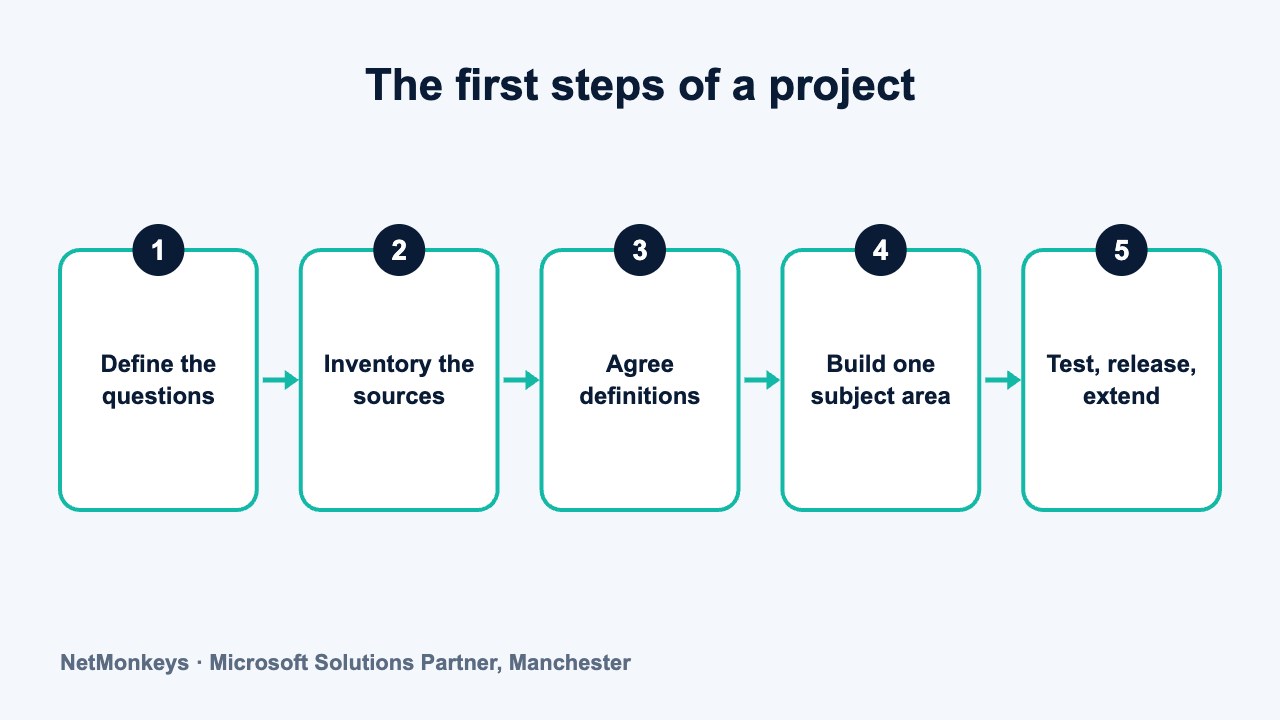
Sequence matters. Skipping ahead to the build is the most common way to waste time. The order below reflects how we approach scoping, and it works whatever platform you end up using.
- Define the questions. Write down what the business needs to know and which decisions depend on it. Rank them.
- Inventory the sources. List each system, what it holds, how it can be accessed and how clean the data looks. Spot checks reveal problems early.
- Agree definitions. Settle what counts as revenue, a customer, an active contract or a late delivery. Write the answers down and get sign-off.
- Choose the approach. Decide on platform, hosting and the shape of the model. This is where data warehouse design choices are made.
- Build one subject area. Take a single area, such as sales or finance, from source to dashboard. A thin slice proves the approach.
- Test against known numbers. Compare outputs with figures the business already trusts. Investigate every difference.
- Release and train. Give users access, show them what the figures mean and agree how to report problems.
- Extend. Add the next subject area, using what the first one taught you.
Between steps three and four, many teams discover that two departments hold different versions of the same fact. Treat that as a finding, not a failure. It is exactly what the warehouse project is meant to surface.
The slice in step five should be small enough to finish and big enough to matter. A finance revenue view that the board actually uses builds more confidence than a half-built model of everything.
↑ Back to contentsWho is involved in a data warehouse project?
Smaller projects combine roles, but the responsibilities still need to exist. Someone has to hold each one.
| Role | What they do | Time they need |
|---|---|---|
| Executive sponsor | Sets priorities, resolves disputes, protects the budget | Light, but regular and decisive |
| Business data owner | Defines terms, signs off figures, answers questions about the data | Steady through the project, heavier at definition and testing |
| Source system administrator | Provides access and explains how each system stores data | Concentrated at the start and when sources change |
| Data engineer | Builds the loads, staging and storage | Full time during the build |
| Data modeller or architect | Designs the model and the overall structure | Heavy early, lighter later |
| Report developer | Builds dashboards and reports on top of the warehouse | Mainly in the second half |
| Project manager | Coordinates people, scope and communication | Throughout |
Many organisations fill the technical roles with a partner and keep the business roles in house. That is a sensible split, because nobody outside your business can decide what your numbers mean. A business intelligence consultants team can supply the technical side and challenge the requirements.
↑ Back to contentsHow long does a data warehouse project take?
Anyone who quotes a fixed duration before looking at your data is guessing. Timelines depend on a handful of factors, and you can judge most of them yourself.
| Factor | Tends to shorten the work | Tends to lengthen the work |
|---|---|---|
| Number of sources | One or two well-documented systems | Many systems, including older or hosted ones |
| Data quality | Consistent, complete records | Duplicates, gaps and free-text fields |
| Definitions | Already agreed and written down | Disputed between departments |
| People | Business owners available on request | Owners busy, or not yet named |
| Scope of release | One subject area | Several subject areas at once |
| Access | Standard connectors or exports | Locked-down systems or no extraction route |
The first release is slower than later ones because the foundations are being laid. Each extra subject area reuses the loading pattern, the shared definitions and the security set-up. Plan for a phased delivery and a steady rhythm rather than one large launch.
Be wary of plans that show a single long build followed by a launch. They hide risk until the end. A short first release that real users test gives you evidence about quality, usability and pace within a reasonable time, and lets you adjust the plan.
A warehouse is also never finished. Sources change, new questions arrive and loads need monitoring. Budget time for running it as well as building it.
↑ Back to contentsWhat are the most common early mistakes?
- Choosing the platform first. Picking a product before knowing the questions often leads to a poor fit and an awkward rebuild.
- Skipping the definitions. If finance and sales disagree on revenue, the warehouse will faithfully reproduce the disagreement.
- Trying to load everything. Bringing in every table from every system buries the useful data and slows the project.
- Leaving the business out. A build run only by IT produces tidy tables that nobody trusts or uses.
- Ignoring source data quality. If records are duplicated or incomplete at source, cleaning them in the warehouse is a recurring cost.
- No owner after go-live. Without a named owner, loads fail quietly and trust erodes.
- Treating it as a one-off. Failing to plan support and change handling means the warehouse drifts from the business.
Common mistake
The most expensive error we see in scoping is starting to build before the definitions are agreed. Rework after the build is far more costly than a few workshops before it. Write each definition in one sentence, name its owner and keep it somewhere everyone can read it.
What should you do about the data you already have?
Most organisations already hold more useful data than they realise, scattered across systems and spreadsheets. Before building, take stock.
Look for where people re-key or copy data between systems. Those points show where integration is weak and where errors creep in. Our guides on combining data from multiple systems into one dashboard and improving data accuracy across departments explain the practical side.
If you plan to move data out of an old system as part of the project, treat that as its own workstream. Data migration services cover the planning and checking that such moves need.
A short audit of three or four key systems is usually enough to show whether the data is ready, needs tidying first, or is too poor to rely on yet.
↑ Back to contentsA simple readiness checklist
Answer each question honestly. The more you can answer yes to, the more ready you are. Gaps are not a reason to stop. They tell you what to fix first.
| Question | If yes | If no |
|---|---|---|
| Can you list your top ten business questions? | You have a clear scope | Run a short workshop first |
| Is there a named executive sponsor? | Decisions can be made quickly | Find one before spending money |
| Do you know every system that holds relevant data? | Scoping can start | Complete a system inventory |
| Have key terms such as revenue been agreed? | Modelling can begin | Agree and document them first |
| Can you get data out of each main system? | Loads are feasible | Check connectors, permissions and suppliers |
| Can business staff give time to testing? | Results will be trusted | Plan backfill or a longer timetable |
| Is there a plan for who runs it afterwards? | Ongoing care is covered | Decide before go-live |
| Have you checked data protection obligations? | Personal data is handled lawfully | Review with your data protection lead |
Share the checklist with your sponsor and your business data owners and ask each to answer separately. Differences in their answers are useful. They show where expectations about scope, ownership or timing have not yet been aligned.
If most answers are no, you are not ready to build, but you are ready to prepare. That preparation is useful whichever route you choose.
↑ Back to contentsWhen should you wait, or choose something simpler?
A warehouse is not always the answer. If you have one main system and a handful of reports, a well-built Power BI model may be enough. Power BI implementation cost explains what is involved at that scale, and Power BI services describes the delivery side.
Waiting also makes sense when a major system change is imminent. Building a warehouse on a platform you are about to replace means doing the work twice. Settle the system plan first, then design the warehouse around the new landscape.
Where the need is genuine and the preparation is done, a specialist team can shorten the path. NetMonkeys is a Manchester-based Microsoft Solutions Partner, and its data warehouse team can help at this stage.
↑ Back to contentsWhere should you read next?
Once you have the basics, three follow-up topics are worth your time. Data warehouse concepts explains the terms your technical team will use. Data warehouse design covers how the structure is decided. Data warehouse examples shows what finished warehouses look like in practice.
If you are weighing outside help, a data warehouse consultancy can review your checklist answers and tell you plainly whether to start, prepare or hold off.
↑ Back to contentsFrequently asked questions
What do I need before starting a data warehouse project?
You need a short list of business questions, a sponsor with authority, a list of source systems with access arranged, and business people who can give time. You do not need a platform chosen. That decision is easier once the questions and sources are clear.
How long does a data warehouse take to build?
It depends on the number of source systems, the quality of the data, how settled your definitions are and how available your people are. A first release covering one subject area is quicker than a full programme. Ask any supplier to explain what drives their estimate rather than quote a fixed duration up front.
Do I need technical skills to manage a data warehouse project?
No, but you need to be able to make business decisions: what the measures mean, which questions matter most and who owns each data set. The technical build can sit with a partner or an internal team, provided you keep ownership of the definitions.
What is the biggest early mistake?
Starting the build before the business has agreed its definitions. If departments disagree about what counts as revenue or a customer, the warehouse will store both versions and the argument continues. Settling terms early saves rework later.
Can I start small?
Yes, and you should. Build one subject area from source to dashboard, test it against figures you trust, then extend. A small, finished slice proves the approach and builds confidence far better than a large, unfinished plan.
Is a data warehouse the same as a dashboard?
No. A dashboard displays figures. A warehouse is where the underlying data is collected, cleaned and organised so that dashboards show consistent numbers. Many businesses start with dashboards and add a warehouse when the data sources multiply.
About this guide and NetMonkeys
Written by Caleb Adoh, Growth Marketing Manager at NetMonkeys. NetMonkeys is a Manchester-based Microsoft Solutions Partner offering data warehouse services, Power BI services and business intelligence consultancy. This guide explains general data warehousing practice. Vendor products and features change, so check the current vendor documentation before making platform decisions.
Planning a data warehouse?
Talk to NetMonkeys about what you need to report on, where your data lives and which approach fits your business.
Explore data warehouse services Contact the team
