
Managed SharePoint Hosting Services
Looking for the best SharePoint hosting services for your business? Start with the platform you need and the responsibilities you want someone to manage. NetMonkeys helps UK organisations plan their SharePoint environment, migrate content and agree practical support for the way their teams work.
For SharePoint Online, Microsoft hosts the platform; our role is to help manage your configuration, sites, access and business use within an agreed scope. If your requirements point towards SharePoint Server infrastructure, we can assess the architecture and the specialist management it would require.
- Clear hosting responsibilities
- Migration and configuration
- Access and governance planning
- Defined support scope
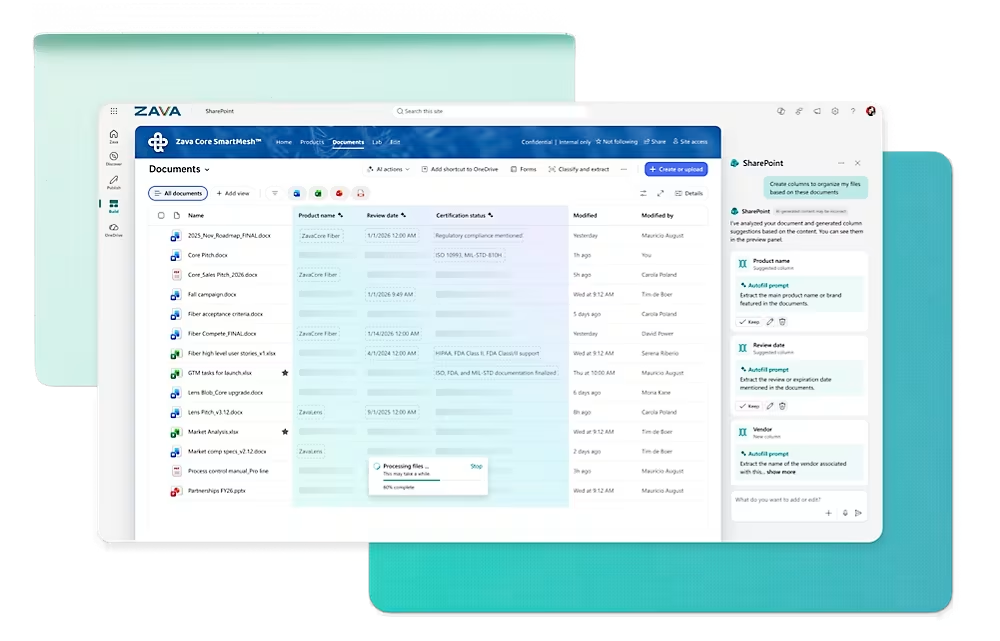
What does managed SharePoint hosting actually mean?
The phrase can describe two different services. You might need help operating SharePoint Online within Microsoft 365, or you might need infrastructure for a SharePoint Server deployment. These options have different costs, responsibilities and maintenance requirements. They should not be treated as interchangeable hosting packages.
SharePoint Online: Microsoft-hosted
Microsoft operates the underlying online service. Your organisation still needs ownership of tenant settings, site structure, permissions, content and everyday administration. A managed service can provide agreed help with those responsibilities alongside your existing team.
SharePoint Server: infrastructure required
A server deployment needs a supported architecture, operating systems, database services and SharePoint administration. Hosting infrastructure in Azure does not remove the need to manage the application, dependencies, licensing, resilience and recovery arrangements.
We establish which model you mean before proposing work. If the goal is a staff intranet, document libraries or collaboration in Teams, the starting discussion is usually about SharePoint Online requirements. A legacy application or custom dependency may need a more detailed options assessment.
Our core SharePoint consultancy services cover the information architecture, intranet and document management work around the platform. Hosting and ongoing management should support that design rather than substitute for it.
SharePoint Online, Azure-hosted SharePoint Server or a migration plan?
Choosing hosting begins with the business requirement. We review your current version, integrations, identity arrangements and content before recommending a route. The right answer might be a managed SharePoint Online environment, a staged modernisation project or further assessment of server infrastructure.
Manage SharePoint Online
Suitable for organisations adopting Microsoft 365 collaboration or improving an existing tenant. Agree who manages sites, access, storage reviews, change requests and user issues. Any Microsoft subscription and additional products remain distinct from the management service.
Assess SharePoint Server in Azure
Relevant where a server-based requirement needs investigation. The assessment considers supported deployment design, dependencies, licences, availability and operational ownership. An Azure subscription alone is not a managed SharePoint farm or an application support agreement.
Modernise an existing deployment
For businesses deciding what to do with an inherited environment, begin with content and dependency discovery. Separate standard documents from custom features, confirm version support and plan which parts can migrate or need redesign.
Microsoft provides a SharePoint Online service description and guidance on designing SharePoint Server farms in Azure. We assess the current requirements for your proposed deployment rather than assuming an older design remains appropriate.
What our managed SharePoint service can cover
The scope is agreed against your environment. A site administration agreement is different from a cloud infrastructure contract, and neither automatically includes custom development. We identify the activities you need and allocate ownership before onboarding.
Environment review and onboarding
Assess the agreed tenant or deployment, identify known issues and establish a baseline. Confirm administrator access, business contacts, outstanding changes and the information needed to begin supporting the environment.
Site and library administration
Handle agreed site configuration, library changes and administration requests. Define how new sites are requested and who approves their purpose, owner and access so the environment does not grow without accountability.
Permissions and sharing support
Help implement authorised access changes and review relevant sharing settings. Your business decides who should see sensitive content; our role is to apply and explain the agreed technical controls.
Content and storage oversight
Review storage use and document growth within the agreed remit. Identify ownership and lifecycle questions before recommending additional capacity. Any subscription or extra storage purchase is discussed separately.
Service issue triage
Investigate reported problems within scope and distinguish tenant configuration, user device, network, workflow and Microsoft service issues. Agree how escalation and communication work when the underlying cause sits outside our direct control.
Governance improvements
Support agreed naming, ownership and site lifecycle practices. Periodic reviews can identify abandoned workspaces, unclear responsibility or processes that need a separate improvement project.
Recovery planning
Agree what needs to be recoverable, who performs recovery actions and which products are involved. Version history, retention and backup have different purposes; the service description should identify what is actually provided.
Changes and user enablement
Provide scoped assistance with owner guidance and approved improvements. New intranets, migrations, integrations or major workflow changes can be treated as projects rather than silently expanding a routine support agreement.
How to choose the best SharePoint hosting services for your business
The best service is the one that fits your platform, risk and support needs. A low monthly figure is difficult to judge if it excludes the administration or recovery work you expect. Ask each provider to explain the same operating scenarios before comparing proposals.
| Ask the provider | What a useful answer covers |
|---|---|
| Who hosts the platform? | Whether you are buying management of Microsoft-hosted SharePoint Online or infrastructure and administration for SharePoint Server. |
| What is included in the monthly scope? | Administration tasks, support channels, coverage hours, change allowances and any exclusions. |
| Who owns our tenant and access? | Your organisation’s administrative control, supplier access and the information provided at handover. |
| What happens when a file needs recovering? | The recovery mechanism, dependencies, applicable limits and the people responsible for the action. |
| What happens during an outage? | Triage, escalation, communications and the distinction between provider response commitments and Microsoft service availability. |
| How are changes priced? | The difference between included requests, additional work and separately scoped implementation projects. |
| How do we leave? | Notice terms, documentation, configuration handover and the review of supplier access and dependencies. |
NetMonkeys will discuss these responsibilities with you before proposing a service. We do not claim that one configuration suits every organisation. A practical brief explains what your users need, what your team can manage and where specialist help will make the environment easier to operate.
SharePoint hosting and Microsoft Azure services
Azure may be relevant to SharePoint Server infrastructure, connected applications or services supporting a wider business process. Those are separate architectural decisions from subscribing to SharePoint Online. We identify where Azure is genuinely required before adding infrastructure to the proposal.
Our managed Azure cloud services can support the assessment of infrastructure, operational responsibilities and ongoing management. Any SharePoint Server application requirements must also be assessed and explicitly included; infrastructure management should not be mistaken for full application ownership.
For wider cloud decisions, explore our managed cloud services. We can discuss the relationship between identity, connectivity, applications and your document environment, with the scope and dependencies documented for each part.
Security, access and governance need clear owners
Hosting does not determine who should see a customer contract, finance report or personnel document. That requires business decisions translated into an access model. We work with your authorised owners to establish sensible site boundaries, group membership and sharing arrangements.
Identity and user access
Confirm how staff authenticate, who manages accounts and how access changes when people join, move roles or leave. Additional identity controls are assessed against your licences and wider security requirements.
External collaboration
Agree which sites or documents can be shared with customers, suppliers or guests. Define an owner for those relationships and a way to review access when the collaboration ends.
Content lifecycle
Establish responsibility for document review, archiving and site closure. Retention and disposal rules need approval from your designated owners, with technical implementation scoped around the required features.
Our managed cybersecurity services can be considered alongside the project where broader identity, device or tenant protection is required. The proposal should show the relationship between those services and SharePoint administration rather than imply that one automatically includes the other.
What should SharePoint backup and recovery include?
Begin with the event you need to recover from. An accidentally edited document is different from a deleted site or a wider security incident. Your recovery design needs to identify what is protected, what recovery options exist and what the business expects to happen next.
For SharePoint Online, assess Microsoft’s available recovery capabilities alongside any additional backup requirements. For SharePoint Server, the assessment also needs to cover the application and its infrastructure dependencies. We confirm the configuration and products needed rather than assuming that hosting includes an independent backup service.
Agree the recovery brief
- Content and services in scope
- Acceptable data loss and recovery time
- Recovery ownership and authorisation
- Testing and evidence requirements
- Dependencies and known limitations
- Any separately licensed backup products
Recovery targets and testing commitments belong in the agreed service scope. They should not be inferred from the word “managed”, a cloud logo or a general availability statement. We help clarify those expectations before onboarding.
Switching your managed SharePoint hosting provider
A change of provider does not always require a content migration. If your existing SharePoint Online tenant remains in place, the work may primarily involve access, documentation, configuration review and a support handover. Moving between tenants or changing platforms introduces a separate migration project.
1. Understand the current arrangement
Review the existing contract, licences, tenant control and outstanding work. Establish whether your supplier manages the environment, provides infrastructure or owns specific connected components.
2. Collect the technical handover
Gather the relevant site inventory, configuration, workflow ownership, integration information and recovery arrangements. Identify gaps that need assessment before support can transfer.
3. Agree the transition scope
Define what stays, what changes and who handles issues during the handover. Where a migration is required, scope discovery, mapping, pilot work and acceptance separately.
4. Test and transfer responsibilities
Confirm authorised access and test the agreed user journeys. Review dependencies before removing outgoing supplier accounts or credentials that may be used by applications or workflows.
Our cloud migration services can support a wider infrastructure transition. For document moves, our SharePoint migration guide outlines preparation questions to bring to the discussion. We propose a route based on the environment you have, not an assumption that everything must be rebuilt.
What determines managed SharePoint hosting costs?
Pricing depends on the operating model and the work included. SharePoint Online typically involves the relevant Microsoft subscriptions and a separately defined management service. A SharePoint Server deployment also needs assessment of infrastructure, server and database licensing, administration, resilience and recovery costs.
Other factors include the number of sites, user support requirements, content growth, integrations, backup products and coverage expectations. An existing environment with incomplete documentation may need an onboarding assessment or remediation work before a routine service can begin.
We distinguish one-off work from recurring services. A new intranet, content migration or integration is different from ongoing administration. Your proposal should make those boundaries clear and explain how future requests are assessed and priced.
Bring your current setup, the problems you need solved and the responsibilities you want us to take on. We will discuss the information needed for a meaningful quote rather than publishing a low entry price that assumes away the work your business actually needs.
How we put a managed SharePoint service in place
Assess the environment
Confirm the platform, business uses, dependencies and ownership. Review the areas in scope and identify immediate issues that affect onboarding.
Agree the responsibilities
Document included activities, support arrangements, escalation routes and exclusions. Identify the decisions and routine tasks that remain with your organisation.
Complete the transition
Carry out agreed configuration or migration work, establish authorised access and validate the service arrangements with your team.
Review and improve
Use agreed review points to discuss incidents, content growth and change requirements. Prioritise improvement projects separately from routine support.
Your business retains a role in the service. Content owners authorise document and access decisions, your administrators remain involved where appropriate, and staff need a clear route for reporting problems. We establish that working relationship alongside the technical setup.
Managed SharePoint hosting FAQs
What are the best SharePoint hosting services for a UK business?
The best fit depends on whether you need SharePoint Online management or SharePoint Server infrastructure, plus your support, security and recovery requirements. Compare proposals against the same responsibilities rather than the headline monthly price.
Does NetMonkeys host SharePoint Online?
Microsoft hosts SharePoint Online. NetMonkeys can provide agreed configuration, administration, migration and support services around your environment. The scope explains the activities we manage and those retained by Microsoft or your organisation.
What is managed SharePoint hosting?
It can mean management of a Microsoft-hosted SharePoint Online environment or hosting and administration of SharePoint Server. We clarify the platform and responsibilities before proposing a service so the term does not hide important differences.
Can SharePoint Server run in Azure?
Microsoft documents supported SharePoint Server deployment scenarios on Azure virtual machines. A suitable design still needs assessment of dependencies, licensing, application administration, availability and recovery. Azure hosting alone does not provide a fully managed SharePoint application.
Should we choose SharePoint Online or SharePoint Server?
We review your current environment, required features, custom dependencies and operational needs. SharePoint Online may suit standard collaboration requirements, while a server-based dependency may need more investigation. The recommendation follows that assessment.
Is SharePoint included in our Microsoft 365 subscription?
That depends on your subscription. We check your licences and required features during scoping. Additional storage, governance tools, automation or backup products may introduce separate requirements beyond basic access to SharePoint.
Does managed hosting include backup?
Only where the agreed service explicitly includes it. We discuss recovery scenarios, products, responsibilities and testing. Version history, retention and an independent backup service have different purposes and should not be treated as equivalent.
Can you guarantee SharePoint Online uptime?
Microsoft operates the underlying online service. Our agreement defines our own support responsibilities and response arrangements; those should be distinguished from Microsoft’s availability commitments and events outside our control.
Will our data remain in the UK?
Data location needs to be checked for the specific tenant, subscriptions, features and connected services. A UK-based support provider alone does not establish where all data is stored or processed. We assess relevant requirements during scoping.
Can we keep our existing Microsoft 365 tenant?
Potentially. A provider change may involve an administration and support handover without moving content. We review tenant ownership, access and dependencies first. A tenant-to-tenant move is a separate migration project.
Can you migrate our existing SharePoint content?
Migration can be scoped following discovery of the source, destination and dependencies. We agree content mapping, permissions, pilot testing and acceptance checks. Custom features or integrations may need redesign rather than a straightforward transfer.
Can you manage SharePoint alongside our existing IT team?
Yes. We can agree a defined division of responsibilities with your administrators or current provider. The scope identifies who handles content decisions, user issues, configuration changes, escalation and ongoing documentation.
Can you help with permissions and external sharing?
We can assess and configure agreed access requirements within scope. Your business authorises who should see sensitive content. We help implement the model and document how future changes should be requested and approved.
How much does a managed SharePoint service cost?
Costs depend on platform, licences, environment complexity, support coverage and included activities. We separate onboarding or implementation work from recurring management and discuss additional product requirements before quoting.
What happens if we leave the service?
The agreement should define notice terms, handover responsibilities and access changes. We establish ownership of your environment and identify dependencies so supplier access can be reviewed without unintentionally disrupting connected services.
Ready to find the right managed SharePoint service?
Tell us which platform you use, what your team needs help with and where the current arrangement falls short. We will discuss the right starting point, from an environment review to a migration or a defined management service.
Book a free SharePoint consultation
