
Outgrown Your Local IT Guy? Break-Fix vs Managed IT at 50 Staff
Have you outgrown local IT support? Compare break-fix and managed IT at around 50 staff, see the capability gaps, and plan a safe, respectful transition.
The quick answer
You may have outgrown local IT support when you pass about 50 staff and need monitoring, long-term IT budgeting and formal security compliance that a small break-fix provider struggles to scale. Break-fix reacts when something breaks. Managed IT monitors, plans and reports. A local provider can still be right for simple, low-risk setups, or in a co-managed arrangement.
Who this is for: Business owners and directors in fast-growing companies
Key takeaways
- Break-fix reacts to problems, while managed IT monitors, patches and plans ahead.
- Around 50 staff, monitoring, budgeting and compliance evidence become harder for one person to deliver.
- Local IT providers offer real strengths, and staying or partnering can be the right call.
- A co-managed model can close capability gaps without losing local knowledge.
- Move in stages, with overlap, documentation and a 90-day review.
Have you outgrown your local IT support?
If your company has grown quickly and you are wondering whether you have outgrown local IT support, the short answer is that it depends on what your provider can scale. Many local IT freelancers and small break-fix shops do excellent work. The strain usually appears once you pass roughly 50 staff, when the business needs monitoring, planned budgets and formal security evidence, not just fast repairs.
This is not a criticism of the person who has looked after your computers since you had ten employees. They often know your business, your people and your quirks better than any larger firm will in the first year. The question is whether the model, one person or a very small team responding when something breaks, still fits the size and risk of the company you are now.
This guide is for owners and directors in the middle of a growth spurt. It compares reactive break-fix support with monitoring-led managed IT, sets out the capability gaps that tend to appear around 50 staff, and offers a safe way to change if you decide to. It goes further on the break-fix versus managed decision than our checklist on the seven signs an SME has outgrown its IT provider.
When this does not apply
If you have fewer than about 30 staff, simple systems, no customer security requirements and an IT person who responds well, there may be no reason to change. Size is a guide, not a rule. Complexity, risk and the cost of downtime matter as much as headcount.
What is the difference between break-fix and managed IT?
Break-fix means you call when something goes wrong, the provider fixes it, and you pay for the time or the job. There is usually no ongoing monitoring, and no obligation to prevent problems because nobody is watching for them.
Managed IT means the provider takes ongoing responsibility for the health of your systems for a regular fee. They monitor devices and the network, apply updates, manage security tools, keep records and report on how things are performing. Fixing problems is part of it, but preventing them and planning ahead are the larger part. Our guide to why businesses outsource IT support covers the wider case.
Neither model is right or wrong. Break-fix suits a small, stable business with low IT dependence. Managed IT suits a business where downtime is expensive and where systems, data and customers' expectations are growing. The table below sets out the differences.
| Factor | Break-fix | Managed IT |
|---|---|---|
| How work starts | You report a problem | Monitoring flags it, often before you notice |
| Cost pattern | Variable, tied to incidents | Predictable monthly fee, plus agreed projects |
| Provider incentive | Paid when things go wrong | Paid to keep things working |
| Monitoring | Rarely included | Core part of the service |
| Patching and updates | Ad hoc | Scheduled and reported |
| Security | Often basic antivirus | Layered controls, review and reporting |
| Planning and budgeting | Informal | Roadmaps, reviews and renewal dates |
| Cover and continuity | Depends on one or two people | Team, documented processes and escalation |
| Documentation | Often in someone's head | Records, asset lists and runbooks |
| Best fit | Small, simple, low-risk environments | Growing, dependent or regulated businesses |
For the pricing side of the choice, see our guide to IT support pricing and cost. Managed IT is not automatically more expensive over time, but it is a different shape of spend, and comparing like for like needs care.
↑ Back to contentsWhy does 50 employees tend to be the turning point?
Fifty is a rule of thumb, not a legal threshold. Something tends to change around that size, though, and the change is mostly about dependence and exposure.
- More people, more devices, more accounts. Each joiner and leaver adds work, and the chance of something being missed grows.
- More downtime cost. When thirty people cannot work for a morning, the loss is larger than the cost of a monitoring service.
- More data and more customers. Larger customers start to ask about security, backups and compliance.
- More locations and more remote work. Networks, cloud accounts and home working make the estate harder to see.
- Less tolerance for key person risk. A single support person who is on holiday or unwell becomes a visible weakness.
None of these require a dramatic overhaul. They require a provider that can see the whole estate, not just respond to tickets. If you want the wider strategic picture, our article on strategic IT support as an SME growth lever explores the link between IT and growth.
The change often arrives as a series of small events. A laptop is lost, an invoice fraud attempt nearly succeeds, a customer sends a security questionnaire, the broadband drops for half a day. Each is manageable alone. Together they signal that informal arrangements are being stretched. See also our guide to why IT support is important for the underlying business case.
↑ Back to contentsWhat are the signs you are outgrowing break-fix?
Use this checklist as a quick conversation starter within your leadership team. Tick what applies. Three or more ticks suggest a review is worthwhile, though not necessarily a change of provider. Our article on the seven signs of an outgrown provider gives a fuller diagnosis, so the list here focuses on the growth side.
- Nobody can tell you how many devices you own. Without a current asset list, patching and security cannot be reliable.
- You hear about problems from staff, not from monitoring. Issues are found when someone complains.
- Support depends on one person. If they are unavailable, nobody else knows your systems.
- Updates happen when someone remembers. There is no schedule and no report.
- IT spend surprises you. Projects and emergency work arrive without a budget or forecast.
- Customers ask for security evidence. You struggle to produce certificates, policies or reports.
- You have had a near miss. A phishing success, a failed backup or an outage exposed a gap.
- Growth plans do not mention IT. New offices, acquisitions or system changes are not discussed with your provider until late.
If most of these describe you, the issue is almost always capacity and process, not goodwill. A talented individual cannot monitor, patch, document, plan and respond around the clock alone, and it is unfair to expect it.
↑ Back to contentsWhere does a small break-fix shop struggle to scale?
The gaps below are not failings of character. They are limits of scale. A one- or two-person business has finite hours and often lacks the tooling and cover that a larger operation spreads across many clients.
| Capability | Typical break-fix position | What a growing business needs |
|---|---|---|
| Network and endpoint monitoring | Checked when a problem is reported | Continuous monitoring with alerts reviewed by a team |
| Out-of-hours cover | Phone or text, subject to availability | Defined cover, escalation and response targets |
| Patch management | Manual and irregular | Scheduled, reported and tracked by device |
| Security tooling | Antivirus, sometimes a firewall | Endpoint protection, email security, MFA and review |
| Compliance support | Occasional advice | Policies, evidence and certification support |
| Long-term budgeting | Invoice by invoice | Lifecycle plans, renewal dates and a yearly roadmap |
| Documentation and handover | Knowledge held by the individual | Records and procedures anyone on the team can follow |
| Vendor management | Ad hoc calls to suppliers | Single point of contact for ISPs, software and hardware vendors |
| Strategic input | Reactive advice | Regular reviews with a technology lead |
Two of these deserve extra attention. First, monitoring: it moves the discovery of problems from the user to the provider. Our guide to the levels of IT support shows how monitoring fits alongside the service desk and escalation. Second, compliance: formal evidence, such as Cyber Essentials, is increasingly expected by larger customers and by insurers. Our guide to cyber security requirements for UK businesses gives the broader context.
An experienced freelancer can sometimes close these gaps by partnering with tools and other specialists, and some do it well. What matters is whether the arrangement is documented, covered when they are away and accountable for results.
↑ Back to contentsWhen is the local IT person still the right choice?
It is worth being fair here. A good local provider offers real strengths that larger firms often struggle to match.
- Loyalty and goodwill. They may take a call at an awkward hour and remember your history.
- Deep knowledge of your business. They know why something was set up in a particular way.
- Flexibility. They can adapt to how you work without a rigid process.
- Personal accountability. You know who is responsible, and they know you.
- Price. For a small, stable estate, break-fix can cost less than a managed contract.
There are also cases where staying is the better answer. If you have around 50 staff but simple systems, no regulated data and no customer security demands, a capable individual may still serve you well. If your current provider is already adding monitoring, documenting systems and offering cover, the gap may be small.
A middle route often works. You can keep your trusted IT person for local knowledge and add a managed provider for monitoring, security and out-of-hours cover. This is a form of co-managed IT, where responsibilities are split deliberately. It protects the relationship while closing the gaps.
Practical tip
If you decide to change, tell your current provider early and respectfully. They often hold passwords, documentation and knowledge you will need, and a good handover protects both sides.
What questions should you ask your current provider before deciding?
Before you assume a change is needed, have a direct conversation. The questions below give your provider a fair chance to show what they can do, and help you judge whether the gaps can be closed.
- How do you monitor our devices and network today? Ask what tools are used, what is alerted and who reviews it.
- What happens if you are unavailable for a week? Look for a named backup, documented systems and access to credentials held securely.
- Can you show us our current asset list and patch status? A reliable answer includes dates and device counts.
- How do you handle security for our business? Listen for MFA, endpoint protection, backups and testing, not just antivirus.
- How would you support a customer security questionnaire or Cyber Essentials? Ask what evidence you could expect.
- What is the plan and budget for the next 12 months? A provider thinking ahead will have views on renewals and replacements.
- What would you need to support us at 100 staff? Their answer to this question tells you whether they see themselves growing with you.
Listen to how the answers are given as well as what they say. Honest uncertainty is better than confident vagueness. If your provider says a service is outside what they offer, that is useful information, and a reason to discuss a partnership rather than a failure. When you compare alternatives, use our guide on how to choose an IT support company and our IT services buyer's guide for 50-plus users.
↑ Back to contentsWhat does staying reactive cost a growing business?
The cost of break-fix is rarely the invoice. It is the time staff lose waiting, the work that stops during an outage and the risk that accumulates unseen. These costs are hard to see because nobody records them, so they never appear next to the IT bill.
Consider where the hidden cost lands. A sales team that cannot reach the CRM for a morning, a finance team waiting on a repaired laptop at month end, a director who spends an evening chasing a mailbox problem. Multiply by headcount and frequency, and the real number is usually larger than expected. Use your own figures: [add figure from client data] is a better basis than any industry average.
- Downtime. Count the hours lost per incident and the people affected, then multiply by what those hours are worth to you.
- Management time. Note how often a director or office manager handles IT matters that should sit elsewhere.
- Emergency purchases. Urgent hardware and licences usually cost more than planned replacement.
- Security exposure. Unpatched systems and unreviewed accounts raise the chance of an incident, and recovery is rarely cheap. See our guide to cyber insurance for how insurers view these gaps.
None of this proves managed IT wins on cost in every case. It does mean the comparison should include more than the monthly fee. A fair review sets the managed quote against the true cost of current arrangements, including the time and risk you have been absorbing.
Common mistake
Comparing a managed IT quote with last year's break-fix invoices and concluding managed IT is dearer. Last year's invoices exclude downtime, management time and the work that did not get done because nobody had capacity.
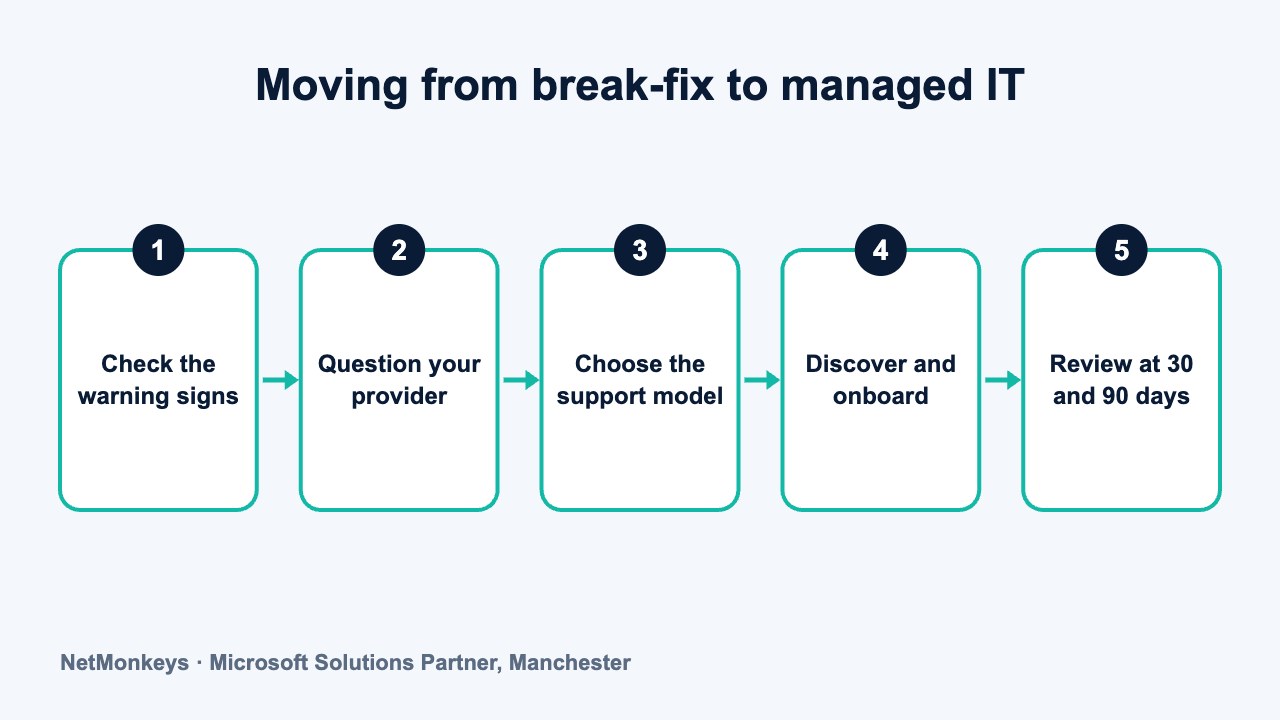
How do you move to managed IT without putting the business at risk?
A change of IT provider can go smoothly or badly depending almost entirely on preparation. The main risks are lost knowledge, missing credentials and a gap in cover. A staged approach reduces all three.
- Agree the reason and the target. Be clear what you want: monitoring, security, cover, compliance or all four.
- Collect what exists. Gather documentation, admin accounts, licence details, supplier contacts and renewal dates. Store credentials securely and ensure the business, not an individual, owns them.
- Choose the model. Fully managed, co-managed or a hybrid with your current provider for local knowledge.
- Run a discovery period. The new provider audits devices, accounts, backups and security before taking over. Findings go into a prioritised plan.
- Overlap the services. Keep the old arrangement running until the new one is live, and agree a clear cut-over date.
- Review after 30 and 90 days. Check reporting, response and the plan against what you expected.
Our 90-day IT provider transition plan sets this out week by week, and the guide on how to switch IT support providers without downtime covers the practical safeguards. Check your current contract for notice periods and exit terms before you act, and take advice if anything is unclear.
Illustrative scenario. A 55-person distribution firm has relied on one local IT contractor for eight years. After winning a larger customer, it receives a supplier security questionnaire it cannot answer. Rather than cutting ties, the owner asks the contractor to join a co-managed arrangement with a managed provider that supplies monitoring, patching and security reporting. The contractor keeps day-to-day support and local knowledge. Six months on, the firm has an asset list, reports and a path to certification, and the working relationship is intact.
↑ Back to contentsWhat should you do next?
You do not need to decide this week. You do need to know where you stand. A simple three-step approach works for most growing firms.
- Run the signs checklist with your leadership team and note the answers.
- Hold the conversation with your current provider using the questions above.
- Decide on the model that fits your size, risk and growth plans, which may be to stay, to partner or to move.
If you want an outside view, our team provides managed IT support and can talk through what a monitoring-led service would look like for your business, along with IT consultancy to help you plan the change. You can contact us for a conversation with no obligation.
Whatever you choose, treat it as a business decision about risk and growth, not a verdict on the person who got you this far. Companies that handle the transition respectfully usually keep what worked and add what is missing.
↑ Back to contentsFrequently asked questions
At what size does a business usually need managed IT?
There is no fixed number, but many businesses feel the strain around 50 staff. Larger numbers of devices, higher downtime costs and customer security demands make monitoring and planning more valuable. Complexity and risk matter as much as headcount.
Is break-fix always cheaper than managed IT?
Not always. Break-fix can be cheaper for a small, simple environment with few incidents. As the estate grows, unplanned incidents, downtime and emergency projects can erode the saving. Compare total cost over a year, including time lost, not just the monthly invoice.
Can a local IT freelancer provide monitoring and security?
Some can, using monitoring tools and partnerships with specialists. The questions to ask are about cover when they are away, documentation, escalation and accountability for results. If those are in place, the model can work well at 50 staff.
Should we tell our current IT provider we are reviewing options?
Usually yes, and early. They often hold knowledge and credentials you will need, and an open conversation gives them a chance to close gaps. Check your contract for notice periods and exit terms, and take advice if you are unsure.
What is co-managed IT?
It is an arrangement where an internal person or small provider and a managed service provider share responsibilities. For example, the local contact handles day-to-day support while the managed provider handles monitoring, security and out-of-hours cover. It can preserve relationships while closing gaps.
How long does a move to managed IT take?
Plans commonly run over about 90 days, covering discovery, onboarding, tooling and a review. The timeline depends on the size and condition of your estate. Overlapping the old and new services reduces risk.
Will managed IT help with customer security questionnaires?
It should help, because monitoring, patching and access reports provide the evidence questionnaires ask for. Confirm what reporting and certification support is included. Our guide to cyber security compliance for customers covers the wider picture.
About this guide and NetMonkeys
Written by Caleb Adoh, Growth Marketing Manager at NetMonkeys. NetMonkeys is a Manchester-based Microsoft Solutions Partner with offices in Manchester, Nottingham and London and field engineers across around 12 UK cities, providing managed IT support, cyber security and virtual CIO services. This guide gives general information for UK businesses. Contracts, insurance policies and certification schemes differ, so check your own documents and current requirements, and take legal, insurance or financial advice where it matters.
Want a second opinion on your IT?
Talk to NetMonkeys about your current set-up, your contract and what a sensible next step looks like for your business.
Explore managed IT support Contact the team
