
The Internal IT Burnout Checklist: 5 Signs Your IT Admin Needs Backup
Internal IT burnout shows up as slipping projects, ticket backlogs and skipped patching. Use this checklist and scored self-assessment to spot overload early.
The quick answer
Internal IT burnout in a 50+ seat business usually shows up as workload and risk signals before anything else: projects slipping, a growing ticket backlog, security patching deferred to deal with user requests, no holiday cover and mistakes creeping in. Leaders can check for these using ticket data and short, supportive conversations, then choose relief that fits, such as co-managed IT, helpdesk outsourcing, project support, automation or a new hire.
Who this is for: Operations Managers, HR Directors
Key takeaways
- Look for workload and risk signals first: deadlines, backlog, patching, cover and error rates.
- Skipped security patching is the sign with the clearest business risk, so check it early.
- Use a scored self-assessment and ticket data, not guesswork, to decide how urgent the situation is.
- Hold supportive 1:1 conversations that ask what is getting in the way, not what is going wrong.
- Relief options differ in cost, speed and risk. Match the option to the workload pattern.
What does internal IT burnout look like in a 50+ seat business?
Internal IT burnout is a pattern of sustained overload in the person or small team who run your IT. In practice, leaders rarely see it as a statement. They see it as missed deadlines, slower replies and quiet shortcuts, and the business risk builds before anyone says the workload is too much.
This guide takes a practical view. It focuses on workload and operational risk, which leaders can observe and measure, and it does not attempt to assess anyone's health. If you are concerned about a colleague's wellbeing, speak to them directly and involve your HR and occupational health routes in the normal way.
On a network of 50 or more seats, one internal IT person typically covers helpdesk requests, new starters and leavers, Microsoft 365 administration, security, backups, suppliers, hardware and whatever project the business has just asked for. That is a wide remit. It works until volume rises, someone is off, or a security incident lands in the middle of everything else.
Practical tip
Do not wait for a complaint. A conscientious IT person is often the last to say they are overloaded, because they do not want to let anyone down. Treat the checklist below as something leadership runs on a regular schedule, not only when something goes wrong.
What are the five main signs that your IT admin needs backup?
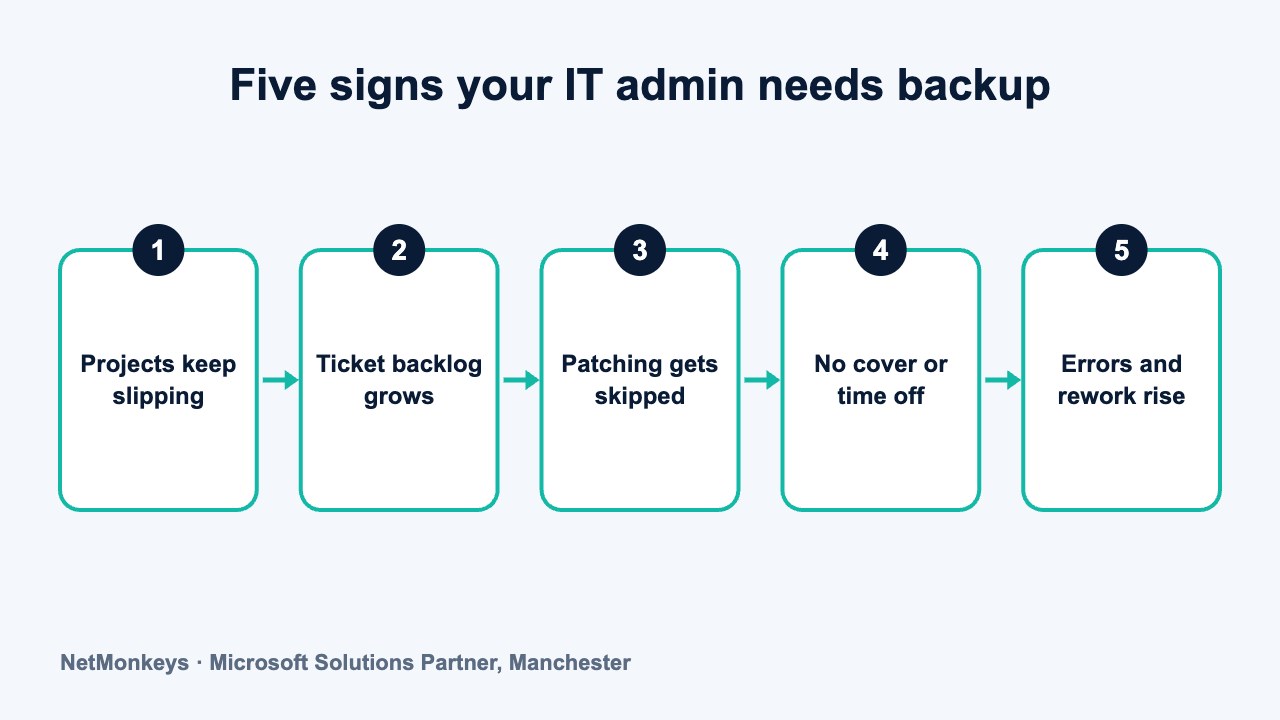
These five signs are the ones leaders can verify from data and normal conversation. Any one of them deserves a closer look. Two or more together suggest the workload needs structural change.
- Project deadlines keep slipping. Planned work, such as a laptop refresh, a Microsoft 365 migration or a security improvement, is repeatedly pushed back because the helpdesk takes priority. If the same project has moved date three times, that is a capacity problem, not a planning one.
- The ticket backlog is growing. Open tickets rise month after month, older tickets sit untouched and users start to bypass the process by stopping the IT person in the corridor. A rising backlog with falling closure rates points to demand outpacing capacity.
- Security patching and maintenance are being skipped. Updates are delayed to avoid disrupting users, firewall firmware stays out of date, and backup checks happen when there is time. This is the sign with the clearest business risk, because the work that gets deferred is often the work that prevents incidents.
- There is no real cover. The IT person has not had an uninterrupted week off in a long time, or takes leave while still answering calls. Nobody else has the admin access or the knowledge to step in. See our guide to key-person risk with a single IT manager for the wider exposure this creates.
- Errors and rework are rising. Configuration mistakes, missed steps in the leaver process, forgotten licences and repeat faults all become more likely when one person is working at the limit. Individual errors are rarely the cause. They are the output of a system with no slack.
Notice that none of these signs says anything about the individual's ability. A highly skilled person in an overloaded role will show all five. That is why the response should be about changing the workload, not about performance management.
Other signals that often accompany the five
- Out-of-hours work has become routine. Evening and weekend changes happen regularly, with no time off in lieu.
- Knowledge sits only in one head. Documentation is out of date or missing, and the IT person is the only route to answers.
- Reactive work dominates. Most of the week is firefighting, with little time for improvement or learning.
- Reluctance to take on new requests. Replies get shorter, estimates get longer and the IT person starts saying no to things they would once have welcomed.
- Supplier and licence admin is late. Renewals, warranty expiries and certificates are missed or handled at the last moment.
Why does skipped patching matter so much?
Patching is the clearest link between overload and business risk. When a team is stretched, patching is easy to postpone because it can feel invisible. Nobody complains when an update is delayed, but they do complain when a password reset takes a day.
The result is a growing gap between what is installed and what is current. That gap is exactly what attackers and automated scanners look for. It also affects compliance: Cyber Essentials, client security questionnaires and cyber insurance proposals all ask about patching, and an overloaded team may struggle to evidence it. Our guide to cyber security best practices sets out the baseline controls that most depend on routine maintenance.
Leaders can check this without technical knowledge. Ask the IT person for a simple report: how many devices are missing critical updates, how old the oldest outstanding update is, and when firewall and server firmware were last reviewed. If the answers are hard to produce, that tells you something in itself.
What we would check first
We would ask for the patch status of servers, firewalls and laptops, then the date of the last successful backup restore test. These two checks show quickly whether maintenance is keeping pace with demand. If either is out of date by months, the team is probably firefighting rather than maintaining.
How does an overloaded IT resource affect the wider business?
The effects spread beyond the IT office. Staff wait longer for fixes, so productivity drops in small, hard-to-measure ways. New starters wait for equipment and accounts. Managers lose confidence in IT and start buying their own tools, which creates unmanaged software and data in places nobody is tracking.
There is also a security effect. Overloaded teams find it hard to keep up with the cyber security risks facing smaller businesses, such as phishing, weak access controls and unpatched systems. Microsoft 365 is a common example, because account settings, licences and conditional access need regular attention. If nobody has time to review them, drift sets in. Specialist Microsoft 365 support can take that load.
Questions Operations Managers can ask
- Do users know how to get help, and does it work? A clear route and a realistic response time reduce corridor requests.
- Is support tiered? Simple requests should not take the time of the most experienced person. Our guide to the levels of IT support shows how work is usually divided.
- Is there help outside working hours? If the IT person is the only contact for evening or weekend problems, see whether you need 24/7 IT support or a lighter out-of-hours arrangement.
- Can some of the work be handled remotely? Many routine faults are suited to remote IT support, which takes pressure off a single person walking between desks.
For a fuller view of how to compare providers and models when you are ready, our guide to buying IT services for 50 or more users is a useful next step.
Common mistake
Assuming that a quiet IT person means a healthy IT function. Quiet can mean calm, but it can also mean someone absorbing pressure without raising it. Check the data as well as the mood.
How can you score the situation? A self-assessment table
Use the table below with ticket data and your own observations. Score each row from 0 to 2: 0 means no sign, 1 means some sign, 2 means a clear and sustained sign. Ask the IT person to complete it too, and compare answers.
| Indicator | 0 points | 1 point | 2 points |
|---|---|---|---|
| Project delivery | Projects mostly on time | Occasional slips of weeks | Repeated delays, projects stalled |
| Ticket backlog | Stable or falling | Rising slowly | Rising for several months, old tickets untouched |
| Patching and maintenance | Up to date and evidenced | Some items overdue | Overdue items and no evidence of review |
| Cover and leave | Tested cover for all key tasks | Partial cover, some tasks unprotected | No cover, leave is interrupted |
| Out-of-hours work | Rare and compensated | Regular but manageable | Routine, uncompensated, expected |
| Documentation | Current and shared | Partly current | Out of date or only in one head |
| Errors and rework | Rare | Noticeable increase | Frequent repeat faults and missed steps |
| Security tasks | Done on schedule | Sometimes deferred | Regularly deferred to handle requests |
| Strategic time | Regular time for planning | Occasional time | None, all reactive |
| Ability to say no | Priorities are agreed | Requests accepted without negotiation | Everything is urgent and nothing is dropped |
| Score | What it suggests | Sensible next step |
|---|---|---|
| 0 to 4 | Workload looks manageable | Re-run in six months and keep ticket data |
| 5 to 9 | Early signs of strain | Review priorities, fix cover gaps and talk through options |
| 10 to 14 | Significant overload | Agree a relief plan within the next quarter |
| 15 to 20 | Sustained overload and business risk | Act now on patching, cover and capacity, and take wider advice |
The score is a guide, not a diagnosis. A low total with one maximum score on security tasks may still deserve urgent action. Use judgement, and put any serious gaps in front of the right people.
↑ Back to contentsWhat can you check before speaking to your IT person?
Go into the conversation with data. It keeps the discussion factual and removes any sense that you are questioning their effort.
- Ticket volume by month: is demand rising, and are the same issues recurring?
- Time to resolve: are typical tickets taking longer than they did a year ago?
- Project list: which projects were planned, which were delivered and which have moved?
- Hours worked: does the IT person log or recall regular out-of-hours work?
- Leave taken: when did they last take a full week without calls?
- Headcount growth: how many more users, devices and applications are there than when the role was designed?
Headcount growth is often overlooked. A role created for 30 users may still be the same role at 90 users, with no extra support. Our guide to why IT support matters gives wider context for how demand scales with a business.
↑ Back to contentsWhat supportive questions should you ask your IT person?
Hold the conversation in a private one-to-one, with enough time and no agenda that sounds like an appraisal. The aim is to understand what is getting in the way and what would help. Use open prompts and listen.
- What takes up most of your week, and how would you like it to be split? This shows the gap between actual and preferred work.
- Which tasks do you wish you had more time for? The answers usually include patching, documentation and projects.
- What would happen if you were unavailable for a week? This tests cover and documentation without sounding accusatory.
- Is there anything you have been putting off that worries you? Often it is a security or backup task.
- Which requests feel least valuable to your time? These are candidates to automate or hand to a service desk.
- What support would make the biggest difference, and what would you not want to change? This protects the parts of the role the person values.
- Do you have the tools and access you need? Outdated tooling is a frequent hidden source of extra work.
- What would you want us to understand about the pressures on IT? It gives them space to say what has not been said.
Afterwards, follow through. Asking these questions and then doing nothing damages trust faster than not asking at all. Agree one or two concrete actions, with dates, and share them with the IT person.
Common mistake
Treating the conversation as a performance review. If the person feels they are being assessed, they will understate the problem. Keep the focus on the system of work, and make clear that asking for help is expected, not a weakness.
What are your options for relief?
There is no single answer. The right option depends on whether the pressure comes from helpdesk volume, project demand, security workload or a gap in skills. The table compares the five common routes.
| Option | What it addresses | Strengths | Watch-outs |
|---|---|---|---|
| Co-managed IT | Helpdesk volume, cover, security tooling, project capacity | Keeps the internal role, adds a team and out-of-hours cover | Needs a written split of duties and shared tooling access |
| Project support | Slipping projects, migrations, one-off improvements | Targeted, time-limited, brings specific skills | Does nothing for the daily ticket queue |
| Helpdesk outsourcing | Routine tickets and user requests | Quick to start, frees up the internal lead | Escalation rules and user experience need care |
| Automation | Repetitive tasks such as onboarding, patching and password resets | Reduces manual effort over time | Needs set-up time and ongoing ownership |
| Hiring | Sustained growth in demand | Adds in-house capacity and local knowledge | Slow, costly to recruit, still leaves single-team risk |
A provider that already delivers IT support to businesses of your size will usually be able to explain how the options fit together. Many businesses use more than one. A common pattern is to outsource first-line tickets, automate leaver and starter tasks, and bring in project support for a defined period. The internal lead then keeps the work that depends on their knowledge.
Our objective guide to co-managed IT versus fully outsourced IT compares the two main models in detail, including when each is the better fit.
↑ Back to contentsWhen is co-managed IT the right relief?
Co-managed IT tends to suit firms where the internal person is valued and the workload has outgrown them. A provider takes on the routine ticket queue, monitoring, patching and out-of-hours cover, while the internal manager keeps strategy, application knowledge and decisions.
It is not a threat to the role. Done properly, it removes the work that wears people down and leaves the work that uses their experience. A provider that offers managed IT support can often adapt the scope to start with the highest-pressure area, such as helpdesk or patching.
- Start with the pressure point. If the backlog is the issue, start with the helpdesk. If patching has slipped, start with patching and backup checks.
- Keep the internal lead involved. They should help choose the provider and shape the scope.
- Set measures before you begin. Track backlog, patch status, project dates and hours returned.
- Review at 60 to 90 days. Adjust scope based on evidence.
If the business has no budget for external support, even a smaller change can help: agreeing priorities with the IT person, dropping low-value requests and fixing documentation. These do not replace additional capacity, but they can reduce pressure in the short term.
↑ Back to contentsWhat does leadership need to do next?
Leadership owns the decision. The IT person can describe the problem, but only the business can add budget, change priorities or approve outside support. A short plan helps.
- Run the self-assessment this month. Complete it yourselves and ask the IT person to do the same.
- Hold the one-to-one. Use the questions above and agree one or two actions.
- Check patching and backups. Ask for a simple status report and fix anything critical.
- Choose a relief route. Match the option to the pressure point and set a review date.
- Repeat every six months. Workload changes as the business grows.
If you want an independent view on workload, IT consultancy can review ticket data, systems and responsibilities and recommend options without presupposing a particular answer. The review can also cover whether cyber security tasks are being kept up to date.
When you are ready to talk through options, you can contact NetMonkeys to discuss how support could work alongside your internal IT person.
Practical tip
Think in terms of resilience as well as wellbeing. A business that can lose any one person for a fortnight without major disruption is better protected, and the staff who run IT are better supported. Our guide to reasons to outsource IT support sets out how outside help can add that resilience.
Frequently asked questions
What is internal IT burnout?
In a business context, it describes sustained overload in the person or team running your IT, visible through slipping projects, rising ticket backlogs, deferred maintenance and rising errors. This guide treats it as a workload and risk issue that leaders can measure. It does not make any health assessment.
How do I know if my IT person is overloaded?
Look at ticket volume and age, project delivery dates, patching and backup status, leave taken and out-of-hours work. Then ask them directly in a supportive one-to-one. A scored self-assessment helps compare your view with theirs.
Is it a sign of weakness if my IT admin asks for help?
No. On a network of 50 or more users, the workload commonly grows faster than the role. Asking for support is a sign of good judgement. Leaders should make it normal by reviewing workload regularly rather than waiting for a request.
Should I replace my IT person with an outsourced provider?
Not as a reflex. Overload is usually a capacity problem, not a performance problem. Options include co-managed IT, project support, helpdesk outsourcing, automation or hiring. Full outsourcing can be right in some cases, but it is one option among several.
What should an HR Director do about an overloaded IT role?
Support the Operations Manager in running a workload review, check that leave, out-of-hours work and wellbeing routines are being handled as for other roles, and make sure the IT person has a safe route to raise concerns. Keep the focus on the work, and follow your normal HR processes where an individual's wellbeing is a concern.
How often should we run the checklist?
At least every six months, and whenever the business changes materially, such as through hiring, a new site, an acquisition or a major system change. Regular reviews let you act early, before backlogs and deferred maintenance become a risk.
Can automation solve the problem on its own?
Sometimes, for repetitive tasks such as onboarding, password resets and patch deployment. Automation needs set-up time and an owner, so it rarely helps if the team is already at the limit. It works best alongside extra capacity.
About this guide and NetMonkeys
Written by Caleb Adoh, Growth Marketing Manager at NetMonkeys. NetMonkeys is a Manchester-based Microsoft Solutions Partner with offices in Manchester, Nottingham and London and field engineers across around 12 UK cities, providing managed IT support, cyber security and virtual CIO services. This guide gives general information for UK businesses. Contracts, insurance policies and certification schemes differ, so check your own documents and current requirements, and take legal, insurance or financial advice where it matters.
Want a second opinion on your IT?
Talk to NetMonkeys about your current set-up, your contract and what a sensible next step looks like for your business.
Explore managed IT support Contact the team
