
Co-Managed IT vs Fully Outsourced: Which Fits 50 to 150 Staff?
Co-managed IT vs outsourced IT compared for 50 to 150 staff: who owns what, when each model wins, and what a co-managed agreement should specify.
The quick answer
Co-managed IT keeps your internal IT manager in charge of strategy and business knowledge while a provider takes the helpdesk queue, monitoring, patching and project capacity. Fully outsourced IT hands the whole function to the provider. For many firms of 50 to 150 staff with a capable internal lead who is stretched, co-management is the better fit; where there is no internal IT role at all, full outsourcing is usually simpler.
Who this is for: IT Managers, Operations Managers
Key takeaways
- Co-managed IT adds capacity around an internal IT manager. It is not a route to replacing them.
- Fully outsourced IT works well where there is no internal IT role and no plan to create one.
- Write the split of responsibilities down, task by task, before signing anything.
- A co-managed agreement should cover tooling access, escalation, documentation and change control.
- Start small: one workstream, one review date, and a clear way to widen or narrow scope.
What is the difference between co-managed IT and fully outsourced IT?
In a co-managed model, your internal IT person or team keeps ownership of strategy, business knowledge and priority decisions. An external provider takes defined work alongside them: usually the helpdesk queue, monitoring, patching, security tooling and extra capacity for projects. Both sides work in the same systems and share the same documentation.
In a fully outsourced model, the provider runs the whole IT function. There is either no in-house IT role, or a single coordinator who manages the relationship but does not carry out technical work. The provider owns the service desk, the infrastructure, the security tooling and, often, the planning.
For a business with 50 to 150 staff, neither model is better in the abstract. The right choice depends on how much IT knowledge needs to sit inside the company, how stretched the current team is, and how much risk the business carries on one or two people.
What usually sits inside each model
- Co-managed: the internal lead keeps vendor relationships, budget input, line-of-business applications and decisions on priorities. The provider covers first-line tickets, out-of-hours monitoring, patching, backup checks and security tooling.
- Fully outsourced: the provider covers all of that, plus planning, procurement advice, lifecycle management and, in many contracts, a named account lead or virtual CIO to handle strategy.
- Neither: break-fix support, where someone is called when something breaks. That is a third model and is covered separately in our guide to choosing an IT support company.
How do the two models compare side by side?
The table below sets out the practical differences. It describes the models in general terms. Individual providers structure their services differently, so check the detail in any proposal you receive.
| Factor | Co-managed IT | Fully outsourced IT |
|---|---|---|
| Who owns IT strategy | Internal IT manager, with provider input | Provider, usually with a named account lead; business sets direction |
| Day-to-day helpdesk | Shared. Routine tickets go to the provider, complex or sensitive ones stay internal | Provider handles the full queue |
| Business knowledge | Stays in the building with your own people | Held by the provider, so documentation and account continuity matter more |
| Capacity for projects | Internal lead is freed to focus on projects; provider adds engineers when needed | Provider schedules project work as part of the agreement or as separate work |
| Key-person risk | Reduced, because a second team knows the environment | Moved to the provider, where it is spread across a team if the contract is well run |
| Cost shape | Provider fee plus internal salary, usually with a smaller provider scope than full outsourcing | Single provider fee, no internal salary, though a coordinator role may remain |
| Management effort | Higher at the start, because the split of duties has to be agreed and maintained | Lower day to day, but service reviews still need someone senior |
| Cultural fit | Suits firms that value an in-house expert and want to keep one | Suits firms that want IT handled as a utility service |
| Best for | Firms with a capable internal lead who is stretched | Firms with no internal IT role, or one that is being phased out by choice |
Cost is the factor people most often get wrong. Co-management is not automatically cheaper or dearer than full outsourcing. It depends on how much you keep in-house and how the provider prices its part. For the mechanics, see our guide to IT support pricing.
↑ Back to contentsIs co-managed IT a threat to the internal IT manager?
It should not be, and a well-designed arrangement is built to prevent that outcome. The point of co-management is to take the work that wears down a small internal team and leave the work that needs local knowledge and judgement.
Most internal IT managers at this size spend a large share of their week on password resets, printer faults, new starter kit and queue triage. Those tasks matter, but they do not need an experienced person who understands how the business works. They can be done by a service desk working to documented procedures.
What the internal IT manager gains
- Time for work that matters: planning, vendor management, application owners, board-level reporting and improvements that never get scheduled.
- A second pair of eyes: someone to review a firewall change, cover a holiday or pick up an incident at 2am without the internal lead being the only option.
- Access to specialist skills: security tooling, Microsoft 365 administration, networking or cloud skills that one generalist cannot be expected to hold at depth.
- A stronger position with the board: reporting on ticket volumes, patch levels and risks gives the internal lead evidence when asking for budget.
The risk to the internal role comes from how the arrangement is introduced, not from the model itself. If leadership frames co-management as a cost-saving test of whether the internal person is needed, trust breaks down quickly. If it is framed as backup for a stretched team, it tends to work.
Practical tip
Involve the internal IT manager in choosing the provider and in writing the split of duties. They know which tasks are routine and which carry hidden risk. If they are handed a finished arrangement, they have little reason to make it succeed. Our guide to signs an internal IT person needs backup sets out the signals leaders should watch for.
Who does what? A division-of-responsibilities table
The table below uses a simplified RACI approach. R means responsible for doing the work, A means accountable for the outcome, C means consulted, and I means informed. Treat it as a starting point. Your own table should reflect your systems, your staff and your risk appetite.
| Activity | Internal IT manager | Provider | Business leadership |
|---|---|---|---|
| Level 1 helpdesk tickets | A, C | R | I |
| Level 2 and 3 technical escalations | C | R | I |
| Line-of-business applications | A, R | C | C |
| Patching and updates | A | R | I |
| Endpoint security tooling and alerts | A | R | I |
| Backup monitoring and restore tests | A | R | I |
| New starter and leaver processes | A | R | C |
| Access rights approval | A, R | C | C |
| Vendor and licence management | A, R | C | I |
| IT strategy and roadmap | R | C | A |
| Change approval for major changes | A | R | C |
| Incident response coordination | A | R | I |
| Budget and supplier contracts | C | C | A, R |
Notice the pattern. The provider is responsible for repeatable operational work. The internal lead stays accountable for the outcome and holds decisions that depend on business context. Leadership keeps strategy and money.
For more on how tiers of support are normally divided, our guide to the levels of IT support explains the usual boundaries between first, second and third line work.
↑ Back to contentsWhat criteria should decide between the two models?
Use the following questions as decision criteria. Score each one candidly, ideally with the internal IT manager and an Operations Manager in the same room.
- Is there an internal IT role today? If yes, and the person is capable, co-management is usually worth testing before full outsourcing. If no, the case for full outsourcing is stronger.
- How is the workload split? If most of the week goes on routine tickets, the helpdesk is the obvious thing to hand over. If most of it goes on project work and application support, project capacity is the need.
- How much business-specific knowledge is needed? Firms with bespoke software, regulated processes or complex integrations benefit from keeping an in-house owner.
- What is the key-person risk? If one person holds all the passwords and all the knowledge, any model that adds a second team reduces that risk. Our guide to key-person risk with a single IT manager covers it in detail.
- What is the security and compliance load? Obligations such as Cyber Essentials, client audits or insurance requirements often need tooling and evidence that a small team struggles to maintain.
- What is the growth plan? A business planning an acquisition, a new site or a system migration needs project capacity that a single internal person cannot supply.
- What is the appetite for managing a supplier? Co-management needs an engaged internal lead. Full outsourcing needs someone senior to review service, but the daily effort is lower.
- What do staff expect? Some teams value a person they know who walks over to their desk. Others only care that the problem is fixed quickly. Neither preference is wrong.
If five or more answers point the same way, the decision is usually clear. If they split evenly, begin with a limited co-managed pilot, because it is easier to widen or narrow scope than to reverse a full handover.
Common mistake
Choosing a model on price alone. A cheaper arrangement that leaves the internal lead overloaded, or one that removes the only person who understands the business, can cost far more when something goes wrong. Compare scope, risk and responsibilities, then compare price.
When is fully outsourced IT the better choice?
Full outsourcing is the right answer more often than co-management advocates like to admit. It works best in these situations.
- There is no internal IT role and none is planned. A 60-person professional services firm with a simple Microsoft 365 environment rarely needs a full-time IT employee. A provider with a team behind it can be a better fit.
- The internal role has become a coordination job only. If the person mostly raises tickets with suppliers and does little technical work, the cost of the role may not match the value.
- The business wants one accountable supplier. Splitting responsibility between internal staff and a provider introduces a boundary. Some firms prefer a single party to hold the whole service.
- Recruitment is the real problem. If good IT staff are hard to hire and retain in your area, relying on a provider for the whole function can be more stable than a vacancy that stays open for months.
- The environment is standardised. Where devices, applications and processes are uniform, an outsourced team can run them at scale without much local knowledge.
Full outsourcing also suits businesses that are early in their IT maturity. If there is no documentation, no asset register and no patching routine, a provider can build those foundations faster than one internal person starting from nothing. Our guide to reasons to outsource IT support covers this case in more detail.
The trade-off is dependency. When the provider holds all the knowledge, you need strong documentation, clear exit terms and regular service reviews. Our guide to a 90-day IT provider transition plan is useful reading even if you are not planning a change, because it shows what a good handover contains.
↑ Back to contentsWhen is co-managed IT the better choice?
Co-management tends to be the better fit when the internal person is a genuine asset, but the workload has outgrown what one person or a very small team can carry.
- A capable internal manager is overloaded. The business depends on their knowledge, and they are spending most of their week on routine tickets. Handing the queue to a provider releases their time without losing their expertise.
- The firm has specialist systems. Manufacturing, legal, healthcare and finance firms often run software that needs an in-house owner who understands the process. A provider can support the infrastructure around it.
- Cover is thin. One person means no holiday cover, no sickness cover and no one to take a call outside working hours. Co-management adds a team without removing the internal role.
- Projects keep slipping. Office moves, migrations, security improvements and refreshes get pushed back because the helpdesk always takes priority.
- Leadership wants to retain control. Some boards are not ready to hand over the whole function. Co-management allows them to move one workstream at a time.
It is a sensible model for firms that want the safety of a team and the continuity of an in-house person. It is less suited to businesses where the internal role is vacant and no one wants to fill it, or where the internal person is unwilling to share access and documentation.
What we would check first
Before recommending either model, we would look at six weeks of ticket data: volume, categories, repeat requests and how long each type takes. The data usually shows what share of the work is routine and what share needs local knowledge. That split points to the right model. If you do not have ticket data, start recording it now.
What should a co-managed IT agreement specify?
The agreement is where co-managed arrangements succeed or fail. A vague contract leads to arguments over who should have fixed what. Check the following areas carefully, and take advice from a solicitor on the contract wording.
Tooling access
- Administrative access: state which admin roles the provider holds, which the internal team holds, and that the internal team keeps at least equal visibility of all systems.
- Shared tools: the helpdesk platform, remote management tool, monitoring dashboards and documentation system should be accessible to both sides. Avoid arrangements where the provider's tooling is a black box.
- Credentials and secrets: agree where passwords and recovery keys are stored, who can see them, and how access is removed when staff leave on either side.
- Licensing: record who owns licences for the management tools and security software, and what happens to them if the arrangement ends.
Escalation
- Routing rules: which tickets go to the provider, which stay internal, and which are routed to the internal lead by default, such as anything involving executives or confidential data.
- Response and resolution targets: see our guide to IT support SLAs for what to specify and how to read the reports.
- Out-of-hours handling: who is called, in what order, and what the provider can do without waiting for approval. See our guide on whether you need 24/7 IT support for when this matters.
- Major incidents: a named contact on each side, a communication route and agreed authority to isolate systems if needed.
Documentation
- Ownership: documentation about your environment should belong to you, be held in a system you can access and be exportable in a usable format.
- Standards: agree what is documented, such as network diagrams, configurations, admin procedures and supplier details, and how often it is reviewed.
- Handover: the provider should update documentation as part of each change, not as a separate project.
Change control
- Approval levels: routine changes can be pre-approved, standard changes need sign-off from the internal lead, and major changes need a written plan and rollback steps.
- Change records: every change should be logged with who made it, when and why.
- Testing and backout: agree minimum testing and a backout plan for anything that affects users or security.
- Maintenance windows: agree when disruptive work can be done and how users are told.
Also check notice periods, minimum terms, how scope can be widened or narrowed, and what happens to data and documentation on exit. Our guide to managed IT support describes what is normally included in a service, which helps when comparing proposals.
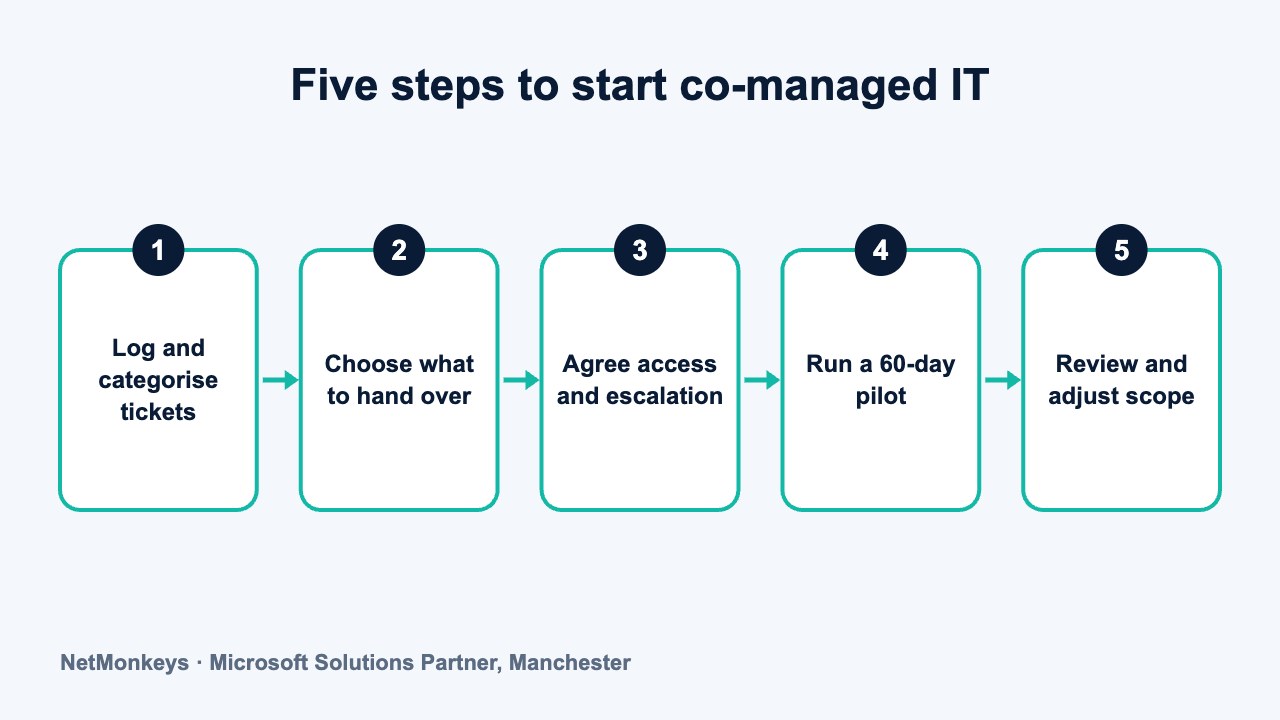
↑ Back to contentsHow do you start a co-managed arrangement in five steps?
A staged start reduces risk and gives the internal IT manager time to see the benefits before the scope widens.
- Log and categorise tickets for four to six weeks. Record volume, category, time spent and who handled each ticket. This gives you evidence for what to hand over and what to keep.
- Choose the first workstream. Common starting points, many of which run through remote IT support, are level 1 helpdesk, patching, backup monitoring or out-of-hours cover. Pick one or two, not six.
- Agree access, escalation and documentation rules. Put the points from the previous section into a short operating document that both sides sign off, with the internal lead involved in writing it.
- Run a pilot for around 60 days. Treat it as a trial with agreed measures: response times, repeat tickets, user satisfaction and the hours returned to the internal lead.
- Review and adjust. Hold a review with the provider, the internal lead and an Operations Manager. Decide what to widen, what to bring back and what to leave alone.
If you would like an outside view on which model fits, an IT consultancy review of your current setup and ticket data is a low-risk way to start. You can also talk to our team about how a co-managed arrangement might work alongside your internal IT manager.
Where a business is also considering a change of provider, our guide to buying IT services for 50 or more users covers the wider procurement questions.
↑ Back to contentsWhat mistakes make co-managed arrangements fail?
Most failures come from a small set of avoidable problems. These are the ones that come up most often.
- No written split of duties. Both sides assume the other is handling something, and it is missed.
- Internal lead not involved. They feel bypassed, withhold knowledge and the arrangement drifts into a poor outsourced one.
- Tooling that the internal team cannot see. Without visibility, the internal lead cannot judge service quality or step in.
- Unclear escalation. Tickets bounce between teams, and users stop trusting the process.
- No review cycle. What was sensible in month one may not suit month twelve, and no one has the job of checking.
- Treating it as a cost-cutting exercise. If the real aim is headcount reduction, it is better to say so openly and consider full outsourcing.
The remedy is mostly discipline: written responsibilities, shared tools, regular reviews and honest communication. A provider that delivers IT support well will want these things as much as you do, because they make the service easier to run.
Common mistake
Letting the provider take over administrative access without keeping any in-house. If the arrangement ends, you may find that the new provider cannot get in without the old one's cooperation. Keep at least one break-glass admin account under your control, stored securely, and test it periodically.
Frequently asked questions
Is co-managed IT cheaper than fully outsourced IT?
Not necessarily. You pay for the provider's scope and keep the internal salary, so the total depends on how much each side does. Co-management can cost less than expanding the internal team, and more than a lean outsourced model. Compare the total cost of ownership across the options, including recruitment, cover and training, not the monthly fee alone.
Will co-managed IT put my internal IT manager's job at risk?
It should not, and it should not be presented that way. The aim is to take on routine tickets and heavy lifting so the internal manager can focus on work that needs business knowledge. If cost reduction is the real goal, say so openly rather than using co-management as a trial of whether the role is needed.
How many staff do you need before co-managed IT makes sense?
There is no fixed threshold. It tends to become useful when one or two internal people support somewhere between 50 and 150 users and the helpdesk crowds out project work. Smaller firms often do well with full outsourcing, and larger ones may need a bigger internal team.
Who is responsible if something goes wrong in a co-managed setup?
That depends on the agreement. The contract should state who does the work, who approves changes and who leads incident response. Without that, responsibility is unclear when something fails. Review the liability and responsibility clauses with a solicitor before signing.
Can we move from co-managed to fully outsourced later, or the other way round?
Yes, and a staged approach makes it easier. Keep documentation current, hold your own administrative access and avoid long minimum terms until the arrangement has proved itself. Moving between models is simpler when the environment is well documented and no single party holds all the knowledge.
What should the internal IT manager keep control of?
Typically strategy input, application ownership, access approval, supplier relationships and decisions on major changes. They should also keep full visibility of the provider's tooling and reports. The aim is to hand over routine operational work, not accountability.
How long should a co-managed pilot last?
Around 60 days is a common starting point, long enough to see patterns in tickets and change requests and short enough to adjust quickly. Set measures before the pilot begins, such as response times, repeat tickets and hours returned to the internal lead, and hold a formal review at the end.
About this guide and NetMonkeys
Written by Caleb Adoh, Growth Marketing Manager at NetMonkeys. NetMonkeys is a Manchester-based Microsoft Solutions Partner with offices in Manchester, Nottingham and London and field engineers across around 12 UK cities, providing managed IT support, cyber security and virtual CIO services. This guide gives general information for UK businesses. Contracts, insurance policies and certification schemes differ, so check your own documents and current requirements, and take legal, insurance or financial advice where it matters.
Want a second opinion on your IT?
Talk to NetMonkeys about your current set-up, your contract and what a sensible next step looks like for your business.
Explore managed IT support Contact the team
