
How to Turn Business Data Into Actionable Insights (UK)
Learn how to move from scattered spreadsheets to trusted reports and clear decisions, with practical steps on data quality, KPIs, governance and UK GDPR.

Key Takeaways
- Start with the decision, then choose the measures and tools that inform it.
- Check data quality and definitions before building any dashboard.
- Keep KPIs few, owned and linked to a clear action.
- UK GDPR applies to analytics that use personal data: minimise, secure and document.
- Aim for one trusted dashboard and one review routine in 90 days.
To turn business data into actionable insights, start with a decision, not a dataset. Name the decision you need to make, identify the few measures that inform it, check that the data behind them is accurate, and put the answer in front of the person who can act on it, with a named owner and a date. Dashboards and tools come after that. For UK organisations, add one more step: confirm that using personal data for analysis fits the purpose it was collected for under UK GDPR.
Most SMEs and mid-market firms already hold plenty of data in accounting packages, CRM systems, Microsoft 365, websites, helpdesk tools and spreadsheets. The gap is rarely volume. It is usually definitions that differ between teams, figures nobody trusts, reports nobody reads and no routine that turns a number into an action. This guide sets out how to close that gap in a sensible order, including data quality, KPIs, business intelligence tools, governance and a 90-day plan.
It is written from the perspective of a managed IT provider that sees how data actually sits across systems, devices and cloud services. It is a practical guide, not a software pitch: Power BI appears as one option among several, and the method works with any reporting tool, including well-built spreadsheets. If you want help with the underlying systems, our managed IT support team works with UK organisations on exactly this foundation.
What are actionable insights, and how do they differ from reports?
An actionable insight is a finding that points to a specific decision or action, with someone responsible for taking it. A report tells you what happened. An insight tells you what it means and what to do next.
Consider the difference between these two statements:
- Report: support tickets rose last month.
- Insight: support tickets about password resets doubled after the new starter intake, so the onboarding checklist needs a self-service reset step, owned by the IT manager, by the end of the month.
The second version names a cause, a change and an owner. If a chart cannot lead to a decision, it is decoration. A useful test before building anything is to ask: if this number moved up or down by a significant margin, what would we do differently? If the honest answer is nothing, do not track it.
What makes an insight actionable?
Four features recur in the reporting that gets used:
- Relevant: it relates to a decision someone actually has to make.
- Trusted: the data behind it is accurate and the definition is agreed.
- Timely: it arrives while the decision is still open.
- Owned: a named person is responsible for responding.
Where does useful business data come from?
Useful business data comes from the systems you already run, grouped by the question each one answers. Before buying anything, list what you hold and who owns each source.
| Source type | Typical examples | Questions it can answer |
|---|---|---|
| Finance | Accounting package, invoicing, expenses | Margin by service, late payers, cash timing |
| Sales and marketing | CRM, website analytics, email platform | Pipeline conversion, lead sources, win and loss reasons |
| Operations | Job management, stock, scheduling, project tools | Delivery time, utilisation, rework |
| People | HR system, rota, timesheets | Absence patterns, overtime, vacancies |
| Customer service | Helpdesk, call logs, surveys | Response times, repeat issues, satisfaction |
| IT and security | Microsoft 365 reports, device inventory, licence usage | Unused licences, ageing devices, risky sign-ins |
Should I use internal or external data?
Start with internal data. It is cheaper, you control it, and it reflects your own customers. Add external sources, such as market or public datasets, only when a specific question needs them. Each extra source adds cleaning work and, if personal data is involved, a legal check.
Where data sits in several places, moving it into one governed location may be worthwhile. That is a migration job in its own right, and our data migration services cover the planning and checking that stops records being lost or duplicated on the way.
↑ Back to ContentsWhy does data quality matter before any dashboard?
Data quality matters first because a polished dashboard built on unreliable data gives confident wrong answers. Once a director spots one figure that is clearly wrong, trust in the whole report falls and people return to their own spreadsheets.
The accuracy principle in UK GDPR makes the same point for personal data: it should be accurate and kept up to date, with errors corrected or deleted promptly, as set out in the ICO guide to the data protection principles. Good analytics practice and good compliance practice point the same way.
What are the most common data quality problems?
- Duplicates: the same customer entered three ways in the CRM.
- Inconsistent definitions: sales counts an order when it is signed, finance when it is invoiced.
- Missing fields: optional boxes that staff skip, so a source or category is blank.
- Manual re-keying: figures copied between systems and spreadsheets.
- Stale data: records not updated since the contact left or the contract ended.
How do I check data quality quickly?
Pick the one report the leadership team already uses and trace each headline figure back to its source system. Check totals against a trusted record, count blanks and duplicates in key fields, and write down the definition of each measure. That single exercise usually exposes more than a long audit would, and it produces your first data dictionary.
Fix it at the point of entry
Cleaning data downstream is a recurring cost. Making key fields mandatory, using drop-down lists instead of free text and validating formats in the source system prevents most problems from arising at all.
How do I choose KPIs that lead to action?
Choose KPIs by working back from decisions: for each decision, pick one or two measures that would change your answer, and keep the total small. A short list that people understand beats a wall of metrics.
How many KPIs should a small business track?
There is no official number, but most leadership teams cope well with five to ten headline measures, each with a named owner, and a wider set of diagnostic measures that sit underneath. If nobody can say who owns a KPI, it is not yet a KPI.
What does a good KPI definition include?
- The exact calculation and the source system.
- The reporting period and refresh frequency.
- A target or acceptable range, so movement means something.
- The owner and the action expected when it falls outside range.
- The date the definition was last reviewed.
What is the difference between leading and lagging indicators?
Lagging indicators, such as revenue or churn, tell you the result. Leading indicators, such as quote volume, response time or overdue tasks, tell you early enough to intervene. Use both: the lagging measure confirms whether the approach worked, the leading measure gives you time to change it.
| Decision | Example measure | Action if it moves |
|---|---|---|
| Where to put marketing spend | Qualified leads by source | Shift budget to the best-converting source |
| Whether to hire | Utilisation and backlog age | Open a role or reschedule work |
| Which customers need attention | Repeat support issues per account | Account review call |
| Where IT spend is wasted | Assigned versus used licences | Reclaim or reassign licences |
How to turn business data into actionable insights: a UK step-by-step method
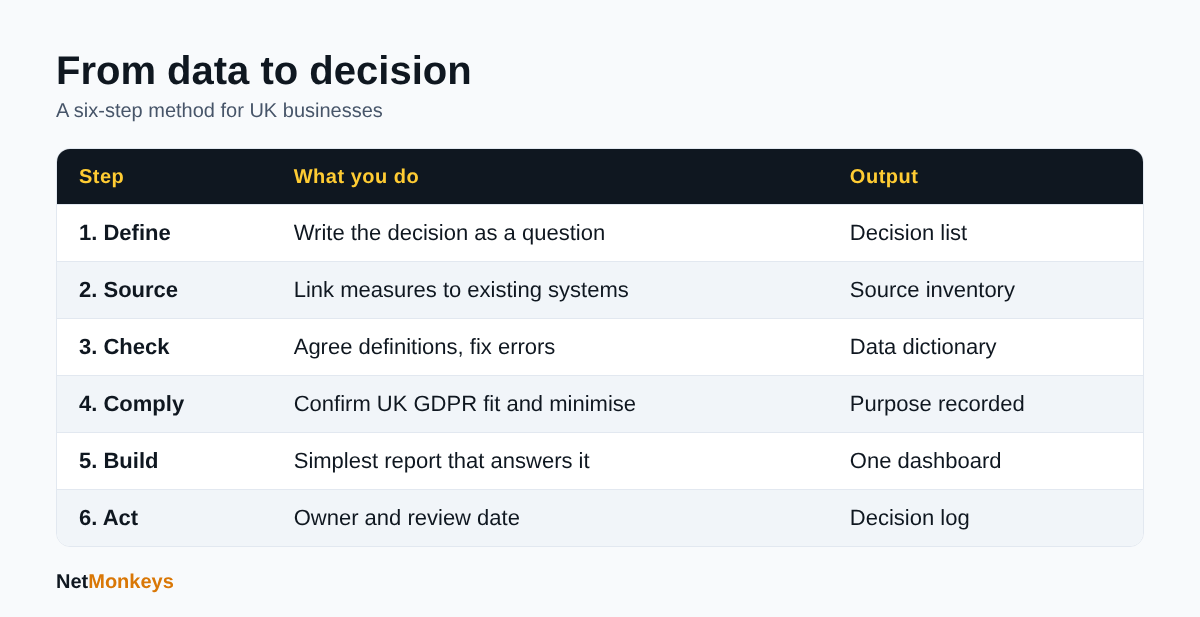
The method that works for most UK SMEs has six steps, and the order matters because later steps depend on earlier ones.
- Define the decision. Write it as a question, such as which services are least profitable.
- Identify the measures and sources. Use the tables above to link each decision to data you already hold.
- Check quality and definitions. Agree one meaning for each measure and fix obvious errors.
- Check the legal basis. If personal data is involved, confirm the purpose and minimise what you use.
- Build the simplest report that answers the question. A table or one chart is often enough.
- Attach an owner and a review date. Decide in advance who acts and when the result is reviewed.
Can you give a worked example?
The following is an illustrative example with assumed circumstances, not a real client. A professional services firm believes one service line is its most profitable because it brings in the most revenue. The decision is whether to hire another specialist for it.
- Measures: revenue, hours recorded and write-offs by service line, from the accounting and timesheet systems.
- Quality check: timesheets are filled in weekly, so the firm confirms the hours are complete and that write-offs are coded consistently.
- Finding: once hours and write-offs are included, the service line brings in the most revenue but not the most margin per hour.
- Action: the managing partner owns a review of pricing for that service line before any hire, with a re-check in the next quarter.
Nothing here needed advanced tooling. It needed an agreed definition of profit per hour, complete data and an owner.
 The six-step method described in this guide.
Which BI tools and dashboards should UK businesses consider?
Business intelligence tools connect to your data, model it and present it in reports, and the right choice depends on your data sources, skills and existing licences. Power BI is one common option, particularly for organisations already using Microsoft 365. Microsoft describes it as a business analytics platform with a desktop authoring application, an online service for publishing and sharing, and a mobile app, as set out in the Microsoft Learn overview of Power BI.
Is Power BI the only option?
No. Other widely used options include Tableau, Qlik, Looker Studio and the reporting built into your CRM, accounting or ERP package. Spreadsheets with well-structured tables and pivot tables remain a sensible starting point for smaller datasets. Choose on fit, not brand.
| Option | Suits | Watch for |
|---|---|---|
| Spreadsheets and pivot tables | Small datasets, first reports | Version control, manual refresh, errors in formulas |
| Built-in reports in line-of-business software | Single-system questions | Hard to combine data across systems |
| Power BI | Combining several sources, shared dashboards, Microsoft 365 users | Licensing, workspace sprawl, skills needed for modelling |
| Other BI platforms | Teams with existing skills or specific features | Integration effort, separate licensing and admin |
What makes a dashboard useful?
- One audience and one purpose per dashboard.
- The most important figure at the top, with a target or comparison beside it.
- Plain titles that state the question being answered.
- A visible refresh date and data source.
- A route from the number to the underlying detail, so people can ask why.
If your reporting depends on Microsoft 365 data or licences, our Microsoft 365 support team can help you check access, permissions and licence assignment before reports go live. Where data is held across on-premises and cloud systems, a managed cloud services provider can help design where it should live.
↑ Back to ContentsHow does UK GDPR apply to analytics and reporting?
UK GDPR applies whenever your analysis uses personal data, which includes customer, employee and website visitor information that identifies a person directly or indirectly. The ICO guide to the data protection principles sets out seven principles: lawfulness, fairness and transparency; purpose limitation; data minimisation; accuracy; storage limitation; integrity and confidentiality; and accountability.
What does that mean in practice for analytics?
- Purpose limitation: do not reuse data in ways that conflict with the purpose you collected it for without checking that it is compatible and telling people where needed.
- Data minimisation: use only the fields the question needs. Aggregated or anonymised data is often enough for management reporting.
- Storage limitation: do not keep identifiable data in reporting extracts longer than you need it.
- Security: restrict who can see detailed data, and review sharing settings on dashboards.
- Accountability: keep a record of what you do and why.
When is a data protection impact assessment needed?
A DPIA is required where processing is likely to result in a high risk to individuals, and the ICO guidance on data protection impact assessments lists the triggers and the meaning of terms such as large scale. Profiling customers or monitoring staff at scale are the kinds of analytics projects where it is sensible to check. As at October 2026, the ICO notes that some of its guidance is under review because of the Data (Use and Access) Act, so check the current page before relying on a specific detail.
What about sharing data with suppliers and partners?
If analytics involves passing personal data to another organisation, including a reporting or analytics supplier, the ICO data sharing code of practice explains what to consider. Make sure you have a written agreement that covers the supplier's role and security. Our guide to Microsoft Purview explains one set of tools for classifying and protecting data in Microsoft environments.
Not legal advice
This section is a practical summary of ICO guidance. For complex or high-risk processing, take advice from your data protection officer or a qualified adviser.
How do I set up data governance and make people act on insights?
Data governance is simply agreeing who owns each dataset, who may see it, how definitions change and how problems are reported. For an SME, a one-page set of rules and a named owner per system is a good start.
What should a lightweight governance model include?
- Data owners: one named person per source system, accountable for quality.
- A data dictionary: a shared list of measures and their definitions.
- Access rules: role-based access, with detailed or sensitive data restricted to those who need it.
- Change control: a simple route for requesting a new measure or changing a definition.
- Certified sources: a small set of approved datasets people are told to use, so they do not build their own copies.
How do I keep reports secure?
Reporting platforms can become a route for data to leak if sharing is unmanaged. Use multi-factor authentication, limit who can publish or share externally, review workspace membership regularly and apply row-level security where users should see only their own region or team. Microsoft documents row-level security, sensitivity labels and audit logs among Power BI service features in its overview, and similar controls exist in other platforms.
Reporting data is a target like any other. Good basics from our cybersecurity best practices guide, and for smaller organisations our page on cybersecurity for small business, apply equally to data platforms. Working towards Cyber Essentials also gives you a clear baseline for the devices and accounts that access your reports.
How do I make people act on the insights?
People act on insights when the report is built into a routine, so build the meeting, the owner and the follow-up into the process. A dashboard that is not reviewed at a regular meeting is rarely used.
What does a decision workflow look like?
- Trigger: a measure moves outside its agreed range, or a scheduled review date arrives.
- Question: the owner asks what changed and checks the data for errors first.
- Options: the owner lists two or three possible responses and their cost.
- Decision: the responsible manager picks one and records it, with a date.
- Follow-up: the same measure is reviewed at the next meeting to see whether the action worked.
How do I run a good review meeting?
- Keep it to a fixed length and a fixed set of measures.
- Begin with exceptions, not a tour of every chart.
- Record decisions and owners in one visible place.
- Close the loop by reporting on the previous meeting's actions first.
If your insights depend on IT systems staying available, align reporting with your continuity planning. Our business continuity plan template is a useful starting point for identifying which systems and data sources matter most.
↑ Back to ContentsWhat are the most common mistakes when using business data?
The most common mistakes are building tools before defining decisions, trusting unchecked data and reporting without owners. These problems recur across organisations of all sizes.
- Starting with the tool. Buying a platform first, then looking for questions to ask it.
- Too many metrics. Fifty measures with no priorities mean no one acts on any.
- Mixed definitions. Two departments reporting different numbers under the same name.
- Ignoring data protection. Pulling full customer records into reports when counts would do.
- Vanity metrics. Page views or follower counts with no link to revenue or retention.
- Over-reliance on one person. One analyst holds all the knowledge and leaves.
- Confusing correlation with cause. Acting on a pattern without testing whether it is real.
- No refresh discipline. Stale dashboards that quietly stop updating.
Dependency on a single person or supplier is an IT risk as much as an analytics risk. Our comparison of outsourced IT support and in-house IT sets out the trade-offs for knowledge and cover.
↑ Back to ContentsWhat does a realistic 90-day plan look like?
A realistic 90-day plan delivers one trusted dashboard and one repeatable decision routine, rather than a full data platform. The aim is a working habit, not a perfect system.
| Period | Focus | Outputs |
|---|---|---|
| Days 1 to 30 | Decisions, sources and quality | List of top decisions, source inventory with owners, first data dictionary, quality check of one core report |
| Days 31 to 60 | Build and govern | Five to ten KPIs with definitions and owners, first dashboard, access rules, UK GDPR check on any personal data |
| Days 61 to 90 | Embed and review | Regular review meeting, decision log, feedback from users, plan for the next dashboard |
What should be in place by day 90?
- One dashboard that leadership actually opens.
- Named owners for every KPI and source system.
- A decision log showing at least a few actions taken because of the data.
- A short list of known data quality issues, with owners and dates.
- A repeatable method for adding the next question.
Conclusion: how to turn business data into actionable insights in the UK
To turn business data into actionable insights in the UK, begin with the decision, trust the data, pick a small set of KPIs, respect UK GDPR and give every insight an owner and a review date. Tools matter less than these habits, and a modest dashboard in a disciplined routine will beat an elaborate platform that nobody reviews.
If you would like help getting the systems, access and security right underneath your reporting, speak to our team. We work from Manchester, Nottingham and London, with field engineers across around 12 UK cities. You can also read about our approach to IT support for small businesses. Contact NetMonkeys to discuss your data and reporting needs.
Who wrote this and how it was checked
Written by Caleb Adoh, Growth Marketing Manager at NetMonkeys, a Microsoft Solutions Partner. The legal and product statements in this guide were checked against the ICO and Microsoft Learn pages cited above as at October 2026.
Frequently Asked Questions (FAQs)
How do I turn business data into actionable insights in the UK?
Start with a decision you need to make, choose the few measures that inform it, check the data behind them is accurate, then present the result to a named owner with a review date. If personal data is involved, confirm your use fits UK GDPR principles such as purpose limitation and data minimisation before you build the report.
What is the first step in using business data?
The first step is to list the decisions that matter most, such as pricing, hiring or marketing spend. Then identify which existing data would change your answer. Starting with the decision keeps reporting focused and prevents you from building dashboards that look impressive but do not lead to any action.
Do I need Power BI to analyse business data?
No. Power BI is one option, and Microsoft describes it as an analytics platform with desktop, online and mobile components. Spreadsheets, built-in reports in your accounting or CRM software and other BI tools can all work. Choose based on your data sources, skills, budget and the licences you already hold.
How many KPIs should a small business track?
There is no fixed rule, but five to ten headline KPIs, each with a named owner and a clear definition, is manageable for most leadership teams. Keep diagnostic measures underneath for investigation. If nobody owns a measure or knows what action to take when it moves, remove it.
Does UK GDPR apply to business analytics?
Yes, when the analysis uses personal data such as customer, employee or website visitor information. The ICO sets out seven principles, including purpose limitation, data minimisation, accuracy and accountability. Use only the data you need, keep it secure, and consider a DPIA where processing is likely to be high risk.
Why do business dashboards often go unused?
Dashboards go unused when they are not tied to a decision, use unreliable data, show too many measures or have no owner and no review meeting. Fixing this means agreeing definitions, limiting the content, assigning accountability and building the dashboard into a regular management routine.
How long does it take to build a useful reporting routine?
A focused organisation can have one trusted dashboard and a regular review routine within about 90 days. The first month covers decisions, sources and data quality, the second builds KPIs and governance, and the third embeds the meeting and decision log. Larger, multi-system projects take longer.
Who should own data in a small organisation?
Each source system should have one named data owner, usually the manager who depends on it most, such as the finance lead for the accounting package. They are accountable for quality and definitions. IT supports access and security, while a senior sponsor makes sure the reporting is used for decisions.
Speak to a NetMonkeys specialist
Want an expert to review your setup, or to put this guide into practice with you? Our team can help.
Book a conversation
