
Phishing Protection Services for Law Firms: UK Guide
Phishing is the usual first step in client account fraud against solicitors. This guide sets out the layers of protection UK law firms need and how to judge a provider.

Key Takeaways
- Phishing protection services for law firms work best as layers: email filtering, domain protection, MFA, training and a rehearsed response plan.
- The SRA reports that email modification fraud is the most common cyberattack on firms, so payment verification by a second channel matters as much as technology.
- DMARC, SPF and DKIM stop criminals spoofing your domain to your clients and are recommended by the NCSC.
- Training is one layer, not the main defence: the NCSC advises building a no-blame reporting culture.
- A personal data breach that is likely to risk individuals must reach the ICO within 72 hours of you becoming aware.
Phishing protection services for law firms are the combination of email security tools, domain authentication, access controls, staff awareness and incident response that stops fraudulent emails reaching fee earners, or limits the damage when one does. No single product does this. The firms that cope best treat phishing as a process problem as well as a technology problem.
Law firms are attractive targets because they hold client money, move large sums at predictable moments (completions, settlements) and exchange sensitive documents by email. The Solicitors Regulation Authority (SRA) states that email modification fraud, where a criminal redirects a payment by impersonating a party, is the most common cyberattack its firms experience. See the SRA cyber security advice for the detail.
This guide is written for managing partners, COLPs, practice managers and IT leads at UK firms. It explains what each layer does, how to compare providers, what to do when something gets through, and how to sequence the work. The position is as at October 2026, checked against the NCSC guidance on phishing attacks, the SRA and the ICO. If you want the wider context for your sector, our page on IT support for law firms covers how we work with practices.
What are phishing protection services for law firms?
Phishing protection services for law firms are managed or self-run controls that detect, block, report and respond to deceptive messages aimed at your people, clients and bank details. They cover the whole journey of a malicious message, from the moment it is sent to the moment it is reported or acted on.
A typical service bundles several parts:
- Inbound email filtering that scans links, attachments and sender behaviour.
- Domain protection through SPF, DKIM and DMARC so your own domain cannot be spoofed.
- Identity protection such as multi-factor authentication and conditional access.
- Awareness training and a simple way to report suspicious email.
- Monitoring and response so a compromised mailbox is spotted and contained quickly.
The NCSC guidance on phishing attacks frames the same idea as four layers: make it hard for attackers to reach users, help users spot and report phishing, limit the impact of messages that get through, and respond quickly to incidents. Use that structure when you assess any provider.
↑ Back to ContentsWhy are law firms such a target for phishing?
Law firms are targeted because a single successful email can redirect a large client payment. Criminals know when money is due to move and often watch a transaction for some time before intervening.
The SRA cyber security advice describes successful attacks as usually targeted rather than mass mailings, with fraudsters building trust over several exchanges before redirecting payment. It also notes that a vishing (voice phishing) victim lost a significant sum after repeated fake payment retries, which shows that email is not the only route.
Several features of legal work raise the risk:
- Public websites list fee earners, roles and sometimes live matters, which gives criminals material for convincing messages.
- Conveyancing and probate involve third parties (agents, lenders, other firms) whose email you cannot control.
- Time pressure around completion encourages quick decisions.
- Client money rules mean a loss must be replaced immediately and reported.
The SRA also publishes its own warnings. In one reported case, the Law Gazette report described fake emails sent from a lookalike domain claiming a complaint had been made against a firm and intended to deliver malware. The lesson is that even regulator-branded messages need checking against the real domain.
↑ Back to ContentsHow does phishing reach solicitors, and what does it look like?
Phishing reaches solicitors through email, text, phone and increasingly collaboration tools, and it usually imitates someone the recipient already deals with. The common patterns are below.
| Attack type | What it looks like | Main control |
|---|---|---|
| Payment diversion | A "change of bank details" email from a client, agent or another firm | Call-back verification on a known number |
| Account takeover | A genuine mailbox used to send fraud, often with hidden forwarding rules | MFA, mailbox rule monitoring |
| Credential harvesting | A fake Microsoft 365 or document-sharing login page | Link scanning, MFA, training |
| Malware attachment | A fake complaint, invoice or court document | Attachment sandboxing, restricted macros |
| Domain spoofing | Email that appears to come from your own domain | SPF, DKIM, DMARC enforcement |
| Vishing and smishing | A call or text pressing for an urgent transfer | Payment policy, staff training |
Our general explainer, what phishing is, with types and examples, covers the wider categories if you want to share a plain-language primer with fee earners.
↑ Back to ContentsWhat layers of email security do law firms need?
Law firms need at least five technical layers working together: filtering, domain authentication, identity protection, device hygiene and monitoring. If you remove one, the others carry more load than they should.
Is the filtering built into Microsoft 365 enough?
The built-in protection is a baseline, not a finish line. According to Microsoft Learn overview of Defender for Office 365, anti-phishing protection against spoofing is built in for cloud mailboxes, while Safe Links, Safe Attachments and user and domain impersonation protection sit in Defender for Office 365 Plan 1, with attack simulation training and deeper investigation in Plan 2. Plan 1 is included in some subscriptions such as Microsoft 365 Business Premium and is also sold as an add-on. Check exactly what your licences include before buying anything additional.
When is a third-party email security gateway worth it?
A third-party filter can add value where you want a second detection engine, per-user quarantine controls, or consistent protection across mixed mail platforms. It can also add cost, mail-routing complexity and another console to monitor. Decide on evidence: ask your provider to compare what your current tools miss against what the extra layer would catch, using your own mail flow.
What should sit behind the filter?
- Multi-factor authentication for every user, with stronger methods for partners and finance staff.
- Patched devices and restricted administrator rights, so a click has limited consequences. Our managed EDR service is one way to monitor endpoints for what filters miss.
- Logging and alerting on suspicious sign-ins and new mailbox forwarding rules.
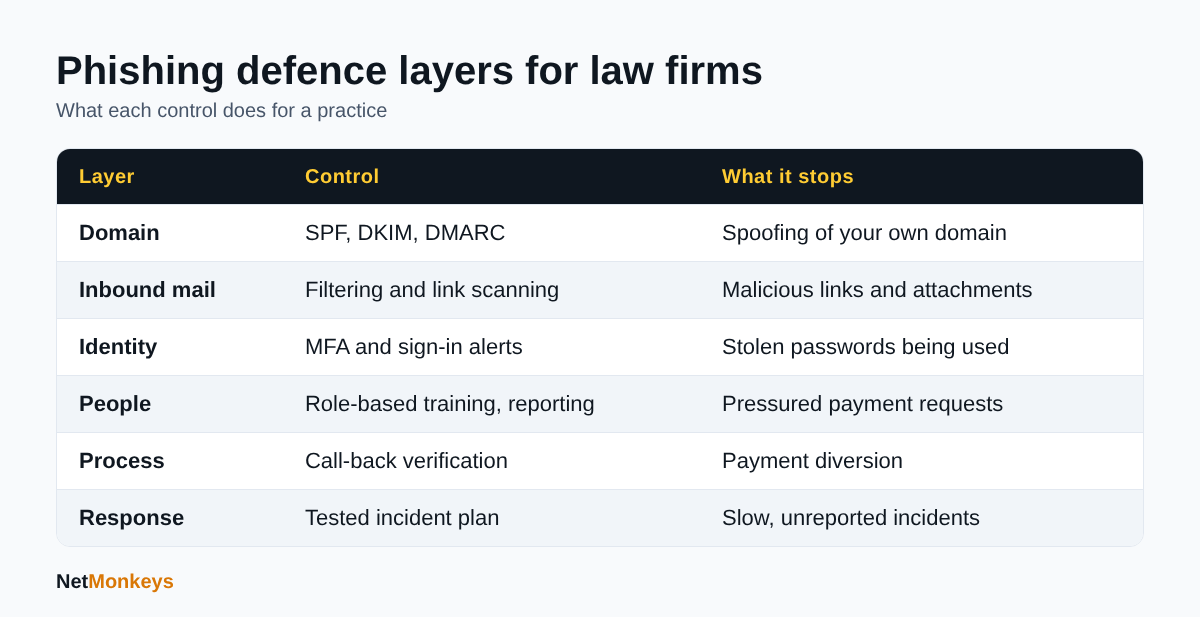 Six layers that work together to reduce phishing risk in a UK law firm.
How do DMARC, SPF and DKIM protect a law firm's domain?
SPF, DKIM and DMARC are three DNS-based standards that let receiving mail servers check whether an email claiming to come from your domain is legitimately authorised. DMARC ties them together and tells receivers what to do with failures.
- SPF lists the servers allowed to send mail for your domain.
- DKIM adds a cryptographic signature to outgoing messages.
- DMARC sets a policy (none, quarantine or reject) and sends reports so you can see who is sending as you.
The NCSC guidance on phishing attacks recommends DMARC with SPF and DKIM so attackers cannot send email that appears to come from your domain, and notes it also helps your legitimate email reach inboxes. The SRA advice likewise asks firms to consider DMARC.
Practical sequencing
Start DMARC in monitoring mode, read the reports to find every legitimate sender (case management systems, marketing tools, billing platforms), fix them, then move to quarantine and finally reject. Jumping straight to reject can block your own legitimate mail.
DMARC protects clients from emails pretending to be you. It does nothing about lookalike domains such as a one-letter variation, so it complements rather than replaces filtering and staff vigilance.
↑ Back to ContentsHow can a firm stop payment diversion and client account fraud?
A firm stops payment diversion mainly through process: no bank detail change is actioned on email alone, and every change is confirmed by a second channel using contact details you already held. Technology reduces the number of fraudulent emails; process stops the one that arrives anyway.
Drawing on the SRA cyber security advice, a sensible control set looks like this:
- Tell clients at engagement that you will never change your bank details by email, and repeat it in completion correspondence.
- Require verbal or written confirmation, using known details, before acting on any bank detail change or releasing funds.
- Check email accounts for unexpected forwarding rules, which criminals use to watch a matter quietly.
- Check sender addresses for small variations rather than trusting the display name.
- Limit what your website reveals about live matters and internal roles.
- Train everyone, from partners to reception, to query pressured payment requests.
The SRA also notes that Confirmation of Payee helps with bank mandate fraud but does not remove the need for vigilance. Treat it as an additional check, not a substitute for call-backs.
Where payment diversion involves a compromised mailbox on the other side of the transaction, you may see nothing wrong on your own systems. That is why verification by phone, using details from an independent source, is a standing rule rather than an optional extra.
↑ Back to ContentsDoes phishing awareness training work for solicitors?
Training helps, but only as one layer. The NCSC is explicit that nobody can spot every phishing email, so training should sit alongside technical controls and a culture where people report quickly without fear of blame.
The SRA expects training across the firm, including senior and support staff, with records kept so gaps can be identified, and content that reflects current threats and the firm's own risks. Practical ways to make it stick:
- Keep sessions short and tied to real workflows, such as completion statements and bank detail changes.
- Give fee earners, cashiers and finance staff role-specific scenarios.
- Provide a one-click report button in Outlook and acknowledge every report.
- Measure reporting rates, not only click rates.
- If you run phishing simulations, agree the approach with HR first and avoid shaming individuals.
Defender for Office 365 Plan 2 includes attack simulation training according to Microsoft Learn, and many awareness vendors offer similar features. Whichever you choose, the test is whether people report earlier and more often over time.
↑ Back to ContentsWhat should a law firm do if a phishing email is clicked?
If someone clicks, act on the assumption that credentials may be stolen: isolate, reset, review and report. Speed matters more than certainty in the first hour.
- Contain: disconnect the device if malware is suspected, reset the password and revoke active sessions.
- Check the mailbox: look for new forwarding rules, delegated access and sent items the user did not write.
- Protect money: contact the bank immediately if any payment instruction may have been affected.
- Preserve evidence: keep the original message and logs for investigators and insurers.
- Assess data exposure: work out whether personal data was accessed.
- Report: to the SRA where a cyber incident has succeeded, to the ICO where required, and to Action Fraud.
On timing, the ICO guidance on personal data breaches says a notifiable personal data breach must be reported without undue delay and no later than 72 hours after you become aware, and that you should document your reasoning if you decide it is not reportable. The SRA advice also asks firms to report successful attacks to it and to set out reporting protocols in policy.
Write this down before you need it. Our cyber incident response plan template is a starting point, and the NCSC advises testing the plan through exercises rather than leaving it in a drawer.
↑ Back to ContentsHow do insurance and regulatory duties affect phishing protection?
Insurance and regulation shape both what you must do and what you can recover. Read your cover before an incident, not during one.
The SRA cyber security advice advises firms to check their professional indemnity insurance, noting that minimum terms may respond to client money losses from cybercrime up to the insured amount, and that some firms have discovered their policy did not cover cyber losses. It also notes that the SRA Account Rules require improperly withdrawn client money to be replaced immediately and reported.
Questions to put to your broker:
- Does the policy cover social engineering and payment diversion losses?
- Are there conditions such as MFA, backups or patching that must be in place?
- Does it fund forensic investigation, legal costs and notification?
- What are the notification time limits?
Insurers increasingly ask about security controls on proposal forms. Our guides to cyber insurance and Cyber Essentials explain how a recognised baseline supports both applications and client due diligence. Corporate and public sector clients often ask panel firms for evidence of controls, so documented protection has commercial value as well.
↑ Back to ContentsHow do you choose a phishing protection provider for a law firm?
Choose a provider on evidence of legal-sector understanding, clear service boundaries and measurable outcomes, not on a feature list. Use the table below as a scoring sheet.
| Question | What a good answer shows |
|---|---|
| How do you handle DMARC rollout? | A staged plan from monitoring to reject, with ownership of sender discovery |
| What is covered, and what is not? | A written scope listing filtering, monitoring, response and who acts out of hours |
| How do you detect mailbox compromise? | Sign-in anomaly and forwarding-rule alerts, not just inbound filtering |
| How is training delivered and measured? | Role-based content and reporting-rate metrics |
| What happens during an incident? | A named process, response times in the contract, and evidence handling |
| How do you report to us? | Regular, plain-English reporting a COLP can use |
| What licences do we already own? | An audit of existing Microsoft 365 entitlements before extra spend |
Ask whether the provider will work inside a managed IT support arrangement or as a standalone tool, because separating email security from the rest of IT often leaves gaps in who owns an alert. Our guide on choosing an IT support company covers general selection criteria, and a cyber security audit can establish your starting position first.
↑ Back to ContentsHow should a law firm sequence phishing protection in 90 days?
A firm should start with the cheapest, highest-impact controls and move to the slower projects in parallel. The following is an illustrative sequence for a mid-sized practice on Microsoft 365, not a description of any specific client.
Days 1 to 30: close the obvious gaps
- Enforce MFA for all users and block legacy authentication.
- Audit existing licences to see which Defender for Office 365 features you already own and switch them on.
- Publish a payment verification rule and brief the accounts team.
- Start DMARC in monitoring mode.
Days 31 to 60: tighten detection and process
- Turn on alerts for mailbox forwarding rules and unusual sign-ins.
- Add a report-phishing button and agree who triages reports.
- Update client engagement letters with the no-bank-changes-by-email statement.
- Run first role-based training sessions for cashiers and conveyancers.
Days 61 to 90: prove it works
- Move DMARC towards quarantine, then reject once senders are clean.
- Run a tabletop exercise based on a diverted completion payment.
- Review insurance conditions against what is now in place.
- Report progress to partners with agreed measures, such as reporting rates and time to contain.
Where the firm lacks in-house capacity, Microsoft 365 support and small business cyber security services can carry the configuration and monitoring work while the firm owns the policy decisions. Our overview of cyber security best practices lists wider controls to schedule after the first 90 days.
↑ Back to ContentsConclusion: what does good phishing protection look like for a law firm?
Good phishing protection services for law firms combine filtering, domain authentication, MFA, role-based training and a rehearsed response, all backed by a payment verification rule that no pressure can override. The SRA, NCSC and ICO sources cited here point the same way: layered controls, a no-blame reporting culture and quick, documented action.
Start with what you can switch on this month, measure reporting as well as clicking, and review the position at least annually. If you would like a second opinion on your current setup, speak to the NetMonkeys team.
Who wrote this and how it was checked
Written by Caleb Adoh, Growth Marketing Manager at NetMonkeys, a Manchester-headquartered Microsoft Solutions Partner with offices in Nottingham and London. Content was checked against the cited NCSC, SRA, ICO and Microsoft Learn pages as at October 2026. This guide is general information, not legal advice or a regulatory opinion.
Frequently Asked Questions (FAQs)
What are phishing protection services for law firms?
They are the combined email filtering, domain authentication, multi-factor authentication, staff training, monitoring and incident response that protect a legal practice from fraudulent messages. The aim is to stop criminals reaching staff, limit damage when a message gets through, and recover quickly. Most firms use a mix of Microsoft 365 features, specialist tools and a managed provider.
Why are solicitors targeted by phishing?
Solicitors hold client money and move large payments at predictable moments, such as completion. The SRA reports that email modification fraud is the most common cyberattack on firms, often built up over several exchanges. Public staff details and third-party emails from agents and other firms also give criminals material and opportunity.
Is Microsoft 365 email security enough for a law firm?
Built-in protection is a useful baseline, but it is not the whole answer. Microsoft documents that features such as Safe Links, Safe Attachments and impersonation protection sit in Defender for Office 365 Plan 1, which some subscriptions include. Firms should still add MFA, DMARC, monitoring, training and a payment verification process.
What is DMARC and does my firm need it?
DMARC is a DNS-based policy that, with SPF and DKIM, tells receiving servers how to treat email that fails checks claiming to come from your domain. The NCSC recommends it and the SRA advises firms to consider it. It stops direct spoofing of your domain, but not lookalike domains, so it complements filtering.
How can we prevent conveyancing and client account fraud?
Never act on a bank detail change by email alone. Confirm by phone using details you already held, tell clients at the outset that you will not change your bank details by email, and check mailboxes for hidden forwarding rules. Train cashiers and fee earners to question pressured payment requests, and use Confirmation of Payee as an extra check.
Does phishing awareness training actually work?
It helps when used as one layer. The NCSC says nobody can spot every phishing email, so training should be paired with technical controls and easy reporting. Role-specific sessions, a no-blame culture and measuring how many people report suspicious email are better indicators than click rates alone.
What should a law firm do after a phishing incident?
Contain the account or device, reset credentials, check for forwarding rules, contact the bank if payments may be affected and preserve evidence. Assess whether personal data was involved. A notifiable personal data breach must go to the ICO within 72 hours of awareness, and successful cyber incidents should be reported to the SRA.
Will insurance cover losses from phishing fraud?
It depends on the policy. The SRA advises checking professional indemnity cover, because minimum terms may respond to client money losses from cybercrime only up to the insured amount, and some policies do not cover cyber losses. Ask your broker about social engineering cover, security conditions and notification deadlines.
Speak to a NetMonkeys specialist
Want an expert to review your setup, or to put this guide into practice with you? Our team can help.
Book a conversation
