
Microsoft Dynamics GP End of Support: Dates and Options
Microsoft will end support for Dynamics GP 18.x on 31 December 2029, with security patches to April 2031 if needed. Here is the timeline and what to do about it.

Key Takeaways
- 31 December 2029 is the current end of support date for Dynamics GP 18.x, moved from 30 September 2029.
- Security patches may continue to 30 April 2031, but only if needed. Do not plan around them.
- GP 2016 extended support ended in July 2026; older fixed-lifecycle versions ended earlier.
- Your options are to stay with an exit plan, move to Business Central, or choose another ERP.
- Aim to go live well before Q4 2029 and start with an inventory in the next 90 days.
The Microsoft Dynamics GP support end date is 31 December 2029, as at October 2026. On that date Microsoft stops supporting the current Dynamics GP 18.x releases for product enhancements, regulatory (tax) updates and technical support. Security patches, where needed, are due to continue until 30 April 2031. Microsoft moved the end date from 30 September 2029 to 31 December 2029, per Microsoft's Dynamics GP lifecycle page.
That gives a finance team roughly three years and two months from today. It sounds generous, but an ERP replacement rarely fits in a casual plan. Most organisations need time to choose a direction, clean data, test year-end processes, run the old and new systems side by side and train people.
This guide sets out the Dynamics GP end of support timeline, what each date means in practice, the realistic options (stay, move to Dynamics 365 Business Central, or move to another ERP) and how to sequence the work. Our team at NetMonkeys, a Manchester-headquartered managed IT support provider and Microsoft Solutions Partner, sees the infrastructure, security and data side of these projects. The choice of ERP itself is a business decision that belongs with your finance director and software partner.
What is the Microsoft Dynamics GP support end date?
The Dynamics GP end of support date is 31 December 2029, and it applies to the current version, Dynamics GP 18.x. Microsoft states that support ends on that date for product enhancements, regulatory (tax) updates and technical support, with security updates and patches available until 30 April 2031 if needed (Microsoft's Dynamics GP lifecycle page, read October 2026).
Dynamics GP also appears in the Product Retirements table on Microsoft's 2029 end-of-support list, listed as retiring on 31 December 2029.
Three points are worth stating plainly:
- The date has already moved once. The previously announced date was 30 September 2029. Treat 31 December 2029 as the current date, and check Microsoft's page again before you sign anything long-term.
- GP does not stop working on that day. It becomes unsupported. There are no tax or regulatory updates and no technical support from Microsoft.
- The security patch tail is conditional. Microsoft says patches will be made available until 30 April 2031 "if needed". It is not a commitment to a full extended support period, so do not plan around it.
Short answer
Dynamics GP 18.x: support ends 31 December 2029. Security patches, if needed, until 30 April 2031. Dates as published by Microsoft and read in October 2026.
What is the Dynamics GP end of support timeline?
The Dynamics GP timeline has two parts: older fixed-lifecycle versions that have already reached or are reaching their end dates, and the current 18.x release on Microsoft's Modern Lifecycle Policy. The table below uses the dates Microsoft publishes.
| Version | Policy | Mainstream support | Extended or final date |
|---|---|---|---|
| GP 2013 / 2013 R2 | Fixed | Ended 4 April 2018 | Ended 11 April 2023 |
| GP 2015 / 2015 R2 | Fixed | Ended 14 April 2020 | Ended 8 April 2025 |
| GP 2016 / 2016 R2 | Fixed | Ended 13 July 2021 | Ended 14 July 2026 |
| GP 2018 / 2018 R2 | Fixed (see note) | Ended 10 January 2023 | Ends 11 January 2028 |
| GP 18.x (current) | Modern | Continuous updates | Support ends 31 December 2029; security patches to 30 April 2031 if needed |
Source: Microsoft's Dynamics GP lifecycle page, read October 2026.
The practical reading for October 2026: if you are still on GP 2016, its extended support finished in July 2026, so you are already running without Microsoft fixes. GP 2013 and 2015 have been out of support for longer.
Installing any compatible tax release or hotfix on GP 2018 or 2018 R2 takes you to version 18.5 or later, which enacts the Modern Lifecycle Policy. Microsoft says there are no tax releases or hotfixes that would let you stay on the fixed lifecycle. So most live GP 2018 systems that are being kept up to date are effectively on the 2029 date, not the 2028 one.
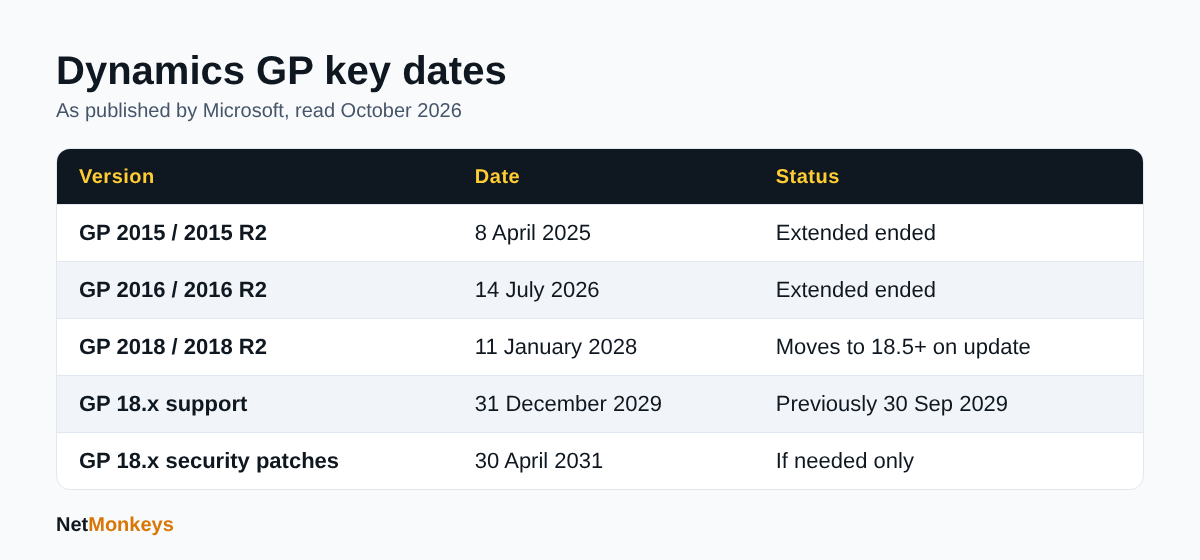 Dynamics GP lifecycle dates, from Microsoft's published lifecycle page.
How does the Modern Lifecycle Policy affect Dynamics GP?
Under the Modern Lifecycle Policy you stay supported by staying current, and falling behind is what creates risk before 2029. Microsoft says customers keep supported by taking at least one of the three all-inclusive GP updates, typically released in June, October and December each year. The updates normally consist of hotfixes, tax updates and relevant regulatory updates.
For a finance team this has a few consequences:
- Tax and regulatory updates are tied to the update cycle. If you skip updates, you can fall out of support before 2029 and miss changes you need for payroll-adjacent or VAT reporting.
- Updates need testing. Third-party add-ons, custom reports, integrations and Excel-based tools can break with a new build. A test company and a written regression checklist save year-end pain.
- Someone has to own it. In many small finance teams the person who ran GP updates has left or moved on. Confirm who applies updates today and what the fallback is.
A sensible check this month is to confirm which GP build you are on, when it was last updated, and whether your add-ons are certified for the current release. If you cannot answer those three questions in a few minutes, that is the first piece of work.
↑ Back to ContentsWhat are my options when Dynamics GP support ends?
You have three realistic options: stay on GP and accept the risk, move to Dynamics 365 Business Central, or move to a different ERP. There is also a variant of the first option, where you stay for now but only with a dated exit plan.
| Option | Best fit | Main trade-off |
|---|---|---|
| Stay on GP to 2029 and plan an exit | Stable processes, heavy customisation, limited appetite for change | Cost of change is deferred, not removed; the final year is crowded |
| Move to Business Central | Microsoft-centred estates that want a cloud ERP with familiar tooling | Data model and process differences need design, not just a data copy |
| Move to another ERP | Needs that GP and Business Central do not meet, such as sector-specific functions | Longest evaluation and implementation, widest change for staff |
| Stay beyond 2029 unsupported | Only as a short, controlled run-off for a closing or merging business | No tax or regulatory updates; audit and security exposure rises |
None of these is automatically right. The main decision criteria we see in practice are the number of integrations, the amount of GP customisation, the finance team's appetite for process change, the licensing and subscription position, and how long the business expects to operate in its current form.
Your ERP or finance software partner should lead the product comparison. Where a managed IT provider helps is in the surrounding work: infrastructure, identity, security, data movement and user support.
↑ Back to ContentsShould I migrate from Dynamics GP to Business Central?
For many Microsoft-centred organisations Business Central is the natural candidate, but it should be chosen on fit, not because the logo matches. Microsoft documents a cloud migration route from Dynamics GP to Business Central online, and notes that the Cloud Migration setup guide for Dynamics GP is supported for the United States, Canada and United Kingdom markets (Microsoft's Business Central cloud migration documentation, read October 2026).
Points to weigh before committing:
- Functional fit. List what GP does for you today, including the awkward parts: intercompany, multi-currency, fixed assets, project costing, custom reports. Check each against Business Central standard functionality and any add-on you would need.
- Cloud versus on-premises thinking. GP is often hosted on your own servers. Business Central online changes how you handle updates, backups, access and integrations. That is a benefit to some teams and a loss of control to others.
- Licensing. Subscription pricing differs from GP's licence and maintenance model. Ask your Microsoft partner for a written quote for your user mix rather than relying on list-price assumptions.
- Reporting. Many GP sites run on Management Reporter, SmartList or Excel extracts. Plan the replacement reporting early, because finance directors notice reporting gaps before anything else.
How does Dynamics GP data migration work?
Data migration moves your GP records into the new system through a mix of automated tooling and manual preparation, and the quality of the source data decides how smooth it is. For Business Central, Microsoft's documentation describes installing the Dynamics GP Historical Data, Dynamics GP Intelligent Cloud and Dynamics GP Intelligent Cloud (US) extensions and running the Cloud Migration Setup guide (Microsoft's Business Central cloud migration documentation). The older Dynamics GP Data Migration extension is deprecated from Business Central 15.3, and Microsoft points users to the cloud migration route.
Microsoft's pages do not give a single list of everything that transfers, so confirm scope with your implementation partner in writing before you rely on any assumption. Whatever the tooling, the work usually breaks down like this:
- Decide what to bring. Opening balances and live master records are usually essential. Full transaction history is a separate decision. Some firms keep history in a read-only archive instead.
- Clean before you move. Duplicate customers, dormant vendors, obsolete items and inconsistent coding are cheaper to fix before migration than after.
- Map structures. Chart of accounts, dimensions, tax codes and payment terms rarely map one-to-one. Document the mapping and have finance sign it off.
- Rehearse. Run at least two trial migrations and reconcile trial balances, ageing and stock values each time. The third run is the real one.
- Plan the archive. UK businesses must keep accounting records for statutory periods, so decide where old GP data will live, who can read it and how it is backed up.
Our data migration services cover the technical movement, validation and rehearsal side of this kind of project, working alongside your ERP partner.
↑ Back to ContentsWhat should a Dynamics GP migration timeline look like?
Work back from 31 December 2029 and aim to finish live running well before it, ideally after at least one full financial year-end on the new system. The illustrative plan below is an example with stated assumptions, not a quote or a promise: a mid-sized UK business with one legal entity, a moderate number of integrations and a decision made in 2027.
| Phase | Illustrative timing | What happens |
|---|---|---|
| Discovery and decision | Now to mid-2027 | Inventory GP modules, add-ons, integrations and reports; shortlist options; agree a business case |
| Selection and contract | Mid-2027 to late 2027 | Demos against your scripts; partner selection; licensing quotes; project plan |
| Design and build | Late 2027 to mid-2028 | Process design, mapping, integrations, reporting, security model |
| Test and rehearse | Mid-2028 to late 2028 | Trial migrations, user acceptance testing, training |
| Go-live | Aligned to a period start in 2029 or earlier | Cut-over at a month or year boundary; hypercare |
| Run-off and archive | After go-live | Read-only GP access, archive checks, decommission servers |
Assumptions: single entity, no major acquisitions during the project, the finance team has time to test alongside the day job. If any of those are untrue, add time. The most common mistake is to start the clock when the vendor date is close, then find that the selection stage alone took longer than planned.
Avoid putting go-live in the last quarter of 2029. If something slips, you have no room left, and you are asking staff to do a year-end close in an ERP that is about to lose support.
↑ Back to ContentsWhat are the risks of staying on Dynamics GP after support ends?
Staying on an unsupported ERP raises compliance, security and operational risk, and the risks grow each month. Because Microsoft says support ends for tax and regulatory updates on 31 December 2029, any later change to UK tax or reporting rules would have to be handled outside the product.
The main risks:
- Regulatory drift. Without Microsoft regulatory updates you rely on workarounds or third parties for changes to tax and reporting requirements.
- Security exposure. The security patch tail runs to 30 April 2031 "if needed". Beyond it, GP, SQL Server, Windows Server and Office components underneath it carry their own lifecycles, and an unsupported stack is hard to defend.
- Insurance and assurance questions. Cyber insurers, auditors and customers increasingly ask about unsupported software. Expect questions in renewals and supplier questionnaires.
- Skills risk. GP consultants and administrators will gradually move to other platforms, making support slower and dearer.
- Integration breakage. Connected systems such as banking tools, expenses and CRM change their interfaces over time. An ERP that cannot be updated becomes the weak link.
If you do have to run GP for a period, treat it like any legacy system: restrict network access, enforce multi-factor authentication on remote access, keep underlying servers patched, and test restores. Our guidance on cybersecurity best practices and a cybersecurity assessment are good starting points, and Cyber Essentials controls apply to the servers and endpoints around GP.
↑ Back to ContentsWhat should you do in the next 90 days?
Spend the next 90 days on facts, not vendor demos: build an inventory, set an owner and agree a decision date. A checklist you can use as it stands:
- Record your GP version, build number, last update date and database server version.
- List every add-on, custom report, SmartList, macro and Excel link, with an owner for each.
- List every integration: bank feeds, payroll, CRM, e-commerce, expenses, EDI, reporting tools.
- Confirm who applies GP updates and how they are tested. Name a deputy.
- Check the supported status of the servers and operating systems GP runs on, and whether remote access uses MFA.
- Confirm backups and test a restore of the GP database, not just the file share.
- Ask finance which reports and processes the business cannot operate without for a week.
- Agree a decision date and a steering group of finance, operations and IT.
- Request written proposals from at least two partners, including your current GP partner, with scope and assumptions stated.
If your IT is already outsourced, ask your provider for the infrastructure side of this inventory. If you are weighing support models, our comparison of outsourced and in-house IT support may help, and a clean IT support handover checklist is useful if responsibility for GP is moving between teams.
↑ Back to ContentsHow can NetMonkeys help with Dynamics GP end of support?
We help with the technology around the ERP decision, and we say so plainly: your finance software partner leads application design and configuration. As a Microsoft Solutions Partner with offices in Manchester, Nottingham and London and field engineers across around 12 UK cities, our role tends to fall into five areas.
- Infrastructure and hosting. Reviewing where GP runs today and, where relevant, planning a move to Azure through managed cloud services and cloud migration services.
- Data movement and validation. Supporting extraction, cleansing, rehearsal and reconciliation through our data migration work.
- Identity and Microsoft 365. Aligning user access, single sign-on and licences with Microsoft 365 support so the new ERP fits your tenant.
- Security. Running a cyber security audit on the legacy and target environments, and keeping controls in place during the transition.
- Resilience. Making sure backups, access and continuity arrangements work throughout cut-over. Our business continuity plan template is a starting point for that planning.
Conclusion: planning around the Dynamics GP support end date
The Microsoft Dynamics GP support end date is 31 December 2029 for the current 18.x release, with security patches available to 30 April 2031 if needed. Older fixed-lifecycle versions have already ended or end sooner, and GP 2016 extended support finished in July 2026. As at October 2026, that leaves enough time for a well-run decision and migration, but not enough to drift.
The sequence that works is: confirm your version and dependencies, set the decision date, choose between staying, Business Central or another ERP on functional evidence, rehearse the migration and keep go-live away from the final quarter of 2029.
If you want infrastructure, security and data migration support alongside your ERP partner, contact NetMonkeys to talk through your timeline.
Who wrote this and how it was checked
Written by Caleb Adoh, Growth Marketing Manager at NetMonkeys, a Microsoft Solutions Partner. Lifecycle dates and Business Central migration points were checked against Microsoft's Dynamics GP lifecycle page, Microsoft's 2029 end-of-support list and Microsoft's Business Central cloud migration documentation, content checked against the cited official sources as at October 2026. This is general information, not licensing, tax or accounting advice.
Frequently Asked Questions (FAQs)
What is the Microsoft Dynamics GP support end date?
Microsoft will end support for Dynamics GP 18.x on 31 December 2029, covering product enhancements, regulatory tax updates and technical support. Security updates are planned to be available until 30 April 2031 if needed. The date was previously 30 September 2029. These are the dates Microsoft published as at October 2026, so recheck its lifecycle page before major decisions.
Is Dynamics GP being discontinued?
Microsoft has announced an end of support date rather than an overnight shutdown. Dynamics GP appears in its list of product retirements for 31 December 2029. Until then, the Modern Lifecycle Policy applies, with updates normally released in June, October and December. After that date, you would be running an unsupported product without regulatory or technical support.
What happens to Dynamics GP after December 2029?
The software keeps running, but Microsoft stops providing enhancements, tax and regulatory updates and technical support. Security patches may continue until 30 April 2031 if needed. You would need to handle regulatory changes and fixes yourself or through third parties, and the risk to compliance, security and audit grows the longer you stay.
Which Dynamics GP versions are already out of support?
Per Microsoft's published dates, extended support for GP 2013 ended in April 2023, GP 2015 in April 2025 and GP 2016 on 14 July 2026. GP 2018 extended support is shown as ending 11 January 2028, but applying a tax release or hotfix moves it to 18.5 or later, which is on the Modern Lifecycle Policy.
Can I migrate from Dynamics GP to Business Central?
Yes. Microsoft documents a cloud migration route from Dynamics GP to Business Central online, supported for the United States, Canada and United Kingdom markets. It uses specific GP migration extensions and the Cloud Migration Setup guide. Scope varies, so confirm which data moves, and whether history is included, with your implementation partner before you commit to a plan.
How long does a Dynamics GP migration take?
It depends on size, customisation, integrations and data quality, so no honest single figure applies to everyone. As an illustration, a single-entity business might plan around a year or more from decision to go-live, including selection, design, trial migrations and testing. Start early and avoid a final-quarter 2029 go-live, which leaves no room to recover from slippage.
Should I stay on Dynamics GP until 2029?
Staying can be sensible if GP meets your needs, you keep it updated and you have a dated exit plan. The risk is leaving the decision too late. A common approach is to confirm your inventory now, decide a direction within the next year, and keep GP supported by taking at least one update each year until cut-over.
Do I need to keep GP data after migrating?
UK businesses must retain accounting records for statutory periods, so you need a plan for historical data. Options include migrating history, keeping a read-only GP environment, or exporting to a secure archive. Whichever route you choose, decide who can access it, how it is backed up and when it will eventually be disposed of.
Speak to a NetMonkeys specialist
Want an expert to review your setup, or to put this guide into practice with you? Our team can help.
Book a conversation
