
Why IT Asset Visibility Matters for UK Businesses
You cannot patch, license or protect what you cannot see. This guide explains IT asset visibility, shadow IT, inventories and CMDBs, and how to start in 30 days.


Key Takeaways
- Visibility is a foundation: the NCSC treats asset management as the base for risk, vulnerability and monitoring work.
- Combine sources: device management, network, identity, cloud and finance records each see different assets.
- Start with an inventory: a short, trusted list with owners beats a complex CMDB nobody maintains.
- Cyber Essentials and patching depend on it: you cannot scope or update what you have not identified.
- 30 days is enough to begin: collect, reconcile, assign owners and set a monthly routine.
The importance of IT asset visibility for businesses comes down to one point: you cannot secure, patch, license or replace what you do not know you have. IT asset visibility is a current, accurate view of every device, application, cloud service, account and data store your organisation relies on, and who owns each one.
For most UK SMEs and mid-market firms, that view is incomplete. Laptops are bought on a card, a team signs up to a SaaS tool, a contractor connects a personal phone, an old server keeps running in a comms cupboard. Each gap is a place where a missing patch, an unused licence or an unmonitored login can sit unnoticed.
This guide explains what asset visibility is, how it relates to shadow IT, discovery tools, inventories and CMDBs, how it connects to Cyber Essentials scope and patching, and how to make a useful start in 30 days. It is written from the perspective of a managed IT provider that sees the same gaps repeatedly when taking on new environments. The cited guidance was checked as at October 2026.
What is IT asset visibility?
IT asset visibility is the ability to see, at any moment, everything that touches your technology environment and to know its state. That covers hardware, software, cloud services, user accounts, data and suppliers, not only the laptops on a spreadsheet.
The NCSC 10 Steps guidance on asset management describes an asset inventory that records hardware, software, data, accounts and suppliers, with an owner and a purpose for each. That is a useful working definition because it goes beyond devices.
What counts as an IT asset?
An IT asset is anything your business depends on, or that could be used against it, within your technology estate. In practice, the categories are:
- Hardware: laptops, desktops, servers, phones, tablets, routers, switches, firewalls, printers and Wi-Fi access points.
- Software and services: installed applications, operating systems, SaaS subscriptions, browser extensions and cloud workloads.
- Identities: staff accounts, admin accounts, service accounts, shared mailboxes and third-party access.
- Data: where business and personal data lives, including backups and file shares.
- Suppliers: the providers who host, manage or have access to any of the above.
What is the difference between visibility, inventory and asset management?
An inventory is a list; visibility is a list you can trust because it is checked against reality; asset management is the process that keeps it current through the lifecycle. A spreadsheet created during an audit is an inventory. It becomes visibility only when something keeps comparing it with what is actually on the network.
↑ Back to ContentsWhy does the importance of IT asset visibility for businesses keep growing?
The importance of IT asset visibility for businesses keeps growing because estates now stretch across home offices, cloud platforms and SaaS, so the gap between what is recorded and what exists widens every quarter. The NCSC notes that systems tend to grow organically and that incidents often trace back to gaps in understanding, such as unpatched services or exposed cloud storage.
Four practical reasons stand out:
- Security: unknown assets are unpatched, unmonitored and outside your endpoint protection.
- Cost: unused licences, duplicate subscriptions and forgotten cloud resources keep billing.
- Resilience: in an incident you need to know what is affected and what depends on what.
- Compliance: certifications and insurers expect you to define and control your scope.
Visibility is a prerequisite, not a project
The NCSC treats asset management as a foundation for risk management, vulnerability management and monitoring. If it is weak, every control built on top of it inherits the weakness.
What is shadow IT and why does it create blind spots?
Shadow IT is any device, application or cloud service used for business purposes without the knowledge or approval of whoever manages IT. It is rarely malicious; it usually appears because someone needed to get work done faster than procurement allowed.
What are common examples of shadow IT in a UK SME?
The patterns repeat across organisations of every size:
- A team signs up for a file-sharing or project tool using a work email and a personal card.
- Staff forward business email to personal accounts or use personal phones without management.
- A supplier installs a small appliance, camera system or smart device on the office network.
- A department runs its own website, plug-ins or marketing platforms outside IT oversight.
- Old test servers and virtual machines are left running after a project ends.
Why is shadow IT a risk rather than just an inconvenience?
Because the usual controls never reach it. Unmanaged software does not receive your patching routine, unmanaged accounts may skip multi-factor authentication, and data held in an unapproved service may not appear in your backup, retention or breach-response plans. The answer is rarely a ban. Making the approved route quick and giving staff a way to declare tools without blame closes more gaps than policing does.
↑ Back to ContentsHow do you discover the assets you do not know about?
You discover unknown assets by combining several data sources and comparing them, because no single tool sees everything. The NCSC advises using more than one source of information and testing that unauthorised devices and non-compliant software can actually be detected.
Which discovery sources should you combine?
- Endpoint management: your device management platform shows enrolled laptops, phones and tablets. See our guide to Intune and mobile device management.
- Network discovery: scans and DHCP, switch and Wi-Fi records reveal devices that have no agent installed.
- Identity platform: sign-in logs and application registrations expose SaaS services people are using.
- Finance records: card statements and supplier invoices show subscriptions IT never approved.
- Cloud consoles: subscription and resource lists show virtual machines, storage and databases.
- Physical walk-round: comms rooms, branch offices and home-worker kit still turn up surprises.
Can existing Microsoft tools help find unmanaged devices?
Yes, where you hold the right licences. As described on the Microsoft Learn page on device discovery in Defender for Endpoint, device discovery in Microsoft Defender for Endpoint Plan 2 uses onboarded devices to find unmanaged endpoints, network devices and IoT devices on the corporate network, and lists them in the device inventory. It offers a passive basic mode and an active standard mode, and the page notes it covers corporate networks only. Your Microsoft licensing determines what is available, so it is worth reviewing how your Microsoft 365 plans are set up before buying anything new.
Whatever the tooling, the principle is reconciliation: every discovered item should match a record, and every record should match something real. The differences form your to-do list.
↑ Back to ContentsWhat is the difference between an asset inventory and a CMDB?
An asset inventory lists what you own and where it is; a configuration management database (CMDB) also records how assets relate to each other, so you can see what a change or failure will affect. For most SMEs, a well-kept inventory is enough, and a full CMDB is a later step.
| Aspect | Asset inventory | CMDB |
|---|---|---|
| Main question answered | What do we have and who has it? | What depends on what? |
| Typical content | Device, owner, location, purchase and warranty dates, licence | Configuration items plus relationships, services and impact links |
| Effort to maintain | Moderate, largely automated through management tools | Higher; needs discipline in change control |
| Best suited to | Small and mid-sized estates | Larger estates with formal change and service management |
What fields should every asset record hold?
Keep the first version short, because the NCSC warns that complicated processes lead to workarounds and inaccurate records. A practical minimum:
- Unique name or ID, type and make or model.
- Business owner and day-to-day user.
- Location and network or cloud tenant.
- Operating system or software version, and support end date where known.
- Data held or business service supported.
- Purchase date, warranty or renewal date and licence reference.
- Status: active, spare, in repair or due for disposal.
When does a CMDB become worth the effort?
It becomes worthwhile when incidents or changes regularly hit things nobody expected, for example a firewall change that breaks a finance application. If you cannot say which systems a given server supports, relationship mapping will pay for itself. If you cannot yet say how many laptops you have, start with the inventory.
↑ Back to ContentsHow does asset visibility link to Cyber Essentials scope and patching?
Asset visibility underpins Cyber Essentials because you must know which devices, software and accounts are in scope before you can show they meet the controls. The NCSC Cyber Essentials overview describes five technical controls: firewalls, secure configuration, security update management, user access control and malware protection.
Why does Cyber Essentials scope depend on knowing your assets?
Scope defines what the certificate covers, and the NCSC page links free cyber liability insurance eligibility to certification covering the whole organisation (for UK organisations with turnover under £20m, as stated on the page at October 2026). If you cannot list the devices, cloud services and home-working kit that staff use, you cannot confidently define or defend that scope. Our Cyber Essentials requirements checklist walks through the preparation in more detail.
How does visibility make patching reliable?
You can only patch what you know about. The NCSC vulnerability management guidance states that vulnerability management depends on knowing what you have, because the asset process identifies what needs scanning. It also recommends naming who applies and checks updates for each system, using vendor-supported software, and planning migrations before support ends.
A visible estate lets you answer questions that otherwise stall a patching programme:
- Which devices missed last month's updates, and why?
- Which operating systems or applications are about to lose vendor support?
- Which internet-facing systems need the fastest response?
The NCSC also says unsupported systems that cannot be replaced immediately should be segregated from the rest of the network, with supported components such as browsers and anti-malware still kept up to date. You can only do that for a system you have identified.
↑ Back to ContentsHow does asset visibility reduce licence waste and manage the hardware lifecycle?
Asset visibility reduces licence waste by showing which paid licences have no active user, and it manages the lifecycle by showing when each device or system reaches warranty, support or replacement dates. Both are cost controls that also reduce risk.
Where does licence waste usually hide?
- Licences still assigned to leavers or to mailboxes nobody uses.
- Higher-tier plans assigned to people who need only a basic one.
- Duplicate tools bought by different teams to do the same job.
- Annual renewals that auto-renew because nobody owns the contract.
Matching licence assignments against actual sign-in activity and leaver records is a quick, low-risk review. No figures are quoted here because waste varies widely by organisation; your own data will give the number that matters.
What does lifecycle management involve?
It means planning each asset's journey: procure, deploy, support, refresh and retire. The NCSC advises decommissioning anything unused or unexplained, removing its data, and disabling related accounts and credentials. A retirement step is where many businesses fall short, so old laptops, phones and servers leave with data still on them or credentials still active.
| Lifecycle stage | Visibility question | Typical action |
|---|---|---|
| Procure | Is it approved and recorded? | Register asset and owner on purchase |
| Deploy | Is it configured to standard? | Enrol in management, apply baseline |
| Support | Is it patched and monitored? | Track update status and alerts |
| Refresh | Is support ending? | Plan replacement before vendor support lapses |
| Retire | Is data wiped and access removed? | Wipe, disable accounts, update record |
How do you start with IT asset visibility in 30 days?
You can build a usable first version of asset visibility in 30 days by working in four weekly stages: collect, reconcile, assign owners, then set a routine. The aim is a trusted list and a repeatable check, not perfection.
What should you do each week?
- Week 1, collect: export from your device management platform, identity platform, cloud consoles, firewall and Wi-Fi records, and finance subscriptions. Agree what counts as an asset and the minimum fields.
- Week 2, reconcile: merge the sources and flag mismatches: devices with no owner, accounts with no device, subscriptions with no contract, and software past vendor support.
- Week 3, assign and triage: give every item an owner, decide keep, replace or retire, and list the highest-risk gaps such as unsupported systems and internet-facing services.
- Week 4, set the routine: automate exports where possible, add a purchasing and leaver step that updates the record, and schedule a monthly reconciliation.
What does a worked example look like?
This is an illustrative example with assumed numbers, not a client case. Suppose a 60-person firm believes it has 60 laptops. The device management export shows 54 enrolled, the network scan shows 63 laptop-type devices, and finance shows 3 contractors on card-paid SaaS tools. Reconciliation produces three actions: enrol the nine unmanaged devices or remove them from the network, identify the three tools and decide whether to approve them, and check whether the six enrolled-but-silent devices belong to leavers. That is a single afternoon of comparison, and it turns a vague belief into a short, owned list.
Do not wait for a perfect tool
The NCSC states that complete visibility is unlikely and that the effort of collecting detail should be weighed against its value. Start with the assets that carry the most risk and expand.
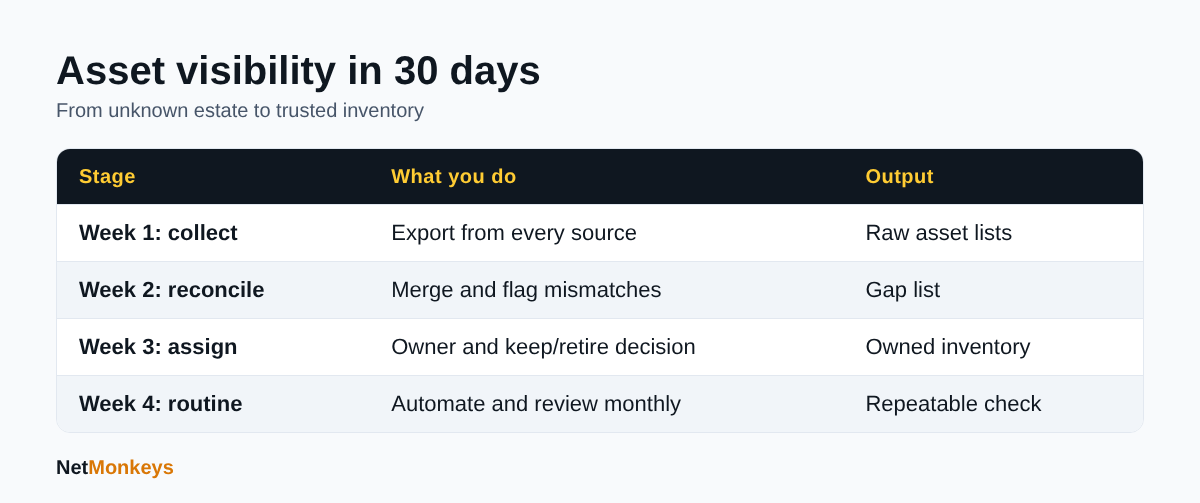 A 30-day plan to build a trusted asset inventory.
Who should own IT asset visibility, in-house or a managed provider?
Ownership should sit with a named person or team accountable for the record, while the day-to-day collection and reconciliation can be automated or handled by a managed provider. The NCSC advises assigning clear responsibility for coordinating asset data and making the process simple and automated so people do not work around it.
When does it make sense to use a managed IT provider?
It makes sense when nobody in the business has the time to run the monthly reconciliation, or when the estate spans offices, cloud platforms and remote workers. A provider with managed IT support tooling already sees device health, patch status and alerts, so the inventory becomes a by-product of service delivery rather than a separate project. If you are weighing options, our comparison of outsourced IT support versus in-house IT sets out the trade-offs.
What should the records look like when you change provider?
You should own your inventory, credentials list and documentation, not your provider. A clean record shortens any move between suppliers, and the IT support handover checklist shows what to ask for. Visibility also feeds wider assurance work such as a cyber security audit, and it is the first input to a cybersecurity assessment.
↑ Back to ContentsWhat is the next step for IT asset visibility in your business?
The importance of IT asset visibility for businesses is practical rather than theoretical: it decides how quickly you can patch, how accurately you can scope Cyber Essentials, how much you overspend on licences and how calmly you respond to an incident. Start with the assets that carry the most risk, reconcile several sources, give every item an owner and repeat the check monthly.
Visibility also supports the layers that sit on top of it, such as managed endpoint detection and response, which can only protect devices that are enrolled, and the guidance in our cyber security for small business service pages. If you would like help building a first inventory or reconciling what you have, talk to the NetMonkeys team.
Who wrote this and how it was checked
Written by Caleb Adoh, Growth Marketing Manager at NetMonkeys, a Manchester-headquartered Microsoft Solutions Partner with offices in Nottingham and London. The content was checked against the NCSC and Microsoft Learn pages cited above as at October 2026. Examples are illustrative and not client cases.
Frequently Asked Questions (FAQs)
What is IT asset visibility?
IT asset visibility is a current, accurate view of every device, application, cloud service, account and data store your organisation uses, together with who owns each and what state it is in. It differs from a one-off list because it is regularly checked against what is actually on your networks and cloud platforms.
Why is the importance of IT asset visibility for businesses so high?
Security, cost and resilience all depend on it. Unknown devices miss patches and monitoring, unused licences keep billing, and during an incident you cannot judge impact without knowing what exists. The NCSC treats asset management as a foundation for risk and vulnerability management, so weaknesses there affect every other control.
What is shadow IT?
Shadow IT is any device, application or cloud service used for work without the knowledge or approval of whoever manages IT. Examples include SaaS tools bought on a personal card or unmanaged personal phones. It is usually well-intentioned, but it sits outside your patching, access and backup controls.
What is the difference between an asset inventory and a CMDB?
An asset inventory lists what you own, who has it and its key dates. A CMDB also records relationships between items, so you can see what depends on what and what a change might break. Most SMEs should build a reliable inventory first and add relationship mapping only when needed.
How does asset visibility help with Cyber Essentials?
Cyber Essentials covers five controls: firewalls, secure configuration, security update management, user access control and malware protection. You need to know which devices, software and accounts are in scope before you can show they meet those controls, so an accurate inventory makes scoping and evidence gathering far easier.
How often should an asset inventory be updated?
Automated sources should update continuously, and a human reconciliation across all sources is sensible monthly. Trigger-based updates also matter: record assets at purchase, update them when ownership changes, and mark them retired when they leave. Larger or fast-changing estates may need to check more often than that.
Can I find unmanaged devices with Microsoft tools?
Possibly. Device discovery in Microsoft Defender for Endpoint Plan 2 finds unmanaged endpoints, network devices and IoT devices on corporate networks using onboarded devices, per Microsoft Learn as at October 2026. Availability depends on your licensing, so check your plans before assuming it is included.
How long does it take to get started?
A useful first version is achievable in about 30 days: collect data from your existing sources, reconcile the differences, assign owners and set a monthly routine. The first pass will not be complete, but it exposes your highest-risk gaps and gives you a baseline to improve.
Speak to a NetMonkeys specialist
Want an expert to review your setup, or to put this guide into practice with you? Our team can help.
Book a conversation
