
Business Contingency Plan: What It Is and How to Build One
A business contingency plan sets out what you will do if a specific risk becomes real. This guide shows UK SMEs how to build one, with a free planner.

Key Takeaways
- A business contingency plan is a set of trigger-based responses: if X happens, then Y happens, led by Z.
- Contingency plans cover single scenarios; continuity plans cover critical activities; disaster recovery restores IT.
- Score each scenario on likelihood and impact, then write detailed plans for the top five or six first.
- A notifiable personal data breach must be reported to the ICO within 72 hours of becoming aware of it.
- Test every high-risk scenario at least annually and keep an offline copy of the plan.
A business contingency plan is a documented set of pre-agreed responses to specific things that could go wrong, written as "if this happens, we do that" so you can act quickly instead of improvising. It names the trigger, the person who decides, the actions to take and the point at which you stop and recover. If you are asking what a business contingency plan is and how to build one, the short answer is: pick your most likely and most damaging scenarios, define the triggers, assign owners and rehearse.
It sits alongside business continuity and disaster recovery planning rather than replacing them. Continuity keeps critical activities running; disaster recovery restores systems; a contingency plan covers the specific "what if" scenarios, such as a supplier failing, a key person leaving, an IT outage, a cyber attack or losing your premises.
This guide explains the differences, how trigger-based planning works, how to score risks, and how to write the plan step by step. It ends with a free interactive planner you can complete, save and print. It is written for UK SMEs and mid-market organisations, from the viewpoint of a managed IT provider that sees the same avoidable gaps repeatedly.
What is a business contingency plan?
A business contingency plan is a written playbook for a defined adverse event, listing what triggers it, who acts, what they do first and how you return to normal. It is narrower than a general continuity plan because each scenario has its own trigger and its own actions.
The value is speed and calm. During an incident people are stressed, information is incomplete and everyone has an opinion. A plan agreed in advance removes the arguments about who decides and what happens first, and it shows customers, insurers and auditors that you manage risk deliberately.
What should a contingency plan contain?
A usable plan contains the same core elements for each scenario:
- Scenario description: what has gone wrong, in plain words.
- Trigger: the observable event or threshold that starts the plan.
- Decision owner and deputy: one named person who can invoke the plan, plus a cover.
- Immediate actions: the first steps for the first hour, in order.
- Workaround: how critical work continues while normal service is down.
- Communications: who is told, by whom and through which channel.
- Stand-down criteria: how you know it is over and who confirms it.
- Review step: what you record and change afterwards.
Who needs one?
Any organisation that depends on a small number of suppliers, systems, premises or people. In practice that means almost every SME. A ten-person firm that relies on one line-of-business application, one broadband line and one person who knows how payroll works has several single points of failure, and each is a contingency scenario waiting to be written down.
↑ Back to ContentsWhat is the difference between contingency, continuity and disaster recovery plans?
A contingency plan responds to a specific scenario, a business continuity plan keeps the whole organisation's critical activities running through any disruption, and a disaster recovery plan restores IT systems and data. They overlap, and the best set of documents links them rather than duplicating content.
| Plan | Main question | Scope | Typical owner |
|---|---|---|---|
| Contingency plan | What do we do if this specific thing happens? | One scenario, trigger-based | Scenario owner or department head |
| Business continuity plan | How do critical activities keep going during any disruption? | Whole organisation, priorities and recovery times | Director or operations lead |
| Disaster recovery plan | How do we restore systems and data, and how quickly? | IT systems, applications, backups | IT lead or managed IT provider |
| Incident response plan | How do we handle a security or operational incident? | Detection, containment, recovery, review | Incident lead |
How do they fit together?
Think of continuity as the umbrella. It sets which activities matter most and how long you can tolerate their loss. Disaster recovery delivers the technical part of that promise for IT. Contingency plans then provide detailed scenario playbooks that feed both. The NCSC makes the same connection, advising that an incident response plan should link to disaster recovery, business continuity and crisis management for serious incidents (as at October 2026, see the NCSC incident management guidance).
Do I need all of them?
A small business rarely needs four separate heavyweight documents. A sensible minimum is one short continuity overview, a handful of scenario contingency plans, and a recovery section for IT that states how long each system can be down and how much data you can afford to lose. Our managed IT support clients typically start with the IT recovery section because it is the most measurable and the easiest to test.
↑ Back to ContentsHow does trigger-based contingency planning work?
Trigger-based planning links a measurable warning sign to a pre-agreed response, using the pattern "if X happens, then Y happens, led by Z". The trigger removes debate about whether the situation is serious enough to act on.
What makes a good trigger?
A good trigger is observable, specific and quick to check. Compare "the system seems slow" with "the finance application has been unavailable for more than 30 minutes during working hours". The second leaves no room for argument. Triggers can be:
- Event-based: a supplier confirms it has entered administration; a ransomware note appears on a device.
- Threshold-based: an outage passes a set duration; absence exceeds a set number of people in one team.
- Early-warning: a supplier misses two consecutive deliveries; a key employee hands in notice.
What should the response look like?
Write responses as short numbered actions that someone unfamiliar with the detail could follow. Include a first-hour list, a first-day list and a "when to escalate" line. Avoid long narrative. If a step needs a decision, say who makes it and what information they need.
What are escalation levels?
Many organisations use three levels. Level one is a local issue handled by the team. Level two affects a service or customer group and involves a director. Level three threatens the organisation's ability to trade and triggers the full continuity arrangements. Defining the levels in advance means the first person to spot a problem knows exactly whom to call.
↑ Back to ContentsHow do you score and prioritise business risks?
Score each scenario on likelihood and impact, usually from one to five, then multiply the two numbers to rank them. The result tells you where to write detailed plans first and which risks deserve preventive spending.
What does a simple risk matrix look like?
| Score | Likelihood | Impact |
|---|---|---|
| 1 | Rare: not expected in the next few years | Minor: absorbed within normal operations |
| 2 | Unlikely: possible but not expected | Noticeable: some delay or cost |
| 3 | Possible: could happen within a year or two | Significant: service or customers affected for days |
| 4 | Likely: has happened or will probably happen this year | Serious: major customer, financial or legal consequences |
| 5 | Almost certain: expect it within months | Severe: threatens the organisation's ability to trade |
Multiply the two scores. A common convention treats 15 and above as high, 8 to 14 as medium and below 8 as low, but you should set bands that match your appetite for risk and apply them consistently.
What mistakes do people make when scoring?
- Scoring on gut feel alone. Use incident history, supplier reliability records and your insurer's questions as evidence.
- Ignoring low-likelihood, high-impact events. A premises fire is rare but can end a business with no plan.
- Letting one person score everything. Ask operations, finance, IT and a customer-facing manager; they see different dependencies.
- Never rescoring. Scores should change after you add controls or after the business changes.
Record the owner and the review date next to every score. A risk register with no owners is a list of worries, not a management tool.
↑ Back to ContentsWhich scenarios should a UK SME plan for?
Start with the five scenarios that affect most small and mid-sized organisations: supplier failure, loss of key staff, an IT outage, a cyber attack and loss of premises. Add sector-specific ones later, such as loss of a regulatory permission or a major client leaving.
What if a critical supplier fails?
If a critical supplier fails, your plan should name the alternative, the stock or data you hold, and who authorises switching. Trigger examples are a missed delivery run, an insolvency notice or a service withdrawn at short notice. Actions include contacting the second source, checking contract terms, moving critical orders and informing affected customers. Prevention is cheaper than cure: record where you have only one supplier, and ask about their own continuity arrangements.
What if key staff are unavailable?
Plan for sickness, resignation and sudden absence in roles where knowledge sits in one head. The trigger might be absence of a named role for more than a set number of days. Actions include activating the deputy, using written procedures, and temporarily reallocating or outsourcing tasks. The cheapest control is documentation and cross-training. Our IT support handover checklist shows the level of detail that makes a role transferable, and the same logic applies to finance, operations and sales.
What if IT systems go down?
For an IT outage, set a trigger by duration (for example, a core system unavailable beyond an agreed time) and list the manual workarounds, the contact route to your IT provider and the order in which systems return. Know which cloud services you depend on and how you would work if Microsoft 365 or your internet line were unavailable. A 24/7 IT helpdesk or out-of-hours escalation route matters if outages do not respect office hours.
What if we suffer a cyber attack?
A cyber attack plan should state who isolates affected devices, who contacts the insurer and IT provider, and who decides whether personal data is involved. If personal data is affected, the ICO states that a notifiable breach must be reported without undue delay and no later than 72 hours after you become aware of it, and that you should document the reasoning if you decide not to report (checked October 2026, see the ICO guide to personal data breaches). The NCSC advises calling 0300 123 2040 if an attack is in progress, and reporting significant attacks through its online service (as at October 2026, see the NCSC small business response and recovery guide).
Prevention reduces how often this plan is used. Controls such as Cyber Essentials, managed endpoint detection and response and tested backups are covered in our cybersecurity best practices guide.
What if we lose our premises?
Triggers include fire, flood, a police cordon, a building services failure or loss of access. The plan covers where people work, how phones and post are redirected, which equipment is needed and who contacts the landlord and insurer. If your applications are in the cloud, working from home or a temporary site becomes realistic within hours. If you hold paper records or on-site servers, say how you would reach them or recreate them.
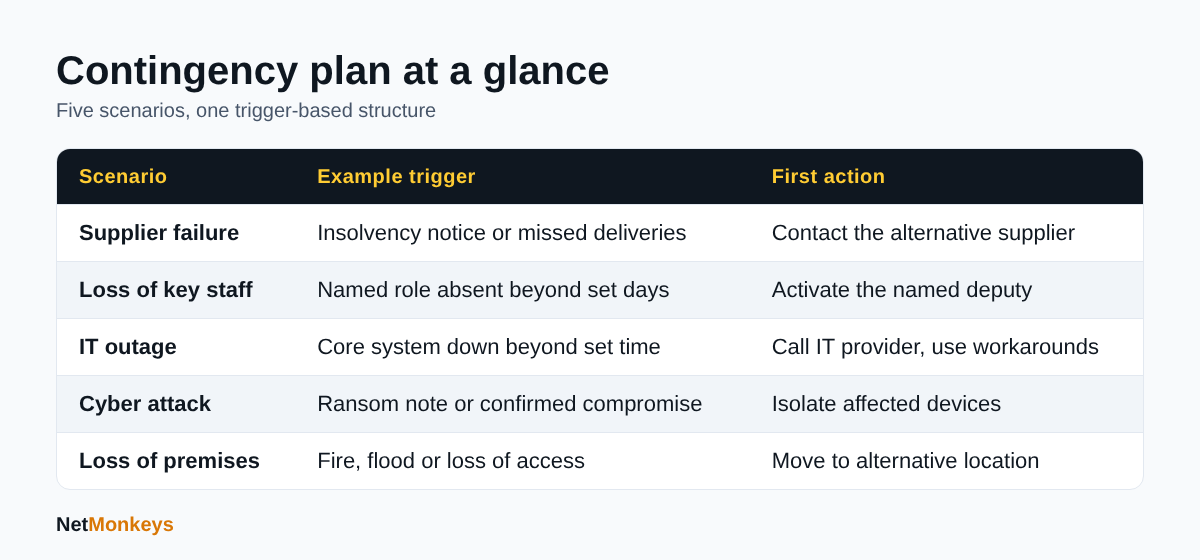 Each scenario needs a trigger, an owner and a first action.
How do you build a business contingency plan step by step?
Build the plan in seven steps: define scope, identify critical activities, list scenarios, score them, write triggers and actions, assign owners, then test and review. A first version can be completed in a few working sessions if you keep it short.
Step 1: What is in scope?
Decide whether the plan covers the whole organisation or one site or service. Name the sponsor, usually a director, who has authority to approve spend and invoke the plan.
Step 2: Which activities and systems are critical?
List what you must keep doing to protect customers, cash and legal compliance: taking orders, paying staff, serving clients, meeting regulatory deadlines. Then list the systems, people, suppliers and premises each depends on. This is a light business impact analysis. For each activity, estimate how long you could be without it before harm becomes serious, and how much recent data you could afford to lose. IT teams call these the recovery time objective and recovery point objective.
Step 3: What could go wrong?
Brainstorm scenarios by dependency: each supplier, system, site and key role. Group similar events. You do not need a plan for every cause, only for every kind of loss.
Step 4: How serious is each scenario?
Score likelihood and impact as described above and rank the results. Plan the top five or six in detail first.
Step 5: What are the triggers and actions?
For each scenario, write the trigger, first-hour actions, workaround, communications and stand-down criteria. Keep each plan to one or two pages.
Step 6: Who owns what?
Every plan needs a named owner, a deputy and an out-of-hours contact. Store a printed or offline copy of the contact list, because the plan is useless if it lives only on the system that has failed. Where IT recovery depends on a provider, make sure the contract and escalation route support it; our guidance on outsourced versus in-house IT explains how responsibilities typically divide.
Step 7: How do you test and review it?
Run a desktop exercise: read out a scenario and walk through the plan with the people who would use it. Note what was unclear, then fix it. Review the plan at least annually and after any significant change, such as a new system, supplier, office or major incident.
What common mistakes undermine a plan?
- Writing for the auditor rather than the user. If the person on call at 2am cannot follow it in minutes, simplify it.
- Assuming suppliers will cover you. Check what your contracts actually promise on recovery times and support hours.
- Forgetting dependencies. Email, identity sign-in, broadband and phones often sit underneath every other system.
- No authority to act. State who may spend money or close a service without waiting for a meeting.
Fixing these four points usually improves a plan more than adding extra pages.
↑ Back to ContentsWhat does a worked example look like?
The example below is illustrative, using assumptions rather than real data: a 40-person professional services firm in the UK with one office, Microsoft 365, and a single line-of-business application hosted by a third-party supplier.
| Element | Entry |
|---|---|
| Scenario | The application supplier suffers an outage lasting more than a working day |
| Trigger | Application unavailable for 2 hours during core hours, confirmed against the supplier status page and a call to the supplier |
| Likelihood / impact | 3 x 4 = 12 (medium) |
| Decision owner | Operations Director, deputy: Finance Manager |
| First hour | Confirm scope with supplier; tell staff to stop re-trying logins; brief the director; start the log |
| Workaround | Use the most recent exported client schedule held in SharePoint; record work on paper timesheets; delay non-urgent invoicing |
| Communications | Email to affected clients by the account manager within 4 hours; internal update every 2 hours |
| Stand-down | Supplier confirms service restored and a data check has passed; owner signs off |
| Review | Ask the supplier for an incident report; consider a contract clause for service credits and recovery times |
Notice what the example does well. It uses a clear trigger, has a named owner, keeps working with a specific workaround and ends with a review action. It also exposes a prevention task: exporting the client schedule on a regular basis is what makes the workaround possible. This is typical of good contingency planning, where writing the plan reveals the cheap controls you should have in place anyway.
↑ Back to ContentsWhere can I get a free business contingency plan template?
You can complete the free interactive template directly beneath this section. It is a scenario and trigger planner: you record your critical activities, risk scores, triggers, actions, contacts and test log, then save, download or print it.
How do I use the template?
- Work through the sections in order, starting with scope and critical activities.
- Complete one scenario at a time. Keep answers short and factual.
- Assign a named owner and deputy to each scenario, not a team name.
- Save your progress, then download a copy and print one for offline storage.
- Book a desktop test within three months and record the outcome in the final section.
Keep an offline copy
Store the printed plan and contact sheet somewhere reachable if your network, email and files are unavailable, and share it with your deputies. Do not store passwords in the template.
The template is a starting point. If your sector has regulatory expectations, such as for financial services or legal practices, add the relevant obligations to the communications and stand-down sections.
Business Contingency Plan: Scenario and Trigger Planner
Complete each section, save your progress, then download or print a copy. Keep answers short, name individuals rather than teams, and do not enter passwords.
1. Plan details
2. Critical activities and recovery targets
3. Risk register and scoring
4. Scenario A: Supplier failure
5. Scenario B: Loss of key staff
6. Scenario C: IT outage
7. Scenario D: Cyber attack
8. Scenario E: Loss of premises
9. Communications and contacts
10. Testing and review log
Your entries stay in your browser. Nothing is sent to NetMonkeys. Use Download or Save to file to keep a copy, because clearing browser data removes saved progress.
How often should you test and update a contingency plan?
Test each high-risk scenario at least once a year and review the whole plan after any significant change. Untested plans fail on small details: out-of-date phone numbers, missing access rights, or a workaround nobody has tried.
What types of test are there?
- Contact check: call every number on the sheet and confirm each person knows their role. Quick and often revealing.
- Desktop exercise: talk through a scenario for an hour with the plan open. Suitable for most SMEs.
- Technical test: restore a file or system from backup and time it against your recovery target.
- Live exercise: switch to the workaround for a short period, such as working from an alternative location.
What should you record after a test?
Record what happened, what took longer than expected, what was missing and the actions agreed with owners and dates. The NCSC treats learning from an incident as a formal step in its small business response and recovery guide, alongside preparing, identifying, resolving and reporting (as at October 2026). The same discipline applies to tests: a lesson not recorded is a lesson repeated.
Does insurance affect your planning?
Often, yes. Insurers commonly ask about backups, access controls and incident response arrangements, and a documented plan helps you answer accurately. Our guide to cybersecurity insurance explains what to expect, and a cyber security audit can highlight the control gaps your plans depend on.
↑ Back to ContentsBusiness contingency plan: where should you start?
Start small. A business contingency plan with five well-written scenarios, named owners, a printed contact sheet and one desktop test is far more useful than a long document nobody has read. Choose your top risks, define the triggers, write the first-hour actions and rehearse them.
If IT is part of the picture, which it is for nearly every organisation, align your plan with how your systems are supported and recovered. We help organisations map dependencies, document recovery arrangements and test them as part of managed IT support, and we cover small business IT support needs in Manchester, Nottingham and London, with field engineers across around 12 UK cities. If you want a second pair of eyes on your plan, speak to the NetMonkeys team.
Who wrote this and how it was checked
Written by Caleb Adoh, Growth Marketing Manager at NetMonkeys, a Manchester-headquartered Microsoft Solutions Partner. The regulatory and guidance points in this article were checked against the cited ICO and NCSC pages as at October 2026. The worked example is illustrative and uses stated assumptions, not client data.
Frequently Asked Questions (FAQs)
What is a business contingency plan?
A business contingency plan is a documented set of pre-agreed responses to specific adverse events, such as a supplier failure, IT outage, cyber attack or loss of premises. Each scenario has a trigger, a named owner, first-hour actions, a workaround and stand-down criteria, so people can act quickly and consistently when something goes wrong.
What is the difference between a contingency plan and a business continuity plan?
A contingency plan covers one defined scenario and what to do if it happens. A business continuity plan is broader: it identifies critical activities, sets how long you can tolerate losing them and describes how to keep them running through any disruption. Contingency plans usually sit beneath the continuity plan as detailed playbooks.
Is a contingency plan the same as a disaster recovery plan?
No. A disaster recovery plan focuses on restoring IT systems and data after a failure, including recovery time and recovery point targets. A contingency plan is wider, covering people, suppliers, premises and communications as well as technology. The two should reference each other so IT recovery supports the business priorities.
What are examples of business contingency plans?
Common examples include a plan for a key supplier becoming insolvent, a plan for sudden loss of a critical employee, an IT outage plan with manual workarounds, a cyber attack plan with containment and reporting steps, and a premises loss plan covering alternative working locations, phone diversion and insurer contact.
How do you write a business contingency plan?
Define scope, list critical activities, identify scenarios, score likelihood and impact, write a trigger and first-hour actions for each top risk, assign owners and deputies, then test with a desktop exercise. Keep each scenario to one or two pages and store an offline copy of the plan and contact list.
How often should a business contingency plan be reviewed?
Review the plan at least once a year and after significant changes such as a new system, supplier, office or major incident. Test your highest-risk scenarios annually and check that every contact number and named owner is still correct, because out-of-date details are a common cause of plan failure.
Do UK businesses have to have a contingency plan?
There is no single UK law requiring every business to hold a contingency plan, but some sectors and contracts expect one, and data protection law requires appropriate security and breach handling. Customers, insurers and regulators increasingly ask to see evidence of planning, so having one is sensible risk management.
When must a data breach be reported to the ICO?
If a personal data breach is likely to put individuals' rights and freedoms at risk, the ICO states you must report it without undue delay and no later than 72 hours after becoming aware of it. If you decide not to report, document the reasons. Details can be provided in phases if not all are known in time.
Speak to a NetMonkeys specialist
Want an expert to review your setup, or to put this guide into practice with you? Our team can help.
Book a conversation
