
Affordable Azure Managed Services With 24/7 Monitoring
Managed Azure services with round-the-clock monitoring can be affordable if scope, severity levels and cost reviews are agreed up front. This guide shows how to judge the offer.

Key Takeaways
- 24/7 means different things: automated monitoring is continuous, but confirm when a human reads the alert.
- Affordable is total cost: include security tooling, call-outs, Azure consumption and exit terms.
- Define severities in writing: response targets, update intervals and who can raise priority.
- Review cost monthly: remove unused resources, right-size, then consider reservations for steady workloads.
- Plan for Sentinel: after 31 March 2027 it is supported only in the Defender portal.
Affordable Azure managed services with 24/7 incident monitoring triage means paying a partner to watch your Azure environment around the clock, decide which alerts matter, and act on them, at a price that reflects what you actually run rather than a fixed premium. For most UK SMEs the affordable option is not the lowest monthly fee. It is the arrangement where monitoring is scoped sensibly, alerts are filtered before they reach a human, and cloud spend is reviewed every month.
This guide explains what a managed Azure service covers, which Microsoft tools sit underneath it, how an incident moves from alert to resolution, and where the cost savings come from. It reflects how managed IT support is normally structured, and every Microsoft product statement was checked against Microsoft Learn as at October 2026.
You will find a severity model you can adapt, a worked cost example with stated assumptions, and a comparison checklist for shortlisting providers. We do not quote NetMonkeys prices here, because a sensible price depends on your estate and the cover you choose.
What do managed Azure services actually cover?
Managed Azure services are an ongoing arrangement in which a provider operates, secures, monitors and optimises your Azure subscriptions on your behalf, under an agreed service description.
The scope varies a great deal between providers, which is the main reason quotes are hard to compare. A typical service has five parts:
- Monitoring and alerting: metrics, logs and health signals collected from your resources, with alert rules that notify the right people.
- Incident management: triage, escalation, fixes and a record of what happened and why.
- Security operations: posture management, threat alerts and response to suspicious activity.
- Change and patching: controlled updates to virtual machines, databases and configuration, with rollback plans.
- Cost and governance: budgets, tagging, right-sizing, commitment purchases and policy enforcement.
It helps to be clear about what is usually not included. Application code, third-party software support and business-level data decisions normally stay with you or your software vendor unless they are written into the contract.
If you are still deciding whether to run workloads in Azure at all, a structured cloud migration assessment comes first. Managed services work best on an environment that has been designed and documented, not one that has grown without ownership.
↑ Back to ContentsWhat does 24/7 incident monitoring mean in practice?
24/7 incident monitoring means automated checks run continuously, and a named team is contactable at any hour to respond when those checks find a problem that matters.
The wording hides an important distinction. Automated monitoring is almost always continuous because it is software. The human response is where providers differ, and where cost sits.
| Model | Who responds out of hours | Typical fit |
|---|---|---|
| Business hours plus automated alerts | Nobody until the next working day | Non-critical development or test workloads |
| On-call escalation | An engineer paged for severe incidents only | Internal systems that can tolerate a short outage |
| Staffed 24/7 operations | A service desk or operations centre triages every alert | Customer-facing or revenue-critical workloads |
Ask which of these you are being offered, and in which hours a human reads the alert, not just a robot. Our overview of a 24/7 IT support helpdesk explains how out-of-hours cover is usually staffed.
Be wary of a monthly fee that promises round-the-clock cover for every resource at the lowest price. Round-the-clock attention on low-value alerts is expensive for the provider, and the cost eventually reaches you through thin cover or alert fatigue.
↑ Back to ContentsWhich Azure tools sit behind the monitoring?
Four Microsoft services do most of the work: Azure Monitor for performance and availability, Microsoft Defender for Cloud for posture and workload threats, Microsoft Sentinel for security event correlation, and Azure Cost Management for spend.
What does Azure Monitor do?
Azure Monitor collects metrics, logs, traces and events from cloud and hybrid resources, then lets you analyse them and raise alerts. According to the Azure Monitor documentation on Microsoft Learn, alerts notify you when issues appear in collected data, and dynamic thresholds adapt to normal patterns to reduce noise. Action groups define what happens next, for example running an Azure Automation runbook or a Logic Apps workflow.
What does Microsoft Defender for Cloud add?
Defender for Cloud is a cloud-native application protection platform covering Azure, hybrid and multicloud environments. The Microsoft Defender for Cloud overview describes a free foundational posture tier that produces recommendations and a secure score, and a paid Defender CSPM plan with extras such as attack path analysis. Separate paid workload plans protect servers, containers, storage, databases and other resource types. Alerts correlate into incidents that can be exported to SIEM, SOAR or ITSM tools.
Where does Microsoft Sentinel fit?
Microsoft Sentinel is a cloud-native SIEM and SOAR service. The Microsoft Sentinel overview states that, after 31 March 2027, Sentinel will no longer be supported in the Azure portal and will be available only in the Microsoft Defender portal. If you or a provider run Sentinel today, plan that move now. It also supports Azure Lighthouse, which lets a service provider manage delegated customer subscriptions without sharing separate logins.
Sentinel is not essential for every SME. It adds cost through data ingestion and needs tuning, so it suits organisations with regulatory pressure, many log sources or a security operations requirement.
↑ Back to ContentsHow does incident triage work from alert to resolution?
Incident triage is the process of deciding, within minutes of an alert, whether it is real, how serious it is, who owns it and what happens next.
A well-run service follows the same sequence every time, so nobody improvises at 3am:
- Detect: an alert rule, health event or security detection fires.
- Filter: automation suppresses duplicates, known maintenance windows and informational noise.
- Validate: an engineer confirms the problem is real and identifies the affected service and users.
- Classify: the incident is given a severity and an owner.
- Contain or fix: the engineer restores service or limits the damage, using a documented runbook where one exists.
- Communicate: the agreed contacts are updated at set intervals.
- Review: a short post-incident review records the cause and the preventive change.
What is the difference between triage and resolution?
Triage decides priority and routing, and resolution fixes the cause. Providers often promise a response time, which is the time to start triage, rather than a resolution time. Check which one the contract measures.
Why does the review step matter for cost?
Repeated incidents are the most expensive kind. A review that removes the cause, for instance by resizing a database or fixing a certificate renewal, reduces future call-outs and gives you a visible reason to renew.
Security-related incidents should connect to your wider response arrangements. Our cyber incident response plan template sets out who decides what when a suspected breach is confirmed.
↑ Back to ContentsWhat severity levels should an Azure support contract define?
A contract should define at least four severity levels, each tied to a business impact, a response target and a communication rhythm.
The table below is an illustrative model. The exact times are for negotiation, and we have deliberately left them as questions to ask rather than numbers to copy.
| Severity | Business impact | Out-of-hours human response? | What to confirm |
|---|---|---|---|
| Severity 1 | Production down or confirmed security incident | Yes, immediately | Response and update interval in writing |
| Severity 2 | Major function degraded, workaround exists | Yes, for customer-facing systems | Who authorises the call-out |
| Severity 3 | Minor fault, limited users | Next working day | Resolution target |
| Severity 4 | Request or advice | Next working day | Queue and priority rules |
Who decides the severity?
Agree the rule in advance. The usual approach is that the provider proposes a level from your documented impact criteria and you can raise it, but not lower it, during an incident.
What counts as an out-of-hours call-out?
Define it. Some contracts treat every Severity 2 alert as chargeable extra work, which can undermine an apparently affordable monthly fee.
Align severities with your business continuity thinking. A business continuity plan template helps you work out which systems justify round-the-clock human attention and which can wait until the morning.
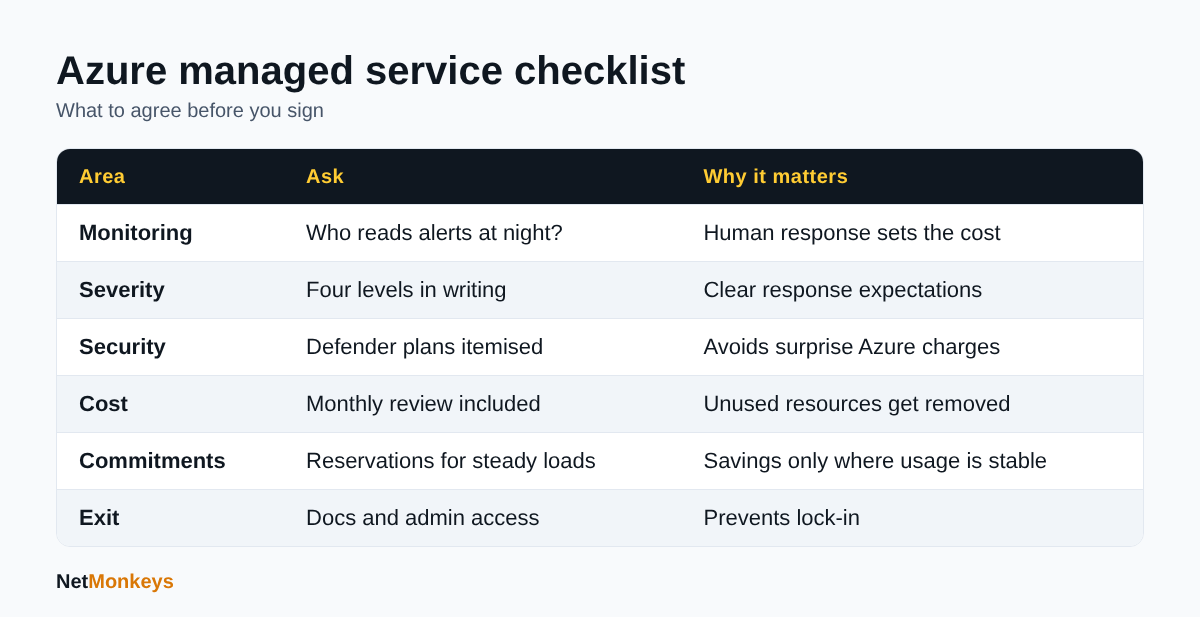 Six items to settle before signing an Azure managed services contract.
What does affordable Azure managed services really mean?
Affordable Azure managed services are those where the total cost of the service plus the Azure bill is lower, for the cover you need, than running the same environment yourself or with a poorly scoped provider.
The monthly management fee is only one component. Four others usually decide whether a service is good value:
- Azure consumption: a provider that never reviews sizing or commitments can cost you more than their fee saves.
- Security tooling: Defender plans, Sentinel ingestion and log retention all carry their own Azure charges, which should be itemised.
- Out-of-hours charges: check whether call-outs are included, capped or billed separately.
- Exit cost: documentation, runbooks and admin access you can take away if you leave.
The last point matters more than people expect. If you cannot retrieve your own documentation and administrative access, a cheap contract becomes expensive at renewal. Our guide on what to do when an outsourced and in-house IT compare covers the ownership trade-offs, and the same logic applies to cloud operations.
A simple test for value
Ask each provider to state, in writing, what is in the fee, what is billed separately and what you receive if you leave. Providers who can answer in a page are usually easier to work with than those who answer with a brochure.
How can you reduce Azure costs without losing cover?
You reduce Azure costs by removing unused resources, matching sizes to real demand, committing to predictable workloads and giving every cost an owner. The Azure cost management best practices recommends this order: remove what is unused first, then check whether what remains is used efficiently.
What should be reviewed every month?
- Budgets with several alert thresholds, wired to action groups so the right person is notified.
- Tags and Azure Policy so cost can be grouped by project, department or customer.
- Azure Advisor recommendations, which flag low-utilisation virtual machines based on the last 30 days of CPU or network use.
- Unattached disks, idle test environments and oversized databases.
Are reservations and savings plans worth it?
They can be, for steady workloads. The Azure Reservations guidance states that one-year or three-year reservations can save up to 72 percent against pay-as-you-go prices, with payment up front or monthly at the same total cost. The cost best-practice page lists Azure savings plan for compute as the most flexible option, saving up to 65 percent. Both figures are maximums for particular products and terms, not averages you should expect across a whole bill.
Reservations suit workloads you are confident will run for the full term. Anything uncertain, seasonal or about to be retired should stay on pay-as-you-go. The reservation guidance also notes that Windows and SQL licensing is not covered by the reservation discount, and that Azure Hybrid Benefit applies to existing eligible licences, so check your licence position first.
What is FinOps and do SMEs need it?
FinOps is the practice of making cloud spend visible and accountable across finance, operations and the people building services. SMEs do not need a dedicated team, but they do need a monthly cost review, clear ownership and a rule about who may create expensive resources.
↑ Back to ContentsWhat does a worked cost example look like?
The example below is illustrative, with assumptions stated, and uses no real prices. It shows how to compare two providers on total cost rather than headline fee.
Assume a 60-person UK business running six production virtual machines, one managed database and a storage account, with a stable workload expected to continue for at least three years.
| Cost line | Provider A (low fee) | Provider B (higher fee) |
|---|---|---|
| Monthly management fee | Lower | Higher |
| Out-of-hours call-outs | Billed per incident | Included for Severity 1 and 2 |
| Monthly cost review | Not included | Included, with written actions |
| Commitment purchases | Customer's responsibility | Reviewed twice a year |
| Documentation and exit pack | Extra charge | Included |
Provider A looks cheaper until you add call-outs and the Azure spend that nobody reviews. If Provider B's reviews identify unused resources and a sensible reservation for the six steady virtual machines, the Azure saving can offset the higher fee. Whether that happens depends on your estate, so ask each provider to show a sample review report with anything sensitive removed.
The point is the method. Put every cost line next to the same assumptions, then compare. Do not accept a saving claim without the assumptions behind it.
↑ Back to ContentsHow do you compare Azure managed service providers?
Compare providers on scope, evidence, security practice and exit terms, using the same questions for each.
Our wider guide on how to choose an IT support company applies here. For Azure specifically, use this checklist:
- Which Azure services and subscriptions are in scope, and which are excluded?
- Who reads alerts out of hours, and from where?
- How is severity decided, and what are the response and update targets?
- Which monitoring tools are used, and who pays for ingestion and retention?
- How does the provider access your tenant? Look for named accounts, multi-factor authentication and delegated access rather than shared logins.
- What happens to documentation, runbooks and admin rights if you leave?
- Can the provider show a sample monthly cost report and a sample incident review?
- How are security alerts handled, and do they connect to endpoint protection such as managed EDR?
Also ask about Microsoft credentials. NetMonkeys is a Microsoft Solutions Partner, which shows a partner has met Microsoft's partner requirements, but you should still ask any provider for relevant references and for named people who will work on your environment.
A short proof-of-concept on one subscription is a fair way to test a provider before committing the whole estate.
↑ Back to ContentsHow should security and governance be handled in a managed Azure contract?
Security and governance should be written into the contract as defined tasks, not left as an assumption that monitoring includes protection.
Monitoring tells you something has happened. Protection reduces the chance and the impact. A managed service should cover:
- Reviewing and acting on Defender for Cloud recommendations, and reporting secure score movement.
- Multi-factor authentication and conditional access for administrators.
- Role-based access control with least privilege, and regular access reviews.
- Azure Policy for tagging, allowed regions and allowed resource types.
- Backup and tested restore for virtual machines and databases.
An independent cyber security audit is a useful baseline before you hand over operations, and our cybersecurity best practices guide covers the controls any cloud estate needs. If your users depend on Microsoft cloud identity, make sure Microsoft 365 support and Azure operations share the same identity standards, since a compromised account affects both.
Finally, ask who is responsible for data protection tasks under UK GDPR. A provider operating your environment is likely to process personal data on your behalf, so a written data processing agreement should accompany the service agreement.
↑ Back to ContentsIs affordable Azure managed services with 24/7 monitoring right for you?
Affordable Azure managed services with 24/7 incident monitoring triage are right for you if downtime or a missed security alert would cost more than the service, and if you lack the in-house hours to watch Azure at night and at weekends.
Start by deciding which workloads justify human response out of hours. Define severities, insist on itemised security and cost lines, and make a monthly cost review part of the fee. Then compare providers on the same assumptions, as in the worked example.
For related planning, see our pages on managed cloud services, and when you are ready to discuss your own environment, contact the NetMonkeys team for a scoping conversation.
Who wrote this and how it was checked
Written by Caleb Adoh, Growth Marketing Manager at NetMonkeys, a Manchester-headquartered Microsoft Solutions Partner with offices in Nottingham and London. Product statements were checked against the cited Microsoft Learn pages as at October 2026. Microsoft changes products and portals regularly, so confirm current details before purchasing.
Frequently Asked Questions (FAQs)
What are affordable Azure managed services?
Affordable Azure managed services are arrangements where the provider's fee, the security tooling charges and the Azure bill together cost less than running the environment yourself for the cover you need. Look at total cost, including out-of-hours call-outs, log retention and monthly cost reviews, not just the headline management fee.
What does 24/7 incident monitoring triage include?
It includes continuous automated monitoring, filtering of noisy alerts, validation by an engineer, a severity classification, containment or fixing, regular updates to named contacts and a post-incident review. Ask whether a human reads alerts out of hours or whether you only receive automated notifications by email.
Which Microsoft tools are used to monitor Azure?
Common tools are Azure Monitor for metrics, logs and alerts, Microsoft Defender for Cloud for posture and workload threat detection, Microsoft Sentinel for security event correlation, and Azure Cost Management for spend. Not every business needs Sentinel, as it adds data ingestion cost and tuning effort.
Is Microsoft Sentinel changing in 2027?
Microsoft Learn states that after 31 March 2027 Microsoft Sentinel will no longer be supported in the Azure portal and will be available only in the Microsoft Defender portal. If you use Sentinel, ask your provider how and when they will move your workspace, and who will retrain your team on the new portal.
How can I reduce my Azure bill?
Remove unused resources first, then right-size what remains using Azure Advisor recommendations. Set budgets with alert thresholds, tag resources for accountability, and consider reservations or savings plans for steady workloads. Microsoft publishes maximum savings figures for these options, but your actual result depends on your usage and terms.
What severity levels should a support contract have?
Four levels work for most SMEs: production down or confirmed security incident, major degradation with a workaround, minor fault with limited impact, and general requests. Each should have a defined response target, an update interval and a clear statement about whether out-of-hours human response applies to it.
Do I need a managed provider if I already have an IT team?
Not always. A managed Azure provider is useful when your team cannot cover nights and weekends, lacks Azure operations experience or needs a second pair of eyes on security and cost. Some businesses keep day-to-day work in-house and buy out-of-hours triage only, which is often the cheaper route.
How do I compare Azure managed service providers?
Ask each one the same questions: scope, who responds out of hours, severity definitions, tooling costs, access controls, documentation and exit terms. Request a sample cost report and incident review from their existing customers. A small proof-of-concept on one subscription is a fair way to test their working practices.
Speak to a NetMonkeys specialist
Want an expert to review your setup, or to put this guide into practice with you? Our team can help.
Book a conversation
