
How to Manage and Maximise Your Power BI Licences
Power BI licensing now sits within Microsoft Fabric, and most overspend comes from assigning Pro to everyone. Here is how to match licences to roles and audit them.


Key Takeaways
- Split creators from viewers before buying anything; only creators usually need Pro or Premium Per User.
- Check Microsoft 365 E5 first, because each E5 subscription includes a Power BI Pro licence.
- Free viewers need F64 or larger capacity; smaller capacities still need paid viewer licences.
- Assign by Entra group and audit quarterly to remove leavers and unused licences.
- Plan for P SKU retirement if you still hold a Premium per-capacity subscription.
To manage and maximise your Microsoft Power BI licence, you need to know who creates content, who only views it, and which licence type each person actually needs. Most waste comes from giving everyone the same paid licence by default, or from leaving licences assigned to people who have left or never open a report.
This guide explains the licence types as at October 2026, how to assign and audit them, where Microsoft 365 E5 fits, and how to decide between per-user licences and Fabric capacity. Prices are quoted from the Microsoft UK pricing page as it appeared on 23 October 2026 and exclude VAT; they change, so confirm them before you buy.
It is written for UK SMEs and mid-market organisations that already run Microsoft 365 and want sensible governance without a long project. Where licensing depends on your agreement type, we say so rather than guess.
What Power BI licence types are available in October 2026?
Power BI licensing now sits inside Microsoft Fabric licensing, and the practical choices are Fabric (Free), Power BI Pro, Premium Per User and Fabric capacity. Microsoft's licence documentation sets out how each one works, and we have summarised it below (Microsoft Learn: Fabric licences).
| Licence | Who it suits | Key point |
|---|---|---|
| Fabric (Free) | Occasional users, viewers on a large capacity | Can view Power BI content only where the workspace sits on F64 or larger (or a P capacity) and the user holds the viewer role |
| Power BI Pro | Creators, publishers and sharers | Needed to share content and create items outside My workspace; also needed by viewers on capacities below F64 |
| Premium Per User (PPU) | Smaller teams needing premium features | Microsoft describes it as more cost-effective below 250 users; it does not provide a Fabric capacity |
| Fabric capacity (F SKUs) | Wider audiences, Fabric workloads | Billed through Azure; F64 and above allow free-licence viewers |
Microsoft is also retiring Power BI Premium per-capacity (P) SKUs and points new and existing customers towards Fabric F SKUs. If you still hold a P capacity, plan its replacement rather than waiting for renewal pressure.
What does Power BI Pro cost in the UK?
On the Microsoft UK pricing page on 23 October 2026, Power BI Pro was listed at £10.80 per user per month, paid yearly, excluding VAT (Microsoft Power BI pricing, UK). Premium Per User was listed at £18.50 per user per month, paid yearly, excluding VAT. Fabric capacity is shown as variable, with an annual reservation described as saving 40.5 percent against pay-as-you-go.
↑ Back to ContentsWho needs a Pro licence and who can use a free one?
Anyone who creates and shares Power BI content outside their personal workspace needs Pro or Premium Per User; viewers can use a free licence only when the content sits on F64 or larger capacity. That rule drives most licensing decisions, so test it against your own numbers before buying.
Creators and viewers: what is the difference?
A creator builds datasets, reports and dashboards, publishes them to shared workspaces and manages access. A viewer opens reports, filters and exports within the permissions granted. In most SMEs creators are a small group, often finance, operations or a single analyst, while viewers are the majority.
What happens on a smaller Fabric capacity?
On F SKUs smaller than F64, Microsoft states that each viewer needs Pro, Premium Per User or an individual trial. That means a small capacity does not remove the per-user cost for readers, which surprises many buyers who assume capacity equals unlimited viewing.
- Creators: Pro or Premium Per User.
- Viewers on F64 or larger: Fabric (Free) with the viewer role.
- Viewers on smaller capacity or Pro workspaces: Pro or Premium Per User.
- Anyone needing Fabric items such as lakehouses: access to an F or trial capacity.
Why does the viewer role matter so much?
Microsoft's rule for free viewing applies to the viewer role on the workspace. Someone given a contributor, member or admin role is not a viewer for licensing purposes and still needs Pro or Premium Per User. This catches out teams who add everyone to a workspace as a member for convenience. Review role assignments at the same time as licences, and use the viewer role by default for anyone who only reads.
Apps are the usual way to publish a curated set of reports to a wide audience, so build an app for each audience rather than sharing individual reports. It keeps access tidy, and it gives you a single place to remove access when someone leaves.
↑ Back to ContentsShould you choose per-user licences or Fabric capacity?
Choose per-user licences when your audience is small and mostly creators; consider capacity when many people only read reports or you need Fabric workloads. The decision is arithmetic plus operational overhead, and the answer shifts as your viewer count grows.
How do you compare the options?
Take the number of creators and viewers, multiply by the per-user price, and compare it with the capacity cost you would pay in Azure plus Pro licences for creators. Remember that even on a large capacity your creators still need Pro or Premium Per User.
Illustrative example
Assume 10 creators and 300 viewers, with a Pro price of £10.80 per user per month. Giving everyone Pro costs 310 licences. Using an F64 capacity means 10 Pro licences plus the Azure cost of the capacity, which you must obtain from the Azure pricing calculator for your region. The capacity route only wins if that monthly Azure cost is lower than the saving on 300 licences. These figures are assumptions for illustration only.
Capacity also brings an operational job: someone must size it, monitor consumption and pause or scale it where appropriate. Microsoft notes F SKUs are billed per second with a one-minute minimum and can be reserved yearly. If you lack that skill internally, our managed cloud services team can run it alongside the rest of your Azure estate.
For very small organisations the usual answer is a handful of Pro licences, a shared workspace and sensible sharing rules.
What should you ask before committing to capacity?
- How many people read reports each month, and could they be served by fewer, better reports?
- Does anyone need Fabric workloads beyond Power BI, which would change the case for capacity?
- Who will monitor consumption and respond when a refresh or query spike affects performance?
- Is a yearly reservation sensible, given that your usage may change in the first year?
- Are you buying through a Cloud Solution Provider, and does that change how licences are managed?
Start small, measure, then commit. A pay-as-you-go capacity for a trial period tells you far more than a spreadsheet forecast.
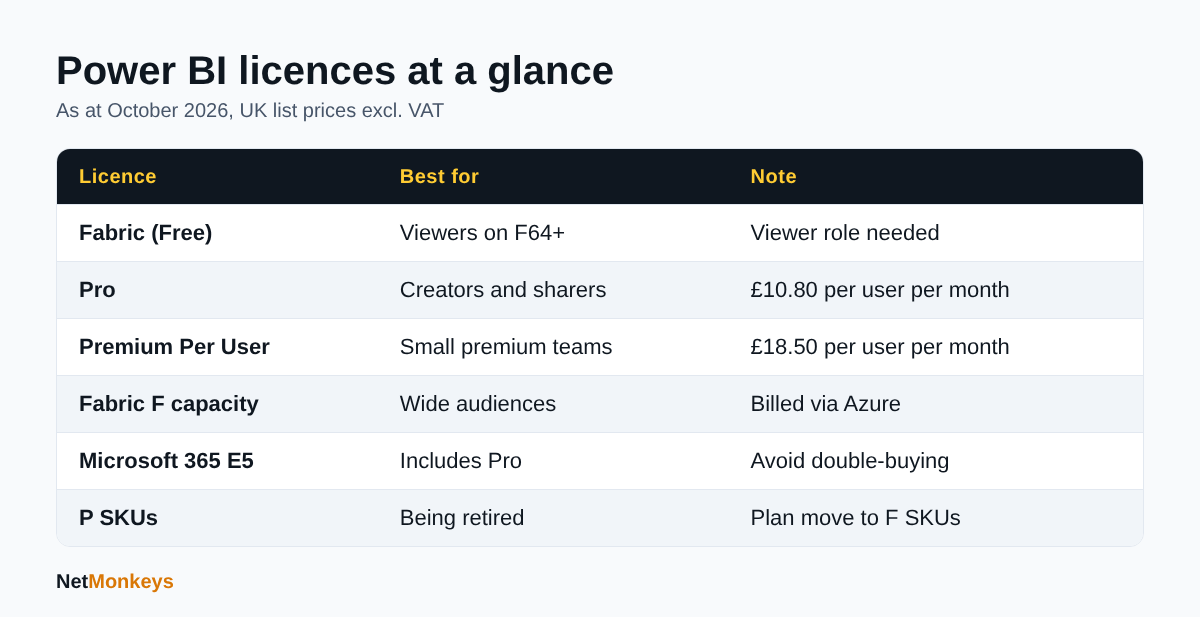 Summary of Power BI licence types based on Microsoft documentation checked on 23 October 2026.
Is Power BI Pro included in Microsoft 365 E5?
Yes. Microsoft's licensing documentation states that each Microsoft 365 E5 subscription includes a Power BI Pro licence, and the pricing page lists Pro as included in Microsoft 365 E5 and Office 365 E5 (Microsoft Learn: Power BI licence administration). Those licences are managed in the same way as standalone Pro licences.
What should E5 customers check?
- Avoid double-buying: if a user holds E5, do not also assign a standalone Pro licence.
- Premium Per User: the pricing page does not say PPU is included in E5. It lists a step-up from Pro to PPU for E5 users, at £10.80 per user per month paid yearly on the date we checked.
- Other plans: do not assume E3 or Business Premium includes Pro. Check each user's licence record.
An E5 estate often hides unused Pro entitlements, because nobody has told staff they already have one. Reviewing entitlements before purchasing is the cheapest optimisation available. Our Microsoft 365 support service includes licence reviews of this kind as part of wider tenant housekeeping.
↑ Back to ContentsHow do you assign and manage Power BI licences?
Billing administrators purchase licences and licence or user administrators assign them, either in the Microsoft 365 admin centre or in Microsoft Entra ID. The steps below follow Microsoft's administration guidance (Microsoft Learn).
How do you assign a licence in the Microsoft 365 admin centre?
- Go to Billing, then Licenses, and select Power BI Pro or Power BI Premium Per User.
- Select the users to assign.
- Check the result under Users, then Active users.
Can you assign licences by group?
Yes. In Microsoft Entra ID, under Licenses, you can choose the product and add users and groups, which lets you tie Power BI creator rights to a security group. Group membership then becomes your approval record, and leavers lose the licence when they drop out of the group.
What about trials and self-service purchase?
Microsoft documents a 30-day Power BI Pro trial of up to 25 licences and a 60-day Fabric trial. Billing administrators control whether users can self-sign up and self-purchase. Disabling self-service purchase blocks paid actions such as sharing and exporting, so decide deliberately; assigning Fabric (Free) licences to everyone is the documented alternative to blocking sign-up. Cloud Solution Provider customers may find these settings locked and need their partner to change them.
Guest users
Microsoft advises contacting your account representative to confirm compliance before assigning paid licences to guest users.
How do you audit Power BI licence usage and reduce waste?
Compare who holds a paid licence against who has signed in and what they do with it, then remove or downgrade the rest. Do this quarterly; a single annual review lets waste accumulate. The licence lists are in the Microsoft 365 admin centre, and Microsoft's Fabric administration guidance lists audit logs and an admin monitoring workspace as governance tools (Microsoft Learn: Fabric administration).
What is a sensible audit sequence?
- Export the list of users holding Pro or PPU from the admin centre.
- Match it to HR leavers and role changes.
- Review sign-in and activity data from the admin monitoring workspace and audit logs.
- Contact owners of unused licences and set a removal date.
- Record the outcome and the next review date.
Where does waste usually come from?
- Leavers and contractors whose licence was never removed.
- Pro assigned to people who only read a report that could be shared another way.
- Duplicate licences where E5 already provides Pro.
- Trials that quietly convert into purchases.
- Departments buying their own licences by card, outside central view.
Microsoft documents grace periods after expiry: 90 days for volume licence purchases, 30 days for direct purchases and none for trials, so removal timing matters.
↑ Back to ContentsHow should you govern who creates and shares Power BI content?
Govern by role: a small, named group of creators, shared workspaces with owners, and tenant settings that match your risk appetite. Licence control and data control are the same conversation, because anyone with a paid licence can potentially share data.
Which controls matter most?
- Tenant settings: review sharing, export and publish-to-web options in the admin portal.
- Workspace ownership: every workspace needs two named owners.
- Sensitivity labels and data loss prevention: auditing and classification sit in Microsoft Purview; see our guide to Microsoft Purview.
- Identity: enforce multi-factor authentication and conditional access for the Power BI service.
Good governance also protects you against shadow BI: personal workbooks full of customer data sitting in individual accounts. Our overview of cybersecurity best practices covers the wider baseline, and a cyber security audit will show where reporting data is exposed. Where analytics touches personal data, the same UK GDPR duties apply as anywhere else.
↑ Back to ContentsWhat does a licence review look like in a 200-person business?
A review starts with a count, not a purchase. This worked example uses assumed figures to show the method; none of the numbers describe a real organisation.
Illustrative example
Assume a 200-person firm holds 120 Pro licences and has Microsoft 365 E5 for 30 senior staff. The audit finds 18 licences held by leavers, 25 held by people who have not signed in recently, and 30 users with both E5 and a separate Pro licence. Removing duplicates, leavers and confirmed inactive users frees 73 licences before any new purchase is considered. Savings are then calculated at the current list price, not assumed.
What decisions follow from the audit?
- Remove the duplicate Pro licences from E5 users first, because no one loses access.
- Remove leaver licences next, after confirming data ownership has been handed over.
- Contact inactive users and give a two-week window to object.
- Convert regular readers to a shared route, such as a scheduled report email or a workspace on larger capacity, where the sums support it.
Keep the evidence. A one-page record of what was removed and why makes the next review quicker and answers finance questions without a meeting.
What mistakes should you avoid?
Four mistakes recur. Buying Pro for everyone, assuming a small capacity removes viewer costs, leaving a Premium P capacity unplanned and having no leaver process. Each is cheap to avoid once you have an owner for licensing, with business leads approving requests and IT assigning through a group. If your internal team is stretched, recurring housekeeping like this suits an outsourced model; compare approaches in our article on outsourced IT support versus in-house IT.
Tie your reporting estate to your business continuity plan too, so you know which dashboards the business cannot run without, and who holds the licences and workspace ownership for them if a key person is away.
How often should the process be reviewed?
Quarterly for assignments, and at every Microsoft renewal date for pricing and capacity. Prices and terms change, so keep renewal dates in a register with the owner named. Treat each review as a short meeting with a fixed agenda: leavers, inactive users, duplicates, new requests, capacity and cost against budget. Thirty minutes is usually enough once the first clean-up has been done, and the habit matters more than the tooling you use to run it.
↑ Back to ContentsWhat does Power BI cost beyond the licence?
Licences are rarely the biggest cost; data preparation, governance and support time usually exceed them. Budget for these before you judge whether the licence price is high.
- Data connections: gateways, service accounts and the work of keeping them secure.
- Report development: time to model data properly and document it.
- Training: creators need modelling skills; viewers need to know how to filter and subscribe.
- Capacity administration: sizing, monitoring and scaling if you choose F SKUs.
- Security and compliance: labels, retention and access reviews.
- Support: someone to answer the daily questions and fix refresh failures.
Cheap licences paired with unmanaged data become expensive quickly. A modest, documented set of certified datasets reduces duplicate reports and the number of people who need a creator licence.
↑ Back to ContentsWhat is a practical checklist for the next 30 days?
You can reach a clean licence position in a month by working through a short sequence. Each step is small and can be done by one administrator.
- Export the current Pro and Premium Per User assignments from the admin centre.
- List Microsoft 365 E5 users and remove any duplicate Pro assignment.
- Match assignments to current staff and contractors, then remove leavers.
- Review activity data and contact owners of unused licences.
- Decide who counts as a creator and create an Entra security group for them.
- Move assignment to the group and document the approval route.
- Check self-service purchase and trial settings against your policy.
- Confirm whether any Premium P capacity exists and note its renewal date.
- Calculate viewer numbers and test whether F64 capacity could ever pay back.
- Diarise the next quarterly review.
If you want a second pair of eyes, our managed IT support engineers, backed by onsite support where needed, can work with your administrator on the review.
↑ Back to ContentsHow do you manage and maximise your Power BI licence in practice?
To manage and maximise your Microsoft Power BI licence, separate creators from viewers, check E5 entitlements first, use group-based assignment, audit quarterly and review capacity only when your viewer count justifies it. That sequence keeps cost low without limiting the people who need the data.
If you would like a licence and tenant review, speak to us: contact the NetMonkeys team and we will walk through your current assignments.
Who wrote this and how it was checked
Written by Caleb Adoh, Growth Marketing Manager at NetMonkeys, a Microsoft Solutions Partner with its headquarters in Manchester and offices in Nottingham and London. Content was checked against the Microsoft Learn and Microsoft pricing pages cited above as at October 2026. Prices and licence terms change, so confirm them with Microsoft or your reseller before purchase.
Frequently Asked Questions (FAQs)
How do I manage and maximise a Microsoft Power BI licence?
Split users into creators and viewers, assign Pro or Premium Per User only to creators, use Entra groups for approval and removal, and audit quarterly. Check whether Microsoft 365 E5 already provides Pro, and consider Fabric capacity only when many people simply read reports. Confirm current prices with Microsoft before any purchase.
What is the difference between Power BI Free, Pro and Premium Per User?
Fabric (Free) suits occasional users and can view content only on F64 or larger capacity as a viewer. Pro lets users share content and create items in shared workspaces. Premium Per User adds most Premium features per person, and Microsoft describes it as cost-effective below 250 users. PPU does not provide a Fabric capacity.
How much does Power BI Pro cost in the UK?
On the Microsoft UK pricing page on 23 October 2026, Pro was listed at £10.80 per user per month, paid yearly, excluding VAT. Premium Per User was £18.50 on the same terms. Prices change and can differ by agreement or reseller, so check before buying.
Is Power BI Pro included in Microsoft 365 E5?
Yes. Microsoft states that each Microsoft 365 E5 subscription includes a Power BI Pro licence, managed like a standalone Pro licence. Premium Per User is not listed as included, though E5 users can buy a step-up from Pro. Do not assign a second Pro licence to an E5 user.
Can free users view Power BI reports?
Only in specific cases. A user with a Fabric (Free) licence and the viewer role can view Power BI content in workspaces on F64 or larger capacity or a P capacity. On smaller F SKUs, viewers need Pro, Premium Per User or an individual trial.
How do I assign Power BI licences to staff?
Billing administrators buy licences and licence or user administrators assign them in the Microsoft 365 admin centre under Billing, then Licenses. You can also assign by user or group in Microsoft Entra ID. Group-based assignment gives you an approval trail and makes removal at leaving easier.
How can I find unused Power BI licences?
Export the list of licensed users from the Microsoft 365 admin centre, then compare it with leavers and with activity data from audit logs and the admin monitoring workspace. Contact owners of inactive licences, set a removal date and repeat the exercise each quarter.
Are Power BI Premium P capacities being retired?
Microsoft's licensing documentation says it is consolidating purchase options and retiring Power BI Premium per-capacity P SKUs, and recommends Fabric F SKUs for new and existing customers. If you hold a P capacity, plan the move to F capacity and check dates with Microsoft or your reseller.
Speak to a NetMonkeys specialist
Want an expert to review your setup, or to put this guide into practice with you? Our team can help.
Book a conversation
