
Azure DevOps Support and Consulting for Delivery Teams
Azure DevOps support teams and consulting services keep your delivery platform secure, governed and running. Here is what they cover and how to choose.

Key Takeaways
- Support and consulting differ: support runs the platform daily, consulting delivers a defined change such as a migration.
- Five core services: Boards, Repos, Pipelines, Test Plans and Artifacts, per Microsoft Learn.
- Server 2022 lifecycle: mainstream support to 12 January 2028, extended to 12 January 2033.
- Governance first: Entra groups, few administrators and quarterly access reviews.
- Pipelines are privileged: use YAML, scoped service connections and approval checks.
Azure DevOps support teams and consulting services exist to keep your delivery platform reliable, secure and well governed, so developers spend their time shipping software rather than fixing pipelines and permissions. In practice that means help with Boards, Repos, Pipelines, Test Plans and Artifacts, migration from older on-premises tooling, access control, build security and day-to-day administration. This guide explains what each model covers and how to choose between them.
Azure DevOps is a suite of five core services. According to Microsoft Learn, those are Azure Boards, Azure Repos, Azure Pipelines, Azure Test Plans and Azure Artifacts, available as the cloud-hosted Azure DevOps Services or as the self-hosted Azure DevOps Server. Most problems we see are not about the tools themselves. They come from unclear ownership, permissions that grew without review, and pipelines nobody dares to touch.
I am Caleb Adoh, Growth Marketing Manager at NetMonkeys, a Manchester-headquartered Microsoft Solutions Partner with offices in Nottingham and London. The sections below cover support versus consulting, migration, governance, security, the GitHub question and how to compare providers. Everything is checked against Microsoft documentation as at October 2026.
What do Azure DevOps support teams and consulting services provide?
They provide specialist help running and improving the platform your delivery teams depend on. Support keeps things working day to day. Consulting changes how the platform is designed, secured or migrated. Most organisations need both at different moments, which is why the distinction matters when you write a brief or compare providers.
A typical Azure DevOps support remit includes:
- Administering organisations, projects, teams, users and licences, including access levels and removal of leavers.
- Troubleshooting failed builds and releases, agent pool problems and service connection errors.
- Maintaining process templates, work item types, area paths and iterations so Boards reflects how teams actually work.
- Managing branch policies, repository permissions and package feeds in Azure Repos and Azure Artifacts.
- Applying updates and monitoring capacity for Azure DevOps Server where you host it yourself.
Consulting is project-shaped. Examples include moving from Team Foundation Server to the cloud, converting classic pipelines to YAML, redesigning permissions, introducing approval checks before production deployments, or deciding whether some repositories belong on GitHub. The output is a design, a plan and a working change rather than a ticket queue.
If your wider environment is already supported by a managed provider, it makes sense for the DevOps platform to sit alongside it. Our managed IT support model treats platforms like this as part of the estate, with the same access reviews and change discipline as everything else.
↑ Back to ContentsWhat are the core Azure DevOps services and what does each do?
Azure DevOps has five core services, and each answers a different delivery question. The descriptions below follow Microsoft Learn, checked in October 2026.
| Service | What it does | Typical support question |
|---|---|---|
| Azure Boards | Planning and tracking with backlogs, Kanban boards and dashboards | Why do our work item states differ between teams? |
| Azure Repos | Private Git repositories, or Team Foundation Version Control (TFVC) | Who can push to main, and are branch policies enforced? |
| Azure Pipelines | CI/CD builds, tests and deployments for any language, platform or cloud | Why is the pipeline failing, and who owns the service connection? |
| Azure Test Plans | Manual test cases, exploratory testing and automated test integration | Who needs the Basic + Test Plans access level? |
| Azure Artifacts | Hosting and sharing NuGet, npm, Maven, Python and Universal packages | Which feeds are internal-only, and who can publish? |
You do not have to use all five. Plenty of teams use Boards and Repos with a different deployment tool, or Pipelines against code held elsewhere. A good consultant starts by mapping what you actually use, because support effort and risk follow usage rather than the product list.
↑ Back to ContentsWhat is the difference between Azure DevOps Services and Azure DevOps Server?
Azure DevOps Services is the Microsoft-hosted cloud service, while Azure DevOps Server is the version you install and maintain on your own infrastructure. Microsoft Learn describes Services as quick to set up with automatic updates, and Server as the choice for organisations that must keep data on-premises or need customisations the cloud service does not offer.
The choice changes who carries the operational burden:
| Area | Azure DevOps Services | Azure DevOps Server |
|---|---|---|
| Hosting | Microsoft-hosted | Your servers or your Azure subscription |
| Updates | Applied by Microsoft | Planned and applied by you |
| Backups and recovery | Platform responsibility, plus your own export needs | Your responsibility, including SQL Server |
| Data location | Chosen from supported regions | Wherever you host it |
| Support work | Administration, governance, pipelines | All of that, plus infrastructure and patching |
Server is a supported product with its own lifecycle. The Microsoft Lifecycle page for Azure DevOps Server 2022 shows mainstream support ending on 12 January 2028 and extended support on 12 January 2033, under the Fixed Lifecycle Policy. That is a long runway, but older Server and TFS versions have shorter ones, so check the version you actually run.
Teams that keep Server should treat it like any business-critical system: patch it, back it up, test restores and restrict who can administer it. If that sounds like work nobody has time for, it is usually the strongest argument for moving to the cloud service.
↑ Back to ContentsHow do you migrate from TFS or Azure DevOps Server to Azure DevOps Services?
You choose between manual migration, the Azure DevOps Data Migration Tool and API-based tools, depending on how much history and fidelity you need. Microsoft Learn migration guidance lists all three, and recommends the Data Migration Tool for medium to large migrations with varied data and complex structures.
| Approach | Best for | Limits to plan around |
|---|---|---|
| Manual | Small projects, or only code and work items | Not everything moves with full fidelity; XML process templates must be recreated as inherited processes |
| Data Migration Tool | Medium to large collections | One collection moves to one new organisation, unchanged; transformation happens afterwards |
| API-based tools | Unusual requirements or automation | Lower fidelity; IDs and dates can change, and TFVC changeset dates are not retained |
What does a sensible migration sequence look like?
The Microsoft process for the Data Migration Tool runs in stages, and consultants add practical checks around it:
- Meet the prerequisites, including updating Azure DevOps Server to one of the two most recent releases.
- Run the premigration validation on each collection and fix what it reports.
- Generate the migration files and prepare for execution.
- Perform a full test run and ask real users to check their work items, repositories and pipelines.
- Migrate, then confirm users, data and the collection behave as expected.
- Make the source read-only and keep it for a defined retention period.
What commonly catches teams out?
- Customised process templates. Microsoft states that customised projects move to Hosted XML, which creates one process per customised project that must be maintained separately.
- Language. The tool cannot be used for collections that use, or previously used, a non-English language.
- Regions. The target organisation must be in a supported Azure region.
- Clean-up. Purging data you no longer need before migration shortens the process and reduces storage.
Migration also touches identity, licences and network access, so it sits naturally within wider cloud migration services planning. Where the work involves moving large volumes of records between systems, our data migration services page explains how we approach validation and cutover.
↑ Back to ContentsHow should you govern Azure DevOps permissions and access?
Govern permissions through groups, grant the narrowest access that works, and review it on a schedule. Microsoft's permissions documentation explains that access levels control which portal features a person can use, while security groups hold the permissions members inherit.
The main building blocks are:
- Access levels: Stakeholder, Basic and Basic + Test Plans. Feature access such as Test Plans follows the access level, not the permission.
- Default groups: Readers, Contributors, Project Administrators and Project Collection Administrators, plus custom groups you create.
- Permission states: Allow, Deny, inherited and Not set. Microsoft notes that Deny generally overrides Allow when assignments conflict at the same scope.
What does good practice look like?
- Use Microsoft Entra groups for membership so joiners, movers and leavers are handled centrally. Microsoft notes that Entra changes can take up to an hour to sync.
- Keep Project Collection Administrators to a very small named group, with an owner for each name.
- Scope object-level permissions to the area, iteration or repository folder rather than the whole project.
- Avoid changing default permissions on the Valid Users groups. Microsoft warns that denying View there can lock out every member of that scope.
- Review access at least quarterly, and whenever a contractor engagement ends.
A short worked example shows why this matters. Imagine a 40-person organisation where contractors were added individually as Contributors during a project and never removed. Nothing is visibly broken, yet former suppliers retain write access to source code. A group-based model with an Entra-managed contractor group and a quarterly review closes that gap with a few hours of work. The numbers here are illustrative, not drawn from any client.
The same discipline applies to the wider tenant. If you are tightening identity across Microsoft services, our Microsoft 365 support team handles Entra, conditional access and licensing alongside the platform.
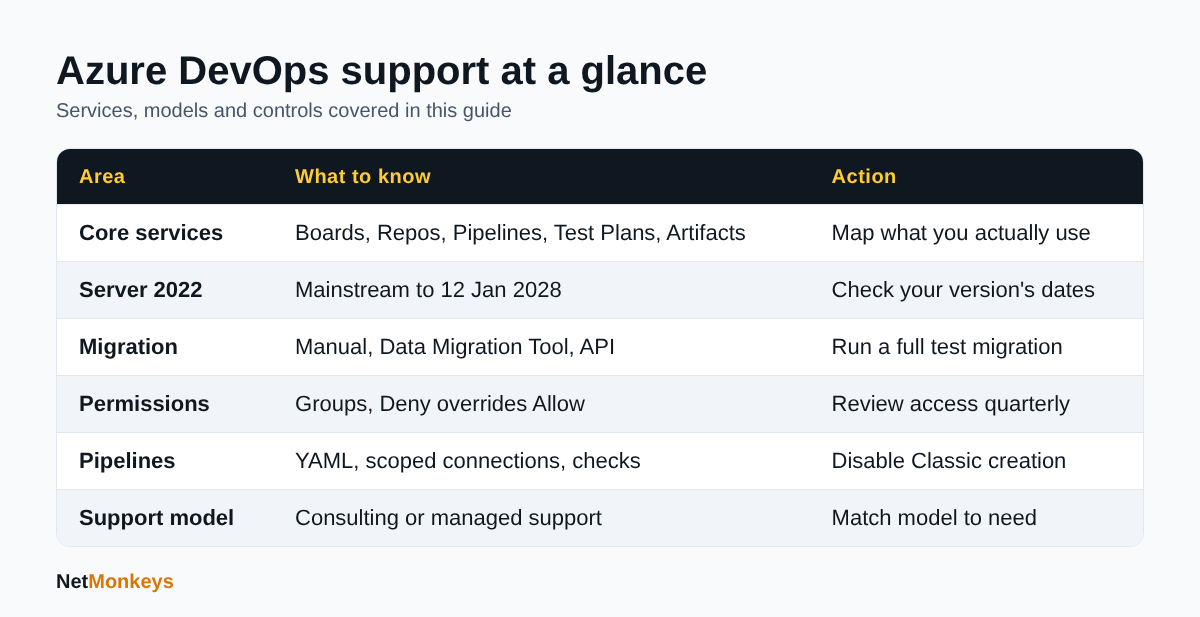 Summary of the main points covered in this guide.
How do you secure Azure Pipelines and your software supply chain?
Treat pipelines as privileged systems, because they hold credentials and can deploy to production. The Azure Pipelines security guidance stresses balancing pipeline power against security so a pipeline never becomes a route for malicious code.
The practical controls Microsoft recommends include:
- Prefer YAML pipelines to Classic, and disable creation of Classic pipelines.
- Use project-scoped build identities rather than collection-level ones, and separate projects per product or team.
- Scope Azure Resource Manager service connections to a specific resource group, and use workload identity federation instead of service principals with secrets.
- Add approvals and checks to protected resources: a protected branch check, manual approval and a business hours check.
- Use extends templates to enforce a fixed pipeline structure with controlled customisation points.
- Keep secrets out of YAML and logs, and keep secrets unavailable to fork builds.
Microsoft's Azure DevOps Roadmap, last updated 14 October 2026 and subject to change, lists continuing work on credential-theft mitigation, including fewer personal access tokens and deeper Microsoft Entra integration. It also lists GitHub Advanced Security for Azure DevOps, a paid add-on offering secret scanning with push protection, code scanning and dependency scanning.
Why this belongs in your security programme
Pipelines and repositories are part of your attack surface. Include them in your cyber security audit scope, and make sure developer endpoints are covered by managed EDR. Our guide to cybersecurity best practices covers the wider baseline.
Should you use Azure DevOps or GitHub?
The answer depends on your existing estate, your team's habits and what you need from planning and release control. Both are Microsoft-backed platforms, and many organisations run both. Making the choice by default rather than by decision is the usual mistake.
One point is worth stating carefully. The Azure DevOps Roadmap shows continuing investment in Azure DevOps, including YAML pipelines, Managed DevOps Pools, Test Plans and security features. As at October 2026 it does not announce a retirement of the service. Roadmap dates are plans that may change, so confirm the current position before making a long-term commitment.
| Consideration | Azure DevOps tends to fit when... | GitHub tends to fit when... |
|---|---|---|
| Planning | You rely on Boards, detailed process templates and Test Plans | Lightweight issues and projects are enough |
| Existing investment | You have years of pipelines, work items and permissions to preserve | You are starting fresh or are open-source minded |
| Security tooling | You can add GitHub Advanced Security for Azure DevOps to existing repos | You want security features native to the repository host |
| Skills | Your teams already know Azure DevOps | Your developers already work in GitHub |
| Mixed estates | Azure Pipelines builds code that lives in GitHub | GitHub Actions runs alongside Azure services |
A consultant should be able to recommend a hybrid arrangement without bias, for example keeping Boards and Pipelines while moving selected repositories. Be wary of any adviser who only knows one platform.
↑ Back to ContentsWhat is the difference between consulting and managed Azure DevOps support?
Consulting delivers a defined change, while managed support provides ongoing operation under agreed response expectations. Choosing the wrong one wastes money. Buying consulting for a continuous need leaves you with a good design and nobody maintaining it. Buying a support retainer for a one-off migration pays for capacity you do not use.
| Factor | Consulting | Managed support |
|---|---|---|
| Scope | Fixed project, assessment or design | Continuous administration and incident handling |
| Commercial shape | Statement of work or day rate | Recurring service with defined hours and response targets |
| Best moments | Migration, governance redesign, pipeline modernisation | After go-live, and for day-to-day running |
| Knowledge | Delivered as documents and handover sessions | Held by a team that sees your estate every week |
| Risk | Design decays if nobody owns it afterwards | Slow to change direction without a project |
Should you build an in-house team instead?
Some organisations keep a platform engineer and use a partner for cover and specialist work. Our article on outsourced IT support versus in-house IT sets out the trade-offs, and the same logic applies to DevOps administration. A single in-house administrator is a continuity risk, so agree documented procedures and a handover routine; our IT support handover checklist is a useful starting point.
↑ Back to ContentsHow do you choose an Azure DevOps support provider?
Choose on evidence of relevant delivery, clarity of scope and how they handle security, not on the length of a certification list. Our general guide to choosing an IT support company applies, with additions specific to DevOps.
Questions worth asking:
- Which Azure DevOps services do they support, and can they describe a migration they would run, including the test run and rollback?
- How do they manage their own access to your organisation? Look for named accounts, Entra groups and no shared credentials.
- Will they work in your tooling, with work items and pull requests, or in a separate ticketing system you will not see?
- What do you receive at the end: documentation, pipeline templates, permission matrices?
- How do they handle incidents involving leaked secrets or compromised accounts? A credible answer references your incident response plan; see our cyber incident response plan template.
- How is exit handled if you change provider?
Be cautious of fixed-price promises made before anyone has looked at your collection, process customisations or pipeline estate. Estimates for migration depend on those factors, and a sound provider will propose a short assessment first.
↑ Back to ContentsConclusion: what should you do next about Azure DevOps support and consulting?
Start by establishing what you run, who administers it and where the risk sits. Then decide whether you need a project, an ongoing service or both. Azure DevOps support teams and consulting services add most value when they are scoped around a specific outcome: a clean migration, a permissions model you can defend, or pipelines that deploy without shared secrets.
A sensible first month looks like this: list your organisations and projects, review who holds Project Collection Administrator rights, check which Server version you run against its lifecycle dates, and identify any classic pipelines. Tie the findings to your wider security baseline, for example Cyber Essentials, and to the cloud platform underneath through our managed cloud services. To talk through your environment, contact NetMonkeys.
Who wrote this and how it was checked
Written by Caleb Adoh, Growth Marketing Manager at NetMonkeys, a Microsoft Solutions Partner. Content was checked against the Microsoft Learn pages cited above, including the Azure DevOps services overview, migration guidance, Azure DevOps Server 2022 lifecycle page, permissions documentation, pipeline security guidance and the Azure DevOps Roadmap, as at October 2026. Product details and dates change, so confirm current terms on Microsoft's site before committing.
Frequently Asked Questions (FAQs)
What do Azure DevOps support teams and consulting services do?
They administer and improve Azure DevOps for you. Support covers access, licences, failed pipelines, process templates and updates. Consulting covers projects such as migration from Team Foundation Server, pipeline modernisation, permissions redesign and security hardening. Most organisations use consulting for change and managed support for ongoing running, often from the same provider.
What are the five services in Azure DevOps?
According to Microsoft Learn, the core services are Azure Boards for planning, Azure Repos for Git or TFVC source control, Azure Pipelines for CI/CD, Azure Test Plans for manual and exploratory testing, and Azure Artifacts for package feeds such as NuGet, npm, Maven and Python. You can adopt them individually.
Can you migrate from TFS to Azure DevOps Services?
Yes. Microsoft describes manual, Data Migration Tool and API-based approaches. The tool suits medium to large collections but moves one collection to one new organisation unchanged, and requires Azure DevOps Server to be on one of the two most recent releases. Run a full test migration first and have users verify results.
When does Azure DevOps Server 2022 support end?
The Microsoft Lifecycle page shows Azure DevOps Server 2022 mainstream support ending on 12 January 2028 and extended support on 12 January 2033, under the Fixed Lifecycle Policy. Other versions have different dates, so check the specific version you run on the Microsoft Lifecycle site before planning.
Is Azure DevOps being replaced by GitHub?
As at October 2026 the Azure DevOps Roadmap on Microsoft Learn lists continuing work on pipelines, test management and security, and does not announce a retirement. Roadmap items are plans that may change. Many organisations run both, for example Azure Pipelines building code that is hosted in GitHub.
How should we manage permissions in Azure DevOps?
Use Microsoft Entra groups, grant access through the narrowest security group and limit Project Collection Administrators to a small named set. Scope permissions to areas, iterations or folders where possible, avoid altering Valid Users defaults, and review access quarterly and whenever contractors leave. Microsoft also notes that Deny generally overrides Allow, so use it sparingly.
How do you secure Azure Pipelines?
Use YAML rather than Classic pipelines, project-scoped build identities and workload identity federation for Azure connections. Scope service connections to resource groups, add protected branch and manual approval checks, keep secrets out of YAML and logs, and enforce structure with extends templates, as Microsoft's pipeline security guidance recommends.
How do I choose Azure DevOps support teams and consulting services?
Ask which services they support, how they would run a test migration, how they control their own access, and what documentation you receive. Prefer an assessment before a fixed price, check they can advise on GitHub objectively, and agree exit and handover terms in advance.
Speak to a NetMonkeys specialist
Want an expert to review your setup, or to put this guide into practice with you? Our team can help.
Book a conversation
