
Microsoft for Charities UK: Eligibility, Offers and Setup
UK registered charities can claim Microsoft's nonprofit offers once validated. This guide covers eligibility by regulator, current offers, trustee duties and a secure tenant set-up.

Key Takeaways
- One programme, UK validation: UK charities use Microsoft for Nonprofits, validated against recognised charitable status, in up to seven business days.
- Check your register: England and Wales, OSCR and Northern Ireland charities each have different numbers; names must match exactly.
- Business Premium is discounted, not granted: Business Basic is the main grant as at October 2026, so budget for extra licences.
- Trustees stay accountable: a donated licence does not transfer data protection or cyber risk to Microsoft.
- Secure before you migrate: admin accounts, email and devices come first, with ICO 72-hour reporting built into your plan.
Microsoft for charities UK means the Microsoft for Nonprofits programme as it applies to UK registered charities: once Microsoft has validated your charity, you can claim donated or discounted cloud software, mainly Microsoft 365, through a nonprofit account. Eligibility turns on recognised charitable status in the UK, and the practical work is registering your charity details correctly, claiming the offers and then setting the tenant up securely.
This guide is written for trustees, chief executives and the person who has been handed "IT" alongside another job. It deliberately stays on the UK charity process: registers and numbers, what trustees should expect to see, how the claim runs, and what a safe first month looks like. If you want a global view of the nonprofit programme and a full offers table, that is a separate topic; here we concentrate on getting a UK charity through the door and running well.
The information below was checked against Microsoft, GOV.UK, NCSC and ICO pages as at October 2026. Microsoft changes nonprofit offers regularly, so treat any licence detail as something to confirm in the Nonprofit Hub before you commit. At NetMonkeys we support Microsoft 365 tenants for organisations of all sizes, and the sequencing in this article reflects what tends to go wrong when charities rush the set-up.
Who is eligible for Microsoft for charities in the UK?
A UK charity is eligible when it holds recognised charitable status and is not in one of Microsoft's excluded categories. The Microsoft Nonprofit eligibility page, read in October 2026, lists nonprofit or non-governmental organisations with recognised charitable status in their country as eligible, and names housing associations as the one UK-specific exclusion.
How this article differs from the general nonprofit guide
We do not repeat a global eligibility list or a full product catalogue here. The focus is UK charity registers, trustee oversight, data protection and the set-up sequence that suits a small charity.
Which organisations are excluded?
Microsoft's page lists several ineligible groups. The ones most likely to affect UK charities are:
- Schools, colleges and universities, including nonprofit ones, and academic museums.
- Government bodies and agencies.
- Professional, commerce and trade associations.
- Political, labour and fraternal organisations.
- Nonprofits whose activities focus on influencing public policy.
- Housing associations, named specifically for the United Kingdom.
- Hospitals and health systems, with narrow exceptions that apply to the US and Australia rather than the UK.
Can a community group or CIC apply?
Not on the strength of being a good cause alone. The test is recognised charitable status. A community interest company, a social enterprise or an unregistered community group is not a registered charity, so it should not expect to pass validation. If you are unsure whether your organisation counts, use the Microsoft support form linked from the eligibility page before spending time on set-up work.
What about charities that run trading arms or a school?
Apply with the charity itself, not the trading subsidiary, and expect a school or college run by the charity to fall into an excluded category. Microsoft's validation looks at the entity you register, so keep the legal entity, the registration number and the tenant name consistent from the start.
↑ Back to ContentsWhich charity registration number do I need?
You need the registration number issued by whichever regulator holds your charity's record, and it must match the details you give Microsoft. The UK has three separate charity regulators, and a charity's home nation decides which one applies.
| Where the charity is based | Regulator | What to have ready |
|---|---|---|
| England and Wales | Charity Commission for England and Wales | Registered charity number, exact registered name, main address |
| Scotland | Office of the Scottish Charity Regulator (OSCR) | Scottish charity number, exact registered name |
| Northern Ireland | Charity Commission for Northern Ireland | Registered charity number, exact registered name |
Does every charity in England and Wales have a number?
Not necessarily. GOV.UK guidance on registering a charity, checked in October 2026, says a charity based in England or Wales must apply to register if its income is at least £5,000 a year, and that a charitable incorporated organisation (CIO) must register. Smaller unincorporated charities may not be on the register. If yours is one of them, speak to Microsoft's support route before you plan any migration, because validation relies on recognised status.
What is a CIO and does it change anything for Microsoft?
A CIO is a legal form created specifically for charities, and it becomes a charity on registration. For Microsoft purposes it makes no difference to the offers. It does help with consistency: the registered name and number are on the public register and the governing document, so there is less room for mismatches.
Why do mismatches cause problems?
Validation compares the organisation details you enter with what the validating supplier can see or request. Differences in name (for example, a trading name used on the website), an old address or a number typed for the wrong country slow things down. Microsoft's FAQ says validation can take up to seven business days depending on country requirements and how quickly you respond to documentation requests, so quick, accurate replies matter.
↑ Back to ContentsWhat does Microsoft offer UK charities in 2026?
As at October 2026, Microsoft's published offer structure for validated nonprofits combines a granted Microsoft 365 Business Basic offer, annual Azure credits and discounts on other products. The figures below come from Microsoft Learn (page last updated 26 March 2026) and a Microsoft partner announcement dated 14 May 2025; confirm current terms in the Nonprofit Hub before you order.
| Offer | Type | What Microsoft states |
|---|---|---|
| Microsoft 365 Business Basic | Grant | Described as the primary cloud grant offer; Microsoft's announcement says up to 300 granted licences |
| Microsoft 365 Business Premium and Office 365 E1 | Discount | Grant ended at renewal on or after 1 July 2025; Microsoft's announcement says up to 75% off many offers |
| Azure | Grant | USD 2,000 in credits annually |
| Dynamics 365 | Discount | Discounted licences, no price stated on the page |
| Power Platform | Grant and discount | Described as grants and discounts; amounts not stated |
| Copilot | Discount | Discounted nonprofit pricing; requires a Microsoft 365 licence |
| LinkedIn and GitHub for Nonprofits | Discount | No amounts stated |
| Hardware such as Surface | Donation or discount | Occasional, through partners, not guaranteed |
Sources: Microsoft Learn nonprofit offerings and the Microsoft partner announcement on Business Premium and Office 365 E1. We have not stated pounds-and-pence prices because Microsoft's pages do not give a single UK figure and prices vary by channel and date.
Is Microsoft 365 Business Premium still free for charities?
No. Microsoft's announcement says the Business Premium and Office 365 E1 grants ended for the CSP and Web Direct channels at each customer's next renewal on or after 1 July 2025. Business Premium is now a discounted offer. It matters because Business Premium is the licence that bundles the device management and advanced security features most charities should want, so budget for it rather than assuming Business Basic is enough.
What happens to the licences if our status changes?
Microsoft's FAQ states that if eligibility changes, an organisation may have to move to commercial licensing and pricing at renewal, and existing licences generally stay active through the current term. In practice, keep the Charity Commission, OSCR or CCNI record current and diarise the renewal.
↑ Back to ContentsHow do I apply for Microsoft nonprofit status as a UK charity?
You apply by creating a Microsoft nonprofit account for the charity, entering your registration details, and responding to any documentation requests from Microsoft's validation supplier. Allow up to seven business days for validation, according to Microsoft's FAQ, longer if documents are requested and answered slowly.
What is the right order of steps?
- Agree who applies. A trustee or senior manager with authority to accept Microsoft's terms on the charity's behalf should be named, not a volunteer acting informally.
- Gather the facts. Registered name, charity number, regulator, registered address and a monitored organisational email address.
- Check your domain. Confirm who owns the charity's domain name and can change its DNS records. This is the most common blocker later.
- Submit the application and respond promptly to document requests.
- Claim offers in the Nonprofit Hub once validated, and note the renewal date for each.
- Move to tenant set-up with security configured before staff are added.
Which email address should we use?
Use a shared or role-based mailbox that more than one trustee or officer can access, not a personal email belonging to a volunteer. Charities regularly lose control of a Microsoft account when the person who created it leaves, which is the same problem we describe in our guide to a IT support handover checklist.
Why do some applications fail?
The usual causes are easy to avoid: a number typed for the wrong regulator, a registered name that differs from the one submitted, an organisation type on the exclusion list, or no response to a documentation request. Microsoft's pages describe validation as dependent on country requirements, so replies to the validation supplier should be treated as time-sensitive.
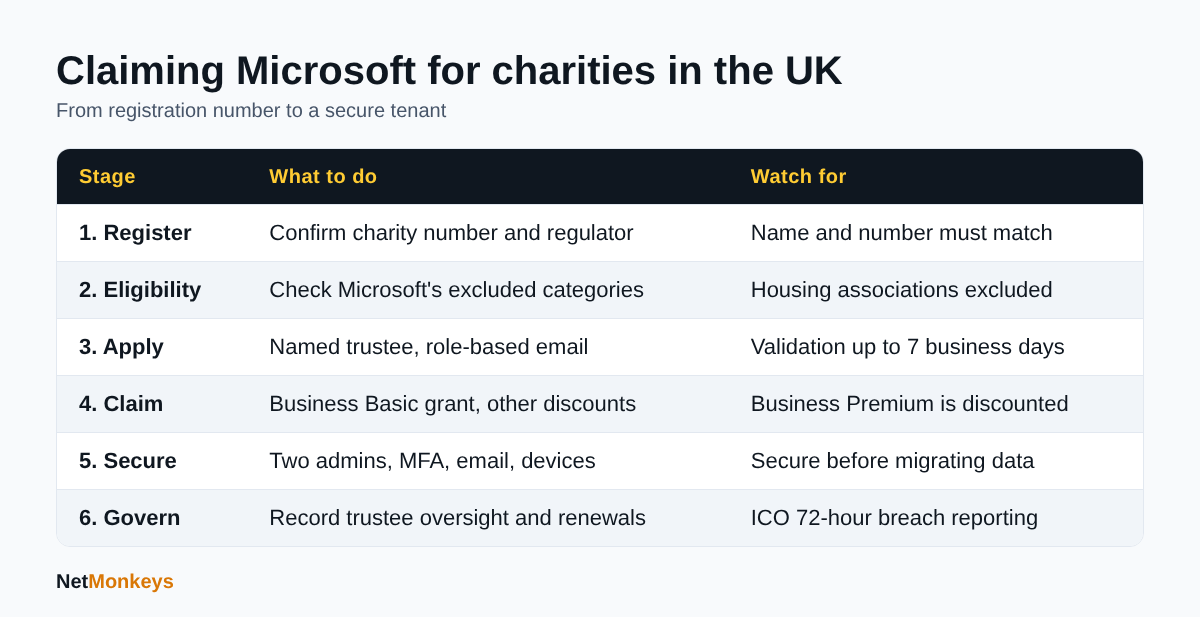 The six stages a UK charity moves through, with the main pitfall at each.
What should trustees know before approving a Microsoft 365 move?
Trustees remain responsible for the charity's data, finances and risk, and moving to a cloud platform does not transfer that responsibility to Microsoft. A donated licence is a licence, not a managed service, so someone still has to configure, secure and support it.
What questions should the board ask?
- Who is the named administrator, and who is their deputy?
- Where will beneficiary and donor data live, and who can see it?
- How will we know if an account is compromised?
- What is the cost after the grant, including support, backup and security licences?
- What happens when we renew, and who owns that date?
How should the decision be recorded?
Minute the decision, the risks considered and the named owner. A short risk entry for cyber and data loss, reviewed at least annually, is usually enough for a small charity and shows trustees have considered the issue properly. The NCSC's cyber security guidance for small to medium organisations, which names charities among its intended audience, is a sensible reference to cite in that paper.
Who should have global administrator rights?
Very few people. Two named, trusted administrators with separate accounts is a common pattern, with day-to-day staff holding ordinary user rights. Avoid giving an outside supplier or a long-serving volunteer sole control. Our article on what to do when an IT provider will not give admin access shows how costly that dependency becomes.
↑ Back to ContentsHow do I secure a charity Microsoft 365 tenant in the first month?
Secure the tenant before you migrate data or invite everyone: protect administrator accounts with multi-factor authentication, turn on the security defaults or equivalent policies, and set up backup and device controls. That order matters because a new tenant with weak sign-in is an easy target and all your charity's email will soon pass through it.
What does a sensible week-by-week plan look like?
| Week | Focus | Examples |
|---|---|---|
| 1 | Identity and admin | Two admin accounts, multi-factor authentication, recovery contacts, break-glass access recorded securely |
| 2 | Email and domain | Domain verification, mail flow, anti-phishing policies, shared mailboxes |
| 3 | Devices and data | Device enrolment, encryption, file structure in SharePoint, sensible sharing limits |
| 4 | People and recovery | Staff and volunteer onboarding, short training, tested backup, written leaver process |
What does the NCSC advise small organisations to do?
The NCSC small organisations guide to cyber security focuses on five areas: securing email, securing important online accounts, protecting devices, backing up data and spotting attacks. Its message is that cyber security is everyone's business and many actions take minutes. It maps neatly onto the four weeks above.
Should a charity buy Business Premium or settle for Business Basic?
Business Basic covers web and mobile apps, email and Teams, which is enough for some low-risk teams. If your staff and volunteers use their own laptops and phones, handle safeguarding or health information, or you want to manage devices centrally, Business Premium is worth costing. Our explainer on Intune and mobile device management shows what that control looks like in practice. Costs after the grant should appear in the budget the trustees approve.
What about volunteers using personal devices?
Treat them as a risk decision, not an afterthought. Options include browser-only access to web apps, app-level protection on mobiles, or issuing a small pool of managed devices. Whichever you choose, write it down and put the same rule in the volunteer handbook.
↑ Back to ContentsHow does data protection apply to a charity's Microsoft setup?
Charities are data controllers under UK data protection law, so they must protect personal data about donors, beneficiaries, staff and volunteers whatever platform they use. Microsoft 365 is a processor in this relationship; the charity remains accountable for how it configures access, retention and sharing.
What must we do if there is a personal data breach?
Report a notifiable breach to the ICO without undue delay and no later than 72 hours after becoming aware of it. The ICO's guide to personal data breaches adds that you can report in phases if you lack full details, that you need not report a breach unlikely to risk people's rights and freedoms (but should record that decision), and that you must tell affected individuals directly when the risk to them is high. A charity supporting vulnerable beneficiaries should assume a lost mailbox or exposed spreadsheet needs prompt assessment.
What data protection settings matter most in Microsoft 365?
- Access by role. Case notes and safeguarding records belong in restricted libraries, not an all-staff folder.
- External sharing limits. Decide who may share outside the charity and with whom.
- Retention. Keep records for as long as your policy says and no longer. Our guide to Microsoft Purview explains the tools that support retention and labelling.
- Logging. Make sure someone can answer who accessed what if there is an incident.
Do we need a data protection fee or privacy notice?
Most organisations that process personal data have to consider the ICO data protection fee and must publish a clear privacy notice. Check your position on the ICO website, as exemptions are specific and the ICO's small organisation pages are the right place to confirm them.
When does moving to the cloud need a data migration plan?
Whenever existing files, mailboxes or databases move. Plan scope, sensitive folders, a cut-over date and a rollback route. If the charity has years of unstructured shared drives, professional data migration help usually save more than they cost, and cleaning out stale data first reduces risk.
↑ Back to ContentsWhat cyber security standards and protections should a charity aim for?
A small charity should aim for a baseline that covers accounts, devices, email, patching and backup, and should be able to evidence it. The NCSC's charity page points small and medium organisations to a three-step path: a Cyber Action Toolkit, free tools such as Check your cyber security and Early Warning, and then Cyber Essentials certification.
Is Cyber Essentials worth it for a charity?
Often yes, particularly where the charity handles personal data, takes grant funding with security conditions, or works with local authorities and corporate partners. The NCSC describes it as a government-backed certification scheme against common cyber attacks and available to organisations of any size. Our Cyber Essentials support explains how it works. Moving to a properly configured Microsoft 365 tenant helps with several of its technical requirements.
What are the most likely threats to a charity?
Phishing aimed at finance staff and trustees, mailbox takeover, invoice or bank-detail fraud, and ransomware on unmanaged devices. These are the same patterns affecting small businesses, so our overview of cybersecurity for small business transfer almost directly.
Do we need endpoint detection and an audit?
If you hold sensitive beneficiary data or run a larger staff and volunteer estate, endpoint detection on laptops adds a layer that antivirus alone does not. See managed EDR services. A one-off cyber security audit is a proportionate way to give trustees evidence of where you stand before a major migration.
What should the response plan say?
Who to call, how to isolate affected accounts, who tells the ICO and when, and when to inform your funder and regulator. The NCSC's small organisation resources include response and recovery guidance and the free Exercise in a Box; a short tabletop run with trustees is a good use of an hour.
↑ Back to ContentsHow do I choose an IT partner for a charity?
Choose a partner that understands your regulator and funder obligations, shows its Microsoft credentials, gives you admin access and documentation, and can explain costs clearly after the grant ends. A cheaper quote that leaves a single volunteer holding every password is a false saving.
What questions separate a good partner from a poor one?
- Will you document the tenant and hand over admin details?
- Are you a Microsoft partner, and what is your experience with charity or nonprofit tenants?
- How do you handle safeguarding or confidential data?
- What happens at the end of the contract?
- Can you help with Cyber Essentials, backup and training, not only licences?
Our wider guide on how to choose an IT support company gives a longer checklist, and the NCSC guidance on choosing a managed service provider is linked from its charity page.
Should a charity outsource IT or hire in-house?
Most small and medium charities cannot justify a dedicated technical hire, so a managed support model usually fits better. We compare the trade-offs in outsourced IT support versus in-house IT. NetMonkeys provides managed IT support from its Manchester headquarters and offices in Nottingham and London, with field engineers across around 12 UK cities, and as a Microsoft Solutions Partner we can help charities claim, configure and secure their tenant.
Can we use the nonprofit licences through a partner?
Microsoft's announcement refers to CSP and Web Direct channels, so licences can be managed either directly or through a partner. A partner arrangement can simplify billing, support and renewals, but ask who owns the tenant and what happens if you leave. The answer should be: you do.
↑ Back to ContentsWhere can I get a charity Microsoft 365 readiness checklist?
You can complete the free readiness checklist directly below this section: it is an interactive form that lets you tick items, type notes, save your progress, download it and print it. It is designed for a charity manager or trustee preparing to claim Microsoft's nonprofit offers and set up a tenant.
How should we use it?
- Complete it with the person who will be the main administrator, so details are accurate.
- Leave an item unticked if you are not sure; a gap is more useful to trustees than a guess.
- Save a copy, share it with the board or your IT partner, and revisit it before each renewal.
The checklist is a planning aid, not a compliance certificate. It reflects the steps in this guide and the cited ICO and NCSC material, and it should be adapted to your charity's size and risks.
Charity Microsoft 365 readiness checklist
Use this checklist to prepare your charity for the Microsoft nonprofit application and a secure Microsoft 365 set-up. Save your progress, download it or print it for trustees.
1. Charity details
2. Eligibility check
3. People and authority
4. Application and licences
5. Domain and email
6. Security baseline
7. Data protection
8. Support and trustee oversight
Your entries stay in your browser. Nothing is sent to NetMonkeys. Use Download or Save to file to keep a copy, because clearing browser data removes saved progress.
Next steps for Microsoft for charities UK
To make the most of Microsoft for charities in the UK, confirm your registration details, apply with a named authorised person, claim only what you need, then secure the tenant before you move data. A donated licence saves money only if the surrounding set-up is safe, supported and owned by the charity.
What is the short version?
- Check your charity is on the right register and that the name and number match your application.
- Apply using a role-based email address and a named trustee or officer.
- Understand which licences are granted and which are discounted, and budget for the latter.
- Secure admin accounts and email first, then devices, then data.
- Record trustee oversight, data protection decisions and renewal dates.
The interactive Microsoft 365 readiness checklist above can be filled in, saved and printed for your next trustee meeting. If you would like a second pair of eyes on your application, tenant or security settings, contact NetMonkeys for a conversation.
Who wrote this and how it was checked
Written by Caleb Adoh, Growth Marketing Manager at NetMonkeys, a Microsoft Solutions Partner. Content was checked against the cited Microsoft, GOV.UK, NCSC and ICO pages as at October 2026. Offers, prices and eligibility rules change, so confirm current terms with Microsoft before you apply.
Frequently Asked Questions (FAQs)
What is Microsoft for charities UK?
Microsoft for charities UK is the way UK registered charities access Microsoft's nonprofit programme. Once Microsoft's validation supplier confirms your charitable status, you can claim granted and discounted software, mainly Microsoft 365 plus options such as Azure credits. There is no separate UK scheme; the same programme applies with country-specific validation.
Which UK charities are eligible for Microsoft nonprofit offers?
Organisations with recognised charitable status are eligible, typically those on the Charity Commission, OSCR or Charity Commission for Northern Ireland register. Microsoft's page excludes categories such as schools, universities, government bodies, trade associations and, in the UK, housing associations. If you are unsure, use the Microsoft support form before you apply.
How long does Microsoft nonprofit validation take?
Microsoft's FAQ says validation can take up to seven business days, depending on country requirements and how quickly you respond to any documentation requests. Using the exact registered name and number and replying promptly to the validation supplier is the best way to avoid delays.
Is Microsoft 365 free for UK charities?
Partly. As at October 2026, Microsoft describes Microsoft 365 Business Basic as its primary cloud grant offer, while Business Premium is discounted rather than granted following a change announced in May 2025. Other products carry discounts. Confirm current terms in the Nonprofit Hub and budget for any licences that are not granted.
Does a small charity need to be registered to apply?
Recognised charitable status is the test, so you normally need a registration number. In England and Wales, GOV.UK says a charity must register if its income is at least £5,000 a year, and a CIO must register. If you are not registered, contact Microsoft support before planning a migration.
Do charities have to report a data breach to the ICO?
If a personal data breach is likely to risk people's rights and freedoms, you must report it to the ICO without undue delay and within 72 hours of becoming aware. You must record decisions not to report, and tell affected individuals directly when the risk to them is high.
What security should a charity set up first in Microsoft 365?
Start with two named administrator accounts protected by multi-factor authentication, then secure email and the domain, then devices and data sharing. The NCSC's small organisation guidance covers email, accounts, devices, backups and spotting attacks, which is a sound order to follow for a small charity with limited time.
Should a charity use an IT partner for Microsoft 365?
Many do, because configuration, security, backup and support still need skilled hands after the licences are claimed. Choose a partner who documents the tenant, hands over admin access, explains post-grant costs and understands data protection. Ask who owns the tenant and what happens at contract end.
Speak to a NetMonkeys specialist
Want an expert to review your setup, or to put this guide into practice with you? Our team can help.
Book a conversation
