
Is WordPress Safe in 2026? PHP Update and Security Guide
Critical PHP flaws patched on 21 October 2026 and a fresh WordPress security release have raised fair questions. This guide explains what happened, how to update PHP and WordPress, and how to keep your site secure.

Key Takeaways
- The PHP flaws sit on your server. WordPress, plugin and theme updates do not fix them. PHP 8.5.12, 8.4.27, 8.3.36 or 8.2.35 (or a vendor backport) does.
- Check your PHP version today in Tools, Site Health, Info, Server, and ask your host to confirm the 21 October fixes are applied.
- PHP 8.2 support ends on 31 December 2026 and PHP 8.1 and older are already unsupported. Plan the move to 8.3 or newer.
- Most hacks use known, fixed flaws in plugins, themes or weak logins, so fast updates and two-factor authentication matter most.
- Layer your defences: supported PHP, updates, a firewall, least-privilege accounts, off-server backups and monitoring.
WordPress itself is safe enough for serious business use, but a WordPress site is only as secure as the PHP, plugins and passwords behind it. The news this month is a good example. On 21 October 2026, PHP released fixes for two critical flaws that can let an unauthenticated attacker run code on a web server, and every WordPress site runs on PHP.
This guide answers the questions people are searching for around that story: what WordPress PHP is, how to check and update your PHP version, how WordPress sites get hacked and how to stay secure. It is written for UK business owners and the people who look after their websites, and the facts are checked against official sources as at 23 October 2026.
If you only read one section, make it the one on whether the PHP vulnerability affects your site. The fix is on the server, and many owners assume it has already been done.
What Is WordPress PHP?
WordPress is a content management system, and PHP is the programming language it is written in. Every time a visitor opens a page on a WordPress site, the web server runs PHP code that reads your content from the database, applies your theme and plugins, and builds the page that appears in the browser. When people search for "WordPress PHP", they usually mean one of two things: the PHP version their site runs on, or the PHP files that make up WordPress, its themes and its plugins.
The distinction matters because the two sit in different places. WordPress core, your theme and your plugins are PHP applications. The PHP engine that runs them is software installed on your hosting server. You update the applications from the WordPress dashboard. You normally update the engine through your hosting control panel, or by asking your host to do it.
Why PHP version matters for security
Each PHP version is supported for a limited period. Once it falls out of support, the PHP project stops releasing security fixes for it, so any newly discovered flaw stays open. A site can have WordPress, every plugin and every theme fully updated and still be exposed because the underlying PHP is out of date.
The WordPress requirements page recommends PHP 8.3 or newer. It lists PHP 7.4 as the oldest version that still works, but only for legacy environments, and notes that those older versions are end of life and carry security risk.
The short version
WordPress runs on PHP. Keep both updated: WordPress, plugins and themes from the dashboard, and PHP through your host. Both layers can be attacked.
Why Is WordPress Security in the News?
Several separate stories have landed within a few weeks, which is why the subject feels busy. They are different problems, and it helps to keep them apart. The facts below are as at 23 October 2026.
| Story | What it is | Where you fix it |
|---|---|---|
| Critical PHP flaws (CVE-2026-109618 and CVE-2026-109619) | Two flaws in PHP itself, fixed on 21 October 2026 | On the server, by updating PHP |
| WordPress 7.1.3 | Maintenance and security release, published 6 October 2026, with seven security fixes | WordPress dashboard |
| Bricksforge plugin (CVE-2026-85097) | Maximum-severity flaw in a Bricks add-on, reported as exploited | Plugin update |
| WordPress XSS2Shell (CVE-2026-64638) | Flaw in WordPress versions before 7.0.3, reported as exploited | WordPress update |
The PHP vulnerabilities
The most serious story is the PHP one. PHP published a security release on 21 October 2026 fixing two flaws that are rated critical and can allow an unauthenticated attacker to run code on a server. One involves PHP being interrupted when it runs out of memory, leaving request data half-prepared. The other involves internal request state that can outlive the memory it points to. The fixed versions are PHP 8.5.12, 8.4.27, 8.3.36 and 8.2.35.
The NCSC alert on the PHP flaws was published the same day. It says every PHP version may be affected, tells organisations to find all PHP installations and update internet-facing systems first, and says that if neither an update nor a mitigation is possible, the system should be considered for taking offline.
The Help Net Security report adds that a working exploit exists and that Amazon Threat Intelligence recorded an exploitation attempt on 17 October, four days before disclosure. Treat that as a reason to move quickly, not as a reason to panic.
The WordPress and plugin issues
WordPress 7.1.3 is a routine but important release. The WordPress 7.1.3 release announcement lists seven security fixes, including a stored cross-site scripting flaw in the comments admin screen, a second-order SQL injection in the export feature, and unauthenticated exposure of comments on private and unpublished posts. It also strongly recommends updating straight away.
The plugin story is the older and more common one. The Bricksforge flaw lets an attacker without a login upload and run PHP code on a vulnerable site, and security researchers at Patchstack reported exploitation attempts from 7 October 2026. The Canadian Centre for Cyber Security advisory for the earlier WordPress flaw, CVE-2026-64638, says versions before 7.0.3 are affected and that exploitation has been reported.
↑ Back to ContentsDoes the PHP Vulnerability Affect My WordPress Site?
If your WordPress site runs on PHP and serves web requests, which every WordPress site does, it is potentially in scope. The PHP advisory covers PHP-FPM, Apache with mod_php, php-cgi, FrankenPHP and LiteSpeed. It treats mod_php as the highest risk, because an unauthenticated request can trigger the problem before any application code runs.
That last point is the important one for WordPress owners. Because the flaws are in PHP rather than in WordPress, updating WordPress, plugins or themes does not fix them. The fix has to be applied to the PHP installed on the server.
Who needs to act, and how quickly
- Managed WordPress hosting: the host normally patches PHP for you. Check the host's status page or email notices to confirm it has happened.
- Shared hosting: you rely on the host. Ask support to confirm the patched PHP build is live for your account, and select the newest PHP version in the control panel if one is offered.
- VPS, dedicated or self-managed servers: you or your IT provider must install the patched PHP packages and restart PHP. This group has the most urgent job.
- PHP 8.1 or older: the PHP project no longer supports these. Some Linux distributions and long-term-support vendors ship their own backported fixes, but the dependable answer is to move to a supported branch.
Be careful with version numbers. A distribution may patch PHP without changing the version string shown in WordPress, so a lower-looking number does not always mean an unpatched server. If you are unsure, ask your host or IT provider to confirm in writing that the 21 October fixes are applied.
Mitigations are not fixes
PHP published partial mitigations, such as disabling session upload progress and tightening request size limits, for teams that cannot update at once. Its own advice is that they block only the confirmed attack paths and do not make an installation safe. Use them to buy time, not as a substitute for the update.
How Do I Check Which PHP Version My WordPress Site Uses?
You can find your PHP version in a minute without touching any code. Use whichever of these suits you.
- Site Health: in the WordPress dashboard go to Tools, then Site Health, then the Info tab, and open the Server section. The PHP version is listed there. WordPress also shows a warning on the Status tab when the version is out of date.
- Hosting control panel: most hosts (cPanel, Plesk and custom dashboards alike) have a "PHP version" or "PHP selector" setting per domain.
- Ask your host or IT provider: useful if you manage several sites or want confirmation that a security fix has been applied rather than just the version number.
Write down the version, the date you checked it and who confirmed it. That small record becomes valuable if you are ever asked for evidence during a Cyber Essentials assessment or a customer security questionnaire.
Check the rest of your estate too
The NCSC advises looking at every PHP installation, not just the main website. Many organisations also run PHP behind customer portals, intranets, staging copies, old microsites and third-party products that bundle PHP. Forgotten staging sites are a frequent weak spot, because they are internet-facing, rarely updated and often hold a copy of live data.
↑ Back to ContentsHow Do I Update PHP for WordPress?
Updating PHP is a hosting task, not a WordPress dashboard task. The safe sequence is the same on any host: back up, test on a copy, switch, then check. Allow more time if the site uses older or unmaintained plugins, because compatibility is where upgrades usually go wrong.
Step by step
- Take a full backup. Files and database, stored somewhere other than the server itself. Confirm you can restore from it.
- Update WordPress, plugins and themes first. Current versions are far more likely to support newer PHP. Remove anything you no longer use rather than updating it.
- Clone the site to staging. Many hosts offer one-click staging. If yours does not, ask your IT provider to build a copy.
- Switch the staging copy to the target PHP version and turn on debug logging. Click through the pages that matter: home page, key landing pages, forms, checkout, login and the admin area.
- Fix or replace anything that breaks. A plugin that errors on a supported PHP version is a risk in its own right. Look for an updated release or an alternative.
- Switch the live site. Pick a quiet period, change the PHP version in the hosting panel and re-test the same pages.
- Watch the error logs for a few days and keep the backup until you are satisfied.
How to update PHP on cPanel and similar panels
On cPanel, look for "MultiPHP Manager" or "Select PHP Version", choose the domain and pick the new version. Plesk has a PHP settings page per subscription. Managed WordPress hosts normally put the same choice on a site settings screen. If the version you want is not offered, your host may not have rolled it out yet, so ask them directly.
On a self-managed server
On a virtual or dedicated server, updating means installing the patched PHP packages from your Linux distribution or a trusted repository, then restarting PHP-FPM or Apache so the new binaries load. A restart is easy to forget, and until it happens the old code stays in memory. The PHP advisory warns against relying on the volunteer-run rpms.remirepo.net repository for this particular fix, because it had no update available at release time. Use your distribution's packages or build from source if needed.
When it is not worth doing alone
If the site takes payments, holds customer data or is a major lead source, a failed upgrade costs more than the time to do it properly. Our managed IT support team handles PHP upgrades with staging, testing and rollback as part of normal service.
Which PHP Version Should I Run in 2026?
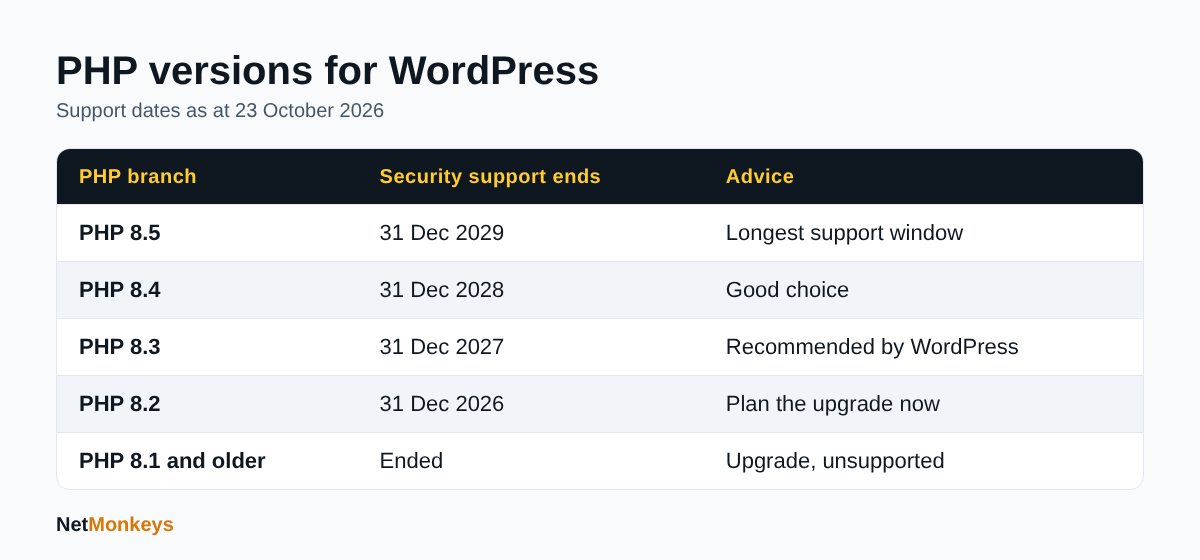
Run the newest PHP branch your plugins and theme support, and never fall behind the end-of-support dates. The PHP supported versions page shows each branch receives two years of active support followed by two years of security-only support. As at 23 October 2026 the position is as follows.
| PHP branch | Active support ends | Security support ends | Advice |
|---|---|---|---|
| 8.5 | 31 Dec 2027 | 31 Dec 2029 | Best long-term choice if your plugins support it |
| 8.4 | 31 Dec 2026 | 31 Dec 2028 | Good choice |
| 8.3 | 31 Dec 2025 | 31 Dec 2027 | Supported and recommended by WordPress |
| 8.2 | 31 Dec 2024 | 31 Dec 2026 | Plan the move now, support ends in about two months |
| 8.1 and older | Ended | Ended | Not supported by the PHP project, upgrade |
For most business sites, PHP 8.3 or 8.4 is a sensible target today: both are comfortably supported and widely compatible. If you are on PHP 8.2, treat the upgrade as scheduled work for this quarter, because its security support ends on 31 December 2026.
What about PHP 7.4 and PHP 8.0?
These are long past end of life. They still run, which is why sites stay on them, but nothing is being fixed. In the PHP advisory, the project says it published minimal backports for the 7.4, 8.0 and 8.1 branches for people building from source, yet it also states those versions are no longer maintained. Treat that as an emergency stopgap rather than a plan.
 Source: PHP supported versions page, as at 23 October 2026.
How Do I Update WordPress, Plugins and Themes Safely?
The WordPress dashboard makes updating simple, but doing it safely is a routine, not a single click. The WordPress 7.1.3 release announcement recommends updating immediately and notes that sites with automatic background updates enabled will update themselves.
A routine that works
- Turn on automatic updates for security and minor releases. These are low risk and close known holes quickly.
- Update plugins and themes weekly, and sooner when a vulnerability is reported in one you use. Plugin flaws are exploited within days of disclosure.
- Back up before major updates and test them on staging for business-critical sites.
- Delete, do not just deactivate, plugins and themes you do not use. A deactivated plugin's files remain on the server and can still be attacked.
- Replace abandoned plugins. If a plugin has not been updated for a long time or has been removed from the WordPress directory, plan a replacement.
Why plugins carry most of the risk
WordPress core is reviewed heavily and has a dedicated security team. Plugins and themes are written by thousands of independent developers with very different standards. The Bricksforge case shows the pattern: a flaw in one add-on can give an attacker the same result as a flaw in core, namely the ability to upload and run code. The practical response is to run fewer plugins, choose actively maintained ones and subscribe to a vulnerability feed or monitoring service so you hear about problems on the day, not weeks later.
↑ Back to ContentsHow Do WordPress Sites Get Hacked?
Most compromises do not involve anything clever. They use a known, fixed flaw that the site owner has not applied yet, or a login that was easy to guess or steal. The common routes are listed below.
| Attack route | How it works | Main defence |
|---|---|---|
| Vulnerable plugins and themes | Attackers scan for sites running a plugin version with a published flaw and exploit it automatically | Fast updates, fewer plugins, monitoring |
| Outdated PHP or WordPress | Unfixed flaws in the engine or core are used to run code or read data | Supported PHP, automatic updates |
| Weak or reused passwords | Automated login guessing and credential stuffing using passwords leaked elsewhere | Unique passwords, two-factor authentication, login limits |
| Stolen admin accounts | Staff are tricked into giving up logins through phishing | Awareness training, MFA, least privilege |
| Insecure hosting | Neighbouring sites on a poorly isolated server or weak server settings | Reputable host, isolation, regular patching |
| Malicious or nulled themes | Pirated premium plugins arrive with backdoors built in | Only install from trusted sources |
What attackers do once they are in
The usual aims are to plant a web shell for persistent access, inject spam or malicious redirects that damage your search rankings, harvest customer or form data, create hidden admin users, or use your server to attack others. Some malware is designed to rebuild itself after cleanup, which is why deleting one suspicious file is rarely enough.
The PHP flaws add a more direct route, because they target the server rather than your WordPress login. That is why server-level patching and a web application firewall now sit alongside the classic advice on passwords and plugins.
↑ Back to ContentsHow Can I Tell If My WordPress Site Has Been Hacked?
A compromised site does not always look broken. Visitors may see nothing wrong while the site quietly sends spam or serves malicious content to search engines. Check for these signs.
- Admin users you do not recognise, or a changed email address on an admin account.
- Unexpected redirects, pop-ups or pages in a different language, especially for visitors arriving from Google.
- A browser or search engine warning that the site is unsafe, or a sudden drop in traffic.
- Files in the uploads folder with PHP extensions, or recently modified core files you did not change.
- Your host suspending the account, reporting spam or flagging unusual CPU use.
- New plugins or themes you did not install.
Security plugins and server-side file integrity monitoring can compare your files with the official WordPress versions and flag differences. For a business site, add uptime monitoring and log review so unusual activity is spotted by a person, not discovered by a customer. Our managed EDR service and 24/7 IT helpdesk cover this kind of watchfulness for client estates.
↑ Back to ContentsHow Do I Secure My WordPress Site?
No single setting makes WordPress secure. The sensible approach is layers, so that if one control fails another still stands. This checklist works for most UK business sites and lines up with the WordPress hardening guide.
Keep everything current
- Run a supported PHP version and confirm your host applies PHP security patches promptly.
- Keep WordPress core on automatic updates for security releases.
- Remove unused plugins, themes and staging sites.
Protect logins
- Use long, unique passwords stored in a password manager.
- Switch on two-factor authentication for every administrator and editor.
- Limit login attempts and consider restricting the admin area by IP address or behind a VPN.
- Give people the lowest role they need. Most staff do not need Administrator.
- Remove accounts when people leave, including agencies and freelancers.
Harden the installation
- Set file permissions correctly. The WordPress guide advises 755 for directories and 644 for files, with only the wp-content folder writable by the web server where possible.
- Restrict access to wp-config.php, and consider moving it one directory above the site root.
- Add
DISALLOW_FILE_EDITto wp-config.php so attackers who reach the dashboard cannot edit theme and plugin code from it. The guide notes this does not stop uploaded malicious files. - Serve the whole site over HTTPS. The WordPress requirements page treats it as mandatory for every installation.
- Download WordPress, themes and plugins only from wordpress.org or the vendor's official site.
Add a protective layer in front of the site
- Use a web application firewall, set to block rather than only log. Cloudflare says it has deployed initial rules for the known PHP exploit paths, but a firewall is an interim layer and not a replacement for patching.
- Run malware scanning and file integrity checks.
- Rate-limit the login and XML-RPC endpoints, or disable XML-RPC if you do not use it.
Prepare for the day it goes wrong
- Keep automated daily backups stored away from the server, and test a restore at least twice a year.
- Keep a short written incident plan: who to call, who can change DNS, how to take the site offline.
- Know your legal position. If personal data is exposed, UK GDPR may require you to report to the ICO within 72 hours of becoming aware.
If your business is working towards accreditation, many of these controls map directly to the Cyber Essentials requirements checklist, including patching, user access control and malware protection.
↑ Back to ContentsWhat Should I Do If My WordPress Site Has Been Hacked?
Act in a calm order. Rushed deletion destroys evidence and often leaves the backdoor in place.
- Contain it. Put the site into maintenance mode or take it offline. The NCSC advises considering this if you cannot patch or mitigate quickly.
- Tell your host and ask for server logs. They can often identify the entry point.
- Preserve a copy of the compromised files and database for investigation.
- Change every credential: WordPress admins, hosting, FTP or SFTP, database, email and any API keys stored in the site. Do this from a clean device.
- Find and remove the cause. Check for rogue admin users, web shells, modified core files and unknown scheduled tasks.
- Restore from a known-clean backup taken before the compromise if you have one, then apply every update before going live again.
- Close the entry point, whether that was a plugin, PHP or a stolen password. Otherwise you will be hit again.
- Check legal duties. If customer data may have been exposed, assess whether the ICO and affected individuals must be told.
The NCSC also says organisations that lack the skills to check for compromise can use an NCSC-assured incident response provider. For many small firms, the quicker option is a retained IT partner who already knows the environment. If you are choosing one, read our guide on how to choose an IT support company.
↑ Back to ContentsWhen Should a Business Get Professional Help With WordPress Security?
A hobby blog can survive a DIY approach. A business website that generates leads, takes orders or sits behind a brand customers trust needs someone accountable for it. Consider outside help if any of the following applies.
- Nobody in the business can say which PHP version the site runs, or when it was last patched.
- The site is on a VPS or dedicated server that you manage yourself.
- You depend on plugins that are old, abandoned or heavily customised.
- The site handles personal data, payments or customer logins.
- A customer, insurer or tender has asked for evidence of security controls.
A good partner will patch servers on a schedule, test updates on staging, monitor for threats, keep backups you can actually restore from and give you plain-English reporting. That is the model behind our managed IT support and outsourced IT support services, and it extends to your wider estate through managed cloud hosting. Smaller organisations can start with small business IT support or a one-off cyber security audit to see where the gaps are, and our cyber security for small business guidance explains what proportionate protection looks like.
↑ Back to ContentsIs WordPress Safe? Conclusion and Next Steps
WordPress is safe enough for serious business use when it is maintained, and risky when it is neglected. The October 2026 headlines make that point sharply. The PHP flaws are a server problem that no plugin update can fix, WordPress 7.1.3 closes seven security issues, and plugin flaws such as Bricksforge keep proving how quickly attackers exploit known holes.
If you do only four things this week, make them these:
- Confirm with your host or IT provider that the PHP security fixes from 21 October 2026 are applied, and that PHP is running a supported branch.
- Update WordPress core to the latest release, then update or remove every plugin and theme.
- Turn on two-factor authentication for all admin accounts.
- Check that you have a recent backup stored away from the server and that you know how to restore it.
Not sure where your site stands? get in touch with NetMonkeys for a straight answer on your PHP version, update status and exposure, and a plan to fix whatever needs fixing.
↑ Back to ContentsFrequently Asked Questions (FAQs)
Is WordPress safe to use in 2026?
Yes, when it is kept up to date and sensibly configured. WordPress core has a dedicated security team and releases fixes quickly, as seen with WordPress 7.1.3. Most compromises come from outdated plugins, weak passwords or unpatched servers rather than from WordPress itself, so maintenance matters more than the platform choice.
What is PHP in WordPress?
PHP is the programming language WordPress is written in, and it runs on your web server. When someone visits a page, PHP executes WordPress, your theme and your plugins to build it. The PHP version on your hosting is separate from the WordPress version and is updated through your host, not the dashboard.
How do I update PHP on my WordPress site?
Back up the site, update WordPress, plugins and themes, then test the newer PHP version on a staging copy. If everything works, change the PHP version in your hosting control panel for the live site and re-test. Managed hosts usually do the patching for you. On a self-managed server you install the patched packages and restart PHP.
Which PHP version is best for WordPress?
WordPress recommends PHP 8.3 or newer. As at October 2026, PHP 8.3, 8.4 and 8.5 are all supported, with 8.5 having the longest support window. PHP 8.2 stops receiving security fixes on 31 December 2026, and PHP 8.1 and older no longer receive fixes from the PHP project.
Does the October 2026 PHP vulnerability affect WordPress?
Potentially, yes, because every WordPress site runs on PHP and the flaws are in PHP itself. WordPress and plugin updates do not fix them. The fix is to run PHP 8.5.12, 8.4.27, 8.3.36 or 8.2.35, or a vendor build with the fix backported. Managed hosts usually patch for you, but confirm it.
How do I check my PHP version in WordPress?
Go to Tools, then Site Health, then the Info tab, and open the Server section in the WordPress dashboard. Your PHP version is listed there. You can also find it in your hosting control panel. Remember that some Linux distributions patch PHP without changing the visible version number, so ask your host if unsure.
How do hackers get into WordPress sites?
Mostly through vulnerable plugins or themes that have not been updated, weak or reused passwords, stolen admin logins and unpatched servers. Attackers use automated scanners to find sites running software with a known flaw, so they do not need to target you personally. Fast updates and two-factor authentication close most of these routes.
Do I need a security plugin for WordPress?
A reputable security plugin can add malware scanning, login protection and file integrity checks, but it is not a replacement for updates, strong passwords and good hosting. Think of it as one layer. For business sites, pair it with a web application firewall, off-server backups and monitoring.
Speak to a NetMonkeys specialist
Not sure which PHP version your site runs, or whether the 21 October fixes have been applied? Our team can check your hosting, patch it and monitor it for you.
Book a conversation
